Khaisa Studio
Workflows by Khaisa Studio
Find valid vouchers and promo codes with SerpAPI, Decodo, and GPT-5 Mini
Promo Seeker finds fresh, working promo codes and vouchers on the web so your team never misses a deal. This n8n workflow uses SerpAPI and Decodo Scrapper for real-time search, an agent powered by GPT-5 Mini for filtering and validation, and Chat Memory to keep context—saving time, reducing manual checks, and helping marketing or customer support teams deliver discounts faster to customers (and yes, it's better at hunting promos than your inbox). ## 💡 Why Use Promo Seeker? **Speed:** Saves hours per week by automatically finding and validating current promo codes, so you can publish deals faster. **Simplicity:** Eliminates manual searching across sites, no more copy-paste scavenger hunts. **Accuracy:** Reduces false positives by cross-checking results and keeping only working vouchers—fewer embarrassed "expired code" moments. **Edge:** Combine search APIs with an AI agent to surface hard-to-find, recently-live offers—win over competitors who still rely on manual scraping. ## ⚡ Perfect For **Marketing teams:** Quickly populate newsletters, landing pages, or ads with valid promos. **Customer support:** Give verified discount codes to users without ping-ponging between tabs. **Deal aggregators & affiliates:** Discover fresh vouchers faster and boost conversion rates. ## 🔧 How It Works **⏱ Trigger:** A user message via the chat webhook starts the search (Message node). **📎 Process:** The agent queries SerpAPI and Decodo Scrapper to collect potential promo codes and voucher pages. **🤖 Smart Logic:** The Promo Seeker Agent uses GPT-5 Mini with Chat Memory to filter for fresh, working promos and to verify validity and relevance. **💌 Output:** Results are returned to the chat with clear, copy-ready promo codes and source links. **🗂 Storage:** Chat Memory stores context and recent searches so the agent avoids repeating old results and can follow up with improved queries. ## 🔐 Quick Setup 1. Import JSON file to your [n8n instances](https://n8n.partnerlinks.io/khmuhtadin) 2. **Add credentials:** SerpAPI, Azure OpenAI (Gpt 5 Mini), Decodo API 3. **Customize:** Search parameters (brands, regions, validity window), agent system message, and result formatting 4. **Update:** Azure OpenAI endpoint and API key in the Gpt 5 Mini credentials; add your SerpAPI key and Decodo key 5. **Test:** Run a few queries like "latest Amazon promo" or "food delivery voucher" and confirm returned codes are valid ## 🧩 You'll Need - Active [n8n instances](https://n8n.partnerlinks.io/khmuhtadin) - SerpAPI account and API key - Azure OpenAI (for GPT-5 Mini) with key and endpoint - [Decodo](decodo.com) account/API key ## 🛠️ Level Up Ideas - Push verified promos to a Slack channel or email digest for the team. - Add scheduled scans to detect newly expired codes and remove them from lists. - Integrate with a CMS to auto-post verified deals to landing pages. **Made by:** [khaisa Studio](https://khaisa.studio) **Tags:** `promo, vouchers, discounts` **Category:** `Marketing Automation` **Need custom work?** [Contact Us](https://khaisa.studio/contact)
Apollo data enrichment using Company Id, Google Sheets & Telegram
Apollo Data Enrichment Using Company Id to automatically finds contacts for companies listed in your Google Sheet, enriches each person with emails and phone numbers via Apollo’s API, and writes verified contacts back to your procurement sheet while notifying your team on Telegram.  It removes the manual copy-paste scavenger hunt and turns hours of research into minutes like hiring a tireless intern who never asks for coffee. ## 💡 Why Use Apollo Data Enrichment Based Using Company Id? - **Save time:** Automates enrichment of contacts from company IDs so you stop spending hours looking up emails and phone numbers. - **Solve noisy data:** Only queries relevant titles and email status filters so your outbound team sees fewer dead leads. - **Improve outcomes:** Ensures enriched, outreach ready contacts (emails/phones) land in your sheet. Faster follow-up, higher reply rates. - **Competitive edge:** Targets granular procurement roles (manager/head/lead/director) and marks processed companies to avoid duplicate work makes your outreach becomes smarter and cleaner. ## ⚡ Perfect For - **Outbound/BDR teams:** who need contacts ready for outreach - **Data ops / Growth teams:** who maintain lead lists and enrichment pipelines ## 🔧 How It Works - **⏱ Trigger:** Scheduled trigger “Run Every X Minutes” that periodically picks unprocessed companies. - **📎 Process:** Reads companies from the Google Sheet, fetches the Apollo Company ID, builds title/seniority/email-status filters, calls Apollo `mixed_people/search` and then `people/match` for full contact details. - **🤖 Smart Logic:** Title Converter separates seniority from core titles, the Build Search Filters code node constructs precise Apollo query strings, and an If node branches when no people are found. - **💌 Output:** Writes enriched contacts into the *Purchasing / Procurement Roles* Google Sheet, updates *Leadsfeeder* to mark companies as processed, accepts phone updates via webhook and notifies via Telegram. ## 🔐 Quick Setup 1. Import JSON file to your [n8n instances](https://n8n.partnerlinks.io/khaisastudio) 2. Add credentials: Google Sheets OAuth2, Apollo API Key (HTTP Header Auth), Telegram Bot Token 3. Customize: adjust `person titles` array, `person_seniorities`, `contact_email_status`, `Page` and `Per Page` settings in the **Define Search Settings** / **Title Converter** nodes 4. Update: Google Sheet Data 5. Test: run the workflow with a small set of companies and verify rows appear in the sheet and Telegram notifications arrive ## 🧩 You'll Need - Active [n8n instances](https://n8n.partnerlinks.io/khaisastudio) - Google account with access to spreadsheet id - Apollo API Key (HTTP Header Auth) - Telegram Bot token (for alerts) - Webhook enabled ## 🛠️ Level Up Ideas - Push enriched contacts directly into your CRM (HubSpot, Pipedrive, Salesforce) to start sequences automatically - Add deduplication and scoring (e.g., prefer “verified” or “likely to engage” emails) and deprioritize unverified ones - Respect rate limits and add exponential backoff + request batching for large company lists ## Support Made by: **[Khaisa Studio](https://khaisa.studio?utm_source=n8n-official)** Category: `lead generation`, `data enrichment pipeline`, `apollo.io enrichment` Need custom work? **[Contact Us!](https://khaisa.studio/pages/contact)**
Automate SEO blog post creation and publishing with OpenAI & WordPress
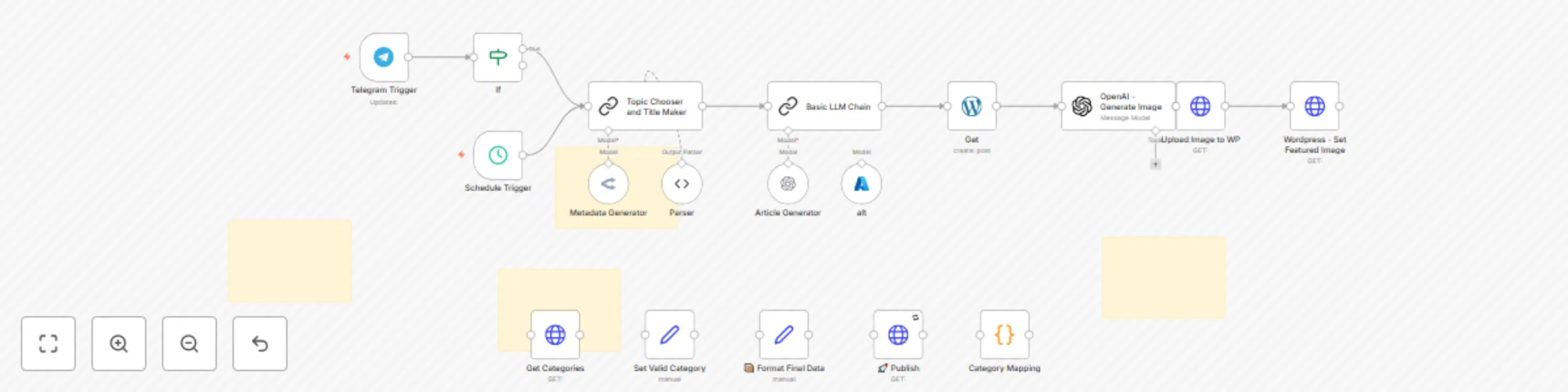
**AI WordPress - SEO Content Generator** automates creating and publishing SEO-friendly blog articles on WordPress. It combines AI technologies like OpenAI and OpenRouter to craft catchy titles, write 1500+ word articles, generate natural featured images, and publish everything seamlessly. This workflow turns your WordPress site into a content powerhouse that boosts traffic and saves you hours by handling the entire blog post process automatically. ## Why Use AI WordPress - SEO Content Generator? ### **Save Time** Automate the entire SEO content creation from ideation to publishing, freeing up hours weekly. ### **Lose Writer's Block** Get fresh, unique, and engaging article ideas without stressing over topics or titles. ### **Boost SEO** Generate optimized titles, meta-descriptions, and focus keyphrases to improve search rankings and click-through rates. ### **Professional Polish** Automated featured images and structured posts make your blog look like it has a full editorial team behind it. ## Perfect For ### **Content Marketers** Streamline your content pipeline for blogs that rank and convert. ### **Small Business Owners** Keep your website fresh with relevant IT and business tech content without hiring writers. ### **WordPress Users** Anyone who wants hassle-free SEO blog posts on their WordPress site without lifting a finger. ## How It Works | Step | Process | |------|---------| | **Trigger** | Starts on schedule every 3 hours or manually via Telegram command "generate" | | **Process** | Chooses article topic and category, then crafts title, slug, keyphrases, and meta description using AI | | **Smart Logic** | Writes a long-form SEO article (1500-2500 words) with actionable, audience-focused advice and generates a natural-looking featured image to match the post | | **Output** | Publishes drafted articles to WordPress, sets featured images, and sends notifications to Discord and Telegram channels | ## Quick Setup ### Step 1: Import & Configure 1. Import JSON file to your [n8n instances](https://n8n.partnerlinks.io/khmuhtadin) ### Step 2: Add Credentials Configure the following API connections: - **WordPress API** - For publishing posts - **OpenAI API** - For article and image generation - **OpenRouter API** - For topic generation - **Discord Webhook** - For notifications (optional) - **Telegram API** - For manual triggering (optional) ### Step 3: Customize Settings - Adjust posting URLs and endpoints - Configure Telegram commands - Set content categories as needed - Replace placeholder WordPress site URLs with your own ### Step 4: Test & Deploy - Run the workflow manually to verify setup - Check that posts appear correctly on your WordPress site - Enable scheduled triggers for automation ## Requirements Before getting started, make sure you have: - Active [n8n instances](https://n8n.partnerlinks.io/khmuhtadin) - WordPress account with API access - OpenAI API key for article and image generation - OpenRouter API key for topic generation - Discord server webhook URL (optional) - Telegram bot token for manual triggering (optional) ## Level Up Ideas Take your automation to the next level: - **Add multilingual support** for global SEO coverage - **Integrate social media posting** for automatic cross-channel promotion **[Available HERE!](https://khaisa.studio/products/wp-socmed-automation)** - **Incorporate advanced AI writing models** for even richer articles ## Get Support **Created by:** [khaisa Studio](https://khaisa.studio) **Tags:** SEO, WordPress, AI Content, Automation **Category:** Content Creation **Need custom work?** [Contact me](https://khaisa.studio/contact) *Start automating your blog posts today!*
Transform meeting notes into action items with Gemini & Google Workspace
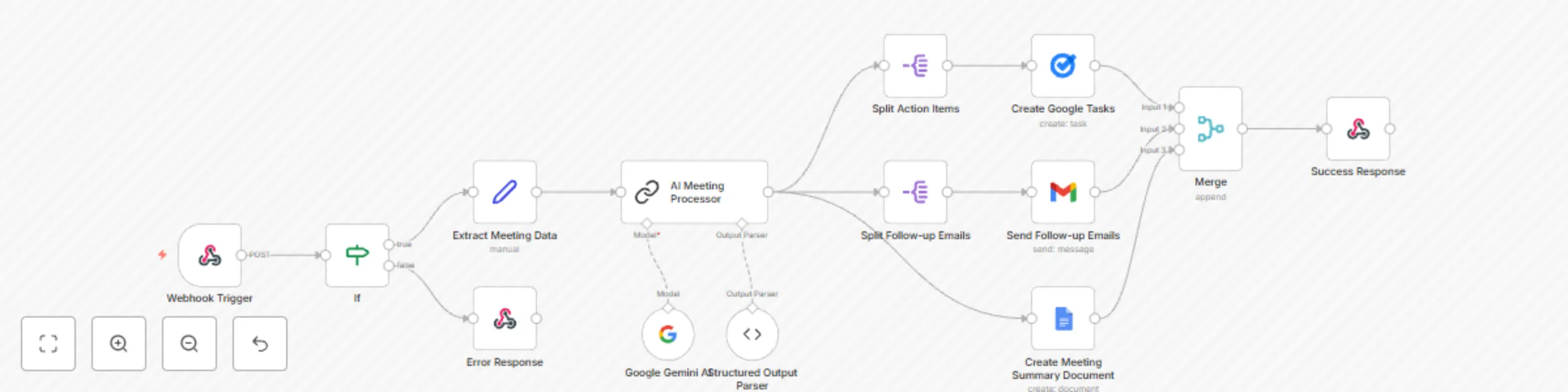
*This workflow contains community nodes that are only compatible with the self-hosted version of n8n.* ## ❓ What Problem Does It Solve? Manual transcription and action planning from meeting notes is often error-prone, time-consuming, and inconsistent. Important tasks, decisions, or deadlines can be overlooked or delayed. This workflow solves these pain points by automatically analyzing notes using AI and turning them into actionable, structured data. It drastically reduces follow-up delays, miscommunications, and administrative effort, letting teams focus on execution instead. ## 💡 Why Use Google Meet Automation? * **Save Hours of Manual Work:** Automatically transform raw meeting notes into structured tasks and emails without lifting a finger. * **Ensure Accurate Follow-up:** Never miss important action items or decisions buried in text; everything is extracted and assigned clearly. * **Improve Team Collaboration:** Instantly distribute meeting summaries and next steps to attendees, keeping everyone aligned. * **Leverage Advanced AI:** Utilize Google Gemini’s powerful natural language processing tailored specifically for meetings. * **Fully End-to-End Automated:** From receiving notes to task creation and email dispatch — your post-meeting workflow is completely hands-free. ### ⚡ Who Is This For? * **Project Managers:** Streamline task delegation and keep project timelines on track. * **Team Leads:** Quickly communicate key takeaways and follow-ups to team members. * **Sales and Account Teams:** Document client meetings efficiently and automate follow-up outreach. * **Remote Teams:** Ensure clarity and continuity after virtual meetings. * **Executives:** Get concise summaries and important decision logs automatically. ### 🔧 What This Workflow Does * ⏱ **Trigger:** Activated via a POST webhook receiving meeting notes, title, attendees, date, and duration. * 📎 **Step 2:** Validates inputs; if missing required fields, sends an error response. * 🔍 **Step 3:** Extracts and formats meeting data into structured variables for processing. * 🤖 **Step 4:** Sends meeting notes to Google Gemini AI for advanced analysis to identify action items, decisions, summaries, follow-ups, and dates. * 💌 **Step 5:** Splits AI responses to create Google Tasks from action items and send personalized follow-up emails via Gmail. * 🗂 **Step 6:** Generates a Google Docs meeting summary document and finally returns a success response with all processed results. ### 🔐 Setup Instructions 1. Import the provided `Google Meet Automation.json` file into your n8n instance. use [Payload example](https://docs.google.com/document/d/1SJIt0WzRqAVKQeEo7K_dqdHlw37L5aywds9qET2sYGE/edit?usp=sharing) 2. Set up credentials for: * Google OAuth2 API (Google Tasks, Google Docs) * Gmail OAuth2 API for sending emails * Google Palm API (for Google Gemini AI access) 3. Customize workflow parameters: * Webhook URL and access permissions * Google Tasks project or folders if applicable * Email templates if desired (subject line, branding) 4. Update any API endpoints or credential references to match your account setup. 5. Thoroughly test with sample meeting note payloads to ensure smooth execution. ### 🧩 Pre-Requirements * Active [n8n instance](https://n8n.partnerlinks.io/khaisastudio) (Cloud or Self-hosted) * Google Cloud Platform project with: * Google Tasks API enabled * Google Docs API enabled * Gmail API enabled * Google Palm API access (Google Gemini AI) * Valid OAuth2 credentials configured in n8n for above services * API quota and permissions for sending emails, creating docs, and tasks ### 🛠️ Customize It Further * Integrate with calendar apps (Google Calendar, Outlook) to auto-schedule next meetings. * Add Slack or Microsoft Teams notifications for real-time alerts. * Extend AI prompt for deeper insights like sentiment analysis or risk flags. * Customize email templates with branding, signatures, or attachments. * Connect task outputs with project management tools like Asana, Trello, or Jira. ## 📞 Support **Made by:** [khaisa Studio](khaisa.studio) **Tag:** automation, google meet, meeting notes, AI, google tasks, gmail, google docs **Category:** Productivity **Need a custom?** **[Contact Us](khaisa.studio/contact)**
Dropbox file management automation suite for bulk operations
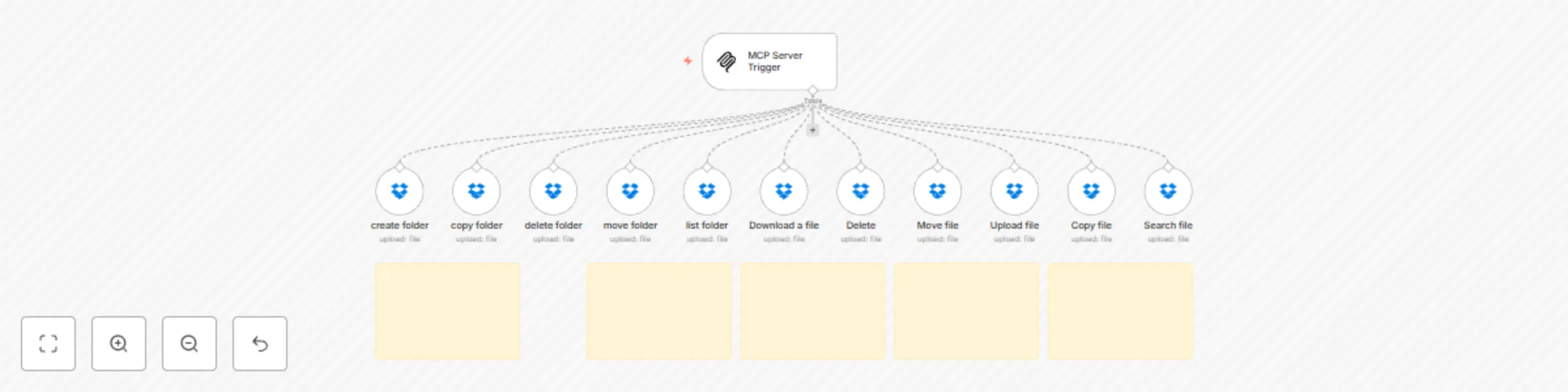
## 🚀 Why Choose MCP - Dropbox? * **Save Time:** Automate bulk actions like copy, move, or delete folders—no more endless clicking. * **Reduce Errors:** Automated rules keep files organized and error-free. * **Work Smarter:** Let automation handle the routine, so you can focus on bigger things. * **Full Dropbox Control:** Manage uploads, archiving, and clean-up automatically. * **Ready to Grow:** Build custom triggers and workflows to suit your needs. ## 👤 Who’s It For? * **IT/Admins:** Automate backups, archiving, and file recovery. * **Freelancers & Creators:** Easily handle multiple projects and clients. ## ❓ What Problem Does It Solve? No more manual folder creation, risky bulk moves, or messy searches. Everything’s automated for accuracy and speed—giving you peace of mind and lots of saved time. ## 🔧 How It Works 1. **Trigger:** Workflow starts with any new Dropbox action. 2. **Automated Operations:** Create, move, copy, or delete folders/files as needed. 3. **Search:** Find specific items instantly. 4. **Download:** Pull files or folders for backup or edits. 5. **Upload:** Add new assets to the right place, every time. 6. **Cleanup:** Archive or remove outdated stuff—automatically. ## 🛠️ Getting Started 1. **Import** the workflow `.json` into n8n. 2. **Connect Dropbox:** * Create a Dropbox dev app and set up OAuth2 in n8n. 3. **Tweak Settings:** * Update folder paths, file names, and trigger events as needed. 4. **Assign Credentials:** * Use your OAuth2 credentials on every Dropbox node. ## 🔑 Requirements * n8n running (cloud or self-hosted) * Dropbox account & developer app (OAuth2) * Dropbox OAuth2 credentials in n8n * *(Optional)* Your folder structure for smarter automation ## 🧩 Make It Yours * **Add Notifications:** Connect with Slack or email for instant updates. * **Automate Backups:** Schedule syncs to local or other cloud accounts. * **Use Logic:** Filter or branch tasks by file name, type, or metadata. ## ⚙️ Key Components * MCP Server Trigger * Dropbox toolnode (for creating, moving, copying, deleting, searching, uploading, and downloading files/folders) --- **Created by [Khaisa Studio](https://khaisa.studio)** **Need custom workflows?** [Contact Khaisa](mailto:[email protected])
Personal Google Calendar & reminder bot on Telegram using Gemini & Whisper
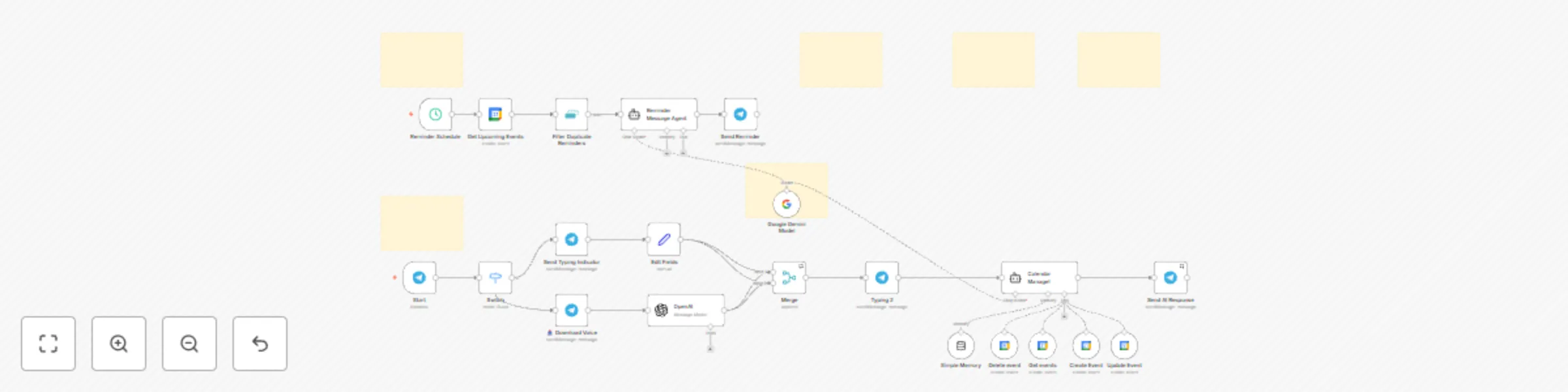
The **CA - Tele Assistant** workflow is an intelligent Telegram bot designed to help you manage your Google Calendar effortlessly through natural language and voice commands.  ## 💡 Why Use CA - Tele Assistant? - **Hands-free calendar management:** Manage your events via text or voice with zero manual calendar app usage - **Smart reminders:** Receive tailored, friendly reminders well in advance, helping you stay prepared - **Multifunctional AI assistant:** Create, view, update, or delete events simply by chatting naturally - **Seamless integration:** Combines Google Calendar, Telegram, OpenAI transcription, and Google Gemini model for powerful capabilities - **Context-aware messaging:** Personalized message tone, emoji use, and prep tips depending on event type and urgency  ## ⚡ Who Is This For? - **Busy professionals:** Who want to manage their schedule quickly without opening multiple apps - **Remote teams:** Needing easy calendar coordination and friendly reminders via Telegram - **People who prefer voice commands:** Allows scheduling and querying via Indonesian voice messages - **Anyone overwhelmed by calendar clutter:** Automates reminders and event organization effortlessly ## ❓ What Problem Does It Solve? Manually juggling your calendar events—creating entries, checking your schedule, or remembering appointments—is time-consuming and error-prone. Traditional calendar apps require multiple interactions and can flood you with generic notifications that lack context or personality. Voice commands or natural chat to manage calendars are rarely supported natively. **CA - Tele Assistant** solves these issues by offering a chat-based, AI-powered interface that understands your natural language or voice, automates calendar operations, and sends smart reminders tailored to your event and preferences. This reduces the cognitive load, minimizes missed appointments, and makes calendar management seamless. ## 🔧 How This Workflow Works **⏱ Step 1:** Incoming Telegram messages or voice messages trigger the workflow via Telegram Trigger node **📥 Step 2:** Voice messages are automatically downloaded and transcribed into text using OpenAI **🔀 Step 3:** A Switch node routes text and voice commands for unified processing **✍️ Step 4:** The Google Gemini AI model processes natural language commands for calendar actions **🧠 Step 5:** A Langchain AI agent ("Calendar Manage!") handles operations such as event creation, update, deletion, and fetching events using Google Calendar API tools. It uses session memory to keep contextual chat flow **🔔 Step 6:** A scheduled trigger every 15 minutes retrieves upcoming calendar events (within 45-60 mins), filters duplicates, and an AI Reminder Message Agent crafts personalized reminder messages **💬 Step 7:** Reminder messages are sent automatically to the user's Telegram chat, with typing indicators for a humanized feel **🛠 Step 8:** All data flows and interactions are combined, ensuring seamless conversational experience with real-time calendar sync ## 🔐 Setup Instructions 1. **Import** the provided JSON workflow into your n8n instance 2. **Set up credentials:** - Telegram API Bot credentials via BotFather - Google Calendar OAuth2 credentials - OpenAI API key (for voice transcription) - Google Palm API credentials (for Gemini AI) 3. **Customize:** Adjust chat IDs, timezone preferences, and reminder timing (default 45-60 minutes before events) 4. **Update:** Replace placeholder chat IDs with your Telegram chat ID 5. **Test:** Send test commands or voice messages through your Telegram bot to verify event creation, updates, and reminder delivery ## 🧩 Pre-Requirements 1. **Telegram Bot**: Create bot via [@BotFather](https://t.me/botfather) 2. **Google Calendar**: Setup OAuth2 credentials 3. **OpenAI API**: For voice message transcription 4. **Google Gemini**: For AI language model ### 📚 Useful Resources - [n8n Documentation](https://docs.n8n.io) - [Telegram Bot API](https://core.telegram.org/bots/api) - [Google Calendar API](https://developers.google.com/calendar) - [OpenAI API Docs](https://platform.openai.com/docs) ## 🛠️ Customize It Further - Add support for additional languages in voice transcription or chat responses - Integrate weather or traffic APIs for more enhanced reminder tips - Enable multi-user support with dynamic chat ID handling for group chats - Enhance personality or tone configurations for more formal or casual responses ## 🧠 Nodes Used - **Telegram Trigger** - **Telegram** (Send Typing Indicator, Send Message, Download Voice) - **OpenAI** (Audio transcription) - **Langchain Google Gemini Model** - **Langchain AI Agents** (Reminder Message Agent, Calendar Manage! agent) - **Google Calendar** node (Get Upcoming Events) - **Google Calendar Tools** (Create, Update, Delete, Get events) - **Remove Duplicates** node - **Merge** node - **Switch** node - **Set** node - **Schedule Trigger** - **Memory Buffer Window** node ## 📞 Support **Made by:** [khaisa Studio ](https://khaisa.studio) **Tag:** AI, Google Calendar, Telegram, Reminder, Schedule, Voice, OpenAI, Gemini, **Category:** Productivity Automation **Need a custom?** contact [khaisa](mailto:[email protected]) for more tailored templates