Automate SEO blog post creation and publishing with OpenAI & WordPress

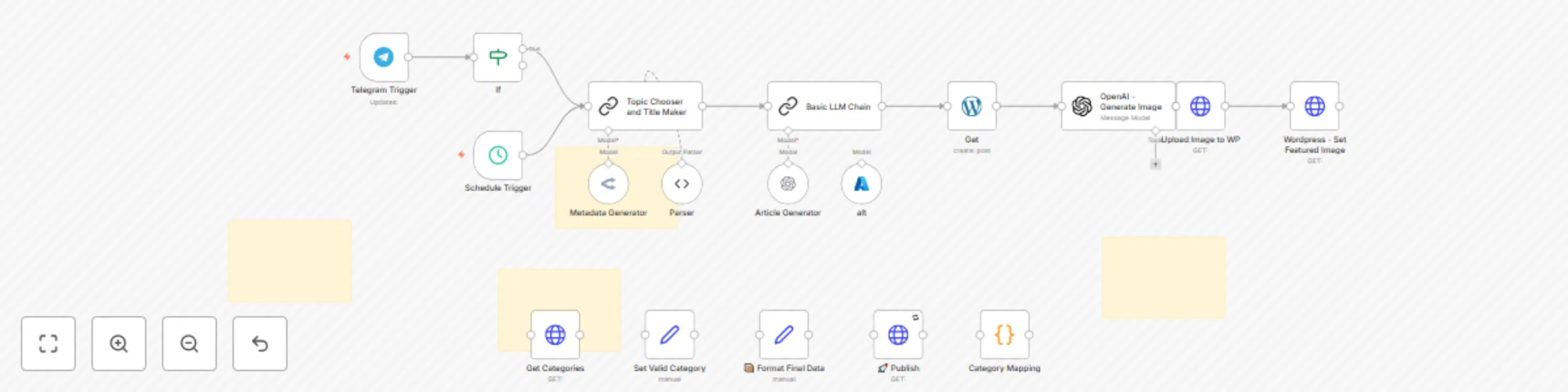
Workflow preview

Workflow preview
100%
Automate SEO blog post creation and publishing with OpenAI & WordPress preview
Open on n8n.io

Important notice

This workflow is provided as-is. Please review and test before using in production.

1. Workflow Overview

AI WordPress SEO Content Generator automates creating and publishing SEO friendly blog articles on WordPress. It combines AI technologies like OpenAI and OpenRouter to craft catchy titles, write 15...

Best for

  • Content Creation automation workflows
  • Multimodal AI automation workflows
  • advanced n8n builders looking for reusable templates

Tools used

@n8n/n8n-nodes-langchain.chainllm, @n8n/n8n-nodes-langchain.openai, n8n-nodes-base.httprequest, n8n-nodes-base.scheduletrigger, @n8n/n8n-nodes-langchain.lmchatopenai, n8n-nodes-base.telegramtrigger, n8n-nodes-base.if, n8n-nodes-base.stickynote

Source and attribution

This workflow is cataloged by N8N Workflows and links back to its original n8n.io source page by Khaisa Studio.

Original n8n.io source

1.1 Workflow description

Title
Automate SEO blog post creation and publishing with OpenAI & WordPress
Workflow name
Automate SEO blog post creation and publishing with OpenAI & WordPress

AI WordPress - SEO Content Generator automates creating and publishing SEO-friendly blog articles on WordPress. It combines AI technologies like OpenAI and OpenRouter to craft catchy titles, write 1500+ word articles, generate natural featured images, and publish everything seamlessly.

This workflow turns your WordPress site into a content powerhouse that boosts traffic and saves you hours by handling the entire blog post process automatically.

Why Use AI WordPress - SEO Content Generator?

Save Time

Automate the entire SEO content creation from ideation to publishing, freeing up hours weekly.

Lose Writer's Block

Get fresh, unique, and engaging article ideas without stressing over topics or titles.

Boost SEO

Generate optimized titles, meta-descriptions, and focus keyphrases to improve search rankings and click-through rates.

Professional Polish

Automated featured images and structured posts make your blog look like it has a full editorial team behind it.

Perfect For

Content Marketers

Streamline your content pipeline for blogs that rank and convert.

Small Business Owners

Keep your website fresh with relevant IT and business tech content without hiring writers.

WordPress Users

Anyone who wants hassle-free SEO blog posts on their WordPress site without lifting a finger.

How It Works

Step Process
Trigger Starts on schedule every 3 hours or manually via Telegram command "generate"
Process Chooses article topic and category, then crafts title, slug, keyphrases, and meta description using AI
Smart Logic Writes a long-form SEO article (1500-2500 words) with actionable, audience-focused advice and generates a natural-looking featured image to match the post
Output Publishes drafted articles to WordPress, sets featured images, and sends notifications to Discord and Telegram channels

Quick Setup

Step 1: Import & Configure

  1. Import JSON file to your n8n instances

Step 2: Add Credentials

Configure the following API connections:

  • WordPress API - For publishing posts
  • OpenAI API - For article and image generation
  • OpenRouter API - For topic generation
  • Discord Webhook - For notifications (optional)
  • Telegram API - For manual triggering (optional)

Step 3: Customize Settings

  • Adjust posting URLs and endpoints
  • Configure Telegram commands
  • Set content categories as needed
  • Replace placeholder WordPress site URLs with your own

Step 4: Test & Deploy

  • Run the workflow manually to verify setup
  • Check that posts appear correctly on your WordPress site
  • Enable scheduled triggers for automation

Requirements

Before getting started, make sure you have:

  • Active n8n instances
  • WordPress account with API access
  • OpenAI API key for article and image generation
  • OpenRouter API key for topic generation
  • Discord server webhook URL (optional)
  • Telegram bot token for manual triggering (optional)

Level Up Ideas

Take your automation to the next level:

  • Add multilingual support for global SEO coverage
  • Integrate social media posting for automatic cross-channel promotion Available HERE!
  • Incorporate advanced AI writing models for even richer articles

Get Support

Created by: khaisa Studio Tags: SEO, WordPress, AI Content, Automation Category: Content Creation Need custom work? Contact me

Start automating your blog posts today!

1.2 Logical Blocks

This catalog entry is organized from the workflow JSON. The node-level section below shows the executable blocks available for review before importing the template.

2. Block-by-Block Analysis

Block 1 - Topic Chooser and Title Maker

Type / Role
@n8n/n8n-nodes-langchain.chainLlm - chainLlm
Config choices
Version 1.6

Block 2 - Basic LLM Chain

Type / Role
@n8n/n8n-nodes-langchain.chainLlm - chainLlm
Config choices
Version 1.6

Block 3 - OpenAI - Generate Image

Type / Role
@n8n/n8n-nodes-langchain.openAi - openAi
Config choices
Version 1.8

Block 4 - Upload Image to WP

Type / Role
n8n-nodes-base.httpRequest - httpRequest
Config choices
Version 4.2

Block 5 - Wordpress - Set Featured Image

Type / Role
n8n-nodes-base.httpRequest - httpRequest
Config choices
Version 4.2

Block 6 - Schedule Trigger

Type / Role
n8n-nodes-base.scheduleTrigger - scheduleTrigger
Config choices
Version 1.2

Block 7 - Article Generator

Type / Role
@n8n/n8n-nodes-langchain.lmChatOpenAi - lmChatOpenAi
Config choices
Version 1.2

Block 8 - Telegram Trigger

Type / Role
n8n-nodes-base.telegramTrigger - telegramTrigger
Config choices
Version 1.2

Block 9 - If

Type / Role
n8n-nodes-base.if - if
Config choices
Version 2.2

Block 10 - Sticky Note

Type / Role
n8n-nodes-base.stickyNote - stickyNote
Config choices
Version 1

Block 11 - Sticky Note1

Type / Role
n8n-nodes-base.stickyNote - stickyNote
Config choices
Version 1

Block 12 - Get

Type / Role
n8n-nodes-base.wordpress - wordpress
Config choices
Version 1

Block 13 - Set Valid Category

Type / Role
n8n-nodes-base.set - set
Config choices
Version 3.4

Block 14 - Category Mapping

Type / Role
n8n-nodes-base.code - code
Config choices
Version 2

Block 15 - 📦 Format Final Data

Type / Role
n8n-nodes-base.set - set
Config choices
Version 3.4

Block 16 - Get Categories

Type / Role
n8n-nodes-base.httpRequest - httpRequest
Config choices
Version 4.2

Block 17 - 🚀 Publish

Type / Role
n8n-nodes-base.httpRequest - httpRequest
Config choices
Version 4.2

Block 18 - Sticky Note2

Type / Role
n8n-nodes-base.stickyNote - stickyNote
Config choices
Version 1

Block 19 - Metadata Generator

Type / Role
@n8n/n8n-nodes-langchain.lmChatOpenRouter - lmChatOpenRouter
Config choices
Version 1

Block 20 - Parser

Type / Role
@n8n/n8n-nodes-langchain.outputParserStructured - outputParserStructured
Config choices
Version 1.2

Block 21 - alt

Type / Role
@n8n/n8n-nodes-langchain.lmChatAzureOpenAi - lmChatAzureOpenAi
Config choices
Version 1

Block 22 - Sticky Note3

Type / Role
n8n-nodes-base.stickyNote - stickyNote
Config choices
Version 1

3. Summary Table

Workflow Automate SEO blog post creation and publishing with OpenAI & WordPress
Complexity advanced
Nodes 22
Categories Content Creation, Multimodal AI
Author Khaisa Studio
Published 06 Aug 2025

4. Reproducing the Workflow from Scratch

  1. 1. Download the workflow JSON

    Use the JSON export at /data/workflows/7038/7038.json as the source template for this automation.

  2. 2. Import the template into n8n

    Open n8n, import the downloaded JSON, and review each node before activating the workflow.

  3. 3. Configure credentials and variables

    Replace placeholder credentials, API keys, webhook URLs, account IDs, and environment-specific values with your own settings.

  4. 4. Test with sample data

    Run the workflow manually or in a staging workspace, inspect node output, and confirm downstream systems receive the expected data.

  5. 5. Activate and monitor

    Enable the workflow only after testing, then monitor executions, errors, and rate limits during the first production runs.

5. General Notes & Resources

Review imported nodes carefully before activation. This catalog entry is intended to help you inspect the workflow structure, understand required services, and find related templates faster.

Node names, credentials, schedules, webhook paths, and external service limits may need adjustment for your workspace.

Frequently asked questions

What does Automate SEO blog post creation and publishing with OpenAI & WordPress do?

AI WordPress SEO Content Generator automates creating and publishing SEO friendly blog articles on WordPress. It combines AI technologies like OpenAI and OpenRouter to craft catchy titles, write 15...

What do I need before importing this workflow?

Review the workflow JSON, configure any required credentials in n8n, and test the automation in a safe workspace before using it in production.

Can I customize this workflow?

Yes. Use the block-by-block analysis and the downloadable JSON to inspect each node, then adjust credentials, prompts, schedules, filters, or destinations for your Content Creation, Multimodal AI use case.