Block 1 - Alert System Info
- Type / Role
- n8n-nodes-base.stickyNote - stickyNote
- Config choices
- Version 1


 Early Deal
This workflow is provided as-is. Please review and test before using in production.
This workflow contains community nodes that are only compatible with the self hosted version of n8n. Intelligent Document Monitoring and Alert System This workflow creates an automated monitoring s...
n8n-nodes-base.stickynote, n8n-nodes-base.scheduletrigger, n8n-nodes-base.ftp, n8n-nodes-base.if, n8n-nodes-pdfvector.pdfvector, n8n-nodes-base.openai, n8n-nodes-base.code, n8n-nodes-base.slack
This workflow is cataloged by N8N Workflows and links back to its original n8n.io source page by PDF Vector.
Original n8n.io sourceThis workflow contains community nodes that are only compatible with the self-hosted version of n8n.
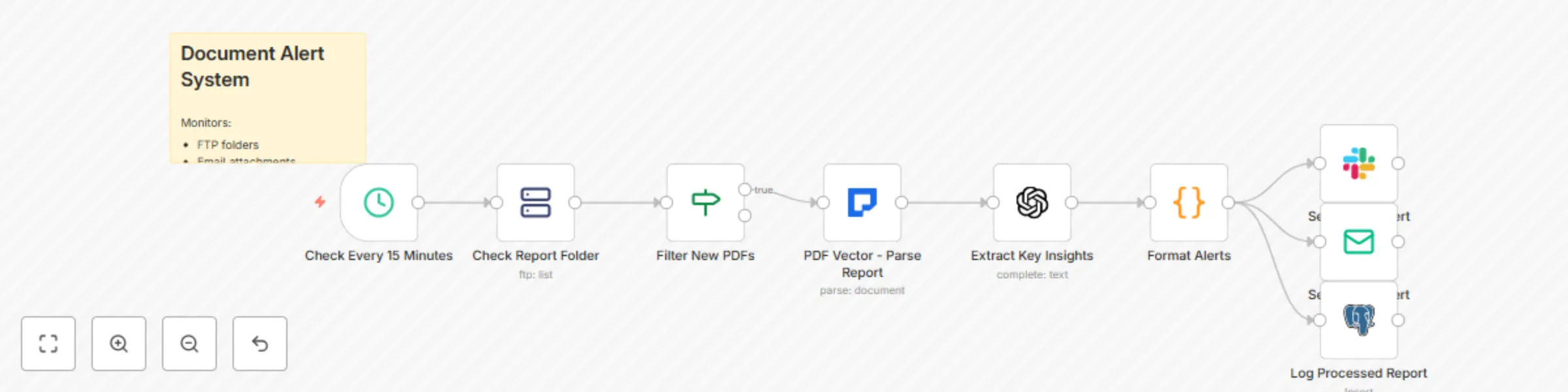
This workflow creates an automated monitoring system that watches for new PDF reports across multiple sources, extracts key insights using AI, and sends formatted alerts to your team via Slack or email. By combining PDF Vector's parsing capabilities with GPT-powered analysis, teams can stay informed about critical documents without manual review, ensuring important information never gets missed.
This template is designed for:
It solves the problem of information overload by automatically processing incoming documents, extracting only the most relevant insights, and delivering them in digestible formats to the right people at the right time.
Configure Document Sources
Set Up API Integrations
Configure Monitoring Schedule
// For hourly checks:
"interval": 60
// For real-time monitoring (every 5 min):
"interval": 5
Customize Alert Channels
Slack Setup:
Email Setup:
Define Alert Rules
The workflow implements a comprehensive monitoring pipeline:
Adding Custom Document Types: Extend the routing logic for specific document types:
// In "Route by Document Type" node:
const documentTypes = {
  'invoice': /invoice|bill|payment/i,
  'contract': /contract|agreement|terms/i,
  'report': /report|analysis|summary/i,
  'compliance': /audit|compliance|regulatory/i
};
Customizing Insight Extraction: Modify the AI prompt for domain-specific analysis:
// Financial documents:
"Extract: 1) Revenue figures 2) YoY growth 3) Risk factors 4) Guidance changes"

// Compliance documents:
"Extract: 1) Policy changes 2) Deadlines 3) Required actions 4) Penalties"

// Research papers:
"Extract: 1) Key findings 2) Methodology 3) Implications 4) Future work"
Advanced Alert Formatting: Create rich Slack messages with interactive elements:
// Add buttons for quick actions:
{
  "type": "actions",
  "elements": [
    {
      "type": "button",
      "text": { "type": "plain_text", "text": "View Full Report" },
      "url": documentUrl
    },
    {
      "type": "button",
      "text": { "type": "plain_text", "text": "Mark as Read" },
      "action_id": "mark_read"
    }
  ]
}
Implementing Alert Conditions: Add sophisticated filtering based on content:
// Alert only if certain conditions are met:
if (insights.metrics.revenue_change < -10) {
  priority = 'urgent';
  alertChannel = '#executive-alerts';
}

if (insights.findings.includes('compliance violation')) {
  additionalRecipients.push('[email protected]');
}
Adding Document Comparison: Track changes between document versions:
// Compare with previous version:
const previousDoc = await getLastVersion(documentType);
const changes = compareDocuments(previousDoc, currentDoc);
if (changes.significant) {
  alertMessage += `\n⚠️ Significant changes detected: ${changes.summary}`;
}
Performance Optimization:
Security Considerations:
This catalog entry is organized from the workflow JSON. The node-level section below shows the executable blocks available for review before importing the template.
| Workflow | Pdf report monitor with GPT-3.5 insights and Slack/Email alerts |
|---|---|
| Complexity | intermediate |
| Nodes | 10 |
| Categories | AI Summarization, Multimodal AI |
| Author | PDF Vector |
| Published | 14 Aug 2025 |
Use the JSON export at /data/workflows/7361/7361.json as the source template for this automation.
Open n8n, import the downloaded JSON, and review each node before activating the workflow.
Replace placeholder credentials, API keys, webhook URLs, account IDs, and environment-specific values with your own settings.
Run the workflow manually or in a staging workspace, inspect node output, and confirm downstream systems receive the expected data.
Enable the workflow only after testing, then monitor executions, errors, and rate limits during the first production runs.
Review imported nodes carefully before activation. This catalog entry is intended to help you inspect the workflow structure, understand required services, and find related templates faster.
Node names, credentials, schedules, webhook paths, and external service limits may need adjustment for your workspace.
This workflow contains community nodes that are only compatible with the self hosted version of n8n. Intelligent Document Monitoring and Alert System This workflow creates an automated monitoring s...
Review the workflow JSON, configure any required credentials in n8n, and test the automation in a safe workspace before using it in production.
Yes. Use the block-by-block analysis and the downloadable JSON to inspect each node, then adjust credentials, prompts, schedules, filters, or destinations for your AI Summarization, Multimodal AI use case.