Block 1 - When clicking ‘Test workflow’
- Type / Role
- n8n-nodes-base.manualTrigger - manualTrigger
- Config choices
- Version 1


 Early Deal
This workflow is provided as-is. Please review and test before using in production.
What this workflow does This (set of) workflow(s) shows how to start multiple sub workflows, asynchronously, in parallel, and then wait for all of them to complete. Normally sub workflows would nee...
n8n-nodes-base.manualtrigger, n8n-nodes-base.splitinbatches, n8n-nodes-base.wait, n8n-nodes-base.code, n8n-nodes-base.set, n8n-nodes-base.if, n8n-nodes-base.httprequest, n8n-nodes-base.respondtowebhook
This workflow is cataloged by N8N Workflows and links back to its original n8n.io source page by Hubschrauber.
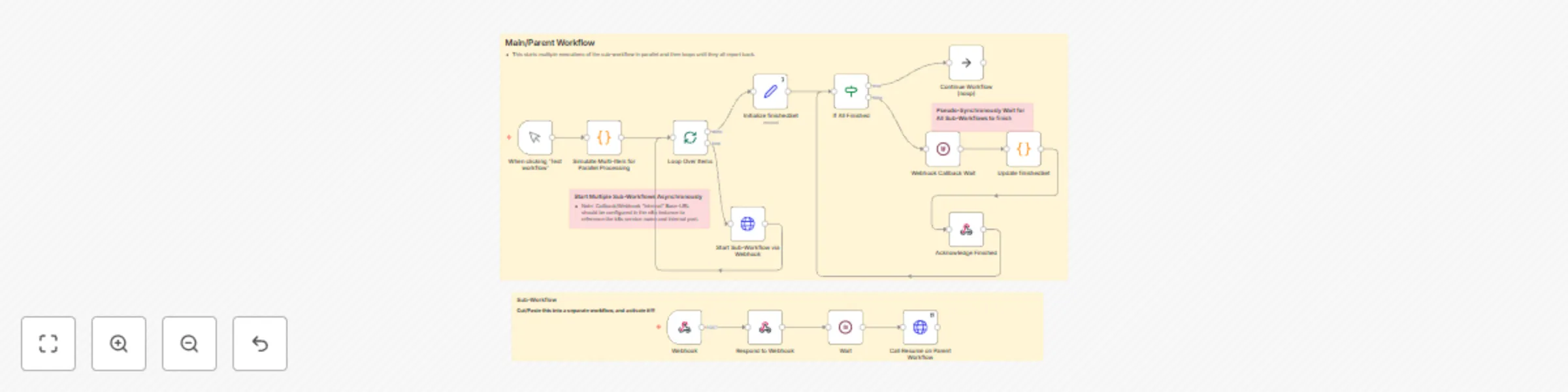
Original n8n.io sourceThis (set of) workflow(s) shows how to start multiple sub-workflows, asynchronously, in parallel, and then wait for all of them to complete. Normally sub-workflows would need to be run synchronously, in series, or, if they are executed asynchronously (to run concurrently, in parallel), there is no easy way to merge/wait for an arbitrary number of them to complete.
This is a "design pattern" template to show one approach for running multiple, data-driven instances of a sub-workflow "asynchronously," in parallel (instead of running them one at a time in series), but still prevent the later steps in the workflow from continuing until all of the sub-workflows have reported back that they are finished, via callback URL. There are other techniques involving messaging services, database tables, or other external "flow manager" helpers, but this technique accomplishes the goal fully within n8n.
To implement this pattern, examine the nodes in the template and modify the incoming data leading to:
if node) and builds a unique list of identifiers from the callbacks received from each execution of the sub-workflow.This is meant to be a possible answer to questions like this one about running things in parallel, maybe this one about waiting for things to finish, this one about managing sub-batches of things by waiting for each batch, or this one about running things in parallel. The topic of how to do this comes up A LOT, and this is one of the only techniques that (so far) seems to work.
This catalog entry is organized from the workflow JSON. The node-level section below shows the executable blocks available for review before importing the template.
| Workflow | Pattern for parallel sub-workflow execution followed by wait-for-all loop |
|---|---|
| Complexity | advanced |
| Nodes | 18 |
| Categories | Engineering |
| Author | Hubschrauber |
| Published | 11 Nov 2024 |
Use the JSON export at /data/workflows/2536/2536.json as the source template for this automation.
Open n8n, import the downloaded JSON, and review each node before activating the workflow.
Replace placeholder credentials, API keys, webhook URLs, account IDs, and environment-specific values with your own settings.
Run the workflow manually or in a staging workspace, inspect node output, and confirm downstream systems receive the expected data.
Enable the workflow only after testing, then monitor executions, errors, and rate limits during the first production runs.
Review imported nodes carefully before activation. This catalog entry is intended to help you inspect the workflow structure, understand required services, and find related templates faster.
Node names, credentials, schedules, webhook paths, and external service limits may need adjustment for your workspace.
What this workflow does This (set of) workflow(s) shows how to start multiple sub workflows, asynchronously, in parallel, and then wait for all of them to complete. Normally sub workflows would nee...
Review the workflow JSON, configure any required credentials in n8n, and test the automation in a safe workspace before using it in production.
Yes. Use the block-by-block analysis and the downloadable JSON to inspect each node, then adjust credentials, prompts, schedules, filters, or destinations for your Engineering use case.