Optimize & update Printify title and description workflow

Workflow preview

Workflow preview
100%
Optimize & update Printify title and description workflow preview
Open on n8n.io

Important notice

This workflow is provided as-is. Please review and test before using in production.

1. Workflow Overview

Printify Automation Update Title and Description Workflow This n8n workflow automates the process of retrieving products from Printify, generating optimized product titles and descriptions, and upd...

Best for

  • Content Creation automation workflows
  • Multimodal AI automation workflows
  • advanced n8n builders looking for reusable templates

Tools used

n8n-nodes-base.manualtrigger, n8n-nodes-base.httprequest, n8n-nodes-base.splitout, n8n-nodes-base.splitinbatches, @n8n/n8n-nodes-langchain.toolcalculator, @n8n/n8n-nodes-langchain.toolwikipedia, n8n-nodes-base.set, n8n-nodes-base.stickynote

Source and attribution

This workflow is cataloged by N8N Workflows and links back to its original n8n.io source page by Alex Kim.

Original n8n.io source

1.1 Workflow description

Title
Optimize & update Printify title and description workflow
Workflow name
Optimize & update Printify title and description workflow

Printify Automation - Update Title and Description Workflow

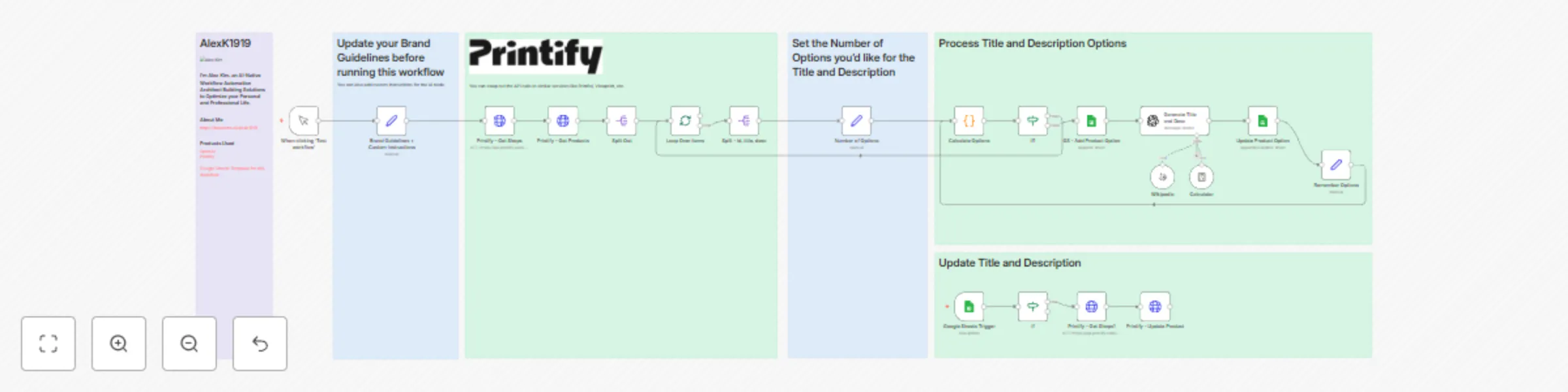
This n8n workflow automates the process of retrieving products from Printify, generating optimized product titles and descriptions, and updating them back to the platform. It leverages OpenAI for content generation and integrates with Google Sheets for tracking and managing updates.


Features

  • Integration with Printify: Fetch shops and products through Printify's API.
  • AI-Powered Optimization: Generate engaging product titles and descriptions using OpenAI's GPT model.
  • Google Sheets Tracking: Log and manage updates in Google Sheets.
  • Custom Brand Guidelines: Ensure consistent tone by incorporating brand-specific instructions.
  • Loop Processing: Iteratively process each product in batches.

Workflow Structure

Nodes Overview

  1. Manual Trigger: Manually start the workflow for testing purposes.
  2. Printify - Get Shops: Retrieves the list of shops from Printify.
  3. Printify - Get Products: Fetches product details for each shop.
  4. Split Out: Breaks down the product list into individual items for processing.
  5. Loop Over Items: Iteratively processes products in manageable batches.
  6. Generate Title and Desc: Uses OpenAI GPT to create optimized product titles and descriptions.
  7. Google Sheets Integration:
    • Trigger: Monitors Google Sheets for changes.
    • Log Updates: Records product updates, including old and new titles/descriptions.
  8. Conditional Logic:
    • If Nodes: Ensure products are ready for updates and stop processing once completed.
  9. Printify - Update Product: Sends updated titles and descriptions back to Printify.
  10. Brand Guidelines + Custom Instructions: Sets brand tone and seasonal instructions.

Setup Instructions

Prerequisites

  1. n8n Instance: Ensure n8n is installed and configured.
  2. Printify API Key:
    • Obtain an API key from your Printify account.
    • Add it to n8n under HTTP Header Auth.
  3. OpenAI API Key:
    • Obtain an API key from OpenAI.
    • Add it to n8n under OpenAI API.
  4. Google Sheets Integration:
    • Share your Google Sheets with the Google API service account.
    • Configure Google Sheets credentials in n8n.

Workflow Configuration

  1. Set Brand Guidelines:
    • Update the Brand Guidelines + Custom Instructions node with your brand name, tone, and seasonal instructions.
  2. Batch Size:
    • Configure the Loop Over Items node for optimal batch sizes.
  3. Google Sheets Configuration:
    • Set the correct Google Sheets document and sheet names in the integration nodes.
  4. Run the Workflow:
    • Start manually or configure the workflow to trigger automatically.

Key Notes

  • Customization:
    • Modify API calls to support other platforms like Printful or Vistaprint.
  • Scalability:
    • Use batch processing for efficient handling of large product catalogs.
  • Error Handling:
    • Configure retries or logging for any failed nodes.

Output Examples

Optimized Content Example

  • Input Title: "Classic White T-Shirt"
  • Generated Title: "Stylish Classic White Tee for Everyday Wear"
  • Input Description: "Plain white T-shirt made of cotton."
  • Generated Description: "Discover comfort and style with our classic white tee, crafted from premium cotton for all-day wear. Perfect for casual outings or layering."

Next Steps

  1. Monitor Updates:
    • Use Google Sheets to review logs of updated products.
  2. Expand Integration:
    • Add support for more Printify shops or integrate with other platforms.
  3. Enhance AI Prompts:
    • Customize prompts for different product categories or seasonal needs.

Feel free to reach out for additional guidance or troubleshooting!

1.2 Logical Blocks

This catalog entry is organized from the workflow JSON. The node-level section below shows the executable blocks available for review before importing the template.

2. Block-by-Block Analysis

Block 1 - When clicking ‘Test workflow’

Type / Role
n8n-nodes-base.manualTrigger - manualTrigger
Config choices
Version 1

Block 2 - Printify - Get Shops

Type / Role
n8n-nodes-base.httpRequest - httpRequest
Config choices
Version 4.2

Block 3 - Printify - Get Products

Type / Role
n8n-nodes-base.httpRequest - httpRequest
Config choices
Version 4.2

Block 4 - Split Out

Type / Role
n8n-nodes-base.splitOut - splitOut
Config choices
Version 1

Block 5 - Loop Over Items

Type / Role
n8n-nodes-base.splitInBatches - splitInBatches
Config choices
Version 3

Block 6 - Split - id, title, desc

Type / Role
n8n-nodes-base.splitOut - splitOut
Config choices
Version 1

Block 7 - Calculator

Type / Role
@n8n/n8n-nodes-langchain.toolCalculator - toolCalculator
Config choices
Version 1

Block 8 - Wikipedia

Type / Role
@n8n/n8n-nodes-langchain.toolWikipedia - toolWikipedia
Config choices
Version 1

Block 9 - Printify - Update Product

Type / Role
n8n-nodes-base.httpRequest - httpRequest
Config choices
Version 4.2

Block 10 - Brand Guidelines + Custom Instructions

Type / Role
n8n-nodes-base.set - set
Config choices
Version 3.4

Block 11 - Sticky Note9

Type / Role
n8n-nodes-base.stickyNote - stickyNote
Config choices
Version 1

Block 12 - Sticky Note10

Type / Role
n8n-nodes-base.stickyNote - stickyNote
Config choices
Version 1

Block 13 - Google Sheets Trigger

Type / Role
n8n-nodes-base.googleSheetsTrigger - googleSheetsTrigger
Config choices
Version 1

Block 14 - Printify - Get Shops1

Type / Role
n8n-nodes-base.httpRequest - httpRequest
Config choices
Version 4.2

Block 15 - GS - Add Product Option

Type / Role
n8n-nodes-base.googleSheets - googleSheets
Config choices
Version 4.3

Block 16 - Update Product Option

Type / Role
n8n-nodes-base.googleSheets - googleSheets
Config choices
Version 4.5

Block 17 - Sticky Note1

Type / Role
n8n-nodes-base.stickyNote - stickyNote
Config choices
Version 1

Block 18 - Sticky Note2

Type / Role
n8n-nodes-base.stickyNote - stickyNote
Config choices
Version 1

Block 19 - Sticky Note11

Type / Role
n8n-nodes-base.stickyNote - stickyNote
Config choices
Version 1

Block 20 - If1

Type / Role
n8n-nodes-base.if - if
Config choices
Version 2.2

Block 21 - Number of Options

Type / Role
n8n-nodes-base.set - set
Config choices
Version 3.4

Block 22 - Calculate Options

Type / Role
n8n-nodes-base.code - code
Config choices
Version 2

Block 23 - Remember Options

Type / Role
n8n-nodes-base.set - set
Config choices
Version 3.4

Block 24 - Sticky Note

Type / Role
n8n-nodes-base.stickyNote - stickyNote
Config choices
Version 1

Showing the first 24 of 26 workflow blocks. Download the JSON for the full node graph.

3. Summary Table

Workflow Optimize & update Printify title and description workflow
Complexity advanced
Nodes 26
Categories Content Creation, Multimodal AI
Author Alex Kim
Published 28 Nov 2024

4. Reproducing the Workflow from Scratch

  1. 1. Download the workflow JSON

    Use the JSON export at /data/workflows/2583/2583.json as the source template for this automation.

  2. 2. Import the template into n8n

    Open n8n, import the downloaded JSON, and review each node before activating the workflow.

  3. 3. Configure credentials and variables

    Replace placeholder credentials, API keys, webhook URLs, account IDs, and environment-specific values with your own settings.

  4. 4. Test with sample data

    Run the workflow manually or in a staging workspace, inspect node output, and confirm downstream systems receive the expected data.

  5. 5. Activate and monitor

    Enable the workflow only after testing, then monitor executions, errors, and rate limits during the first production runs.

5. General Notes & Resources

Review imported nodes carefully before activation. This catalog entry is intended to help you inspect the workflow structure, understand required services, and find related templates faster.

Node names, credentials, schedules, webhook paths, and external service limits may need adjustment for your workspace.

Frequently asked questions

What does Optimize & update Printify title and description workflow do?

Printify Automation Update Title and Description Workflow This n8n workflow automates the process of retrieving products from Printify, generating optimized product titles and descriptions, and upd...

What do I need before importing this workflow?

Review the workflow JSON, configure any required credentials in n8n, and test the automation in a safe workspace before using it in production.

Can I customize this workflow?

Yes. Use the block-by-block analysis and the downloadable JSON to inspect each node, then adjust credentials, prompts, schedules, filters, or destinations for your Content Creation, Multimodal AI use case.