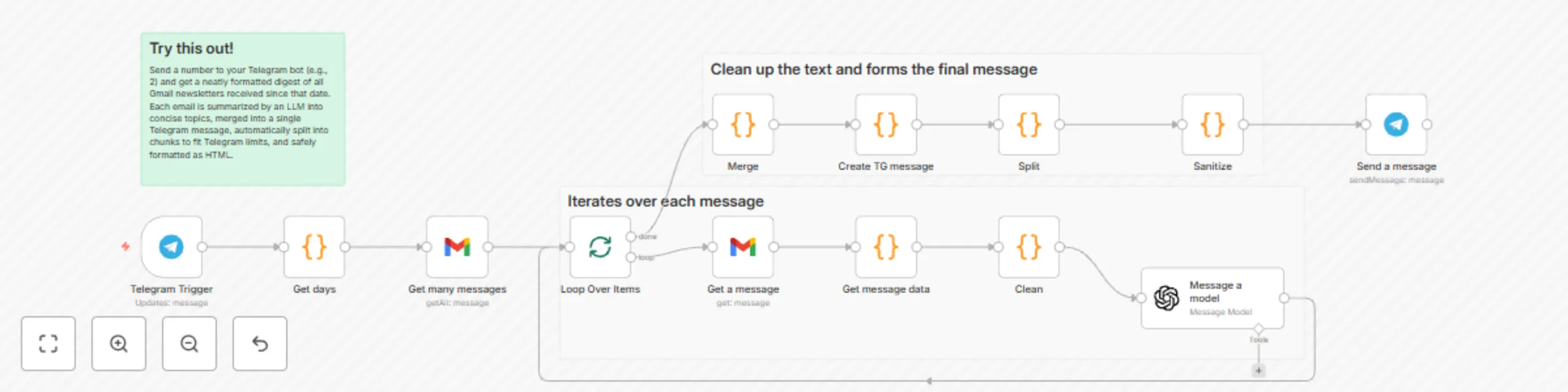
On-demand email newsletter summaries from Gmail to Telegram with GPT-4.1-mini

Workflow preview

Workflow preview
100%
On-demand email newsletter summaries from Gmail to Telegram with GPT-4.1-mini preview
Open on n8n.io

Important notice

This workflow is provided as-is. Please review and test before using in production.

1. Workflow Overview

Summary Send a number to your Telegram bot (e.g., 2) and get a neatly formatted digest of all Gmail newsletters received since that date. Each email is summarized by an LLM into concise topics, mer...

Best for

  • Personal Productivity automation workflows
  • Multimodal AI automation workflows
  • advanced n8n builders looking for reusable templates

Tools used

n8n-nodes-base.gmail, n8n-nodes-base.telegramtrigger, n8n-nodes-base.splitinbatches, n8n-nodes-base.code, n8n-nodes-base.telegram, @n8n/n8n-nodes-langchain.openai, n8n-nodes-base.stickynote

Source and attribution

This workflow is cataloged by N8N Workflows and links back to its original n8n.io source page by Vlad Arbatov.

Original n8n.io source

1.1 Workflow description

Title
On-demand email newsletter summaries from Gmail to Telegram with GPT-4.1-mini
Workflow name
On-demand email newsletter summaries from Gmail to Telegram with GPT-4.1-mini

Summary

Send a number to your Telegram bot (e.g., 2) and get a neatly formatted digest of all Gmail newsletters received since that date. Each email is summarized by an LLM into concise topics, merged into a single Telegram message, automatically split into chunks to fit Telegram limits, and safely formatted as HTML.

What this workflow does

  • Triggers on your Telegram message containing a number of days, e.g., 1, 2, 7
  • Fetches all Gmail messages since that date using a custom search query, optionally filtered by senders
  • Retrieves and decodes each email’s HTML, subject, sender name, date
  • Prompts an LLM (GPT‑4.1‑mini) to produce a consistent JSON summary of topics per email
  • Merges topics from all emails into a single digest
  • Builds a readable, enumerated message (with bold titles)
  • Splits it into 3 500‑char parts and sanitizes Markdown to Telegram‑safe HTML
  • Sends the digest to your Telegram chat with preview disabled

Apps and credentials

  • Gmail OAuth2: Gmail account
  • Telegram: Telegram account (bot)
  • OpenAI: OpenAi account

Typical use cases

  • Personal or team daily/weekly newsletter digests in Telegram
  • Curated feeds from selected senders compiled on demand
  • Lightweight knowledge briefings without leaving Telegram

How it works (node-by-node)

  • Telegram Trigger
    • Waits for your message (e.g., "2"). Chat ID is restricted to your Telegram ID for safety.
  • Get days (Code)
    • Takes the numeric daysAgo from the Telegram message text
    • Computes YYYY/MM/DD for Gmail’s after: filter
  • Get many messages (Gmail → getAll, returnAll: true)
    • Uses a custom q filter like: =(from:@.com) OR (from:@.com) OR (from:@.com -"____") after:{{ $json.dateString }}
    • Returns a list of message IDs
  • Loop Over Items (Split in Batches)
    • Iterates through each message ID
  • Get a message (Gmail → get)
    • Retrieves the full message/payload for the current email
  • Get message data (Code)
    • Extracts HTML from Gmail’s payload (body/parts)
    • Normalizes sender to just the name
      • Formats the date as DD.MM.YYYY
      • Passes html, subject, from, date forward
  • Clean (Code)
    • Converts DD.MM.YYYY → MM.DD (for prompt brevity)
    • Passes html, subject, from, date to the LLM
  • Message a model (OpenAI, model: gpt‑4.1‑mini, JSON output)
    • Prompt instructs: - Produce JSON: { "topics": [ { "title", "descr", "subject", "from", "date" } ] }
      • Split multi-news blocks into separate topics
      • Combine or ignore specific blocks for particular senders (placeholders ____)
      • Keep subject untranslated; other values in ____ language
      • Injects subject/from/date/html from the current email
  • Loop Over Items (continues)
    • After all iterations complete, the aggregated per-email results are available
  • Merge (Code)
    • Flattens the topics arrays from all processed emails into one combined topics list
  • Create TG message (Code)
    • Renders an enumerated list:
        1. Title (bold)
      • Short description
      • Original subject
      • From — Date
  • Split (Code)
    • Splits into 3 500‑character chunks to stay below Telegram’s 4 096 limit with HTML overhead
  • Sanitize (Code)
    • Escapes &, <, >
    • Fixes unbalanced * and _
    • Converts basic Markdown markers to Telegram HTML
  • Send a message (Telegram)
    • Sends each part with parse_mode=HTML, previews disabled

Node map

Node Type Purpose
Telegram Trigger Trigger Receive daysAgo command from Telegram
Get days Code Compute Gmail after:YYYY/MM/DD from daysAgo
Get many messages Gmail (getAll) Search emails since date with custom from: filters
Loop Over Items Split in Batches Iterate messages one-by-one
Get a message Gmail (get) Fetch full message payload
Get message data Code Extract HTML/subject/from/date; normalize sender and date
Clean Code Reformat date and forward fields to LLM
Message a model OpenAI Summarize email into JSON topics
Merge Code Merge topics from all emails
Create TG message Code Build human-friendly digest text
Split Code Chunk into 3 500‑char parts
Sanitize Code Escape HTML and map Markdown to Telegram HTML
Send a message Telegram Deliver digest to Telegram chat

Before you start

  • Create a Telegram bot and get its token (via @BotFather)
  • Get your Telegram user ID to restrict access
  • Connect Gmail OAuth2 in n8n
  • Add your OpenAI API key
  • Import the provided workflow JSON into n8n

Setup instructions

  1. Telegram
  • Telegram Trigger node:
    • additionalFields.chatIds = your Telegram user ID
  • Send a message node:
    • chatId = your Telegram user ID
    • parse_mode = HTML
    • disable_web_page_preview = true
  1. Gmail
  • Connect a Gmail OAuth2 credential (Gmail account)
  • In Get many messages, adjust filters.q to your senders and rules:
  • If needed, add label: or category: filters
  1. OpenAI
  • Message a model:
    • Model: gpt‑4.1‑mini (can swap to gpt‑4o‑mini or your preferred)
    • Update the prompt placeholders: - ____ language → your target language - ____ sender rules → your special cases (combine blocks, ignore sections)
  1. Safety and formatting
  • Keep parse_mode=HTML in Telegram
  • The Sanitize node is designed for <b> and <i> only; avoid other HTML tags
  • The Split node uses 3 500 chars per part to stay safe under Telegram limits

How to use

  • In Telegram, send a number indicating “days ago”
    • Example: 2 → will query Gmail after the date 2 days ago
  • The workflow compiles and returns a digest in your chat
  • Rerun anytime with a new number

Customization ideas

  • Labels instead of global search: q = label:Newsletters after:{{ $json.dateString }}
  • Time window control: add before: or exact date ranges
  • Different language: set the ____ language in the LLM prompt
  • Model choice: swap to cheaper/faster models if volume is high
  • Chunk size: adjust from 3 500 to your needs
  • Formatting: tweak Create TG message to include links parsed from HTML (if you add an HTML parser step)

Limits and notes

  • Telegram messages are limited to ~4 096 characters; we chunk to 3 500 per part
  • Gmail “after:” uses YYYY/MM/DD and Google’s interpretation of dates; your n8n server time influences the computed date
  • LLM usage incurs cost and latency proportional to email size and count
  • HTML extraction is robust for typical Gmail structures but may need tweaks for exotic MIME layouts

Privacy and safety

  • Emails are sent to OpenAI for summarization—ensure that’s acceptable for your data policies
  • The Telegram Trigger restricts chat access; keep your chatIds locked down
  • Avoid sending raw HTML to Telegram; rely on the Sanitize node

Sample output format (Telegram)

  1. Bold topic title

One-sentence description

Original Subject Line → Sender Name — DD.MM.YYYY

  1. Next topic title

...

Tips and troubleshooting

  • Got empty digests? Check Gmail filters.q and make sure there really are emails after the computed date
  • Model errors or empty JSON? Lower prompt complexity or switch model
  • HTML formatting issues in Telegram? Ensure parse_mode=HTML and keep only <b>, <i>
  • Long messages not fully delivered? Reduce chunk size from 3 500

Tags

  • gmail, telegram, openai, llm, newsletters, digest, summarization, automation

Changelog

  • v1: Initial release with sender filters, topic merging, Telegram HTML sanitization, and on-demand time window via Telegram message

1.2 Logical Blocks

This catalog entry is organized from the workflow JSON. The node-level section below shows the executable blocks available for review before importing the template.

2. Block-by-Block Analysis

Block 1 - Get many messages

Type / Role
n8n-nodes-base.gmail - gmail
Config choices
Version 2.1

Block 2 - Telegram Trigger

Type / Role
n8n-nodes-base.telegramTrigger - telegramTrigger
Config choices
Version 1.2

Block 3 - Loop Over Items

Type / Role
n8n-nodes-base.splitInBatches - splitInBatches
Config choices
Version 3

Block 4 - Get a message

Type / Role
n8n-nodes-base.gmail - gmail
Config choices
Version 2.1

Block 5 - Get days

Type / Role
n8n-nodes-base.code - code
Config choices
Version 2

Block 6 - Get message data

Type / Role
n8n-nodes-base.code - code
Config choices
Version 2

Block 7 - Merge

Type / Role
n8n-nodes-base.code - code
Config choices
Version 2

Block 8 - Create TG message

Type / Role
n8n-nodes-base.code - code
Config choices
Version 2

Block 9 - Sanitize

Type / Role
n8n-nodes-base.code - code
Config choices
Version 2

Block 10 - Split

Type / Role
n8n-nodes-base.code - code
Config choices
Version 2

Block 11 - Clean

Type / Role
n8n-nodes-base.code - code
Config choices
Version 2

Block 12 - Send a message

Type / Role
n8n-nodes-base.telegram - telegram
Config choices
Version 1.2

Block 13 - Message a model

Type / Role
@n8n/n8n-nodes-langchain.openAi - openAi
Config choices
Version 1.8

Block 14 - Sticky Note

Type / Role
n8n-nodes-base.stickyNote - stickyNote
Config choices
Version 1

Block 15 - Sticky Note1

Type / Role
n8n-nodes-base.stickyNote - stickyNote
Config choices
Version 1

Block 16 - Sticky Note2

Type / Role
n8n-nodes-base.stickyNote - stickyNote
Config choices
Version 1

3. Summary Table

Workflow On-demand email newsletter summaries from Gmail to Telegram with GPT-4.1-mini
Complexity advanced
Nodes 16
Categories Personal Productivity, Multimodal AI
Author Vlad Arbatov
Published 11 Aug 2025

4. Reproducing the Workflow from Scratch

  1. 1. Download the workflow JSON

    Use the JSON export at /data/workflows/7254/7254.json as the source template for this automation.

  2. 2. Import the template into n8n

    Open n8n, import the downloaded JSON, and review each node before activating the workflow.

  3. 3. Configure credentials and variables

    Replace placeholder credentials, API keys, webhook URLs, account IDs, and environment-specific values with your own settings.

  4. 4. Test with sample data

    Run the workflow manually or in a staging workspace, inspect node output, and confirm downstream systems receive the expected data.

  5. 5. Activate and monitor

    Enable the workflow only after testing, then monitor executions, errors, and rate limits during the first production runs.

5. General Notes & Resources

Review imported nodes carefully before activation. This catalog entry is intended to help you inspect the workflow structure, understand required services, and find related templates faster.

Node names, credentials, schedules, webhook paths, and external service limits may need adjustment for your workspace.

Frequently asked questions

What does On-demand email newsletter summaries from Gmail to Telegram with GPT-4.1-mini do?

Summary Send a number to your Telegram bot (e.g., 2) and get a neatly formatted digest of all Gmail newsletters received since that date. Each email is summarized by an LLM into concise topics, mer...

What do I need before importing this workflow?

Review the workflow JSON, configure any required credentials in n8n, and test the automation in a safe workspace before using it in production.

Can I customize this workflow?

Yes. Use the block-by-block analysis and the downloadable JSON to inspect each node, then adjust credentials, prompts, schedules, filters, or destinations for your Personal Productivity, Multimodal AI use case.