Vlad Arbatov
Workflows by Vlad Arbatov
Multi-tool personal assistant with Telegram, Grok-4, Gmail, Calendar & Memory
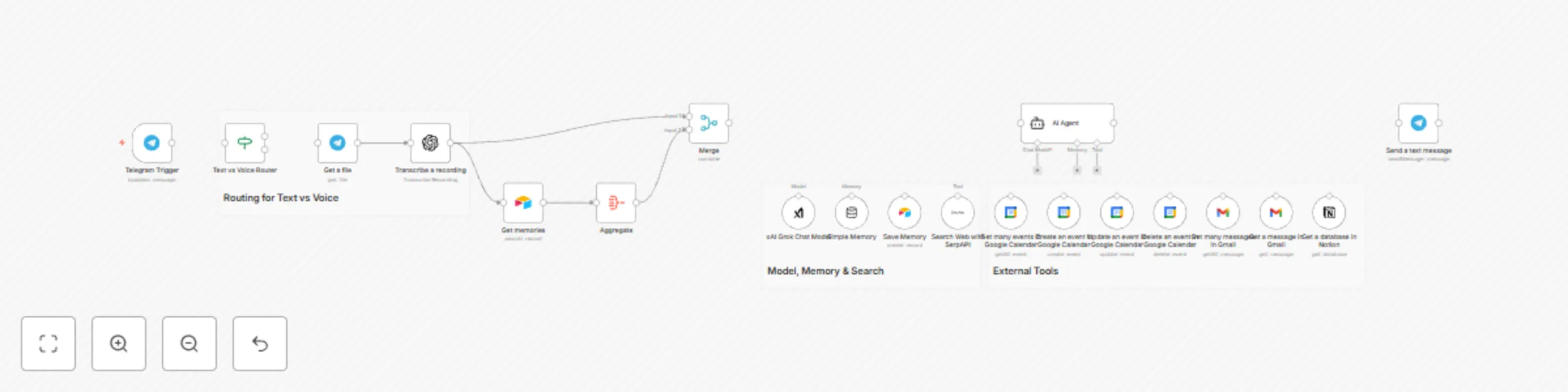
## Summary Chat with your AI agent in Telegram. It remembers important facts about you in Airtable, can transcribe your voice messages, search the web, read and manage Google Calendar, fetch Gmail, and query Notion. Responses are grounded in your recent memories and tool outputs, then sent back to Telegram. ## What this workflow does - Listens to your Telegram messages (text or voice) - Maintains short-term chat memory per user and long-term memory in Airtable - Decides when to save new facts about you (auto “Save Memory” without telling you) - Uses tools on demand: - Web search via SerpAPI - Google Calendar: list/create/update/delete events - Gmail: list and read messages - Notion: fetch database info - Transcribes Telegram voice notes with OpenAI and feeds them to the agent - Combines live tool results + recent memories and replies in Telegram ## Apps and credentials - Telegram Bot API: personal_bot - xAI Grok: Grok-4 model for chat - OpenAI: speech-to-text (transcribe audio) - Airtable: store long-term memories - Google Calendar: calendar actions - Gmail: email actions - Notion: knowledge and reading lists - SerpAPI: web search ## Typical use cases - Personal assistant that remembers preferences, decisions, and tasks - Create/update meetings by chatting, and get upcoming events - Ask “what did I say I’m reading?” or “what’s our plan from last week?” - Voice-first capture: send a voice note → get a transcribed, actionable reply - Fetch recent emails or look up info on the web without leaving Telegram - Query a Notion database (e.g., “show me the Neurocracy entries”) ## How it works (node-by-node) - Telegram Trigger - Receives messages from your Telegram chat (text and optional voice). - Text vs Message Router - Routes based on message contents: - Text path → goes directly to the Agent (AI). - Voice path → downloads the file and transcribes before AI. - Always also fetches recent Airtable memories for context. - Get a file (Telegram) - Downloads the voice file (voice.file_id) when present. - Transcribe a recording (OpenAI) - Converts audio to text so the agent can use it like a normal message. - Get memories (Airtable) - Searches your “Agent Memories” base/table, filtered by user, sorted by Created. - Aggregate (Aggregate) - Bundles recent memory records into a single array “Memories” with text + timestamp. - Merge (Merge) - Combines current input (text or transcript) with the memory bundle before the agent. - Simple Memory (Agent memory window) - Short-term session memory keyed by Telegram chat ID; keeps the recent 30 turns. - Tools wired into the agent - SerpAPI - Google Calendar tools: - Get many events in Google Calendar - Create an event in Google Calendar - Update an event in Google Calendar - Delete an event in Google Calendar - Gmail tools: - Get many messages in Gmail - Get a message in Gmail - Notion tool: - Get a database in Notion - Airtable tool: - Save Memory (stores distilled facts about the user) - Agent - System prompt defines role, tone, and rules: - Be a friendly assistant. - On each message, decide if it contains user info worth saving. - If yes, call “Save Memory” to persist a short summary in Airtable. - Don’t announce memory saves—just continue helping. - Use tools when needed (web, calendar, Gmail, Notion). - Think with the provided memory context block. - Uses xAI Grok Chat Model for reasoning and tool-calling. - Can call Save Memory, Calendar, Gmail, Notion, and SerpAPI tools as needed. - Save Memory (Airtable) - Persists Memory and User fields to “Agent Memories” base; auto timestamp by Airtable. - Send a text message (Telegram) - Sends the agent’s final answer back to the same Telegram chat ID. ## Node map | Node | Type | Purpose | |---|---|---| | Telegram Trigger | Trigger | Receive text/voice from Telegram | | Text vs voice router | Flow control | Route text vs voice; also trigger memories fetch | | Get a file | Telegram | Download voice audio | | Transcribe a recording | OpenAI | Speech-to-text for voice notes | | Get memories | Airtable | Load recent user memories | | Aggregate | Aggregate | Pack memory records into “Memories” array | | Merge | Merge | Combine input and memories before agent call | | Simple Memory | Agent memory | Short-term chat memory per chat ID | | xAI Grok Chat Model | LLM | Core reasoning model for the Agent | | Search Web with SerpAPI | Tool | Web search | | Google Calendar tools | Tool | List/create/update/delete events | | Gmail tools | Tool | Search and read email | | Notion tool | Tool | Query a Notion database | | Save Memory | Airtable Tool | Persist distilled user facts | | AI Agent | Agent | Orchestrates tools + memory, produces the answer | | Send a text message | Telegram | Reply to the user in Telegram | ## Before you start - Create a Telegram bot and get your token (via @BotFather). - Put your Telegram user ID into the Telegram Trigger node (chatIds). - Connect credentials: - xAI Grok (model: grok-4-0709) - OpenAI (for audio transcription) - Airtable (Agent Memories base and table) - Google Calendar OAuth - Gmail OAuth - Notion API - SerpAPI key - Adjust the Airtable “User” value and the filterByFormula to match your name or account. ## Setup instructions 1) Telegram - Telegram Trigger: - additionalFields.chatIds = your_telegram_id - download = true to allow voice handling - Send a text message: - chatId = {{ $('Telegram Trigger').item.json.message.chat.id }} 2) Memory - Airtable base/table must exist with fields: Memory, User, Created (Created auto-managed). - In Save Memory and Get memories nodes, align Base, Table, and filterByFormula with your setup. - Simple Memory: - sessionKey = {{ $('If').item.json.message.chat.id }} - contextWindowLength = 30 (adjust as needed) 3) Tools - Google Calendar: choose your calendar, test get/create/update/delete. - Gmail: set “returnAll/simplify/messageId” via $fromAI or static defaults. - Notion: set your databaseId. - SerpAPI: ensure the key is valid. 4) Agent (AI node) - SystemMessage: customize role, name, and any constraints. - Text input: concatenates transcript or text into one prompt: {{ $json.text }}{{ $json.message.text }} ## How to use - Send a text or voice message to your bot in Telegram. - The agent replies in the same chat, optionally performing tool actions. - New personal facts you mention are silently summarized and stored in Airtable for future context. ## Customization ideas - Replace Grok with another LLM if desired. - Add more tools: Google Drive, Slack, Jira, GitHub, etc. - Expand memory schema (e.g., tags, categories, confidence). - Add guardrails: profanity filters, domain limits, or cost control. - Multi-user support: store chat-to-user mapping and separate memories by user. - Add summaries: a daily recap message created from new memories. ## Limits and notes - Tool latency: calls to Calendar, Gmail, Notion, and SerpAPI add response time. - Audio size/format: OpenAI transcription works best with common formats and short clips. - Memory growth: periodically archive old Airtable entries, or change Aggregate window. - Timezone awareness: Calendar operations depend on your Google Calendar settings. ## Privacy and safety - Sensitive info may be saved to Airtable; restrict access to the base. - Tool actions operate under your connected accounts; review scopes and permissions. - The agent may call external APIs (SerpAPI, OpenAI); ensure this aligns with your policies. ## Example interactions - “Schedule a 30‑min catch‑up with Alex next Tuesday afternoon.” - “What meetings do I have in the next 4 weeks?” - “Summarize my latest emails from Product Updates.” - “What did I say I’m reading?” (agent recalls from memories) - Voice note: “Remind me to call the dentist this Friday morning.” → agent transcribes and creates an event. ## Tags - telegram, agent, memory, grok, openai, airtable, google-calendar, gmail, notion, serpapi, voice, automation ## Changelog - v1: First release with Telegram agent, short/long-term memory, voice transcription, and tool integrations for web, calendar, email, and Notion.
Create daily newsletter digests from Gmail using GPT-4.1-mini
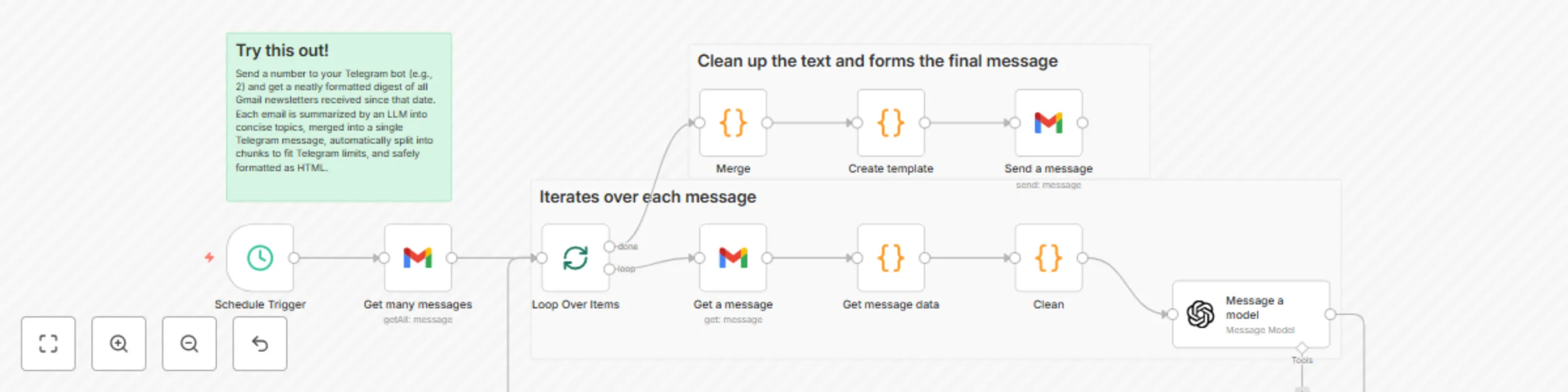
## Summary Every day at a set time, this workflow fetches yesterday’s newsletters from Gmail, summarizes each email into concise topics with an LLM, merges all topics, renders a clean HTML digest, and emails it to your inbox. ## What this workflow does - Triggers on a daily schedule (default 16:00, server time) - Fetches Gmail messages since yesterday using a custom search query with optional sender filters - Retrieves and decodes each email’s HTML, subject, sender name, and date - Prompts an LLM (GPT‑4.1‑mini) to produce a consistent JSON summary of topics per email - Merges topics from all emails into a single list - Renders a styled HTML email with enumerated items - Sends the HTML digest to a specified recipient via Gmail ## Apps and credentials - Gmail OAuth2: Gmail account (read and send) - OpenAI: OpenAi account ## Typical use cases - Daily/weekly newsletter rollups delivered as one email - Curated digests from specific media or authors - Team briefings that are easy to read and forward ## How it works (node-by-node) - Schedule Trigger - Fires at the configured hour (default 16:00). - Get many messages (Gmail → getAll, returnAll: true) - Uses a filter like: =(from:____@____.com) OR (from:____@____.com) OR (from:____@____.com -"____") after:{{ $now.minus({ days: 1 }).toFormat('yyyy/MM/dd') }} - Returns a list of message IDs from the past day. - Loop Over Items (Split in Batches) - Iterates through each message ID. - Get a message (Gmail → get) - Retrieves the full message/payload for the current email. - Get message data (Code) - Extracts HTML from Gmail’s MIME parts. - Normalizes the sender to just the display name. - Formats the date as DD.MM.YYYY. - Passes html, subject, from, date forward. - Clean (Code) - Converts DD.MM.YYYY → MM.DD (for prompt brevity). - Passes html, subject, from, date to the LLM. - Message a model (OpenAI, model: gpt‑4.1‑mini, JSON output) - Prompt instructs: - Produce JSON: { "topics": [ { "title", "descr", "subject", "from", "date" } ] } - Split multi-news blocks into separate topics - Combine or ignore specific blocks for particular senders (placeholders ____) - Keep subject untranslated; other values in ____ language - Injects subject/from/date/html from the current email - Loop Over Items (continues) - Processes all emails for the time window. - Merge (Code) - Flattens the topics arrays from all processed emails into one combined topics list. - Create template (Code) - Builds a complete HTML email: - Enumerated items with title, one-line description - Original subject and “from — date” - Safely escapes HTML and preserves line breaks - Inline, email-friendly styles - Send a message (Gmail → send) - Sends the final HTML to your recipient with a custom subject. Node map | Node | Type | Purpose | |---|---|---| | Schedule Trigger | Trigger | Run at a specific time each day | | Get many messages | Gmail (getAll) | Search emails since yesterday with filters | | Loop Over Items | Split in Batches | Iterate messages one-by-one | | Get a message | Gmail (get) | Fetch full message payload | | Get message data | Code | Extract HTML/subject/from/date; normalize sender and date | | Clean | Code | Reformat date and forward fields to LLM | | Message a model | OpenAI | Summarize email into JSON topics | | Merge | Code | Merge topics from all emails | | Create template | Code | Render a styled HTML email digest | | Send a message | Gmail (send) | Deliver the digest email | Before you start - Connect Gmail OAuth2 in n8n (ensure it has both read and send permissions) - Add your OpenAI API key - Import the provided workflow JSON into n8n Setup instructions 1) Schedule - Schedule Trigger node: - Set your preferred hour (server time). Default is 16:00. 2) Gmail - Get many messages: - Adjust filters.q to your senders/labels and window: - Example: =(from:[email protected]) OR (from:[email protected] -"promo") after:{{ $now.minus({ days: 1 }).toFormat('yyyy/MM/dd') }} - You can use label: or category: to narrow scope. - Send a message: - sendTo = your email - subject = your subject line - message = set to {{ $json.htmlBody }} (already produced by Create template) - The HTML body uses inline styles for broad email client support. 3) OpenAI - Message a model: - Model: gpt‑4.1‑mini (swap to gpt‑4o‑mini or your preferred) - Update prompt placeholders: - ____ language → your target language - ____ sender rules → special cases (combine blocks, ignore sections) ## How to use - The workflow runs daily at the scheduled time, compiling a digest from yesterday’s emails. - You’ll receive one HTML email with all topics neatly listed. - Adjust the time window or filters to change what gets included. ## Customization ideas - Time window control: - after: {{ $now.minus({ days: X }) }} and/or add before: - Filter by labels: - q = label:Newsletters after:{{ $now.minus({ days: 1 }).toFormat('yyyy/MM/dd') }} - Language: - Set the ____ language in the LLM prompt - Template: - Edit “Create template” to add a header, footer, hero section, logo/branding - Include links parsed from HTML (add an HTML parser step in “Get message data”) - Subject line: - Make dynamic, e.g., “Digest for {{ $now.toFormat('dd.MM.yyyy') }}” - Sender: - Use a dedicated Gmail account or alias for deliverability and separation ## Limits and notes - Gmail size limit for outgoing emails is ~25 MB; large digests may need pruning - LLM usage incurs cost and latency proportional to email size and count - HTML rendering varies across clients; inline styles are used for compatibility - Schedule uses the n8n server’s timezone; adjust if your server runs in a different TZ ## Privacy and safety - Emails are sent to OpenAI for summarization—ensure this aligns with your data policies - Limit the Gmail search scope to only the newsletters you want processed - Avoid including sensitive emails in the search window ## Sample output (email body) - Title 1 - One-sentence description - Original Subject - → Sender — DD.MM.YYYY - Title 2 - One-sentence description - Original Subject - → Sender — DD.MM.YYYY ## Tips and troubleshooting - No emails found? Check filters.q and the time window (after:) - Model returns empty JSON? Simplify the prompt or try another model - Odd characters in output? The template escapes HTML and preserves line breaks; verify your input encoding - Delivery issues? Use a verified sender, set a clear subject, and avoid spammy keywords ## Tags - gmail, openai, llm, newsletters, digest, summarization, email, automation ## Changelog - v1: Initial release with scheduled time window, sender filters, LLM summarization, topic merging, and HTML email template rendering
On-demand email newsletter summaries from Gmail to Telegram with GPT-4.1-mini
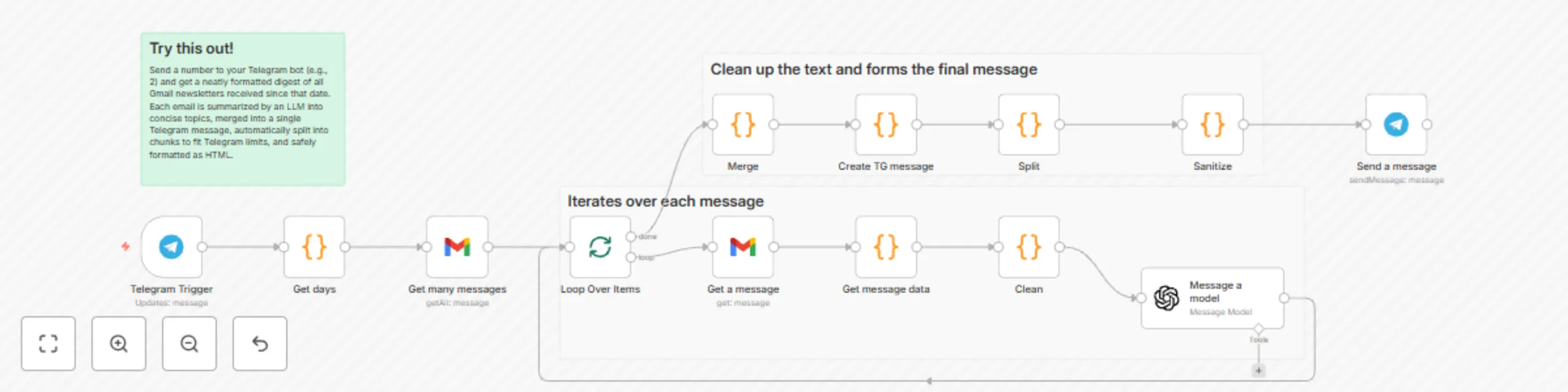
## Summary Send a number to your Telegram bot (e.g., 2) and get a neatly formatted digest of all Gmail newsletters received since that date. Each email is summarized by an LLM into concise topics, merged into a single Telegram message, automatically split into chunks to fit Telegram limits, and safely formatted as HTML. ## What this workflow does - Triggers on your Telegram message containing a number of days, e.g., 1, 2, 7 - Fetches all Gmail messages since that date using a custom search query, optionally filtered by senders - Retrieves and decodes each email’s HTML, subject, sender name, date - Prompts an LLM (GPT‑4.1‑mini) to produce a consistent JSON summary of topics per email - Merges topics from all emails into a single digest - Builds a readable, enumerated message (with bold titles) - Splits it into 3 500‑char parts and sanitizes Markdown to Telegram‑safe HTML - Sends the digest to your Telegram chat with preview disabled ## Apps and credentials - Gmail OAuth2: Gmail account - Telegram: Telegram account (bot) - OpenAI: OpenAi account ## Typical use cases - Personal or team daily/weekly newsletter digests in Telegram - Curated feeds from selected senders compiled on demand - Lightweight knowledge briefings without leaving Telegram ## How it works (node-by-node) - Telegram Trigger - Waits for your message (e.g., "2"). Chat ID is restricted to your Telegram ID for safety. - Get days (Code) - Takes the numeric daysAgo from the Telegram message text - Computes YYYY/MM/DD for Gmail’s after: filter - Get many messages (Gmail → getAll, returnAll: true) - Uses a custom q filter like: =(from:____@____.com) OR (from:____@____.com) OR (from:____@____.com -"____") after:{{ $json.dateString }} - Returns a list of message IDs - Loop Over Items (Split in Batches) - Iterates through each message ID - Get a message (Gmail → get) - Retrieves the full message/payload for the current email - Get message data (Code) - Extracts HTML from Gmail’s payload (body/parts) - Normalizes sender to just the name - Formats the date as DD.MM.YYYY - Passes html, subject, from, date forward - Clean (Code) - Converts DD.MM.YYYY → MM.DD (for prompt brevity) - Passes html, subject, from, date to the LLM - Message a model (OpenAI, model: gpt‑4.1‑mini, JSON output) - Prompt instructs: - Produce JSON: { "topics": [ { "title", "descr", "subject", "from", "date" } ] } - Split multi-news blocks into separate topics - Combine or ignore specific blocks for particular senders (placeholders ____) - Keep subject untranslated; other values in ____ language - Injects subject/from/date/html from the current email - Loop Over Items (continues) - After all iterations complete, the aggregated per-email results are available - Merge (Code) - Flattens the topics arrays from all processed emails into one combined topics list - Create TG message (Code) - Renders an enumerated list: - 1. Title (bold) - Short description - Original subject - From — Date - Split (Code) - Splits into 3 500‑character chunks to stay below Telegram’s 4 096 limit with HTML overhead - Sanitize (Code) - Escapes &, <, > - Fixes unbalanced * and _ - Converts basic Markdown markers to Telegram HTML - Send a message (Telegram) - Sends each part with parse_mode=HTML, previews disabled Node map | Node | Type | Purpose | |---|---|---| | Telegram Trigger | Trigger | Receive daysAgo command from Telegram | | Get days | Code | Compute Gmail after:YYYY/MM/DD from daysAgo | | Get many messages | Gmail (getAll) | Search emails since date with custom from: filters | | Loop Over Items | Split in Batches | Iterate messages one-by-one | | Get a message | Gmail (get) | Fetch full message payload | | Get message data | Code | Extract HTML/subject/from/date; normalize sender and date | | Clean | Code | Reformat date and forward fields to LLM | | Message a model | OpenAI | Summarize email into JSON topics | | Merge | Code | Merge topics from all emails | | Create TG message | Code | Build human-friendly digest text | | Split | Code | Chunk into 3 500‑char parts | | Sanitize | Code | Escape HTML and map Markdown to Telegram HTML | | Send a message | Telegram | Deliver digest to Telegram chat | ## Before you start - Create a Telegram bot and get its token (via @BotFather) - Get your Telegram user ID to restrict access - Connect Gmail OAuth2 in n8n - Add your OpenAI API key - Import the provided workflow JSON into n8n ## Setup instructions 1) Telegram - Telegram Trigger node: - additionalFields.chatIds = your Telegram user ID - Send a message node: - chatId = your Telegram user ID - parse_mode = HTML - disable_web_page_preview = true 2) Gmail - Connect a Gmail OAuth2 credential (Gmail account) - In Get many messages, adjust filters.q to your senders and rules: - Example: =(from:[email protected]) OR (from:[email protected] -"promo") after:{{ $json.dateString }} - If needed, add label: or category: filters 3) OpenAI - Message a model: - Model: gpt‑4.1‑mini (can swap to gpt‑4o‑mini or your preferred) - Update the prompt placeholders: - ____ language → your target language - ____ sender rules → your special cases (combine blocks, ignore sections) 4) Safety and formatting - Keep parse_mode=HTML in Telegram - The Sanitize node is designed for `<b>` and `<i>` only; avoid other HTML tags - The Split node uses 3 500 chars per part to stay safe under Telegram limits ## How to use - In Telegram, send a number indicating “days ago” - Example: 2 → will query Gmail after the date 2 days ago - The workflow compiles and returns a digest in your chat - Rerun anytime with a new number ## Customization ideas - Labels instead of global search: q = label:Newsletters after:{{ $json.dateString }} - Time window control: add before: or exact date ranges - Different language: set the ____ language in the LLM prompt - Model choice: swap to cheaper/faster models if volume is high - Chunk size: adjust from 3 500 to your needs - Formatting: tweak Create TG message to include links parsed from HTML (if you add an HTML parser step) ## Limits and notes - Telegram messages are limited to ~4 096 characters; we chunk to 3 500 per part - Gmail “after:” uses YYYY/MM/DD and Google’s interpretation of dates; your n8n server time influences the computed date - LLM usage incurs cost and latency proportional to email size and count - HTML extraction is robust for typical Gmail structures but may need tweaks for exotic MIME layouts ## Privacy and safety - Emails are sent to OpenAI for summarization—ensure that’s acceptable for your data policies - The Telegram Trigger restricts chat access; keep your chatIds locked down - Avoid sending raw HTML to Telegram; rely on the Sanitize node Sample output format (Telegram) 1. Bold topic title One-sentence description Original Subject Line → Sender Name — DD.MM.YYYY 2. Next topic title ... ## Tips and troubleshooting - Got empty digests? Check Gmail filters.q and make sure there really are emails after the computed date - Model errors or empty JSON? Lower prompt complexity or switch model - HTML formatting issues in Telegram? Ensure parse_mode=HTML and keep only `<b>`, `<i>` - Long messages not fully delivered? Reduce chunk size from 3 500 ## Tags - gmail, telegram, openai, llm, newsletters, digest, summarization, automation ## Changelog - v1: Initial release with sender filters, topic merging, Telegram HTML sanitization, and on-demand time window via Telegram message