Block 1 - Token Splitter
- Type / Role
- @n8n/n8n-nodes-langchain.textSplitterTokenSplitter - textSplitterTokenSplitter
- Config choices
- Version 1


 Early Deal
This workflow is provided as-is. Please review and test before using in production.
This n8n automation is designed to extract, process, and store content from Notion pages into a Pinecone vector store. Here's a breakdown of the workflow: Notion Page Added Trigger: The automation ...
@n8n/n8n-nodes-langchain.textsplittertokensplitter, n8n-nodes-base.notiontrigger, n8n-nodes-base.notion, n8n-nodes-base.filter, n8n-nodes-base.summarize, @n8n/n8n-nodes-langchain.documentdefaultdataloader, @n8n/n8n-nodes-langchain.embeddingsgooglegemini, @n8n/n8n-nodes-langchain.vectorstorepinecone
This workflow is cataloged by N8N Workflows and links back to its original n8n.io source page by Udit Rawat.
Original n8n.io sourceThis n8n automation is designed to extract, process, and store content from Notion pages into a Pinecone vector store. Here's a breakdown of the workflow:
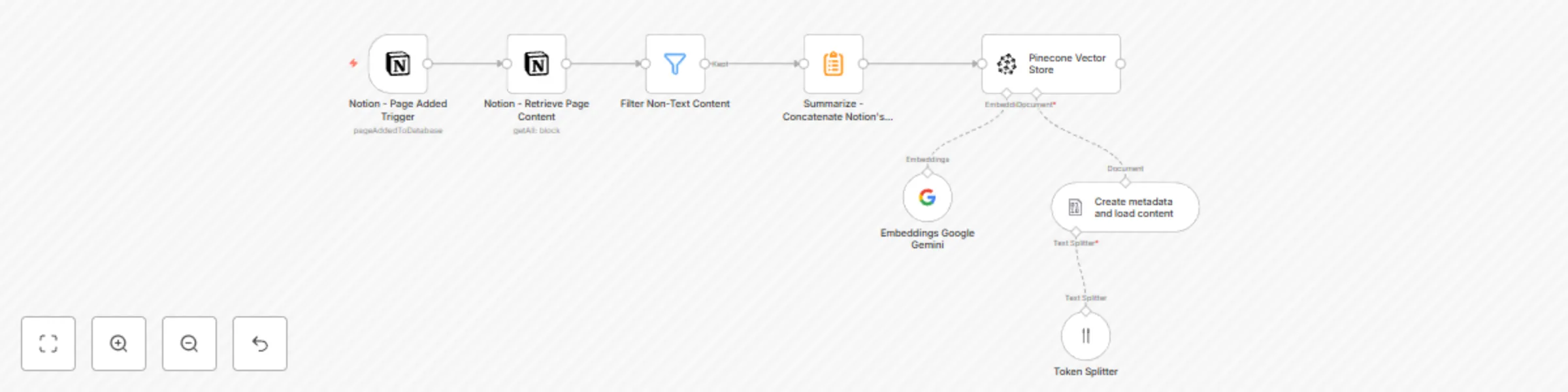
Notion - Page Added Trigger: The automation starts by monitoring for newly added pages in a specific Notion database. It triggers whenever a new page is created, capturing the page's metadata.
Notion - Retrieve Page Content: Once triggered, the automation fetches the full content of the newly added Notion page, including blocks like text, images, and videos.
Filter Non-Text Content: The next step filters out non-text content (such as images and videos), ensuring only textual content is processed.
Summarize - Concatenate Notion's blocks content: The remaining text content is concatenated into a single block of text for easier processing.
Token Splitter: The concatenated text is then split into manageable tokens, which are chunks of text that can be used for embedding.
Create metadata and load content: Metadata such as the page ID, creation time, and title are added to the content, making it easy to reference and track.
Embeddings Google Gemini: The processed text is passed through a Google Gemini model to generate embeddings, which are numerical representations of the text that capture its semantic meaning.
Pinecone Vector Store: Finally, the embeddings, along with the content and metadata, are stored in a Pinecone vector store, making it searchable and ready for use in applications like document retrieval or natural language processing tasks.
This workflow ensures that every new page added to the Notion database is processed into a format that can be easily searched and used in machine learning applications. The automation runs every minute to capture new data in real-time, providing an up-to-date and searchable vector database of Notion content.
Use Case:
This automation converts Notion pages into vector embeddings and stores them in Pinecone for enhanced search and AI-driven insights. It’s ideal for teams using Notion for knowledge management, enabling semantic search and context-based content retrieval. For example, employees can easily find relevant information across documents, and data scientists can use AI models to analyze and summarize the content stored in Notion.
This catalog entry is organized from the workflow JSON. The node-level section below shows the executable blocks available for review before importing the template.
| Workflow | Notion to Pinecone vector store integration |
|---|---|
| Complexity | intermediate |
| Nodes | 8 |
| Categories | Document Extraction, AI RAG |
| Author | Udit Rawat |
| Published | 25 Jan 2025 |
Use the JSON export at /data/workflows/2797/2797.json as the source template for this automation.
Open n8n, import the downloaded JSON, and review each node before activating the workflow.
Replace placeholder credentials, API keys, webhook URLs, account IDs, and environment-specific values with your own settings.
Run the workflow manually or in a staging workspace, inspect node output, and confirm downstream systems receive the expected data.
Enable the workflow only after testing, then monitor executions, errors, and rate limits during the first production runs.
Review imported nodes carefully before activation. This catalog entry is intended to help you inspect the workflow structure, understand required services, and find related templates faster.
Node names, credentials, schedules, webhook paths, and external service limits may need adjustment for your workspace.
This n8n automation is designed to extract, process, and store content from Notion pages into a Pinecone vector store. Here's a breakdown of the workflow: Notion Page Added Trigger: The automation ...
Review the workflow JSON, configure any required credentials in n8n, and test the automation in a safe workspace before using it in production.
Yes. Use the block-by-block analysis and the downloadable JSON to inspect each node, then adjust credentials, prompts, schedules, filters, or destinations for your Document Extraction, AI RAG use case.