n8n subworkflow dependency graph & auto-tagging

Workflow preview

Workflow preview
100%
n8n subworkflow dependency graph & auto-tagging preview
Open on n8n.io

Important notice

This workflow is provided as-is. Please review and test before using in production.

1. Workflow Overview

How it Works As n8n instances scale, teams often lose track of sub workflows—who uses them, where they are referenced, and whether they can be safely updated. This leads to inefficiencies like unne...

Best for

  • Engineering automation workflows
  • advanced n8n builders looking for reusable templates

Tools used

n8n-nodes-base.httprequest, n8n-nodes-base.n8n, n8n-nodes-base.code, n8n-nodes-base.filter, n8n-nodes-base.scheduletrigger, n8n-nodes-base.n8ntrigger, n8n-nodes-base.set, n8n-nodes-base.splitinbatches

Source and attribution

This workflow is cataloged by N8N Workflows and links back to its original n8n.io source page by Ludwig.

Original n8n.io source

1.1 Workflow description

Title
n8n subworkflow dependency graph & auto-tagging
Workflow name
n8n subworkflow dependency graph & auto-tagging

How it Works

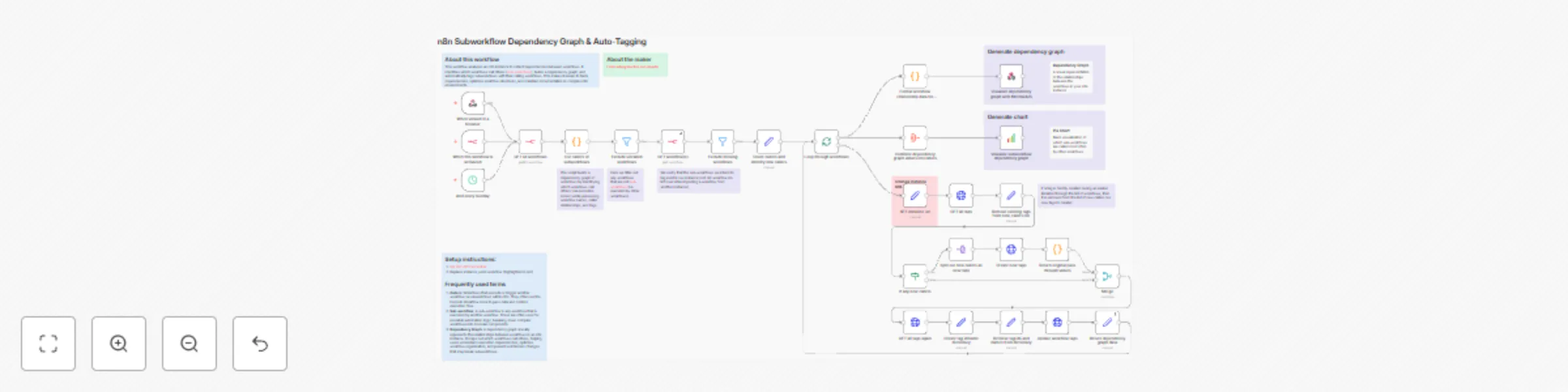
As n8n instances scale, teams often lose track of sub-workflows—who uses them, where they are referenced, and whether they can be safely updated. This leads to inefficiencies like unnecessary copies of workflows or reluctance to modify existing ones. This workflow solves that problem by:

  1. Fetching all workflows and identifying which ones execute others.
  2. Verifying that referenced subworkflows exist.
  3. Building a caller-subworkflow dependency graph for visibility.
  4. Automatically tagging sub-workflows based on their parent workflows.
  5. Providing a chart visualization to highlight the most-used sub-workflows.

Set Up Steps

Estimated time: ~10–15 minutes

  1. Set up n8n API credentials to allow access to workflows and tags.
  2. Replace instance_url with your n8n instance URL.
  3. Run the workflow to analyze dependencies and generate the graph.
  4. Review and validate assigned tags for sub-workflows.
  5. (Optional) Enable pie chart visualization to see the most-used sub-workflows.

This workflow is essential for enterprise teams managing large n8n instances, preventing workflow duplication, reducing uncertainty around dependencies, and allowing safe, informed updates to sub-workflows.

1.2 Logical Blocks

This catalog entry is organized from the workflow JSON. The node-level section below shows the executable blocks available for review before importing the template.

2. Block-by-Block Analysis

Block 1 - Update workflow tags

Type / Role
n8n-nodes-base.httpRequest - httpRequest
Config choices
Version 4.2

Block 2 - GET all workflows

Type / Role
n8n-nodes-base.n8n - n8n
Config choices
Version 1

Block 3 - List callers of subworkflows

Type / Role
n8n-nodes-base.code - code
Config choices
Version 2

Block 4 - Exclude uncalled workflows

Type / Role
n8n-nodes-base.filter - filter
Config choices
Version 2.2

Block 5 - Exclude missing workflows

Type / Role
n8n-nodes-base.filter - filter
Config choices
Version 2.2

Block 6 - And every Sunday

Type / Role
n8n-nodes-base.scheduleTrigger - scheduleTrigger
Config choices
Version 1.2

Block 7 - When this workflow is activated

Type / Role
n8n-nodes-base.n8nTrigger - n8nTrigger
Config choices
Version 1

Block 8 - GET workflow(s)

Type / Role
n8n-nodes-base.n8n - n8n
Config choices
Version 1

Block 9 - Count callers and identify new callers

Type / Role
n8n-nodes-base.set - set
Config choices
Version 3.4

Block 10 - Loop through workflows

Type / Role
n8n-nodes-base.splitInBatches - splitInBatches
Config choices
Version 3

Block 11 - GET all tags

Type / Role
n8n-nodes-base.httpRequest - httpRequest
Config choices
Version 4.2

Block 12 - Remove existing tags from new_callers list

Type / Role
n8n-nodes-base.set - set
Config choices
Version 3.4

Block 13 - If any new callers

Type / Role
n8n-nodes-base.if - if
Config choices
Version 2.2

Block 14 - Split out new callers as new tags

Type / Role
n8n-nodes-base.splitOut - splitOut
Config choices
Version 1

Block 15 - Create new tags

Type / Role
n8n-nodes-base.httpRequest - httpRequest
Config choices
Version 4.2

Block 16 - Return original pass through values

Type / Role
n8n-nodes-base.code - code
Config choices
Version 2

Block 17 - Merge

Type / Role
n8n-nodes-base.merge - merge
Config choices
Version 3

Block 18 - GET all tags again

Type / Role
n8n-nodes-base.httpRequest - httpRequest
Config choices
Version 4.2

Block 19 - Create tag id:name dictionary

Type / Role
n8n-nodes-base.set - set
Config choices
Version 3.4

Block 20 - Retrieve tag ids and names from dictionary

Type / Role
n8n-nodes-base.set - set
Config choices
Version 3.4

Block 21 - Return dependency graph data

Type / Role
n8n-nodes-base.set - set
Config choices
Version 3.4

Block 22 - Combine dependency graph values into labels

Type / Role
n8n-nodes-base.aggregate - aggregate
Config choices
Version 1

Block 23 - Visualize subworkflow dependency graph

Type / Role
n8n-nodes-base.quickChart - quickChart
Config choices
Version 1

Block 24 - Sticky Note

Type / Role
n8n-nodes-base.stickyNote - stickyNote
Config choices
Version 1

Showing the first 24 of 40 workflow blocks. Download the JSON for the full node graph.

3. Summary Table

Workflow n8n subworkflow dependency graph & auto-tagging
Complexity advanced
Nodes 40
Categories Engineering
Author Ludwig
Published 18 Feb 2025

4. Reproducing the Workflow from Scratch

  1. 1. Download the workflow JSON

    Use the JSON export at /data/workflows/2939/2939.json as the source template for this automation.

  2. 2. Import the template into n8n

    Open n8n, import the downloaded JSON, and review each node before activating the workflow.

  3. 3. Configure credentials and variables

    Replace placeholder credentials, API keys, webhook URLs, account IDs, and environment-specific values with your own settings.

  4. 4. Test with sample data

    Run the workflow manually or in a staging workspace, inspect node output, and confirm downstream systems receive the expected data.

  5. 5. Activate and monitor

    Enable the workflow only after testing, then monitor executions, errors, and rate limits during the first production runs.

5. General Notes & Resources

Review imported nodes carefully before activation. This catalog entry is intended to help you inspect the workflow structure, understand required services, and find related templates faster.

Node names, credentials, schedules, webhook paths, and external service limits may need adjustment for your workspace.

Frequently asked questions

What does n8n subworkflow dependency graph & auto-tagging do?

How it Works As n8n instances scale, teams often lose track of sub workflows—who uses them, where they are referenced, and whether they can be safely updated. This leads to inefficiencies like unne...

What do I need before importing this workflow?

Review the workflow JSON, configure any required credentials in n8n, and test the automation in a safe workspace before using it in production.

Can I customize this workflow?

Yes. Use the block-by-block analysis and the downloadable JSON to inspect each node, then adjust credentials, prompts, schedules, filters, or destinations for your Engineering use case.