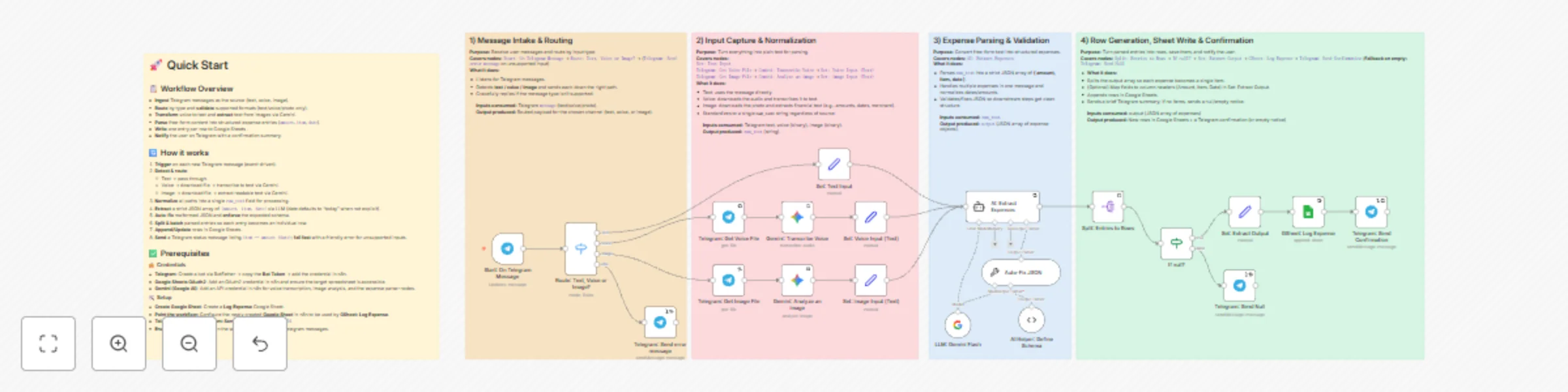
Multi-modal expense tracking with Telegram, Gemini AI & Google Sheets

Workflow preview

Workflow preview
100%
Multi-modal expense tracking with Telegram, Gemini AI & Google Sheets preview
Open on n8n.io

Important notice

This workflow is provided as-is. Please review and test before using in production.

1. Workflow Overview

Problem of Traditional Bookkeeping Context switch kills the habit : Because bookkeeping lives outside the apps you use every day, you postpone it → forget to log . High input friction : Yo...

Best for

  • Personal Productivity automation workflows
  • AI Chatbot automation workflows
  • advanced n8n builders looking for reusable templates

Tools used

n8n-nodes-base.stickynote, n8n-nodes-base.googlesheets, @n8n/n8n-nodes-langchain.lmchatgooglegemini, @n8n/n8n-nodes-langchain.googlegemini, n8n-nodes-base.telegram, n8n-nodes-base.set, @n8n/n8n-nodes-langchain.agent, n8n-nodes-base.splitout

Source and attribution

This workflow is cataloged by N8N Workflows and links back to its original n8n.io source page by OwenLee.

Original n8n.io source

1.1 Workflow description

Title
Multi-modal expense tracking with Telegram, Gemini AI & Google Sheets
Workflow name
Multi-modal expense tracking with Telegram, Gemini AI & Google Sheets

🤯 Problem of Traditional Bookkeeping

  • 🔀 Context switch kills the habit: Because bookkeeping lives outside the apps you use every day, you postpone it → forget to log.
  • 🧱 High input friction: You’re forced to fill rigid fields (amount/category/date/notes…), which is slow and discouraging for quick capture.
  • 🎙️💸 Weak or pricey natural-language options: A few tools support voice/chat, but they’re often expensive, and the experience is hit-or-miss.
  • 🔒📦 Limited data ownership: Records live on third-party servers, so privacy and control are diluted.

📲 How This Workflow Fixes It

  • 💬 Put the capture back where you already are: Log expenses directly inside Telegram (or other channels) in a familiar chat—no new app to learn.
  • Ultra-low-friction, unstructured input: Send text, a voice note, or a receipt photo—the flow extracts amount · item · date, supports multiple languages and relative dates, and can split multiple expenses from one message.
  • 🗂️📝 Your data, your sheet: Final records are written to your own Google Sheet (columnar fields or a JSON column). You keep full control.

🔗 Demo Google Sheet: click me


👥 Who Is This For

  • 😤 Anyone fed up with traditional bookkeeping but curious about an AI-assisted, chat-based way to log expenses.
  • 🤖 People who tried AI bookkeeping apps but found them pricey, inflexible, or clunky.
  • 💵 Bookkeeping beginners who want frictionless capture first, simple review and categorize later.

🧩 How It Works

  • 💬 Captures expenses from Telegram (text, voice note, or receipt photo).
  • 🔎 Normalizes inputs into raw text (uses Gemini to transcribe voice and extract text from images).
  • 🧠 Parses amount · item · date with an LLM expense parser.
  • 📊 Appends tidy rows to Google Sheets.
  • 🔔 Sends a Telegram confirmation summarizing exactly what was recorded.

🛠️ How to Set Up

1) 🔑 Connect credentials (once)

  • TELEGRAM_BOT_TOKEN
  • LLM_API_KEY
  • GOOGLE_SHEETS_OAUTH

2) 🚀 Quick Start

  • Setup: Create a Google Sheet to store Log Expense data and configure it in n8n.
  • Telegram: Fill in and verify the Telegram chatId.
  • Remember enable the workflow!

🧰 How to Customize the Workflow

  • 📝 Other user interaction channels: Add Gmail, Slack, or a website Webhook to accept email/command/form submissions that map into the same parser.
  • 🌍 Currency: Extract and store currency in its own column (e.g., MYR, USD); keep amount numeric only (no symbols).
  • 🔎 Higher-accuracy OCR / STT to reduce errors

📩 Help

Contact: [email protected]

1.2 Logical Blocks

This catalog entry is organized from the workflow JSON. The node-level section below shows the executable blocks available for review before importing the template.

2. Block-by-Block Analysis

Block 1 - Sticky Note

Type / Role
n8n-nodes-base.stickyNote - stickyNote
Config choices
Version 1

Block 2 - Sticky Note1

Type / Role
n8n-nodes-base.stickyNote - stickyNote
Config choices
Version 1

Block 3 - Sticky Note2

Type / Role
n8n-nodes-base.stickyNote - stickyNote
Config choices
Version 1

Block 4 - Sticky Note3

Type / Role
n8n-nodes-base.stickyNote - stickyNote
Config choices
Version 1

Block 5 - Sticky Note4

Type / Role
n8n-nodes-base.stickyNote - stickyNote
Config choices
Version 1

Block 6 - GSheet: Log Expense

Type / Role
n8n-nodes-base.googleSheets - googleSheets
Config choices
Version 4.7

Block 7 - LLM: Gemini Flash

Type / Role
@n8n/n8n-nodes-langchain.lmChatGoogleGemini - lmChatGoogleGemini
Config choices
Version 1

Block 8 - Gemini: Transcribe Voice

Type / Role
@n8n/n8n-nodes-langchain.googleGemini - googleGemini
Config choices
Version 1

Block 9 - Telegram: Send Confirmation

Type / Role
n8n-nodes-base.telegram - telegram
Config choices
Version 1.2

Block 10 - Telegram: Get Voice File

Type / Role
n8n-nodes-base.telegram - telegram
Config choices
Version 1.2

Block 11 - Set: Text Input

Type / Role
n8n-nodes-base.set - set
Config choices
Version 3.4

Block 12 - Set: Voice Input (Text)

Type / Role
n8n-nodes-base.set - set
Config choices
Version 3.4

Block 13 - AI: Extract Expenses

Type / Role
@n8n/n8n-nodes-langchain.agent - agent
Config choices
Version 2.2

Block 14 - Split: Entries to Rows

Type / Role
n8n-nodes-base.splitOut - splitOut
Config choices
Version 1

Block 15 - Telegram: Send error message

Type / Role
n8n-nodes-base.telegram - telegram
Config choices
Version 1.2

Block 16 - Gemini: Analyze an image

Type / Role
@n8n/n8n-nodes-langchain.googleGemini - googleGemini
Config choices
Version 1

Block 17 - Set: image Input (Text)

Type / Role
n8n-nodes-base.set - set
Config choices
Version 3.4

Block 18 - Route: Text, Voice or Image?

Type / Role
n8n-nodes-base.switch - switch
Config choices
Version 3.3

Block 19 - Auto-Fix JSON

Type / Role
@n8n/n8n-nodes-langchain.outputParserAutofixing - outputParserAutofixing
Config choices
Version 1

Block 20 - AI Helper: Define Schema

Type / Role
@n8n/n8n-nodes-langchain.outputParserStructured - outputParserStructured
Config choices
Version 1.3

Block 21 - Telegram: Get Image File

Type / Role
n8n-nodes-base.telegram - telegram
Config choices
Version 1.2

Block 22 - Start: On Telegram Message

Type / Role
n8n-nodes-base.telegramTrigger - telegramTrigger
Config choices
Version 1.2

Block 23 - Set: Extract Output

Type / Role
n8n-nodes-base.set - set
Config choices
Version 3.4

Block 24 - If null?

Type / Role
n8n-nodes-base.if - if
Config choices
Version 2.2

Showing the first 24 of 25 workflow blocks. Download the JSON for the full node graph.

3. Summary Table

Workflow Multi-modal expense tracking with Telegram, Gemini AI & Google Sheets
Complexity advanced
Nodes 25
Categories Personal Productivity, AI Chatbot
Author OwenLee
Published 25 Oct 2025

4. Reproducing the Workflow from Scratch

  1. 1. Download the workflow JSON

    Use the JSON export at /data/workflows/10155/10155.json as the source template for this automation.

  2. 2. Import the template into n8n

    Open n8n, import the downloaded JSON, and review each node before activating the workflow.

  3. 3. Configure credentials and variables

    Replace placeholder credentials, API keys, webhook URLs, account IDs, and environment-specific values with your own settings.

  4. 4. Test with sample data

    Run the workflow manually or in a staging workspace, inspect node output, and confirm downstream systems receive the expected data.

  5. 5. Activate and monitor

    Enable the workflow only after testing, then monitor executions, errors, and rate limits during the first production runs.

5. General Notes & Resources

Review imported nodes carefully before activation. This catalog entry is intended to help you inspect the workflow structure, understand required services, and find related templates faster.

Node names, credentials, schedules, webhook paths, and external service limits may need adjustment for your workspace.

Frequently asked questions

What does Multi-modal expense tracking with Telegram, Gemini AI & Google Sheets do?

Problem of Traditional Bookkeeping Context switch kills the habit : Because bookkeeping lives outside the apps you use every day, you postpone it → forget to log . High input friction : Yo...

What do I need before importing this workflow?

Review the workflow JSON, configure any required credentials in n8n, and test the automation in a safe workspace before using it in production.

Can I customize this workflow?

Yes. Use the block-by-block analysis and the downloadable JSON to inspect each node, then adjust credentials, prompts, schedules, filters, or destinations for your Personal Productivity, AI Chatbot use case.