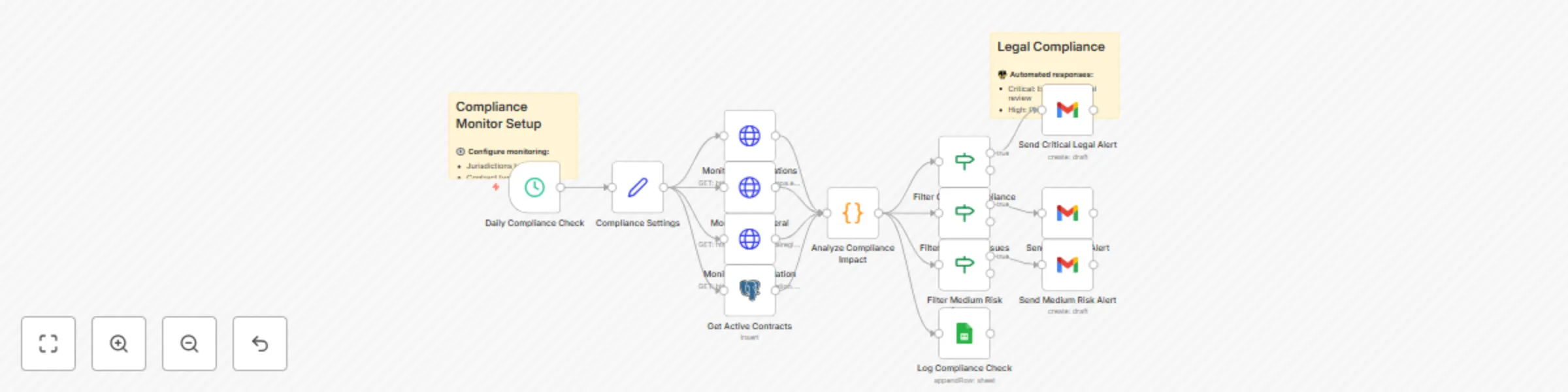
Multi-jurisdiction smart contract compliance monitor with automated alerts

Workflow preview

Workflow preview
100%
Multi-jurisdiction smart contract compliance monitor with automated alerts preview
Open on n8n.io

Important notice

This workflow is provided as-is. Please review and test before using in production.

1. Workflow Overview

How it works Regulatory monitoring : Continuously tracks changes in laws, regulations, and compliance requirements across multiple jurisdictions Contract analysis : AI powered review of existing co...

Best for

  • Document Extraction automation workflows
  • AI Summarization automation workflows
  • advanced n8n builders looking for reusable templates

Tools used

n8n-nodes-base.scheduletrigger, n8n-nodes-base.stickynote, n8n-nodes-base.set, n8n-nodes-base.httprequest, n8n-nodes-base.postgres, n8n-nodes-base.code, n8n-nodes-base.if, n8n-nodes-base.gmail

Source and attribution

This workflow is cataloged by N8N Workflows and links back to its original n8n.io source page by Rodrigue Gbadou.

Original n8n.io source

1.1 Workflow description

Title
Multi-jurisdiction smart contract compliance monitor with automated alerts
Workflow name
Multi-jurisdiction smart contract compliance monitor with automated alerts

How it works

  • Regulatory monitoring: Continuously tracks changes in laws, regulations, and compliance requirements across multiple jurisdictions
  • Contract analysis: AI-powered review of existing contracts to identify compliance gaps and risks
  • Automated alerts: Real-time notifications when regulatory changes affect your contracts or business operations
  • Compliance reporting: Generates audit-ready reports and documentation for regulatory compliance

Set up steps

  • Legal databases: Connect to legal research platforms (Westlaw, LexisNexis, EUR-Lex)
  • Contract repository: Integrate with your contract management system or document storage
  • Regulatory feeds: Configure government and regulatory body RSS feeds and APIs
  • AI legal analysis: Set up OpenAI or specialized legal AI for contract analysis
  • Compliance calendar: Integrate with calendar systems for deadline tracking
  • Audit trail: Configure logging and documentation systems for compliance records

Key Features

  • πŸ” Multi-jurisdiction monitoring: Tracks regulatory changes across different countries and regions
  • πŸ“Š Risk assessment: Automatically scores compliance risks and potential impact
  • ⚑ Real-time alerts: Instant notifications when regulations affecting your business change
  • πŸ“‹ Gap analysis: Identifies discrepancies between current contracts and new requirements
  • πŸ€– AI-powered analysis: Uses natural language processing to understand legal text
  • πŸ“ˆ Compliance dashboard: Visual overview of compliance status across all contracts
  • πŸ”„ Automated remediation: Suggests contract amendments and compliance actions
  • πŸ“± Mobile notifications: Critical compliance alerts on mobile devices

Compliance areas monitored

  • Data protection: GDPR, CCPA, and other privacy regulations
  • Financial services: Banking regulations, securities law, anti-money laundering
  • Healthcare: HIPAA, medical device regulations, pharmaceutical compliance
  • Employment law: Labor regulations, workplace safety, discrimination laws
  • Environmental: ESG requirements, environmental protection regulations
  • Industry-specific: Sector-specific regulations and standards

Contract types supported

  • Vendor agreements: Supplier contracts and service agreements
  • Employment contracts: Employee agreements and contractor terms
  • Data processing agreements: Privacy and data handling contracts
  • Customer agreements: Terms of service and customer contracts
  • Partnership agreements: Joint ventures and strategic partnerships
  • Licensing agreements: Software licenses and intellectual property

Automated responses

  • Low risk (0-30): Routine monitoring and documentation
  • Medium risk (31-60): Enhanced review and stakeholder notification
  • High risk (61-80): Immediate legal review and action planning
  • Critical risk (81-100): Emergency legal intervention and compliance measures

Integration capabilities

  • Legal research: Westlaw, LexisNexis, Bloomberg Law
  • Document management: SharePoint, Google Drive, Dropbox
  • Contract systems: DocuSign, PandaDoc, ContractWorks
  • Communication tools: Slack, Teams, email for legal team alerts
  • Calendar systems: Outlook, Google Calendar for compliance deadlines

This workflow ensures continuous legal compliance by monitoring regulatory changes and automatically assessing their impact on your contracts and business operations.

1.2 Logical Blocks

This catalog entry is organized from the workflow JSON. The node-level section below shows the executable blocks available for review before importing the template.

2. Block-by-Block Analysis

Block 1 - Daily Compliance Check

Type / Role
n8n-nodes-base.scheduleTrigger - scheduleTrigger
Config choices
Version 1

Block 2 - Sticky Note

Type / Role
n8n-nodes-base.stickyNote - stickyNote
Config choices
Version 1

Block 3 - Compliance Settings

Type / Role
n8n-nodes-base.set - set
Config choices
Version 1

Block 4 - Monitor EU Regulations

Type / Role
n8n-nodes-base.httpRequest - httpRequest
Config choices
Version 1

Block 5 - Monitor US Federal Register

Type / Role
n8n-nodes-base.httpRequest - httpRequest
Config choices
Version 1

Block 6 - Monitor UK Legislation

Type / Role
n8n-nodes-base.httpRequest - httpRequest
Config choices
Version 1

Block 7 - Get Active Contracts

Type / Role
n8n-nodes-base.postgres - postgres
Config choices
Version 1

Block 8 - Analyze Compliance Impact

Type / Role
n8n-nodes-base.code - code
Config choices
Version 1

Block 9 - Filter Critical Compliance Issues

Type / Role
n8n-nodes-base.if - if
Config choices
Version 2

Block 10 - Send Critical Legal Alert

Type / Role
n8n-nodes-base.gmail - gmail
Config choices
Version 1

Block 11 - Filter High Risk Issues

Type / Role
n8n-nodes-base.if - if
Config choices
Version 2

Block 12 - Send High Risk Alert

Type / Role
n8n-nodes-base.gmail - gmail
Config choices
Version 1

Block 13 - Filter Medium Risk Issues

Type / Role
n8n-nodes-base.if - if
Config choices
Version 2

Block 14 - Send Medium Risk Alert

Type / Role
n8n-nodes-base.gmail - gmail
Config choices
Version 1

Block 15 - Sticky Note1

Type / Role
n8n-nodes-base.stickyNote - stickyNote
Config choices
Version 1

Block 16 - Log Compliance Check

Type / Role
n8n-nodes-base.googleSheets - googleSheets
Config choices
Version 1

3. Summary Table

Workflow Multi-jurisdiction smart contract compliance monitor with automated alerts
Complexity advanced
Nodes 16
Categories Document Extraction, AI Summarization
Author Rodrigue Gbadou
Published 16 Jul 2025

4. Reproducing the Workflow from Scratch

  1. 1. Download the workflow JSON

    Use the JSON export at /data/workflows/6075/6075.json as the source template for this automation.

  2. 2. Import the template into n8n

    Open n8n, import the downloaded JSON, and review each node before activating the workflow.

  3. 3. Configure credentials and variables

    Replace placeholder credentials, API keys, webhook URLs, account IDs, and environment-specific values with your own settings.

  4. 4. Test with sample data

    Run the workflow manually or in a staging workspace, inspect node output, and confirm downstream systems receive the expected data.

  5. 5. Activate and monitor

    Enable the workflow only after testing, then monitor executions, errors, and rate limits during the first production runs.

5. General Notes & Resources

Review imported nodes carefully before activation. This catalog entry is intended to help you inspect the workflow structure, understand required services, and find related templates faster.

Node names, credentials, schedules, webhook paths, and external service limits may need adjustment for your workspace.

Frequently asked questions

What does Multi-jurisdiction smart contract compliance monitor with automated alerts do?

How it works Regulatory monitoring : Continuously tracks changes in laws, regulations, and compliance requirements across multiple jurisdictions Contract analysis : AI powered review of existing co...

What do I need before importing this workflow?

Review the workflow JSON, configure any required credentials in n8n, and test the automation in a safe workspace before using it in production.

Can I customize this workflow?

Yes. Use the block-by-block analysis and the downloadable JSON to inspect each node, then adjust credentials, prompts, schedules, filters, or destinations for your Document Extraction, AI Summarization use case.