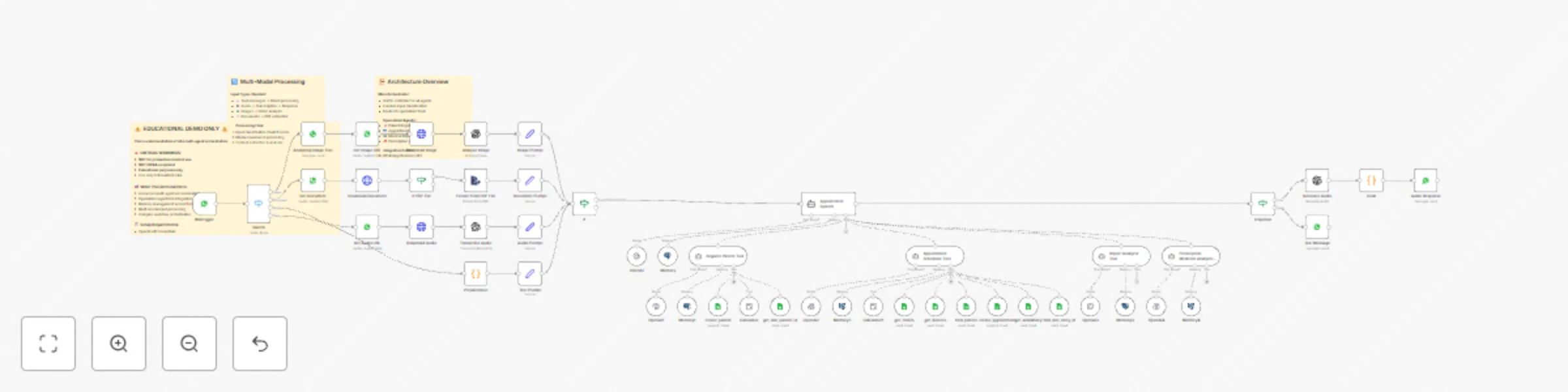
Multi-agent healthcare assistant with WhatsApp, GPT-4 & Google Sheets

Workflow preview

Workflow preview
100%
Multi-agent healthcare assistant with WhatsApp, GPT-4 & Google Sheets preview
Open on n8n.io

Important notice

This workflow is provided as-is. Please review and test before using in production.

1. Workflow Overview

Multi Agent AI Healthcare Assistant Demo ️ EDUCATIONAL DEMONSTRATION ONLY NOT FOR PRODUCTION MEDICAL USE ️ A comprehensive demonstration of n8n's advanced multi agent AI orchestration capabilitie...

Best for

  • AI Chatbot automation workflows
  • Multimodal AI automation workflows
  • advanced n8n builders looking for reusable templates

Tools used

n8n-nodes-base.stickynote, @n8n/n8n-nodes-langchain.agent, @n8n/n8n-nodes-langchain.memorypostgreschat, @n8n/n8n-nodes-langchain.lmchatopenai, n8n-nodes-base.whatsapptrigger, n8n-nodes-base.code, n8n-nodes-base.googlesheetstool, @n8n/n8n-nodes-langchain.toolcalculator

Source and attribution

This workflow is cataloged by N8N Workflows and links back to its original n8n.io source page by Fakhar Khan.

Original n8n.io source

1.1 Workflow description

Title
Multi-agent healthcare assistant with WhatsApp, GPT-4 & Google Sheets
Workflow name
Multi-agent healthcare assistant with WhatsApp, GPT-4 & Google Sheets

Multi-Agent AI Healthcare Assistant Demo

⚠️ EDUCATIONAL DEMONSTRATION ONLY - NOT FOR PRODUCTION MEDICAL USE ⚠️

A comprehensive demonstration of n8n's advanced multi-agent AI orchestration capabilities, showcasing how to build sophisticated conversational AI systems with specialized agent coordination.

🎯 What This Demo Shows

Advanced Multi-Agent Architecture:

  • Main Orchestrator Agent - Traffic controller and decision maker
  • Patient Registration Agent - Specialized data collection and validation
  • Appointment Scheduler Agent - Complex multi-step booking workflows
  • Medical Report Analyzer - Document processing and analysis
  • Prescription Medicine Analyzer - Medicine verification and safety checks

Technical Learning Objectives:

  • Multi-agent coordination patterns
  • Conditional agent routing and tool selection
  • Memory management across conversations
  • Multi-modal input processing (text, audio, images, documents)
  • Complex state management in AI workflows
  • External system integration (Google Sheets, WhatsApp, OpenAI)

🏗️ Architecture Highlights

Multi-Modal Processing Pipeline:

  • Text Messages → Direct agent processing
  • Audio Messages → Transcription → Text processing → Audio response
  • Images → Vision analysis → Context integration
  • Documents → PDF extraction → Content analysis

Agent Specialization:

  • Each agent has focused responsibilities and constraints
  • Intelligent document classification and routing
  • Context-aware tool selection
  • Error handling and recovery mechanisms

Memory & State Management:

  • Session-based conversation persistence
  • Context sharing between specialized agents
  • Multi-step workflow state tracking

🔧 Technical Implementation

Key n8n Features Demonstrated:

  • @n8n/n8n-nodes-langchain.agent - Main orchestrator
  • @n8n/n8n-nodes-langchain.agentTool - Specialized sub-agents
  • @n8n/n8n-nodes-langchain.memoryPostgresChat - Conversation memory
  • n8n-nodes-base.googleSheetsTool - External data integration
  • Complex conditional logic and routing

Integration Patterns:

  • WhatsApp Business API integration
  • OpenAI GPT-4 model orchestration
  • Google Sheets as data backend
  • PostgreSQL for conversation memory
  • Multi-step document processing

📚 Learning Value

For n8n Developers:

  • Enterprise-grade workflow architecture patterns
  • AI agent orchestration best practices
  • Complex conditional logic implementation
  • Memory management in conversational AI
  • Multi-modal data processing techniques
  • Error handling and recovery strategies

For AI Engineers:

  • Agent specialization and coordination
  • Tool calling and function integration
  • Context management across conversations
  • Multi-step workflow design
  • Production workflow considerations

⚙️ Setup Requirements

Required Credentials:

  • OpenAI API Key (GPT-4 access recommended)
  • WhatsApp Business API credentials
  • Google Sheets OAuth2 API
  • PostgreSQL database connection

External Dependencies:

  • Google Sheets database (template structure provided)
  • WhatsApp Business Account
  • PostgreSQL database for conversation memory

🚨 Important Disclaimers

Educational Use Only:

  • This is a DEMONSTRATION of n8n capabilities
  • NOT suitable for actual medical use
  • NOT HIPAA compliant
  • Use only with fictional/test data

Production Considerations:

  • Requires proper security implementation
  • Needs compliance review for medical use
  • Consider HIPAA-compliant alternatives for healthcare
  • Implement proper data encryption and access controls

🎓 Educational Applications

Perfect for Learning:

  • Advanced n8n workflow patterns
  • Multi-agent AI system design
  • Complex automation architecture
  • Integration pattern best practices
  • Conversational AI development

Workshop & Training Use:

  • AI automation workshops
  • n8n advanced training sessions
  • Multi-agent system demonstrations
  • Integration pattern tutorials

🔄 Workflow Components

Main Flow:

  1. WhatsApp message reception and media processing
  2. Input classification and routing
  3. Main agent orchestration and tool selection
  4. Specialized agent execution
  5. Response formatting and delivery

Sub-Agents:

  • Registration Tool - Patient data collection
  • Scheduler Tool - Appointment booking logic
  • Report Analyzer - Medical document analysis
  • Medicine Analyzer - Prescription verification

💡 Customization Ideas

Extend the Demo:

  • Add more specialized agents
  • Implement different communication channels
  • Integrate with other healthcare APIs
  • Add more sophisticated document processing
  • Implement advanced analytics and reporting

Adapt for Other Industries:

  • Customer service automation
  • Educational assistance systems
  • E-commerce support workflows
  • Technical support orchestration

🎯 Perfect for: Learning advanced n8n patterns, AI system architecture, multi-agent coordination

⏱️ Setup Time: 30-45 minutes (with credentials)

📈 Skill Level: Intermediate to Advanced

🏷️ Tags: AI Agents, Multi-Agent Systems, Healthcare Demo, Educational, Advanced Workflows

1.2 Logical Blocks

This catalog entry is organized from the workflow JSON. The node-level section below shows the executable blocks available for review before importing the template.

2. Block-by-Block Analysis

Block 1 - ⚠️ DEMO WARNING & SETUP GUIDE

Type / Role
n8n-nodes-base.stickyNote - stickyNote
Config choices
Version 1

Block 2 - 🏗️ Architecture Guide

Type / Role
n8n-nodes-base.stickyNote - stickyNote
Config choices
Version 1

Block 3 - 🔄 Processing Pipeline

Type / Role
n8n-nodes-base.stickyNote - stickyNote
Config choices
Version 1

Block 4 - Appointment System

Type / Role
@n8n/n8n-nodes-langchain.agent - agent
Config choices
Version 2.1

Block 5 - Memory

Type / Role
@n8n/n8n-nodes-langchain.memoryPostgresChat - memoryPostgresChat
Config choices
Version 1.3

Block 6 - OpenAI

Type / Role
@n8n/n8n-nodes-langchain.lmChatOpenAi - lmChatOpenAi
Config choices
Version 1.2

Block 7 - WATrigger

Type / Role
n8n-nodes-base.whatsAppTrigger - whatsAppTrigger
Config choices
Version 1

Block 8 - PrepareInput

Type / Role
n8n-nodes-base.code - code
Config choices
Version 2

Block 9 - create_patient

Type / Role
n8n-nodes-base.googleSheetsTool - googleSheetsTool
Config choices
Version 4.6

Block 10 - Calculator

Type / Role
@n8n/n8n-nodes-langchain.toolCalculator - toolCalculator
Config choices
Version 1

Block 11 - get_last_patient_id

Type / Role
n8n-nodes-base.googleSheetsTool - googleSheetsTool
Config choices
Version 4.6

Block 12 - Memory1

Type / Role
@n8n/n8n-nodes-langchain.memoryPostgresChat - memoryPostgresChat
Config choices
Version 1.3

Block 13 - OpenAI1

Type / Role
@n8n/n8n-nodes-langchain.lmChatOpenAi - lmChatOpenAi
Config choices
Version 1.2

Block 14 - Register Patient Tool

Type / Role
@n8n/n8n-nodes-langchain.agentTool - agentTool
Config choices
Version 2.2

Block 15 - Appointment Scheduler Tool

Type / Role
@n8n/n8n-nodes-langchain.agentTool - agentTool
Config choices
Version 2.2

Block 16 - get_clinics

Type / Role
n8n-nodes-base.googleSheetsTool - googleSheetsTool
Config choices
Version 4.6

Block 17 - get_doctors

Type / Role
n8n-nodes-base.googleSheetsTool - googleSheetsTool
Config choices
Version 4.6

Block 18 - find_patient

Type / Role
n8n-nodes-base.googleSheetsTool - googleSheetsTool
Config choices
Version 4.6

Block 19 - create_appointment

Type / Role
n8n-nodes-base.googleSheetsTool - googleSheetsTool
Config choices
Version 4.6

Block 20 - get_availability

Type / Role
n8n-nodes-base.googleSheetsTool - googleSheetsTool
Config choices
Version 4.6

Block 21 - find_last_entry_id

Type / Role
n8n-nodes-base.googleSheetsTool - googleSheetsTool
Config choices
Version 4.6

Block 22 - Calculator1

Type / Role
@n8n/n8n-nodes-langchain.toolCalculator - toolCalculator
Config choices
Version 1

Block 23 - Memory2

Type / Role
@n8n/n8n-nodes-langchain.memoryPostgresChat - memoryPostgresChat
Config choices
Version 1.3

Block 24 - OpenAI2

Type / Role
@n8n/n8n-nodes-langchain.lmChatOpenAi - lmChatOpenAi
Config choices
Version 1.2

Showing the first 24 of 52 workflow blocks. Download the JSON for the full node graph.

3. Summary Table

Workflow Multi-agent healthcare assistant with WhatsApp, GPT-4 & Google Sheets
Complexity advanced
Nodes 52
Categories AI Chatbot, Multimodal AI
Author Fakhar Khan
Published 24 Aug 2025

4. Reproducing the Workflow from Scratch

  1. 1. Download the workflow JSON

    Use the JSON export at /data/workflows/7794/7794.json as the source template for this automation.

  2. 2. Import the template into n8n

    Open n8n, import the downloaded JSON, and review each node before activating the workflow.

  3. 3. Configure credentials and variables

    Replace placeholder credentials, API keys, webhook URLs, account IDs, and environment-specific values with your own settings.

  4. 4. Test with sample data

    Run the workflow manually or in a staging workspace, inspect node output, and confirm downstream systems receive the expected data.

  5. 5. Activate and monitor

    Enable the workflow only after testing, then monitor executions, errors, and rate limits during the first production runs.

5. General Notes & Resources

Review imported nodes carefully before activation. This catalog entry is intended to help you inspect the workflow structure, understand required services, and find related templates faster.

Node names, credentials, schedules, webhook paths, and external service limits may need adjustment for your workspace.

Frequently asked questions

What does Multi-agent healthcare assistant with WhatsApp, GPT-4 & Google Sheets do?

Multi Agent AI Healthcare Assistant Demo ️ EDUCATIONAL DEMONSTRATION ONLY NOT FOR PRODUCTION MEDICAL USE ️ A comprehensive demonstration of n8n's advanced multi agent AI orchestration capabilitie...

What do I need before importing this workflow?

Review the workflow JSON, configure any required credentials in n8n, and test the automation in a safe workspace before using it in production.

Can I customize this workflow?

Yes. Use the block-by-block analysis and the downloadable JSON to inspect each node, then adjust credentials, prompts, schedules, filters, or destinations for your AI Chatbot, Multimodal AI use case.