F

Fakhar Khan

3
Workflows

Workflows by Fakhar Khan
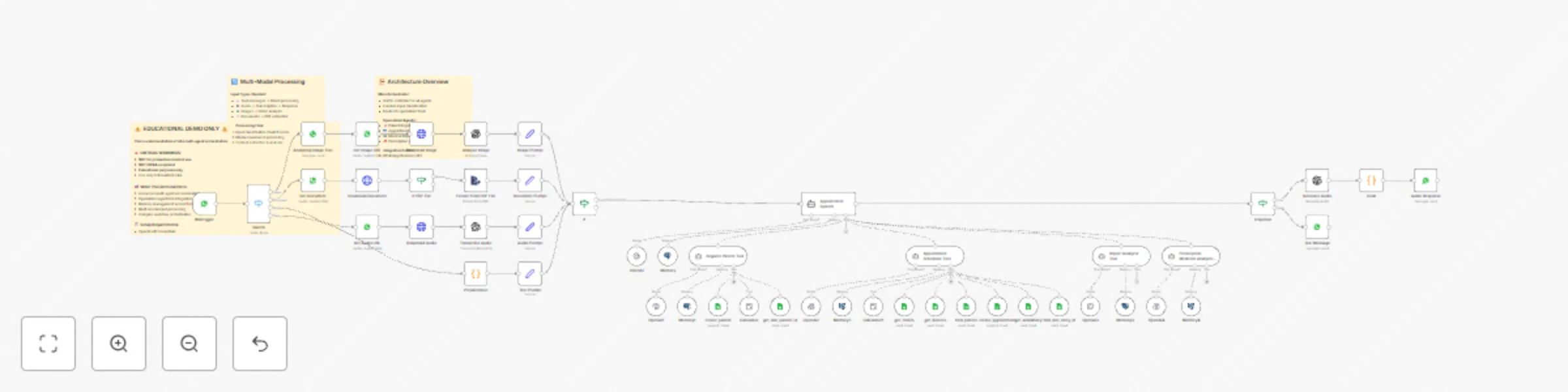
Workflow preview: Multi-agent healthcare assistant with WhatsApp, GPT-4 & Google Sheets
Free advanced

Multi-agent healthcare assistant with WhatsApp, GPT-4 & Google Sheets

## Multi-Agent AI Healthcare Assistant Demo ⚠️ **EDUCATIONAL DEMONSTRATION ONLY - NOT FOR PRODUCTION MEDICAL USE** ⚠️ A comprehensive demonstration of **n8n's advanced multi-agent AI orchestration** capabilities, showcasing how to build sophisticated conversational AI systems with specialized agent coordination. ### 🎯 What This Demo Shows **Advanced Multi-Agent Architecture:** - **Main Orchestrator Agent** - Traffic controller and decision maker - **Patient Registration Agent** - Specialized data collection and validation - **Appointment Scheduler Agent** - Complex multi-step booking workflows - **Medical Report Analyzer** - Document processing and analysis - **Prescription Medicine Analyzer** - Medicine verification and safety checks **Technical Learning Objectives:** - Multi-agent coordination patterns - Conditional agent routing and tool selection - Memory management across conversations - Multi-modal input processing (text, audio, images, documents) - Complex state management in AI workflows - External system integration (Google Sheets, WhatsApp, OpenAI) ### 🏗️ Architecture Highlights **Multi-Modal Processing Pipeline:** - **Text Messages** → Direct agent processing - **Audio Messages** → Transcription → Text processing → Audio response - **Images** → Vision analysis → Context integration - **Documents** → PDF extraction → Content analysis **Agent Specialization:** - Each agent has focused responsibilities and constraints - Intelligent document classification and routing - Context-aware tool selection - Error handling and recovery mechanisms **Memory & State Management:** - Session-based conversation persistence - Context sharing between specialized agents - Multi-step workflow state tracking ### 🔧 Technical Implementation **Key n8n Features Demonstrated:** - `@n8n/n8n-nodes-langchain.agent` - Main orchestrator - `@n8n/n8n-nodes-langchain.agentTool` - Specialized sub-agents - `@n8n/n8n-nodes-langchain.memoryPostgresChat` - Conversation memory - `n8n-nodes-base.googleSheetsTool` - External data integration - Complex conditional logic and routing **Integration Patterns:** - WhatsApp Business API integration - OpenAI GPT-4 model orchestration - Google Sheets as data backend - PostgreSQL for conversation memory - Multi-step document processing ### 📚 Learning Value **For n8n Developers:** - Enterprise-grade workflow architecture patterns - AI agent orchestration best practices - Complex conditional logic implementation - Memory management in conversational AI - Multi-modal data processing techniques - Error handling and recovery strategies **For AI Engineers:** - Agent specialization and coordination - Tool calling and function integration - Context management across conversations - Multi-step workflow design - Production workflow considerations ### ⚙️ Setup Requirements **Required Credentials:** - OpenAI API Key (GPT-4 access recommended) - WhatsApp Business API credentials - Google Sheets OAuth2 API - PostgreSQL database connection **External Dependencies:** - Google Sheets database (template structure provided) - WhatsApp Business Account - PostgreSQL database for conversation memory ### 🚨 Important Disclaimers **Educational Use Only:** - This is a **DEMONSTRATION** of n8n capabilities - **NOT suitable for actual medical use** - **NOT HIPAA compliant** - Use only with fictional/test data **Production Considerations:** - Requires proper security implementation - Needs compliance review for medical use - Consider HIPAA-compliant alternatives for healthcare - Implement proper data encryption and access controls ### 🎓 Educational Applications **Perfect for Learning:** - Advanced n8n workflow patterns - Multi-agent AI system design - Complex automation architecture - Integration pattern best practices - Conversational AI development **Workshop & Training Use:** - AI automation workshops - n8n advanced training sessions - Multi-agent system demonstrations - Integration pattern tutorials ### 🔄 Workflow Components **Main Flow:** 1. WhatsApp message reception and media processing 2. Input classification and routing 3. Main agent orchestration and tool selection 4. Specialized agent execution 5. Response formatting and delivery **Sub-Agents:** - **Registration Tool** - Patient data collection - **Scheduler Tool** - Appointment booking logic - **Report Analyzer** - Medical document analysis - **Medicine Analyzer** - Prescription verification ### 💡 Customization Ideas **Extend the Demo:** - Add more specialized agents - Implement different communication channels - Integrate with other healthcare APIs - Add more sophisticated document processing - Implement advanced analytics and reporting **Adapt for Other Industries:** - Customer service automation - Educational assistance systems - E-commerce support workflows - Technical support orchestration --- **🎯 Perfect for:** Learning advanced n8n patterns, AI system architecture, multi-agent coordination **⏱️ Setup Time:** 30-45 minutes (with credentials) **📈 Skill Level:** Intermediate to Advanced **🏷️ Tags:** AI Agents, Multi-Agent Systems, Healthcare Demo, Educational, Advanced Workflows

F
Fakhar Khan
AI Chatbot
25 Aug 2025
2181
0

Workflow preview: Restaurant reservation management with OpenAI GPT and Google Sheets
Free advanced

Restaurant reservation management with OpenAI GPT and Google Sheets

![image.png](fileId:2068) # How it works - Receives chat messages from customers requesting table reservations. - Uses an AI Agent with OpenAI Chat Model to understand and process requests. - Checks table information, availability, and existing reservations from Google Sheets. - Calculates guest counts and reservation timing using the Calculator node. - Updates table availability and reservation records in real-time. - Handles reservation changes, including updates and cancellations. # Set up steps - **Add credentials** for OpenAI (Chat Model) and Google Sheets. - In the **AI Agent** node, link: - Chat Model → **OpenAI Chat Model** node. - Memory → **Simple Memory** node. - Tools → Calculator and Google Sheets nodes for reservation data handling. - Configure Google Sheets nodes: - **Get Table Information** (read sheet) - **Get Table Availability** (read sheet) - **Get Table Reservations** (read sheet) - **Update Table Availability** (update sheet) - **Update Reservations** (append sheet) - **Cancel Reservations** (delete sheet) - Ensure your sheets have consistent column names for table IDs, dates, times, and guest counts. - Test by sending a reservation request through the **chat trigger** and verify updates in the Google Sheets.

F
Fakhar Khan
Support Chatbot
13 Aug 2025
2393
0
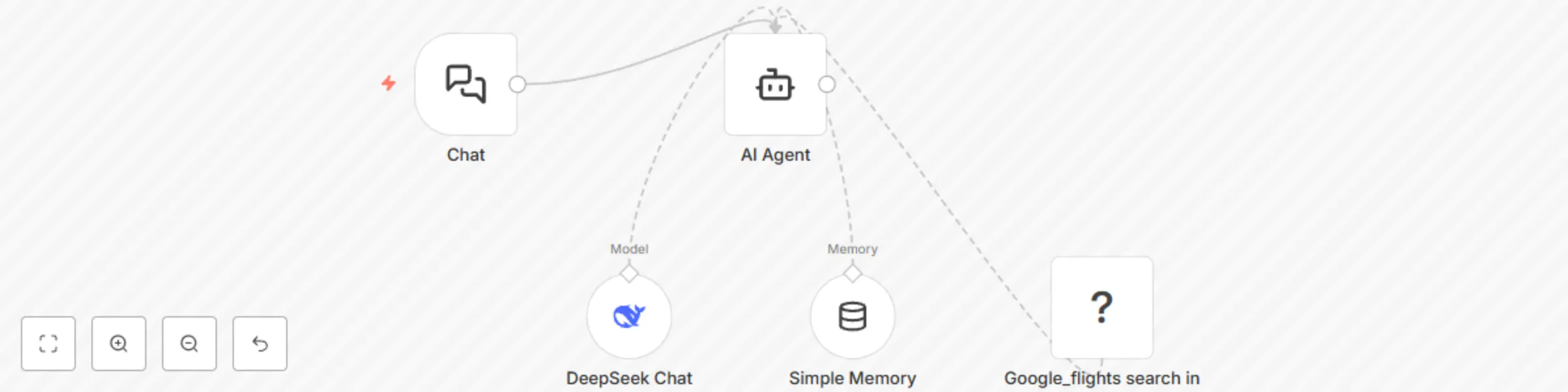
Workflow preview: Search and compare flights with DeepSeek AI and Google Flights API
Free intermediate

Search and compare flights with DeepSeek AI and Google Flights API

*This workflow contains community nodes that are only compatible with the self-hosted version of n8n.* ![image.png](fileId:2067) # How it works - Takes departure city, destination, and travel dates from the user. - Searches multiple airlines for flight options and compares price, duration, and stops. - Suggests flexible travel dates for better deals. - Tracks selected flights and sends real-time price alerts. - Provides 24/7 AI-powered travel recommendations. # Set up steps - **Add credentials** for your chosen Chat Model (DeepSeek in this case) and SerpAPI (Google Flights). - In the **AI Agent** node, link: - Chat Model → **DeepSeek Chat Model** node. - Memory → **Simple Memory** node (for conversation context). - Tool → **Google_flights search in SerpApi** node. - In the **SerpApi** node, set `engine=google_flights` and map input fields for departure, destination, and travel dates. - Test the workflow by providing a sample itinerary request in the **Chat** node’s input. - Review AI responses to ensure it searches, compares, and returns relevant flight options.

F
Fakhar Khan
Support Chatbot
13 Aug 2025
1514
0