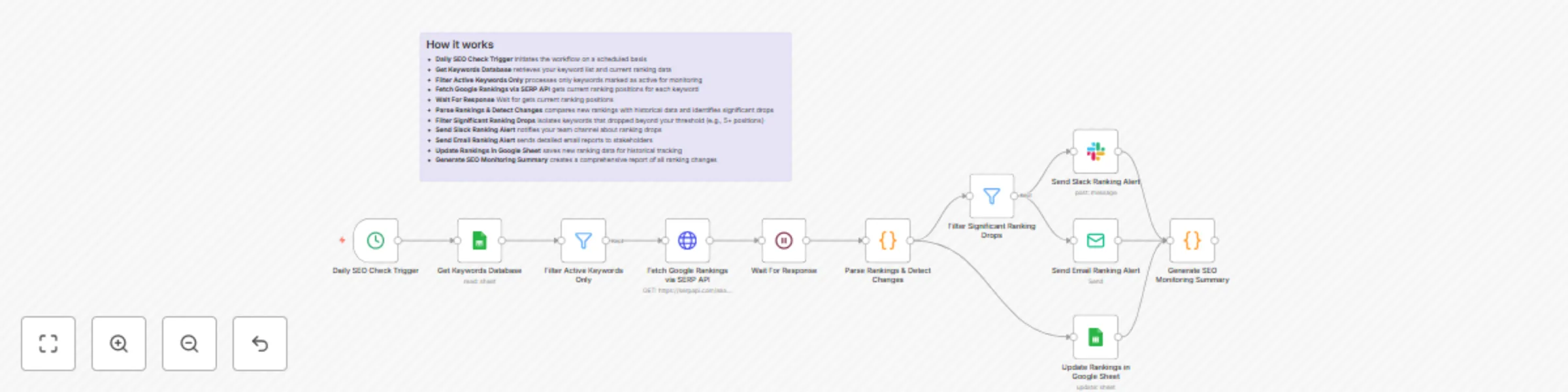
Monitor SEO keyword rankings with SERP API & send drop alerts via Slack

Workflow preview

Workflow preview
100%
Monitor SEO keyword rankings with SERP API & send drop alerts via Slack preview
Open on n8n.io

Important notice

This workflow is provided as-is. Please review and test before using in production.

1. Workflow Overview

This automated workflow monitors your website's keyword rankings daily and sends instant alerts to your team when significant ranking drops occur. It fetches current ranking positions, compares the...

Best for

  • Market Research automation workflows
  • intermediate n8n builders looking for reusable templates

Tools used

n8n-nodes-base.cron, n8n-nodes-base.googlesheets, n8n-nodes-base.filter, n8n-nodes-base.httprequest, n8n-nodes-base.code, n8n-nodes-base.slack, n8n-nodes-base.emailsend, n8n-nodes-base.stickynote

Source and attribution

This workflow is cataloged by N8N Workflows and links back to its original n8n.io source page by Oneclick AI Squad.

Original n8n.io source

1.1 Workflow description

Title
Monitor SEO keyword rankings with SERP API & send drop alerts via Slack
Workflow name
Monitor SEO keyword rankings with SERP API & send drop alerts via Slack

This automated workflow monitors your website's keyword rankings daily and sends instant alerts to your team when significant ranking drops occur. It fetches current ranking positions, compares them with historical data, and triggers notifications through Slack and email when keywords drop beyond your defined threshold.

Good to know

  • The workflow uses SERP API for accurate ranking data; API costs apply based on your usage volume
  • Ranking checks are performed daily to avoid overwhelming search engines with requests
  • The system tracks ranking changes over time and maintains historical data for trend analysis
  • Slack integration requires workspace permissions and proper bot configuration
  • False positives may occur due to personalized search results or data center variations

How it works

  • Daily SEO Check Trigger initiates the workflow on a scheduled basis
  • Get Keywords Database retrieves your keyword list and current ranking data
  • Filter Active Keywords Only processes only keywords marked as active for monitoring
  • Fetch Google Rankings via SERP API gets current ranking positions for each keyword
  • Wait For Response Wait for gets current ranking positions
  • Parse Rankings & Detect Changes compares new rankings with historical data and identifies significant drops
  • Filter Significant Ranking Drops isolates keywords that dropped beyond your threshold (e.g., 5+ positions)
  • Send Slack Ranking Alert notifies your team channel about ranking drops
  • Send Email Ranking Alert sends detailed email reports to stakeholders
  • Update Rankings in Google Sheet saves new ranking data for historical tracking
  • Generate SEO Monitoring Summary creates a comprehensive report of all ranking changes

How to use

  • Import the workflow into n8n and configure your SERP API credentials
  • Set up your Google Sheet with the required keyword database structure
  • Configure Slack webhook URL and email SMTP settings
  • Define your ranking drop threshold (recommended: 5+ position drops)
  • Test the workflow with a small keyword set before full deployment
  • Schedule the workflow to run daily during off-peak hours

Requirements

  • SERP API account with sufficient credits for daily keyword checks
  • Google Sheets access for keyword database and ranking storage
  • Slack workspace with webhook permissions for team notifications
  • Email service (SMTP or API) for stakeholder alerts
  • Keywords database properly formatted in Google Sheets

Database/Sheet Columns Required

Google Sheet: "Keywords Database"

Create a Google Sheet with the following columns:

Column Name Description Example
keyword Target keyword to monitor "best seo tools"
domain Your website domain "yourwebsite.com"
current_rank Latest ranking position 5
previous_rank Previous day's ranking 3
status Monitoring status "active"
target_url Expected ranking URL "/best-seo-tools-guide"
search_volume Monthly search volume 1200
difficulty Keyword difficulty score 65
date_added When keyword was added "2025-01-15"
last_checked Last monitoring date "2025-07-30"
drop_threshold Custom drop alert threshold 5
category Keyword grouping "Product Pages"

Customising this workflow

  • Modify ranking thresholds in the "Filter Significant Ranking Drops" node to adjust sensitivity (e.g., 3+ positions vs 10+ positions)
  • Add competitor monitoring by duplicating the SERP API node and tracking competitor rankings for the same keywords
  • Customize alert messages in Slack and email nodes to include your brand voice and specific stakeholder information
  • Extend to multiple search engines by adding Bing or Yahoo ranking checks alongside Google
  • Implement ranking improvement alerts to celebrate when keywords move up significantly
  • Add mobile vs desktop tracking by configuring separate SERP API calls for different device types

1.2 Logical Blocks

This catalog entry is organized from the workflow JSON. The node-level section below shows the executable blocks available for review before importing the template.

2. Block-by-Block Analysis

Block 1 - Daily SEO Check Trigger

Type / Role
n8n-nodes-base.cron - cron
Config choices
Version 1

Block 2 - Get Keywords Database

Type / Role
n8n-nodes-base.googleSheets - googleSheets
Config choices
Version 4

Block 3 - Filter Active Keywords Only

Type / Role
n8n-nodes-base.filter - filter
Config choices
Version 2

Block 4 - Fetch Google Rankings via SERP API

Type / Role
n8n-nodes-base.httpRequest - httpRequest
Config choices
Version 4.2

Block 5 - Parse Rankings & Detect Changes

Type / Role
n8n-nodes-base.code - code
Config choices
Version 2

Block 6 - Filter Significant Ranking Drops

Type / Role
n8n-nodes-base.filter - filter
Config choices
Version 2

Block 7 - Update Rankings in Google Sheet

Type / Role
n8n-nodes-base.googleSheets - googleSheets
Config choices
Version 4

Block 8 - Send Slack Ranking Alert

Type / Role
n8n-nodes-base.slack - slack
Config choices
Version 2.1

Block 9 - Send Email Ranking Alert

Type / Role
n8n-nodes-base.emailSend - emailSend
Config choices
Version 2

Block 10 - Generate SEO Monitoring Summary

Type / Role
n8n-nodes-base.code - code
Config choices
Version 2

Block 11 - Sticky Note

Type / Role
n8n-nodes-base.stickyNote - stickyNote
Config choices
Version 1

Block 12 - Wait For Response

Type / Role
n8n-nodes-base.wait - wait
Config choices
Version 1.1

3. Summary Table

Workflow Monitor SEO keyword rankings with SERP API & send drop alerts via Slack
Complexity intermediate
Nodes 12
Categories Market Research
Author Oneclick AI Squad
Published 30 Jul 2025

4. Reproducing the Workflow from Scratch

  1. 1. Download the workflow JSON

    Use the JSON export at /data/workflows/6676/6676.json as the source template for this automation.

  2. 2. Import the template into n8n

    Open n8n, import the downloaded JSON, and review each node before activating the workflow.

  3. 3. Configure credentials and variables

    Replace placeholder credentials, API keys, webhook URLs, account IDs, and environment-specific values with your own settings.

  4. 4. Test with sample data

    Run the workflow manually or in a staging workspace, inspect node output, and confirm downstream systems receive the expected data.

  5. 5. Activate and monitor

    Enable the workflow only after testing, then monitor executions, errors, and rate limits during the first production runs.

5. General Notes & Resources

Review imported nodes carefully before activation. This catalog entry is intended to help you inspect the workflow structure, understand required services, and find related templates faster.

Node names, credentials, schedules, webhook paths, and external service limits may need adjustment for your workspace.

Frequently asked questions

What does Monitor SEO keyword rankings with SERP API & send drop alerts via Slack do?

This automated workflow monitors your website's keyword rankings daily and sends instant alerts to your team when significant ranking drops occur. It fetches current ranking positions, compares the...

What do I need before importing this workflow?

Review the workflow JSON, configure any required credentials in n8n, and test the automation in a safe workspace before using it in production.

Can I customize this workflow?

Yes. Use the block-by-block analysis and the downloadable JSON to inspect each node, then adjust credentials, prompts, schedules, filters, or destinations for your Market Research use case.