Monitor scheduled workflow health in n8n with automatic trigger checks

Workflow preview

Workflow preview
100%
Monitor scheduled workflow health in n8n with automatic trigger checks preview
Open on n8n.io

1. Workflow Overview

Automatically detect when your scheduled or polling trigger workflows stop running. Unlike error handlers that catch failures when workflows execute, this catches the silent killer: workflows that ...

Best for

  • DevOps automation workflows
  • intermediate n8n builders looking for reusable templates

Tools used

n8n-nodes-base.manualtrigger, n8n-nodes-base.scheduletrigger, n8n-nodes-base.n8n, n8n-nodes-base.code, n8n-nodes-base.if, n8n-nodes-base.stopanderror, n8n-nodes-base.noop, n8n-nodes-base.stickynote

Source and attribution

This workflow is cataloged by N8N Workflows and links back to its original n8n.io source page by Julian Kaiser.

Original n8n.io source

1.1 Workflow description

Title
Monitor scheduled workflow health in n8n with automatic trigger checks
Workflow name
Monitor scheduled workflow health in n8n with automatic trigger checks

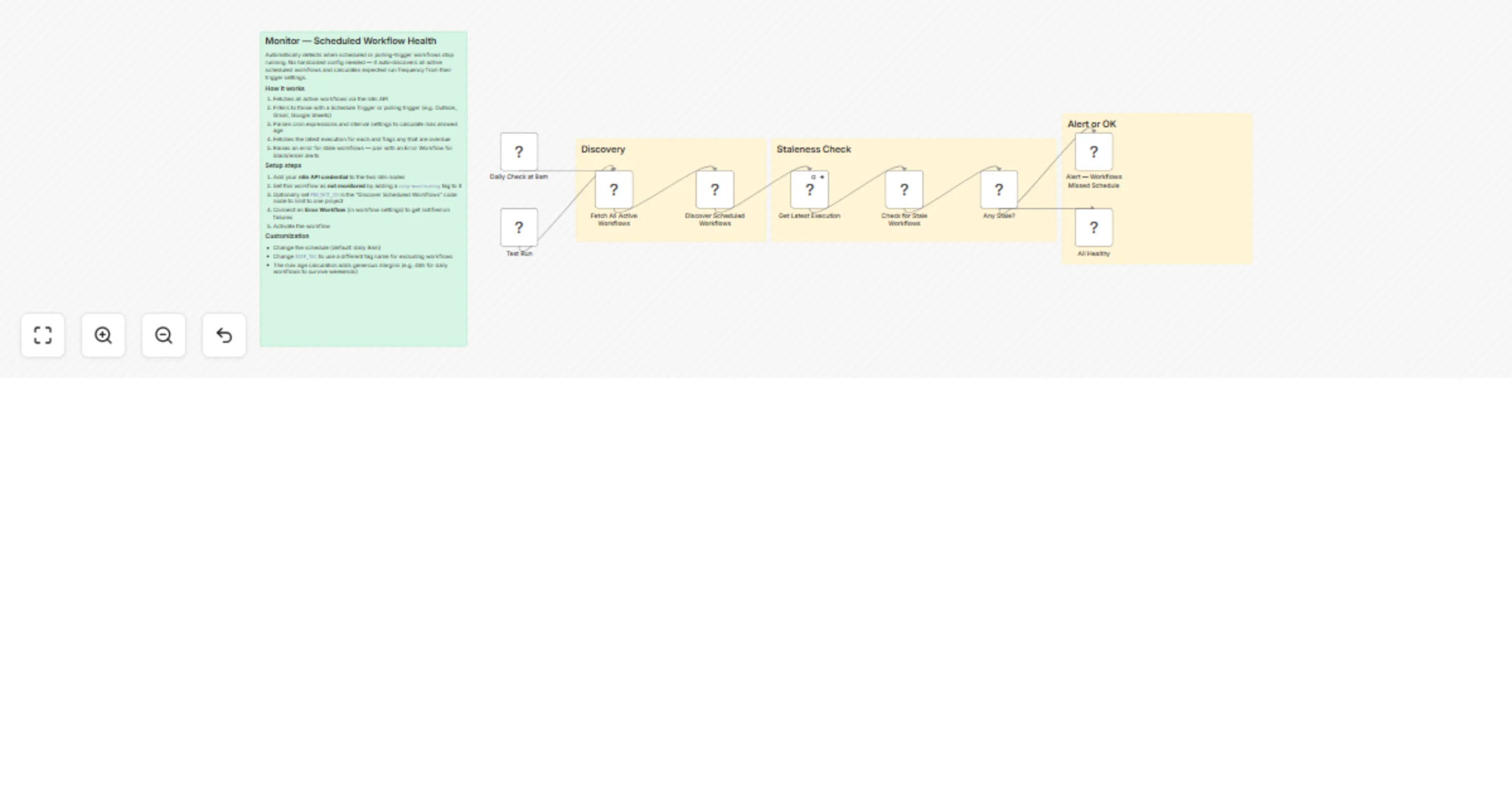
Automatically detect when your scheduled or polling-trigger workflows stop running. Unlike error handlers that catch failures when workflows execute, this catches the silent killer: workflows that simply never trigger at all — broken schedules, accidental deactivation, or trigger node bugs.

No hardcoded workflow list needed. It auto-discovers every active scheduled workflow and infers the expected run frequency from their trigger configuration.

How it works

  1. Fetches all active workflows via the n8n API
  2. Filters to those with a Schedule Trigger or polling trigger (Outlook, Gmail, Google Sheets, IMAP, etc.)
  3. Parses cron expressions and interval settings to calculate the maximum allowed time since last execution
  4. Fetches the latest execution for each discovered workflow
  5. Raises an error listing any workflows that are overdue — pair with an Error Workflow for Slack, email, or other alerts

The max age calculation adds safety margins automatically: daily workflows get 48 hours (to survive weekends), weekly gets 8 days, monthly gets 35 days, and so on.

Setup

  1. Import the workflow and add your n8n API credential to the two n8n nodes ("Fetch All Active Workflows" and "Get Latest Execution")
  2. Tag this workflow with skip-monitoring so it doesn't try to monitor itself
  3. Optionally set PROJECT_ID in the "Discover Scheduled Workflows" code node to limit monitoring to a specific n8n project
  4. Set an Error Workflow in the workflow settings to receive alerts (e.g. a workflow that sends Slack messages or emails on error)
  5. Activate the workflow

Customization

  • Schedule: Default is daily at 9am. Adjust the Schedule Trigger to your preference.
  • Project scope: Set PROJECT_ID to monitor only one project, or leave empty to monitor all.
  • Exclude workflows: Tag any workflow with skip-monitoring to opt it out.
  • Sensitivity: The cron parser handles minutes, hours, days, weeks, months, weekday-only schedules, and every-N-day patterns. Adjust the parseCronMaxAge function if you need different thresholds.

1.2 Logical Blocks

This catalog entry is organized from the workflow JSON. The node-level section below shows the executable blocks available for review before importing the template.

2. Block-by-Block Analysis

Block 1 - Test Run

Type / Role
n8n-nodes-base.manualTrigger - manualTrigger
Config choices
Version 1

Block 2 - Daily Check at 9am

Type / Role
n8n-nodes-base.scheduleTrigger - scheduleTrigger
Config choices
Version 1.2

Block 3 - Fetch All Active Workflows

Type / Role
n8n-nodes-base.n8n - n8n
Config choices
Version 1

Block 4 - Discover Scheduled Workflows

Type / Role
n8n-nodes-base.code - code
Config choices
Version 2

Block 5 - Get Latest Execution

Type / Role
n8n-nodes-base.n8n - n8n
Config choices
Version 1

Block 6 - Check for Stale Workflows

Type / Role
n8n-nodes-base.code - code
Config choices
Version 2

Block 7 - Any Stale?

Type / Role
n8n-nodes-base.if - if
Config choices
Version 2

Block 8 - Alert — Workflows Missed Schedule

Type / Role
n8n-nodes-base.stopAndError - stopAndError
Config choices
Version 1

Block 9 - All Healthy

Type / Role
n8n-nodes-base.noOp - noOp
Config choices
Version 1

Block 10 - Sticky Note

Type / Role
n8n-nodes-base.stickyNote - stickyNote
Config choices
Version 1

Block 11 - Sticky Note1

Type / Role
n8n-nodes-base.stickyNote - stickyNote
Config choices
Version 1

Block 12 - Sticky Note2

Type / Role
n8n-nodes-base.stickyNote - stickyNote
Config choices
Version 1

Block 13 - Sticky Note3

Type / Role
n8n-nodes-base.stickyNote - stickyNote
Config choices
Version 1

3. Summary Table

Workflow Monitor scheduled workflow health in n8n with automatic trigger checks
Complexity intermediate
Nodes 13
Categories DevOps
Author Julian Kaiser
Published 10 Feb 2026

4. Reproducing the Workflow from Scratch

  1. 1. Download the workflow JSON

    Use the JSON export at /data/workflows/13290/13290.json as the source template for this automation.

  2. 2. Import the template into n8n

    Open n8n, import the downloaded JSON, and review each node before activating the workflow.

  3. 3. Configure credentials and variables

    Replace placeholder credentials, API keys, webhook URLs, account IDs, and environment-specific values with your own settings.

  4. 4. Test with sample data

    Run the workflow manually or in a staging workspace, inspect node output, and confirm downstream systems receive the expected data.

  5. 5. Activate and monitor

    Enable the workflow only after testing, then monitor executions, errors, and rate limits during the first production runs.

5. General Notes & Resources

Review imported nodes carefully before activation. This catalog entry is intended to help you inspect the workflow structure, understand required services, and find related templates faster.

Node names, credentials, schedules, webhook paths, and external service limits may need adjustment for your workspace.

Frequently asked questions

What does Monitor scheduled workflow health in n8n with automatic trigger checks do?

Automatically detect when your scheduled or polling trigger workflows stop running. Unlike error handlers that catch failures when workflows execute, this catches the silent killer: workflows that ...

What do I need before importing this workflow?

Review the workflow JSON, configure any required credentials in n8n, and test the automation in a safe workspace before using it in production.

Can I customize this workflow?

Yes. Use the block-by-block analysis and the downloadable JSON to inspect each node, then adjust credentials, prompts, schedules, filters, or destinations for your DevOps use case.