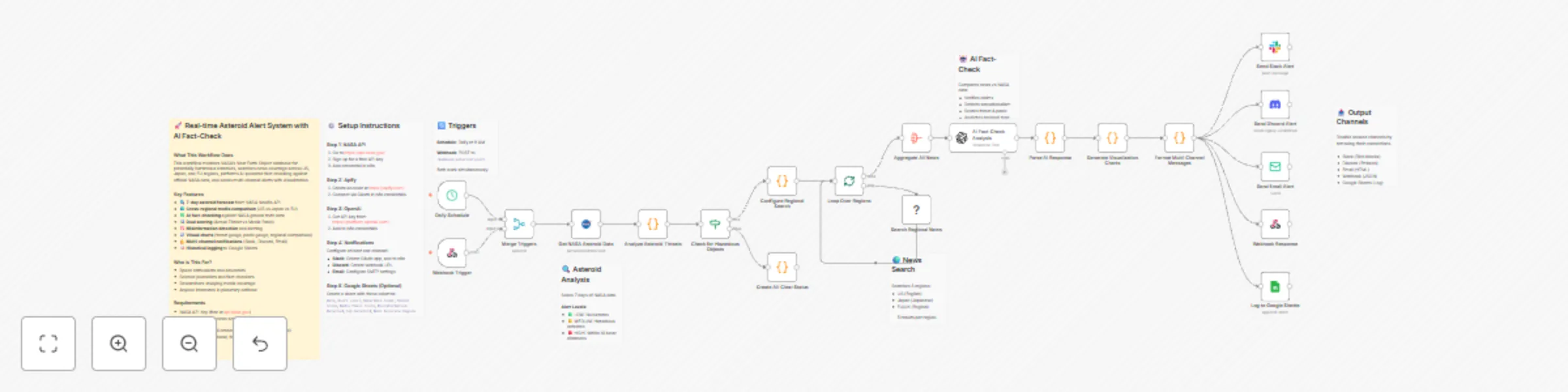
Monitor NASA asteroid threats with AI fact-check and multi-channel alerts

Workflow preview

Workflow preview
100%
Monitor NASA asteroid threats with AI fact-check and multi-channel alerts preview
Open on n8n.io

Important notice

This workflow is provided as-is. Please review and test before using in production.

1. Workflow Overview

Who Is This For? This workflow is designed for space enthusiasts, science educators, journalists, fact checkers, and researchers who want to stay informed about near Earth asteroid threats while fi...

Best for

  • Market Research automation workflows
  • AI Summarization automation workflows
  • advanced n8n builders looking for reusable templates

Tools used

n8n-nodes-base.stickynote, n8n-nodes-base.scheduletrigger, n8n-nodes-base.webhook, n8n-nodes-base.merge, n8n-nodes-base.nasa, n8n-nodes-base.code, n8n-nodes-base.if, n8n-nodes-base.splitinbatches

Source and attribution

This workflow is cataloged by N8N Workflows and links back to its original n8n.io source page by Asuka.

Original n8n.io source

1.1 Workflow description

Title
Monitor NASA asteroid threats with AI fact-check and multi-channel alerts
Workflow name
Monitor NASA asteroid threats with AI fact-check and multi-channel alerts

Who Is This For?

This workflow is designed for space enthusiasts, science educators, journalists, fact-checkers, and researchers who want to stay informed about near-Earth asteroid threats while filtering out media sensationalism. It's also valuable for anyone studying how different regions cover space-related news.

What It Does

This workflow creates an automated planetary defense monitoring system that:

  • Scans NASA's Near Earth Object database for potentially hazardous asteroids over a 7-day window
  • Searches news coverage across three regions (US, Japan, EU) to compare media reporting
  • Uses AI (GPT-4o-mini) to fact-check news claims against official NASA data
  • Detects misinformation and measures media sensationalism levels
  • Generates visual charts comparing actual threat levels vs media panic
  • Sends alerts through multiple channels (Slack, Discord, Email)
  • Logs all alerts to Google Sheets for historical analysis

How It Works

  1. Trigger: Runs daily at 9 AM or on-demand via webhook
  2. NASA Data Fetch: Retrieves 7-day asteroid forecast from NASA NeoWs API
  3. Threat Analysis: Identifies potentially hazardous asteroids and assigns alert levels (LOW/MEDIUM/HIGH)
  4. News Search: Searches news in US, Japan, and EU using Apify's Google Search Scraper
  5. AI Fact-Check: GPT-4o-mini compares news claims against NASA data, detecting misinformation
  6. Visualization: Generates gauge charts for threat level and media panic, plus regional comparison bar chart
  7. Multi-Channel Alerts: Sends formatted reports to Slack, Discord, Email, and logs to Google Sheets

Set Up Steps

Estimated time: 15-20 minutes

  1. NASA API (Required): Get your free API key at api.nasa.gov
  2. Apify (Required): Create account and connect via OAuth
  3. OpenAI (Required): Add your API key from platform.openai.com
  4. Notification Channels (Choose at least one):
    • Slack: Create OAuth app and connect
    • Discord: Create webhook URL
    • Email: Configure SMTP settings
  5. Google Sheets (Optional): Create a sheet for logging with columns: Date, Alert Level, Hazardous Count, Threat Score, Media Panic Score, Misinformation Detected, Top Asteroid, Most Accurate Region

Requirements

  • NASA API key (free)
  • Apify account (free tier available)
  • OpenAI API key (paid)
  • At least one notification channel configured
  • n8n version 1.0+

How to Customize

  • Change scan frequency: Modify the Schedule Trigger node
  • Add more regions: Edit the "Configure Regional Search" code node
  • Adjust alert thresholds: Modify lunar distance threshold (currently 10) in "Analyze Asteroid Threats"
  • Disable channels: Simply remove connections to notification nodes you don't need
  • Customize messages: Edit the "Format Multi-Channel Messages" node

1.2 Logical Blocks

This catalog entry is organized from the workflow JSON. The node-level section below shows the executable blocks available for review before importing the template.

2. Block-by-Block Analysis

Block 1 - Sticky Note1

Type / Role
n8n-nodes-base.stickyNote - stickyNote
Config choices
Version 1

Block 2 - Sticky Note2

Type / Role
n8n-nodes-base.stickyNote - stickyNote
Config choices
Version 1

Block 3 - Sticky Note3

Type / Role
n8n-nodes-base.stickyNote - stickyNote
Config choices
Version 1

Block 4 - Sticky Note4

Type / Role
n8n-nodes-base.stickyNote - stickyNote
Config choices
Version 1

Block 5 - Sticky Note5

Type / Role
n8n-nodes-base.stickyNote - stickyNote
Config choices
Version 1

Block 6 - Sticky Note6

Type / Role
n8n-nodes-base.stickyNote - stickyNote
Config choices
Version 1

Block 7 - Daily Schedule

Type / Role
n8n-nodes-base.scheduleTrigger - scheduleTrigger
Config choices
Version 1.2

Block 8 - Webhook Trigger

Type / Role
n8n-nodes-base.webhook - webhook
Config choices
Version 2

Block 9 - Merge Triggers

Type / Role
n8n-nodes-base.merge - merge
Config choices
Version 3

Block 10 - Get NASA Asteroid Data

Type / Role
n8n-nodes-base.nasa - nasa
Config choices
Version 1

Block 11 - Analyze Asteroid Threats

Type / Role
n8n-nodes-base.code - code
Config choices
Version 2

Block 12 - Check for Hazardous Objects

Type / Role
n8n-nodes-base.if - if
Config choices
Version 2

Block 13 - Configure Regional Search

Type / Role
n8n-nodes-base.code - code
Config choices
Version 2

Block 14 - Loop Over Regions

Type / Role
n8n-nodes-base.splitInBatches - splitInBatches
Config choices
Version 3

Block 15 - Search Regional News

Type / Role
@apify/n8n-nodes-apify.apify - apify
Config choices
Version 1

Block 16 - Aggregate All News

Type / Role
n8n-nodes-base.aggregate - aggregate
Config choices
Version 1

Block 17 - AI Fact-Check Analysis

Type / Role
@n8n/n8n-nodes-langchain.openAi - openAi
Config choices
Version 2

Block 18 - Parse AI Response

Type / Role
n8n-nodes-base.code - code
Config choices
Version 2

Block 19 - Generate Visualization Charts

Type / Role
n8n-nodes-base.code - code
Config choices
Version 2

Block 20 - Format Multi-Channel Messages

Type / Role
n8n-nodes-base.code - code
Config choices
Version 2

Block 21 - Send Slack Alert

Type / Role
n8n-nodes-base.slack - slack
Config choices
Version 2.3

Block 22 - Send Discord Alert

Type / Role
n8n-nodes-base.discord - discord
Config choices
Version 2

Block 23 - Send Email Alert

Type / Role
n8n-nodes-base.emailSend - emailSend
Config choices
Version 2.1

Block 24 - Webhook Response

Type / Role
n8n-nodes-base.respondToWebhook - respondToWebhook
Config choices
Version 1.1

Showing the first 24 of 27 workflow blocks. Download the JSON for the full node graph.

3. Summary Table

Workflow Monitor NASA asteroid threats with AI fact-check and multi-channel alerts
Complexity advanced
Nodes 27
Categories Market Research, AI Summarization
Author Asuka
Published 27 Nov 2025

4. Reproducing the Workflow from Scratch

  1. 1. Download the workflow JSON

    Use the JSON export at /data/workflows/11289/11289.json as the source template for this automation.

  2. 2. Import the template into n8n

    Open n8n, import the downloaded JSON, and review each node before activating the workflow.

  3. 3. Configure credentials and variables

    Replace placeholder credentials, API keys, webhook URLs, account IDs, and environment-specific values with your own settings.

  4. 4. Test with sample data

    Run the workflow manually or in a staging workspace, inspect node output, and confirm downstream systems receive the expected data.

  5. 5. Activate and monitor

    Enable the workflow only after testing, then monitor executions, errors, and rate limits during the first production runs.

5. General Notes & Resources

Review imported nodes carefully before activation. This catalog entry is intended to help you inspect the workflow structure, understand required services, and find related templates faster.

Node names, credentials, schedules, webhook paths, and external service limits may need adjustment for your workspace.

Frequently asked questions

What does Monitor NASA asteroid threats with AI fact-check and multi-channel alerts do?

Who Is This For? This workflow is designed for space enthusiasts, science educators, journalists, fact checkers, and researchers who want to stay informed about near Earth asteroid threats while fi...

What do I need before importing this workflow?

Review the workflow JSON, configure any required credentials in n8n, and test the automation in a safe workspace before using it in production.

Can I customize this workflow?

Yes. Use the block-by-block analysis and the downloadable JSON to inspect each node, then adjust credentials, prompts, schedules, filters, or destinations for your Market Research, AI Summarization use case.