Block 1 - Schedule Trigger
- Type / Role
- n8n-nodes-base.cron - cron
- Config choices
- Version 1


 Early Deal
This workflow is provided as-is. Please review and test before using in production.
This enterprise grade n8n workflow automates competitor monitoring on Instagram — from post fetching to AI driven strategy alerts — using Claude AI , Instagram API, and multi channel notifications....
n8n-nodes-base.cron, n8n-nodes-base.googlesheets, n8n-nodes-base.splitinbatches, n8n-nodes-base.httprequest, n8n-nodes-base.code, n8n-nodes-base.emailsend, n8n-nodes-base.twilio, n8n-nodes-base.set
This workflow is cataloged by N8N Workflows and links back to its original n8n.io source page by Oneclick AI Squad.
Original n8n.io sourceThis enterprise-grade n8n workflow automates competitor monitoring on Instagram — from post fetching to AI-driven strategy alerts — using Claude AI, Instagram API, and multi-channel notifications. It tracks trends, analyzes performance, and delivers actionable insights via WhatsApp and email, keeping your team ahead with zero manual effort.
| Step | Node | Description |
|---|---|---|
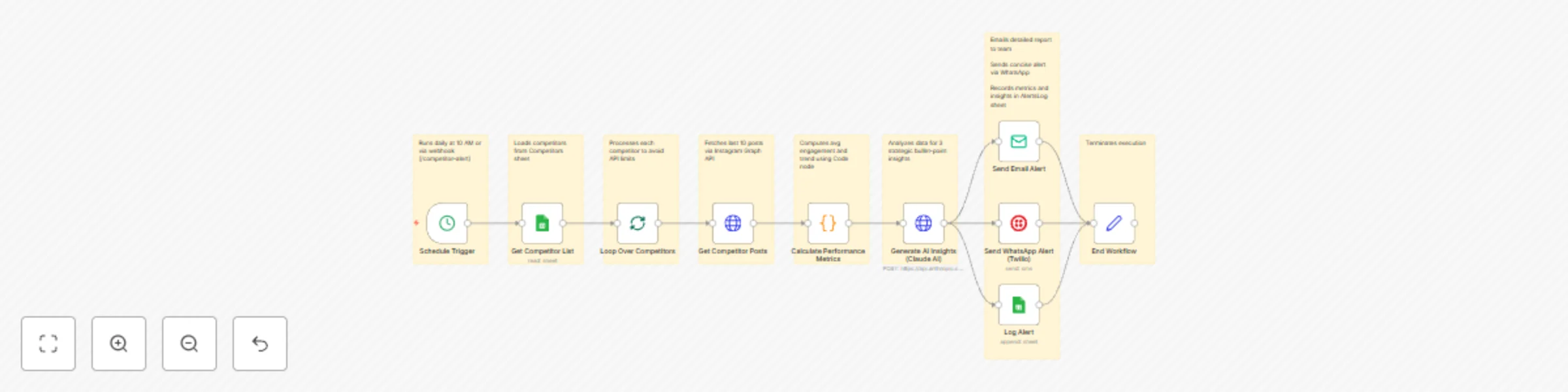
| 1 | Schedule Trigger | Runs daily at 10 AM or via webhook (/competitor-alert) |
| 2 | Get Competitor List | Loads competitors from Competitors sheet |
| 3 | Loop Over Competitors | Processes each competitor to avoid API limits |
| 4 | Get Competitor Posts | Fetches last 10 posts via Instagram Graph API |
| 5 | Calculate Performance Metrics | Computes avg engagement and trend using Code node |
| 6 | Generate AI Insights (Claude AI) | Analyzes data for 3 strategic bullet-point insights |
| 7 | Send Email Alert | Emails detailed report to team |
| 8 | Send WhatsApp Alert (Twilio) | Sends concise alert via WhatsApp |
| 9 | Log Alert | Records metrics and insights in AlertsLog sheet |
| 10 | End Workflow | Terminates execution |
| Integration | Details |
|---|---|
| Google Sheets | Service account with spreadsheet access |
| Instagram API | Business access token for media fetching |
| Claude AI | Anthropic API key for claude-3-5-sonnet-20241022 |
| Twilio | Credentials for WhatsApp messaging |
| SMTP/Email | SMTP or Gmail for email alerts |
Ensure your Google Sheets include:
CompetitorsAlertsLog/webhook/competitor-alert (for on-demand runs)Use manual execution to confirm:
| competitorName | competitorUserId | industryFocus |
|---|---|---|
| BrandX | 1234567890 | Fashion |
| competitor | avgEngagement | trend | insights | timestamp |
|---|---|---|---|---|
| BrandX | 75.5 | Rising | - Bullet 1... | 2023-10-01T12:00:00Z |
| Requirement | Version/Access |
|---|---|
| n8n | v1.50+ (AI and messaging integrations supported) |
| Claude AI API | claude-3-5-sonnet-20241022 |
| Instagram Graph API | Business account access token |
| Twilio API | WhatsApp-enabled phone number |
| Google Sheets API | https://www.googleapis.com/auth/spreadsheets |
| SMTP | For email (e.g., Gmail OAuth) |
Result: A single automated system that monitors competitors, uncovers trends, and arms your team with AI strategies — delivered via WhatsApp and email with zero manual work.
Get in touch with us for custom n8n automation!
This catalog entry is organized from the workflow JSON. The node-level section below shows the executable blocks available for review before importing the template.
| Workflow | Monitor Instagram competitor trends with Claude 3.5 & multi-channel alerts |
|---|---|
| Complexity | advanced |
| Nodes | 18 |
| Categories | Market Research, AI Summarization |
| Author | Oneclick AI Squad |
| Published | 30 Oct 2025 |
Use the JSON export at /data/workflows/10341/10341.json as the source template for this automation.
Open n8n, import the downloaded JSON, and review each node before activating the workflow.
Replace placeholder credentials, API keys, webhook URLs, account IDs, and environment-specific values with your own settings.
Run the workflow manually or in a staging workspace, inspect node output, and confirm downstream systems receive the expected data.
Enable the workflow only after testing, then monitor executions, errors, and rate limits during the first production runs.
Review imported nodes carefully before activation. This catalog entry is intended to help you inspect the workflow structure, understand required services, and find related templates faster.
Node names, credentials, schedules, webhook paths, and external service limits may need adjustment for your workspace.
This enterprise grade n8n workflow automates competitor monitoring on Instagram — from post fetching to AI driven strategy alerts — using Claude AI , Instagram API, and multi channel notifications....
Review the workflow JSON, configure any required credentials in n8n, and test the automation in a safe workspace before using it in production.
Yes. Use the block-by-block analysis and the downloadable JSON to inspect each node, then adjust credentials, prompts, schedules, filters, or destinations for your Market Research, AI Summarization use case.