Monitor high-value USDT transfers on Ethereum with Airtable and Slack alerts

Workflow preview

Workflow preview
100%
Monitor high-value USDT transfers on Ethereum with Airtable and Slack alerts preview
Open on n8n.io

Important notice

This workflow is provided as-is. Please review and test before using in production.

1. Workflow Overview

Smart Contract Event Monitor (Web3) This workflow automatically monitors the Ethereum blockchain, extracts USDT transfer events, filters large value transactions, stores them in Airtable and sends ...

Best for

  • Crypto Trading automation workflows
  • intermediate n8n builders looking for reusable templates

Tools used

n8n-nodes-base.scheduletrigger, n8n-nodes-base.httprequest, n8n-nodes-base.code, n8n-nodes-base.if, n8n-nodes-base.airtable, n8n-nodes-base.slack, n8n-nodes-base.stickynote

Source and attribution

This workflow is cataloged by N8N Workflows and links back to its original n8n.io source page by WeblineIndia.

Original n8n.io source

1.1 Workflow description

Title
Monitor high-value USDT transfers on Ethereum with Airtable and Slack alerts
Workflow name
Monitor high-value USDT transfers on Ethereum with Airtable and Slack alerts

Smart Contract Event Monitor (Web3)

This workflow automatically monitors the Ethereum blockchain, extracts USDT transfer events, filters large-value transactions, stores them in Airtable and sends a clean daily summary alert to Slack.

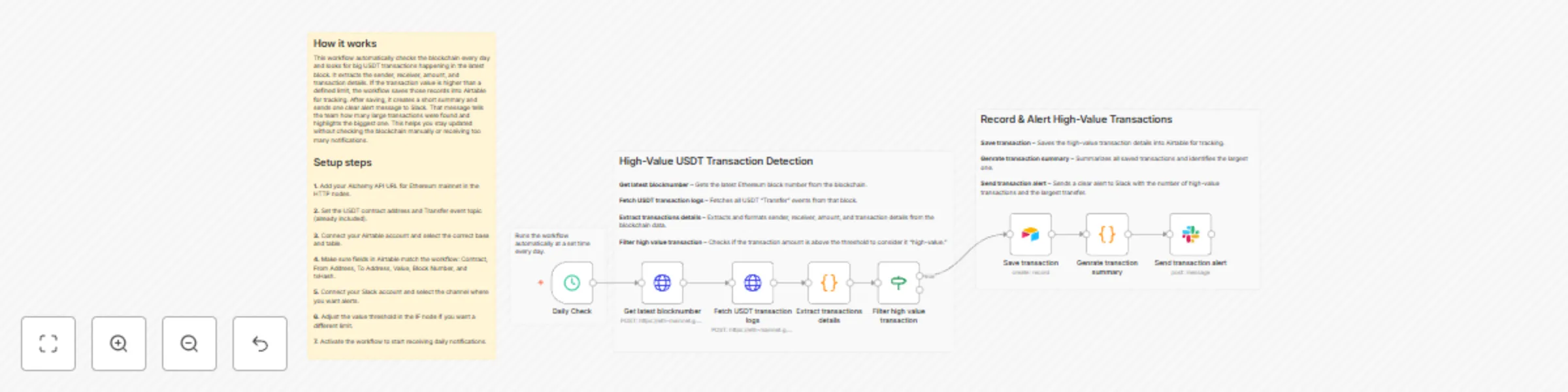
This workflow checks the latest Ethereum block every day and identifies high-value USDT transfers. It fetches on-chain logs using Alchemy, extracts sender/receiver/value details, filters transactions above a threshold, stores them in Airtable and finally sends a single clear summary alert to Slack.

You receive:

  • Daily blockchain check (automated)
  • Airtable tracking of all high-value USDT transfers
  • A Slack alert summarizing the count + the largest transfer

Ideal for teams wanting simple, automated visibility of suspicious or large crypto movements without manually scanning the blockchain.

Quick Start – Implementation Steps

  1. Add your Alchemy Ethereum Mainnet API URL in both HTTP nodes.
  2. Connect and configure your Airtable base & table.
  3. Connect your Slack credentials and set the channel for alerts.
  4. Adjust the value threshold in the IF node (default: 1,000,000,000).
  5. Activate the workflow — daily monitoring begins instantly.

What It Does

This workflow automates detection of high-value USDT transfers on Ethereum:

  1. Fetches the latest block number using Alchemy.
  2. Retrieves all USDT Transfer logs from that block.
  3. Extracts structured data:
    • Sender
    • Receiver
    • Amount
    • Contract
    • Block number
    • Transaction hash
  4. Filters only transactions above a configurable threshold.
  5. Saves each high-value transaction into Airtable for record-keeping.
  6. Generates a summary including:
    • Total number of high-value transfers
    • The single largest transfer
  7. Sends one clean alert message to Slack.

This ensures visibility of suspicious or large fund movements with no repeated alerts.

Who’s It For

This workflow is ideal for:

  • Crypto analytics teams
  • Blockchain monitoring platforms
  • Compliance teams tracking high-value activity
  • Web3 product teams
  • Developers needing automated USDT transfer tracking
  • Anyone monitoring whale movements / suspicious transactions

Requirements to Use This Workflow

To run this workflow, you need:

  • n8n instance (cloud or self-hosted)
  • Alchemy API URL (Ethereum Mainnet)
  • Airtable base + Personal Access Token
  • Slack workspace with API permissions
  • Basic understanding of Ethereum logs, hex values & JSON data

How It Works

  1. Daily Check – Workflow runs automatically at your set time.
  2. Get Latest Block Number – Fetches newest Ethereum block from Alchemy.
  3. Fetch USDT Logs – Queries all Transfer events (ERC-20 standard).
  4. Extract Transaction Details – Converts hex → readable data.
  5. Filter High-Value Transactions – Keeps only large value transfers.
  6. Save to Airtable – Adds each transfer record to your database.
  7. Generate Summary – Finds the largest transfer & total count.
  8. Send Slack Alert – Notifies your team with one clean summary.

Setup Steps

  1. Import the provided n8n JSON file.
  2. Open the Get Latest Block and Fetch Logs HTTP nodes → add your Alchemy API URL.
  3. Ensure USDT contract address (already included):0xdAC17F958D2ee523a2206206994597C13D831ec7
  4. Connect your Airtable account and map:
    • Contract
    • From Address
    • To Address
    • Value
    • Block Number
    • txHash
  5. Connect Slack API credentials and choose your channel.
  6. Change the threshold limit in the IF node if needed (default: 1B).
  7. Activate the workflow — done!

How To Customize Nodes

Customize Value Threshold

Modify the IF node:

  • Increase or decrease the minimum transfer value
  • Change logic to smaller or larger whale-tracking

Customize Airtable Storage

You can add fields like:

  • Timestamp
  • Token symbol
  • USD price (using price API)
  • Transaction status
  • Risk classification

Customize Slack Alerts

You may add:

  • Emojis
  • Mentions (@channel, @team)
  • Links to Etherscan
  • Highlighted blocks for critical transfers

Customize Web3 Provider

Replace Alchemy with:

  • Infura
  • QuickNode
  • Public RPC (not recommended for reliability)

Add-Ons (Optional Enhancements)

You can extend this workflow to:

  • Track multiple ERC-20 tokens
  • Process several blocks instead of just the latest
  • Add price conversion (USDT → USD value)
  • Detect transfers to suspicious wallets
  • Generate daily or weekly summary reports in Slack
  • Create a dashboard using Airtable Interfaces
  • Add OpenAI-based insights (large spike, suspicious pattern, etc.)

Use Case Examples

1. Whale Tracking

Detect large USDT movements (>1M or >5M).

2. Compliance Monitoring

Log high-value transfers in Airtable for audits.

3. Real-Time Alerts

Slack alerts tell your team instantly about big movements.

4. On-Chain Analytics

Automate structured extraction of Ethereum logs.

5. Exchange Monitoring

Detect large inflows/outflows to known addresses.

Troubleshooting Guide


Issue Possible Cause Solution
No data in Airtable Logs returned empty Ensure USDT transfer events exist in that block
Values are “zero” Hex parsing failed Check extract-code logic
Slack alert not sent Invalid credentials Update Slack API key
Airtable error Wrong field names Match Airtable column names exactly
HTTP request fails Wrong RPC URL Re-check Alchemy API key
Workflow not running Schedule disabled Enable "Daily Check" node

Need Help?

If you need help customizing or extending this workflow — adding multi-token monitoring, setting up dashboards, improving alerts or scaling this for production — our n8n workflow developers at WeblineIndia can assist you with advanced automation.

1.2 Logical Blocks

This catalog entry is organized from the workflow JSON. The node-level section below shows the executable blocks available for review before importing the template.

2. Block-by-Block Analysis

Block 1 - Daily Check

Type / Role
n8n-nodes-base.scheduleTrigger - scheduleTrigger
Config choices
Version 1.2

Block 2 - Fetch USDT transaction logs

Type / Role
n8n-nodes-base.httpRequest - httpRequest
Config choices
Version 4.3

Block 3 - Extract transactions details

Type / Role
n8n-nodes-base.code - code
Config choices
Version 2

Block 4 - Filter high value transaction

Type / Role
n8n-nodes-base.if - if
Config choices
Version 2.2

Block 5 - Save transaction

Type / Role
n8n-nodes-base.airtable - airtable
Config choices
Version 2.1

Block 6 - Genrate transction summary

Type / Role
n8n-nodes-base.code - code
Config choices
Version 2

Block 7 - Send transaction alert

Type / Role
n8n-nodes-base.slack - slack
Config choices
Version 2.3

Block 8 - Sticky Note

Type / Role
n8n-nodes-base.stickyNote - stickyNote
Config choices
Version 1

Block 9 - Sticky Note1

Type / Role
n8n-nodes-base.stickyNote - stickyNote
Config choices
Version 1

Block 10 - Sticky Note2

Type / Role
n8n-nodes-base.stickyNote - stickyNote
Config choices
Version 1

Block 11 - Get latest blocknumber

Type / Role
n8n-nodes-base.httpRequest - httpRequest
Config choices
Version 4.3

Block 12 - Sticky Note3

Type / Role
n8n-nodes-base.stickyNote - stickyNote
Config choices
Version 1

3. Summary Table

Workflow Monitor high-value USDT transfers on Ethereum with Airtable and Slack alerts
Complexity intermediate
Nodes 12
Categories Crypto Trading
Author WeblineIndia
Published 22 Dec 2025

4. Reproducing the Workflow from Scratch

  1. 1. Download the workflow JSON

    Use the JSON export at /data/workflows/12026/12026.json as the source template for this automation.

  2. 2. Import the template into n8n

    Open n8n, import the downloaded JSON, and review each node before activating the workflow.

  3. 3. Configure credentials and variables

    Replace placeholder credentials, API keys, webhook URLs, account IDs, and environment-specific values with your own settings.

  4. 4. Test with sample data

    Run the workflow manually or in a staging workspace, inspect node output, and confirm downstream systems receive the expected data.

  5. 5. Activate and monitor

    Enable the workflow only after testing, then monitor executions, errors, and rate limits during the first production runs.

5. General Notes & Resources

Review imported nodes carefully before activation. This catalog entry is intended to help you inspect the workflow structure, understand required services, and find related templates faster.

Node names, credentials, schedules, webhook paths, and external service limits may need adjustment for your workspace.

Frequently asked questions

What does Monitor high-value USDT transfers on Ethereum with Airtable and Slack alerts do?

Smart Contract Event Monitor (Web3) This workflow automatically monitors the Ethereum blockchain, extracts USDT transfer events, filters large value transactions, stores them in Airtable and sends ...

What do I need before importing this workflow?

Review the workflow JSON, configure any required credentials in n8n, and test the automation in a safe workspace before using it in production.

Can I customize this workflow?

Yes. Use the block-by-block analysis and the downloadable JSON to inspect each node, then adjust credentials, prompts, schedules, filters, or destinations for your Crypto Trading use case.