Block 1 - Route by Action
- Type / Role
- n8n-nodes-base.switch - switch
- Config choices
- Version 3


 Early Deal
This workflow is provided as-is. Please review and test before using in production.
Tags : AI Agent, MCP Server, n8n API, Monitoring, Debugging, Workflow Analytics, Automation Context Hi! I’m Samir — a Supply Chain Engineer and Data Scientist based in Pari...
n8n-nodes-base.switch, n8n-nodes-base.splitout, n8n-nodes-base.httprequest, n8n-nodes-base.set, n8n-nodes-base.webhook, n8n-nodes-base.respondtowebhook, n8n-nodes-base.code, n8n-nodes-base.stickynote
This workflow is cataloged by N8N Workflows and links back to its original n8n.io source page by Samir Saci.
Original n8n.io sourceTags: AI Agent, MCP Server, n8n API, Monitoring, Debugging, Workflow Analytics, Automation
Hi! I’m Samir — a Supply Chain Engineer and Data Scientist based in Paris, and founder of LogiGreen Consulting.
This workflow is part of my latest project: an AI assistant that automatically analyses n8n workflow executions, detects failures, and identifies root causes through natural conversation with Claude Desktop.
> Turn your automation logs into intelligent conversations with an AI that understands your workflows.
The idea is to use Claude Desktop to help monitor and debug your workflows deployed in production.
The workflow shared here is part of the setup.
📬 For business inquiries, you can find me on LinkedIn
This template is designed for automation engineers, data professionals, and AI enthusiasts who manage multiple workflows in n8n and want a smarter way to track errors or performance without manually browsing execution logs.
If you’ve ever discovered a failed workflow hours after it happened — this is for you.
This workflow acts as the bridge between your n8n instance and the Claude MCP Server.
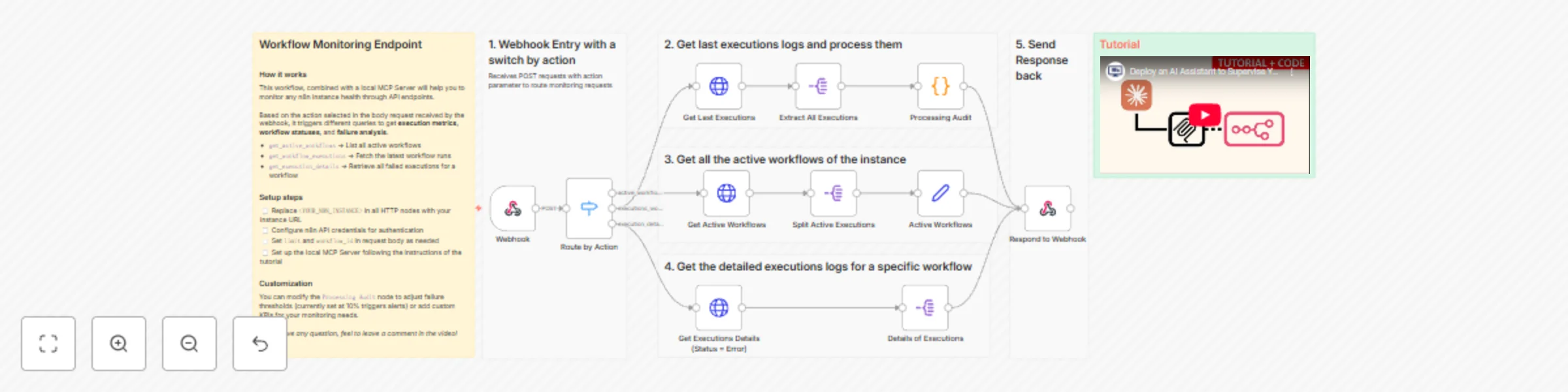
It exposes three main routes that can be triggered via a webhook:
get_active_workflows → Fetches all currently active workflows get_workflow_executions → Retrieves the latest executions and calculates health KPIs get_execution_details → Extracts detailed information about failed executions for debuggingEach request is automatically routed and processed, providing Claude with structured execution data for real-time analysis.
Here’s the complete architecture:
Claude Desktop ←→
   MCP Server ←→
      n8n Monitor Webhook ←→
         n8n API
📘 The full concept and architecture are explained in my article published on my blog:
👉 Deploy your AI Assistant to Monitor and Debug n8n Workflows using Claude and MCP
The full setup tutorial (with source code and demo) is available on YouTube:
"action" parameter Once connected, you can ask Claude questions like:
Bangkok Meetup Scraper workflow failing?” Claude will reply with structured insights, including failure patterns, node diagnostics, and health status indicators (🟢🟡🔴).
You’ll need:
.env fileFollow the tutorial for more details, don't hesitate to leave your questions in the comment section.
🗒️ Use the sticky notes inside the workflow to:
This template was built using n8n v.116.2
Submitted: November 2025
This catalog entry is organized from the workflow JSON. The node-level section below shows the executable blocks available for review before importing the template.
| Workflow | 👲 Monitor & debug n8n workflows with Claude AI assistant and MCP server |
|---|---|
| Complexity | advanced |
| Nodes | 18 |
| Categories | DevOps, AI Summarization |
| Author | Samir Saci |
| Published | 12 Nov 2025 |
Use the JSON export at /data/workflows/10779/10779.json as the source template for this automation.
Open n8n, import the downloaded JSON, and review each node before activating the workflow.
Replace placeholder credentials, API keys, webhook URLs, account IDs, and environment-specific values with your own settings.
Run the workflow manually or in a staging workspace, inspect node output, and confirm downstream systems receive the expected data.
Enable the workflow only after testing, then monitor executions, errors, and rate limits during the first production runs.
Review imported nodes carefully before activation. This catalog entry is intended to help you inspect the workflow structure, understand required services, and find related templates faster.
Node names, credentials, schedules, webhook paths, and external service limits may need adjustment for your workspace.
Tags : AI Agent, MCP Server, n8n API, Monitoring, Debugging, Workflow Analytics, Automation Context Hi! I’m Samir — a Supply Chain Engineer and Data Scientist based in Pari...
Review the workflow JSON, configure any required credentials in n8n, and test the automation in a safe workspace before using it in production.
Yes. Use the block-by-block analysis and the downloadable JSON to inspect each node, then adjust credentials, prompts, schedules, filters, or destinations for your DevOps, AI Summarization use case.