Block 1 - Product anomalies
- Type / Role
- n8n-nodes-base.postgres - postgres
- Config choices
- Version 2.6


 Early Deal
This workflow is provided as-is. Please review and test before using in production.
Description This workflow continuously validates data quality using rules stored in Notion, runs anomaly checks against your SQL database, generates AI powered diagnostics, and alerts your team onl...
n8n-nodes-base.postgres, n8n-nodes-base.code, n8n-nodes-base.set, n8n-nodes-base.notion, @n8n/n8n-nodes-langchain.openai, n8n-nodes-base.splitinbatches, n8n-nodes-base.stickynote, n8n-nodes-base.scheduletrigger
This workflow is cataloged by N8N Workflows and links back to its original n8n.io source page by Yassin Zehar.
Original n8n.io sourceThis workflow continuously validates data quality using rules stored in Notion, runs anomaly checks against your SQL database, generates AI-powered diagnostics, and alerts your team only when real issues occur.
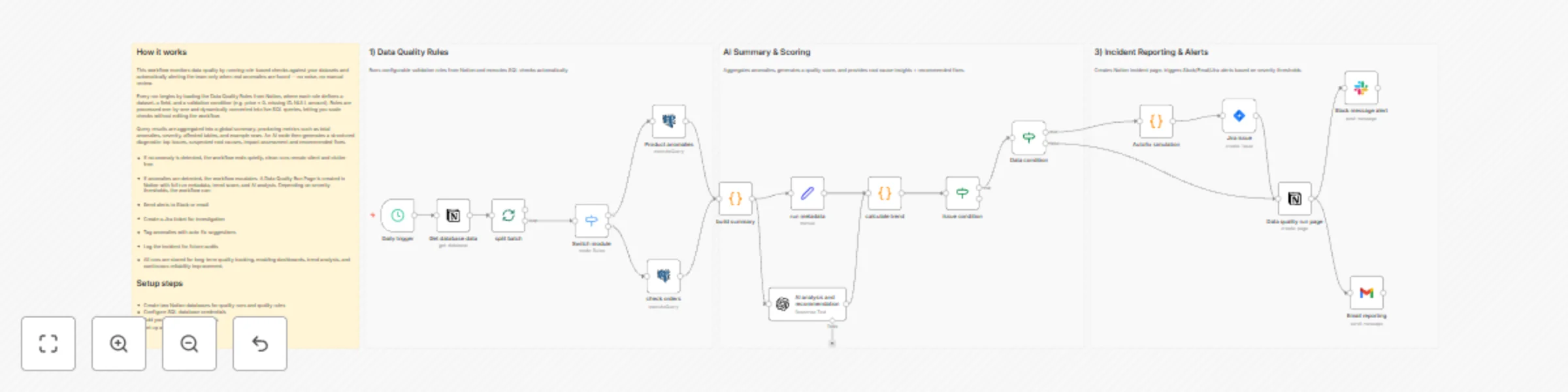
Notion holds all data quality rules (source, field, condition, severity). n8n reads them on schedule, converts them into live SQL queries, and aggregates anomalies into a global run summary.
The workflow then scores data health, creates a Notion run record, optionally opens a Jira issue, and sends a Slack/email alert including AI-generated root cause & recommended fixes.
Perfect for:
Notion → Rules Database Each entry defines a check (table, field, condition, severity).
n8n → Dynamic Query Execution Rules are converted into SQL and checked automatically.
Summary Engine Aggregates anomalies, computes data quality score.
AI Diagnostic Layer Root cause analysis + recommended fix plan.
Incident Handling Notion Run Page + optional Slack/Email/Jira escalation. Silent exit when no anomaly = zero noise.
Data Quality Rules → source / field / rule / severity / owner
Data Quality Runs → run_id / timestamp / score / anomalies / trend / AI summary/recommendation
Watch the Youtube Tutorial video
I’m Yassin a Project & Product Manager Scaling tech products with data-driven project management. 📬 Feel free to connect with me on Linkedin
This catalog entry is organized from the workflow JSON. The node-level section below shows the executable blocks available for review before importing the template.
| Workflow | Monitor data quality with Notion rules, SQL checks & AI-powered alerts |
|---|---|
| Complexity | advanced |
| Nodes | 21 |
| Categories | Document Extraction, AI Summarization |
| Author | Yassin Zehar |
| Published | 26 Nov 2025 |
Use the JSON export at /data/workflows/11256/11256.json as the source template for this automation.
Open n8n, import the downloaded JSON, and review each node before activating the workflow.
Replace placeholder credentials, API keys, webhook URLs, account IDs, and environment-specific values with your own settings.
Run the workflow manually or in a staging workspace, inspect node output, and confirm downstream systems receive the expected data.
Enable the workflow only after testing, then monitor executions, errors, and rate limits during the first production runs.
Review imported nodes carefully before activation. This catalog entry is intended to help you inspect the workflow structure, understand required services, and find related templates faster.
Node names, credentials, schedules, webhook paths, and external service limits may need adjustment for your workspace.
Description This workflow continuously validates data quality using rules stored in Notion, runs anomaly checks against your SQL database, generates AI powered diagnostics, and alerts your team onl...
Review the workflow JSON, configure any required credentials in n8n, and test the automation in a safe workspace before using it in production.
Yes. Use the block-by-block analysis and the downloadable JSON to inspect each node, then adjust credentials, prompts, schedules, filters, or destinations for your Document Extraction, AI Summarization use case.