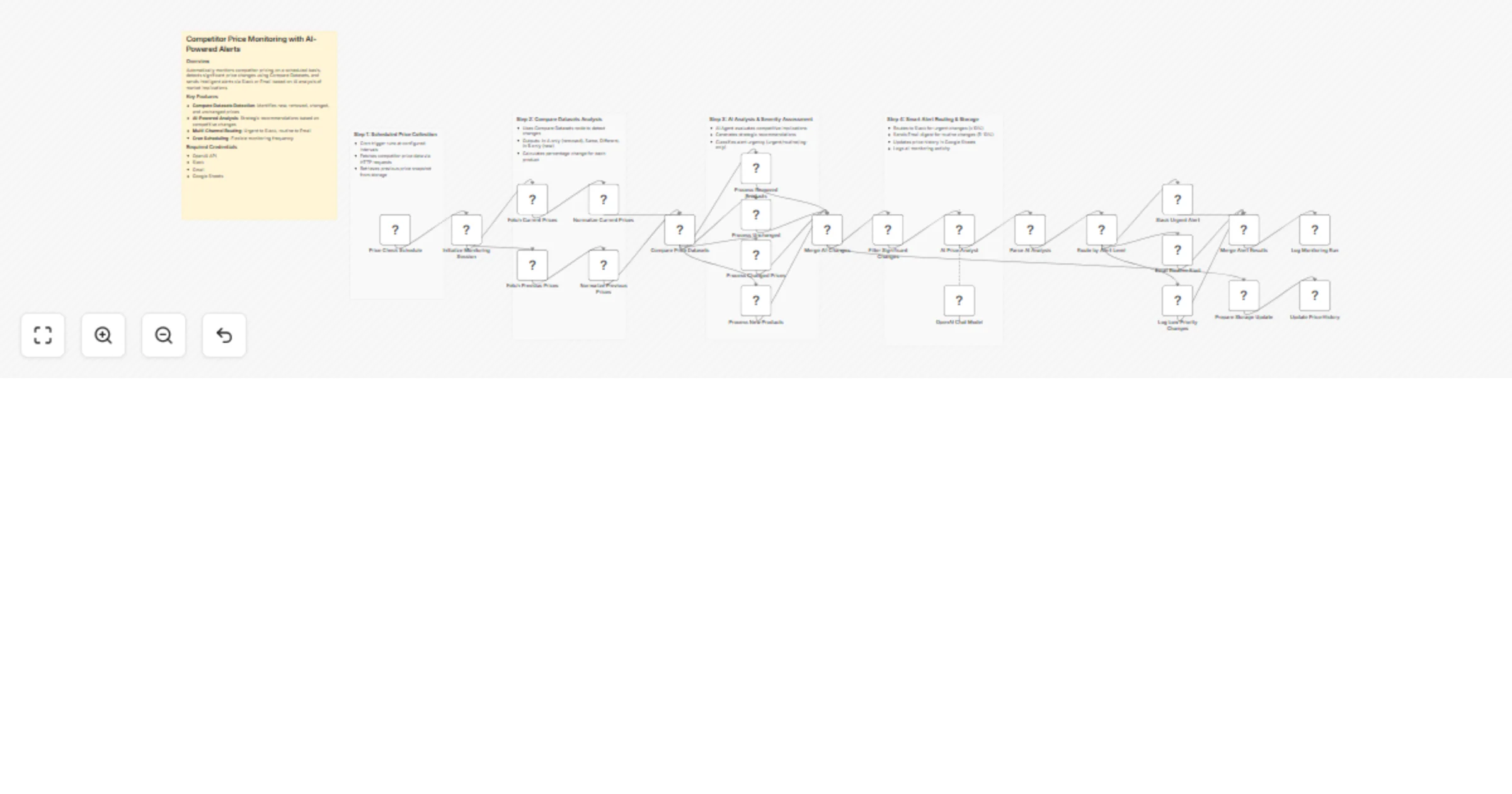
Monitor competitor prices and send OpenAI analysis alerts via Slack and Gmail

Workflow preview

Workflow preview
100%
Monitor competitor prices and send OpenAI analysis alerts via Slack and Gmail preview
Open on n8n.io

1. Workflow Overview

Competitor Price Monitoring with AI Powered Alerts What this workflow does This workflow automatically monitors competitor product prices on a scheduled basis, detects meaningful price changes, and...

Best for

  • Market Research automation workflows
  • AI Summarization automation workflows
  • advanced n8n builders looking for reusable templates

Tools used

n8n-nodes-base.stickynote, n8n-nodes-base.scheduletrigger, n8n-nodes-base.set, n8n-nodes-base.httprequest, n8n-nodes-base.googlesheets, n8n-nodes-base.code, n8n-nodes-base.comparedatasets, n8n-nodes-base.merge

Source and attribution

This workflow is cataloged by N8N Workflows and links back to its original n8n.io source page by Yurie Ino.

Original n8n.io source

1.1 Workflow description

Title
Monitor competitor prices and send OpenAI analysis alerts via Slack and Gmail
Workflow name
Monitor competitor prices and send OpenAI analysis alerts via Slack and Gmail

Competitor Price Monitoring with AI-Powered Alerts

What this workflow does

This workflow automatically monitors competitor product prices on a scheduled basis, detects meaningful price changes, and delivers actionable alerts enriched with AI-powered competitive analysis.

It compares current and historical price datasets, identifies increases, decreases, new products, and removals, and uses AI to assess market impact and recommend strategic actions. Alerts are intelligently routed to Slack or Email based on urgency, while all results are logged for auditing and trend analysis.

This template is ideal for pricing teams, product managers, and competitive intelligence workflows that require timely, data-driven insights without manual monitoring.


How it works

  1. Scheduled execution
  • Runs on a configurable cron schedule (default: every 6 hours).
  • Initializes a monitoring session with timestamps and tracking IDs.
  1. Price data collection
  • Fetches current competitor pricing via HTTP APIs.
  • Retrieves previous price snapshots from Google Sheets.
  1. Data normalization & comparison
  • Normalizes current and historical data into a unified schema.
  • Uses the Compare Datasets node to detect:
  • New products
  • Removed products
  • Price increases or decreases
  • Unchanged prices
  1. Change evaluation
  • Calculates percentage price changes.
  • Classifies severity:
  • Urgent: ≥ 10% change
  • Routine: 5–10% change
  • No alert: < 5% or unchanged
  1. AI-powered analysis
  • An AI agent evaluates competitive impact.
  • Generates concise recommendations (match, hold, differentiate).
  • Justifies urgency based on market implications.
  1. Smart alert routing
  • Urgent changes are sent to Slack.
  • Routine updates are sent via Email.
  • All alerts and runs are logged in Google Sheets.
  1. Historical storage
  • Updates price history for future comparisons.
  • Maintains a complete monitoring audit trail.

Setup requirements

Before activating the workflow, configure the following:

  • Replace the competitor price API endpoint with your own data source.
  • Define product identifiers consistently (SKU, product ID, etc.).
  • Configure Google Sheets documents and sheet names for:
  • Price history
  • Alert logs
  • Monitoring logs
  • Adjust alert thresholds or schedules as needed.

Required credentials

This workflow requires the following credentials to be set up in n8n:

  • HTTP Header Auth (for competitor price APIs)
  • OpenAI (for AI-based price analysis)
  • Slack (urgent alerts)
  • Gmail (routine email notifications)
  • Google Sheets (price history and logging)

Customization ideas

  • Add additional alert channels (Microsoft Teams, Discord, Webhooks).
  • Extend AI analysis with competitor positioning or elasticity insights.
  • Monitor multiple regions or currencies.
  • Add dashboards using BI tools connected to Google Sheets.
  • Trigger downstream pricing or promotion workflows automatically.

Who this is for

  • Pricing & revenue operations teams
  • E-commerce and SaaS product managers
  • Competitive intelligence analysts
  • Growth and strategy teams needing real-time market awareness

This template provides an end-to-end, scalable foundation for AI-assisted competitive price monitoring—turning raw price changes into actionable business decisions.

1.2 Logical Blocks

This catalog entry is organized from the workflow JSON. The node-level section below shows the executable blocks available for review before importing the template.

2. Block-by-Block Analysis

Block 1 - Sticky Note

Type / Role
n8n-nodes-base.stickyNote - stickyNote
Config choices
Version 1

Block 2 - Sticky Note1

Type / Role
n8n-nodes-base.stickyNote - stickyNote
Config choices
Version 1

Block 3 - Sticky Note2

Type / Role
n8n-nodes-base.stickyNote - stickyNote
Config choices
Version 1

Block 4 - Sticky Note3

Type / Role
n8n-nodes-base.stickyNote - stickyNote
Config choices
Version 1

Block 5 - Sticky Note4

Type / Role
n8n-nodes-base.stickyNote - stickyNote
Config choices
Version 1

Block 6 - Price Check Schedule

Type / Role
n8n-nodes-base.scheduleTrigger - scheduleTrigger
Config choices
Version 1.2

Block 7 - Initialize Monitoring Session

Type / Role
n8n-nodes-base.set - set
Config choices
Version 3.4

Block 8 - Fetch Current Prices

Type / Role
n8n-nodes-base.httpRequest - httpRequest
Config choices
Version 4.2

Block 9 - Fetch Previous Prices

Type / Role
n8n-nodes-base.googleSheets - googleSheets
Config choices
Version 4.5

Block 10 - Normalize Current Prices

Type / Role
n8n-nodes-base.code - code
Config choices
Version 2

Block 11 - Normalize Previous Prices

Type / Role
n8n-nodes-base.code - code
Config choices
Version 2

Block 12 - Compare Price Datasets

Type / Role
n8n-nodes-base.compareDatasets - compareDatasets
Config choices
Version 2.3

Block 13 - Process Removed Products

Type / Role
n8n-nodes-base.code - code
Config choices
Version 2

Block 14 - Process Unchanged

Type / Role
n8n-nodes-base.code - code
Config choices
Version 2

Block 15 - Process Changed Prices

Type / Role
n8n-nodes-base.code - code
Config choices
Version 2

Block 16 - Process New Products

Type / Role
n8n-nodes-base.code - code
Config choices
Version 2

Block 17 - Merge All Changes

Type / Role
n8n-nodes-base.merge - merge
Config choices
Version 3

Block 18 - Filter Significant Changes

Type / Role
n8n-nodes-base.filter - filter
Config choices
Version 2

Block 19 - AI Price Analyst

Type / Role
@n8n/n8n-nodes-langchain.agent - agent
Config choices
Version 1.7

Block 20 - OpenAI Chat Model

Type / Role
@n8n/n8n-nodes-langchain.lmChatOpenAi - lmChatOpenAi
Config choices
Version 1.2

Block 21 - Parse AI Analysis

Type / Role
n8n-nodes-base.code - code
Config choices
Version 2

Block 22 - Route by Alert Level

Type / Role
n8n-nodes-base.switch - switch
Config choices
Version 3.2

Block 23 - Slack Urgent Alert

Type / Role
n8n-nodes-base.slack - slack
Config choices
Version 2.2

Block 24 - Email Routine Alert

Type / Role
n8n-nodes-base.gmail - gmail
Config choices
Version 2.1

Showing the first 24 of 29 workflow blocks. Download the JSON for the full node graph.

3. Summary Table

Workflow Monitor competitor prices and send OpenAI analysis alerts via Slack and Gmail
Complexity advanced
Nodes 29
Categories Market Research, AI Summarization
Author Yurie Ino
Published 16 Dec 2025

4. Reproducing the Workflow from Scratch

  1. 1. Download the workflow JSON

    Use the JSON export at /data/workflows/11847/11847.json as the source template for this automation.

  2. 2. Import the template into n8n

    Open n8n, import the downloaded JSON, and review each node before activating the workflow.

  3. 3. Configure credentials and variables

    Replace placeholder credentials, API keys, webhook URLs, account IDs, and environment-specific values with your own settings.

  4. 4. Test with sample data

    Run the workflow manually or in a staging workspace, inspect node output, and confirm downstream systems receive the expected data.

  5. 5. Activate and monitor

    Enable the workflow only after testing, then monitor executions, errors, and rate limits during the first production runs.

5. General Notes & Resources

Review imported nodes carefully before activation. This catalog entry is intended to help you inspect the workflow structure, understand required services, and find related templates faster.

Node names, credentials, schedules, webhook paths, and external service limits may need adjustment for your workspace.

Frequently asked questions

What does Monitor competitor prices and send OpenAI analysis alerts via Slack and Gmail do?

Competitor Price Monitoring with AI Powered Alerts What this workflow does This workflow automatically monitors competitor product prices on a scheduled basis, detects meaningful price changes, and...

What do I need before importing this workflow?

Review the workflow JSON, configure any required credentials in n8n, and test the automation in a safe workspace before using it in production.

Can I customize this workflow?

Yes. Use the block-by-block analysis and the downloadable JSON to inspect each node, then adjust credentials, prompts, schedules, filters, or destinations for your Market Research, AI Summarization use case.