Monitor brand mentions with OpenAI across Twitter/X, Reddit, News, Airtable and Slack

Workflow preview

Workflow preview
100%
Monitor brand mentions with OpenAI across Twitter/X, Reddit, News, Airtable and Slack preview
Open on n8n.io

1. Workflow Overview

Monitors brand mentions across Twitter/X, Reddit, and News APIs in real time (or scheduled), fetches mentions in parallel, normalizes data, uses AI to analyze sentiment/urgency/topics, detects dupl...

Best for

  • Market Research automation workflows
  • AI Summarization automation workflows
  • advanced n8n builders looking for reusable templates

Tools used

n8n-nodes-base.stickynote, n8n-nodes-base.scheduletrigger, n8n-nodes-base.set, n8n-nodes-base.httprequest, n8n-nodes-base.merge, n8n-nodes-base.code, n8n-nodes-base.switch, n8n-nodes-base.filter

Source and attribution

This workflow is cataloged by N8N Workflows and links back to its original n8n.io source page by Oneclick AI Squad.

Original n8n.io source

1.1 Workflow description

Title
Monitor brand mentions with OpenAI across Twitter/X, Reddit, News, Airtable and Slack
Workflow name
Monitor brand mentions with OpenAI across Twitter/X, Reddit, News, Airtable and Slack

Monitors brand mentions across Twitter/X, Reddit, and News APIs in real-time (or scheduled), fetches mentions in parallel, normalizes data, uses AI to analyze sentiment/urgency/topics, detects duplicates, filters critical mentions, logs everything to Airtable, posts alerts to Slack, and emails daily HTML digest reports to the marketing team.

Good to Know

  • Runs every hour (configurable) to provide near-real-time brand monitoring
  • Pulls mentions from multiple platforms in parallel: Twitter/X, Reddit, News sources
  • Uses AI (OpenAI/Grok/etc.) for advanced sentiment classification, urgency detection, topic extraction, and duplicate deduplication
  • Focuses on actionable insights: flags negative/urgent mentions for immediate response
  • Generates beautiful HTML daily digest with summarized mentions, sentiment trends, and key highlights
  • Stores historical data in Airtable for tracking, analytics, and long-term reporting
  • Sends real-time Slack alerts for high-priority/negative mentions
  • Reduces manual social monitoring time dramatically and helps catch reputation issues early

How It Works

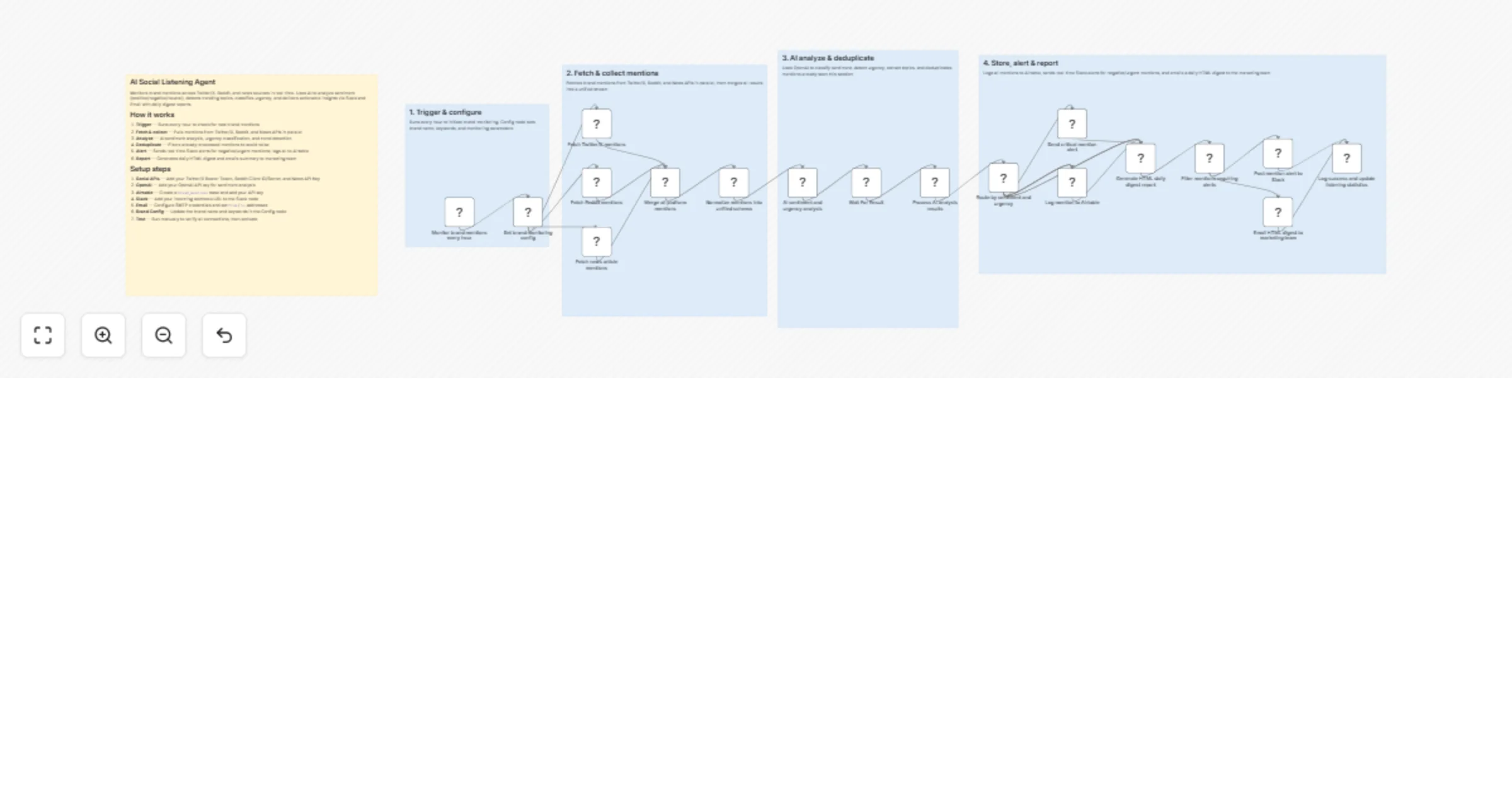
1. Trigger & configure

  • Schedule Trigger — Runs every hour (or custom interval) to check for new brand mentions
  • Set brand monitoring config — Defines brand name, keywords, excluded terms, monitoring parameters (via Set node or variables)

2. Fetch & collect mentions

  • Fetch Twitter/X mentions — Uses Twitter/X node or HTTP Request to search recent tweets (mentions, keywords)
  • Fetch Reddit mentions — Searches relevant subreddits or Reddit-wide for brand keywords/posts
  • Fetch news article mentions — Queries news APIs (e.g. NewsAPI, Google News via RSS/HTTP) for brand coverage
  • Merge platform mentions — Combines results from all sources into a unified stream
  • Normalize mentions into unified schema — Standardizes fields (text, author, platform, timestamp, URL, etc.) for consistent processing

3. AI analyze & deduplicate

  • AI sentiment and urgency analysis — Sends mentions to AI model (OpenAI node) with prompt to classify:
  • Sentiment: positive / neutral / negative
  • Urgency/severity: low / medium / high / critical
  • Topics/themes
  • Key excerpts
  • Wait For Result — Ensures AI responses are complete
  • Process analysis results — Parses structured JSON output from AI
  • Filter mentions requiring alerts — Routes based on sentiment/urgency thresholds
  • Deduplicate — Removes near-duplicate mentions (e.g. same content reposted)

4. Store, alert & report

  • Log mention to Airtable — Appends/updates records with full details, sentiment, AI analysis, timestamp
  • Route by sentiment and urgency — Critical/negative → immediate action path
  • Send mention alert — Posts formatted message to Slack (or Discord/Teams) with link, text snippet, sentiment badge
  • Generate HTML daily digest report — Compiles summary: total mentions, sentiment breakdown, top issues, trends
  • Email HTML digest — Sends polished report to marketing team via Email node (SMTP/Gmail)
  • Log success and update listings — Records workflow completion, stats for monitoring

Data Sources

  • Twitter/X — Recent search for mentions/keywords (via Twitter node or HTTP Request with API)
  • Reddit — Subreddit or site-wide search for brand mentions
  • News APIs — NewsAPI.org, Google News RSS, or similar for article mentions
  • AI Model — OpenAI (GPT-4o / GPT series), Grok, or other LLM for sentiment/urgency analysis
  • Storage — Airtable base (tables for mentions, daily summaries)
  • Notifications — Slack (webhook or app), Email (SMTP)

How to Use

  1. Import the workflow JSON into your n8n instance
  2. Configure credentials:
  • Twitter/X API (OAuth or Bearer token for search)
  • Reddit API (if using official; or RSS/HTTP for subreddits)
  • News API key (e.g. NewsAPI.org)
  • OpenAI API key (or Grok/other LLM)
  • Airtable API key + base/table
  • Slack webhook or app token
  • Email SMTP credentials
  1. Set monitoring parameters — Edit brand name, keywords, exclude lists in Set monitoring config node
  2. Customize AI prompt — In the AI sentiment node, tweak for brand-specific tone, industry terms, urgency criteria
  3. Adjust schedule — Change interval in Monitor mentions every hour trigger
  4. Tune filters — Set thresholds for alerts (e.g. only negative + high urgency)
  5. Test manually — Use Execute Workflow to simulate with known mentions
  6. Activate — Turn on and watch Executions + Airtable/Slack for results

Requirements

  • n8n instance (self-hosted or cloud)
  • API access/keys for Twitter/X, Reddit (optional), News source
  • OpenAI (or compatible LLM) API key with good token limit
  • Airtable workspace/base for logging
  • Slack workspace for alerts
  • Email account for daily digests

Customizing This Workflow

  • Add more platforms — Include Facebook/Instagram (via Meta API), LinkedIn, Discord mentions
  • Enhance AI analysis — Add topic clustering, competitor comparison, virality scoring
  • Improve deduplication — Use fuzzy matching or embeddings for better duplicate detection
  • Visual dashboard — Export Airtable data to Google Looker Studio / Grafana for sentiment trends
  • Auto-response — For low-risk positive mentions, generate draft replies
  • Language support — Add multilingual sentiment detection
  • Hourly vs. real-time — Switch to webhook triggers if platforms support (e.g. Twitter webhooks if available)
  • Daily/weekly reports — Aggregate more stats, charts in HTML email

1.2 Logical Blocks

This catalog entry is organized from the workflow JSON. The node-level section below shows the executable blocks available for review before importing the template.

2. Block-by-Block Analysis

Block 1 - Sticky Note

Type / Role
n8n-nodes-base.stickyNote - stickyNote
Config choices
Version 1

Block 2 - Sticky Note1

Type / Role
n8n-nodes-base.stickyNote - stickyNote
Config choices
Version 1

Block 3 - Sticky Note2

Type / Role
n8n-nodes-base.stickyNote - stickyNote
Config choices
Version 1

Block 4 - Sticky Note3

Type / Role
n8n-nodes-base.stickyNote - stickyNote
Config choices
Version 1

Block 5 - Sticky Note4

Type / Role
n8n-nodes-base.stickyNote - stickyNote
Config choices
Version 1

Block 6 - Monitor brand mentions every hour

Type / Role
n8n-nodes-base.scheduleTrigger - scheduleTrigger
Config choices
Version 1.2

Block 7 - Set brand monitoring config

Type / Role
n8n-nodes-base.set - set
Config choices
Version 3.4

Block 8 - Fetch Twitter/X mentions

Type / Role
n8n-nodes-base.httpRequest - httpRequest
Config choices
Version 4.2

Block 9 - Fetch Reddit mentions

Type / Role
n8n-nodes-base.httpRequest - httpRequest
Config choices
Version 4.2

Block 10 - Fetch news article mentions

Type / Role
n8n-nodes-base.httpRequest - httpRequest
Config choices
Version 4.2

Block 11 - Merge all platform mentions

Type / Role
n8n-nodes-base.merge - merge
Config choices
Version 3

Block 12 - Normalize mentions into unified schema

Type / Role
n8n-nodes-base.code - code
Config choices
Version 2

Block 13 - AI sentiment and urgency analysis

Type / Role
n8n-nodes-base.httpRequest - httpRequest
Config choices
Version 4.2

Block 14 - Process AI analysis results

Type / Role
n8n-nodes-base.code - code
Config choices
Version 2

Block 15 - Route by sentiment and urgency

Type / Role
n8n-nodes-base.switch - switch
Config choices
Version 3

Block 16 - Send critical mention alert

Type / Role
n8n-nodes-base.httpRequest - httpRequest
Config choices
Version 4.2

Block 17 - Log mention to Airtable

Type / Role
n8n-nodes-base.httpRequest - httpRequest
Config choices
Version 4.2

Block 18 - Generate HTML daily digest report

Type / Role
n8n-nodes-base.code - code
Config choices
Version 2

Block 19 - Filter mentions requiring alerts

Type / Role
n8n-nodes-base.filter - filter
Config choices
Version 2

Block 20 - Post mention alert to Slack

Type / Role
n8n-nodes-base.httpRequest - httpRequest
Config choices
Version 4.2

Block 21 - Email HTML digest to marketing team

Type / Role
n8n-nodes-base.emailSend - emailSend
Config choices
Version 2.1

Block 22 - Log success and update listening statistics

Type / Role
n8n-nodes-base.code - code
Config choices
Version 2

Block 23 - Wait For Result

Type / Role
n8n-nodes-base.wait - wait
Config choices
Version 1.1

3. Summary Table

Workflow Monitor brand mentions with OpenAI across Twitter/X, Reddit, News, Airtable and Slack
Complexity advanced
Nodes 23
Categories Market Research, AI Summarization
Author Oneclick AI Squad
Published 24 Feb 2026

4. Reproducing the Workflow from Scratch

  1. 1. Download the workflow JSON

    Use the JSON export at /data/workflows/13653/13653.json as the source template for this automation.

  2. 2. Import the template into n8n

    Open n8n, import the downloaded JSON, and review each node before activating the workflow.

  3. 3. Configure credentials and variables

    Replace placeholder credentials, API keys, webhook URLs, account IDs, and environment-specific values with your own settings.

  4. 4. Test with sample data

    Run the workflow manually or in a staging workspace, inspect node output, and confirm downstream systems receive the expected data.

  5. 5. Activate and monitor

    Enable the workflow only after testing, then monitor executions, errors, and rate limits during the first production runs.

5. General Notes & Resources

Review imported nodes carefully before activation. This catalog entry is intended to help you inspect the workflow structure, understand required services, and find related templates faster.

Node names, credentials, schedules, webhook paths, and external service limits may need adjustment for your workspace.

Frequently asked questions

What does Monitor brand mentions with OpenAI across Twitter/X, Reddit, News, Airtable and Slack do?

Monitors brand mentions across Twitter/X, Reddit, and News APIs in real time (or scheduled), fetches mentions in parallel, normalizes data, uses AI to analyze sentiment/urgency/topics, detects dupl...

What do I need before importing this workflow?

Review the workflow JSON, configure any required credentials in n8n, and test the automation in a safe workspace before using it in production.

Can I customize this workflow?

Yes. Use the block-by-block analysis and the downloadable JSON to inspect each node, then adjust credentials, prompts, schedules, filters, or destinations for your Market Research, AI Summarization use case.