Block 1 - Fetch Active Deals From Zoho
- Type / Role
- n8n-nodes-base.httpRequest - httpRequest
- Config choices
- Version 4.3


 Early Deal
This workflow is provided as-is. Please review and test before using in production.
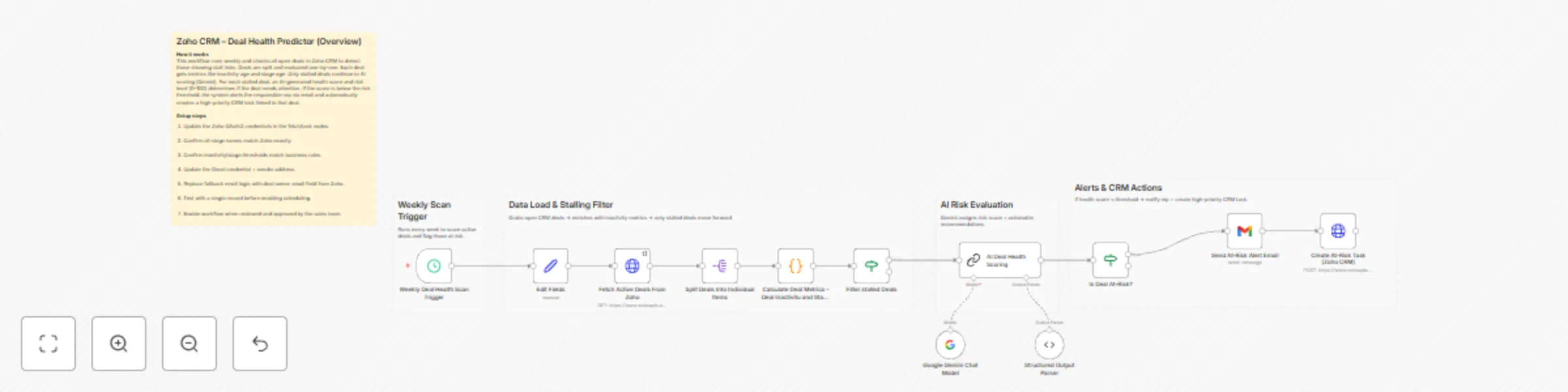
Zoho CRM – Deal Health Predictor with AI Scoring This n8n automation monitors open Zoho CRM Deals every week, identifies stalled opportunities, scores their health using Google Gemini AI and trigge...
n8n-nodes-base.httprequest, @n8n/n8n-nodes-langchain.lmchatgooglegemini, @n8n/n8n-nodes-langchain.outputparserstructured, n8n-nodes-base.if, n8n-nodes-base.scheduletrigger, n8n-nodes-base.splitout, n8n-nodes-base.code, @n8n/n8n-nodes-langchain.chainllm
This workflow is cataloged by N8N Workflows and links back to its original n8n.io source page by WeblineIndia.
Original n8n.io sourceThis n8n automation monitors open Zoho CRM Deals every week, identifies stalled opportunities, scores their health using Google Gemini AI and triggers sales intervention by emailing the deal owner and creating a high-priority task in Zoho CRM — before the deal goes cold.
This workflow dynamically analyzes every open sales deal retrieved from Zoho CRM. It calculates key metrics per deal such as inactivity duration, stage aging and deal age to understand whether the opportunity has stalled. Only deals with significant inactivity move forward to AI scoring.
Using Google Gemini, each deal receives a Health Score (0–100), along with a risk level, reasons and recommended next actions. If a deal is considered “At-Risk,” the system automatically:
It ensures timely sales intervention without needing manual checks.
| Requirement | Why |
|---|---|
| n8n instance (Self-hosted or Cloud) | Runs the workflow |
| Zoho CRM OAuth2 Credentials | Fetch deals + Create tasks |
| Gmail (or SMTP) credentials | Send alert emails |
| Google Gemini API access | AI scoring on deals |
| Deals must have Stage + Owner + Activity history | Ensures accurate scoring |
Last_Activity_TimeStageOwner.emailQualification, Negotiation, Proposal, etc.| Node | What You Can Customize | Example |
|---|---|---|
| Weekly Trigger | Change execution frequency | Daily scan |
| Fetch Deals | Include additional deal stages | Add “Value Proposition” |
| Filter Stalled Deals | Adjust inactivity threshold | > 15 days instead of 30 |
| AI Prompt | Add more data points | Probability to close |
| Email Alert | Modify message template | Localization |
| Task creation | Add reminder / follow-up info | Due date +1 day |
You can easily extend this workflow by adding:
This workflow is ideal for:
Many more scenarios are possible based on deal movement automation.
| Issue | Possible Cause | Fix / Solution |
|---|---|---|
| No deals processed | Stage filters too narrow | Update fetch URL stage list |
| Emails not sent | Gmail credentials missing or expired | Reconnect Gmail OAuth2 |
| Tasks not created | Zoho API permissions missing | Enable write permissions |
| Owner email missing | CRM field not mapped correctly | Update sendTo expression |
| Health score always null | Output parser mismatch | Check prompt & parser config |
| Workflow runs but no alerts sent | No stalled deals or score >= threshold | Temporarily lower threshold for testing |
If you would like expert help customizing this workflow or implementing additional automation like stage-based triggers, dashboards or integration with Slack/Teams, our n8n automation team at WeblineIndia can assist you.
This catalog entry is organized from the workflow JSON. The node-level section below shows the executable blocks available for review before importing the template.
| Workflow | Monitor and alert stalled deals in Zoho CRM with Gemini AI and Gmail |
|---|---|
| Complexity | advanced |
| Nodes | 17 |
| Categories | CRM, AI Summarization |
| Author | WeblineIndia |
| Published | 22 Dec 2025 |
Use the JSON export at /data/workflows/12025/12025.json as the source template for this automation.
Open n8n, import the downloaded JSON, and review each node before activating the workflow.
Replace placeholder credentials, API keys, webhook URLs, account IDs, and environment-specific values with your own settings.
Run the workflow manually or in a staging workspace, inspect node output, and confirm downstream systems receive the expected data.
Enable the workflow only after testing, then monitor executions, errors, and rate limits during the first production runs.
Review imported nodes carefully before activation. This catalog entry is intended to help you inspect the workflow structure, understand required services, and find related templates faster.
Node names, credentials, schedules, webhook paths, and external service limits may need adjustment for your workspace.
Zoho CRM – Deal Health Predictor with AI Scoring This n8n automation monitors open Zoho CRM Deals every week, identifies stalled opportunities, scores their health using Google Gemini AI and trigge...
Review the workflow JSON, configure any required credentials in n8n, and test the automation in a safe workspace before using it in production.
Yes. Use the block-by-block analysis and the downloadable JSON to inspect each node, then adjust credentials, prompts, schedules, filters, or destinations for your CRM, AI Summarization use case.