Migrate Pinecone index to Weaviate class with Airtable pagination

Workflow preview

Workflow preview
100%
Migrate Pinecone index to Weaviate class with Airtable pagination preview
Open on n8n.io

Important notice

This workflow is provided as-is. Please review and test before using in production.

1. Workflow Overview

Who’s it for This workflow is designed for developers, data engineers, and AI teams who need to migrate a Pinecone Cloud index into a Weaviate Cloud class index without recalculating the vectors (e...

Best for

  • Engineering automation workflows
  • AI RAG automation workflows
  • advanced n8n builders looking for reusable templates

Tools used

n8n-nodes-base.set, n8n-nodes-base.airtable, n8n-nodes-base.noop, n8n-nodes-base.stickynote, n8n-nodes-base.scheduletrigger, n8n-nodes-base.code, n8n-nodes-base.httprequest, n8n-nodes-base.if

Source and attribution

This workflow is cataloged by N8N Workflows and links back to its original n8n.io source page by Br1.

Original n8n.io source

1.1 Workflow description

Title
Migrate Pinecone index to Weaviate class with Airtable pagination
Workflow name
Migrate Pinecone index to Weaviate class with Airtable pagination

Who’s it for

This workflow is designed for developers, data engineers, and AI teams who need to migrate a Pinecone Cloud index into a Weaviate Cloud class index without recalculating the vectors (embeddings).
It’s especially useful if you are consolidating vector databases, moving from Pinecone to Weaviate for hybrid search, or preparing to deprecate Pinecone.
⚠️ Note: The dimensions of the two indexes must match.

How it works

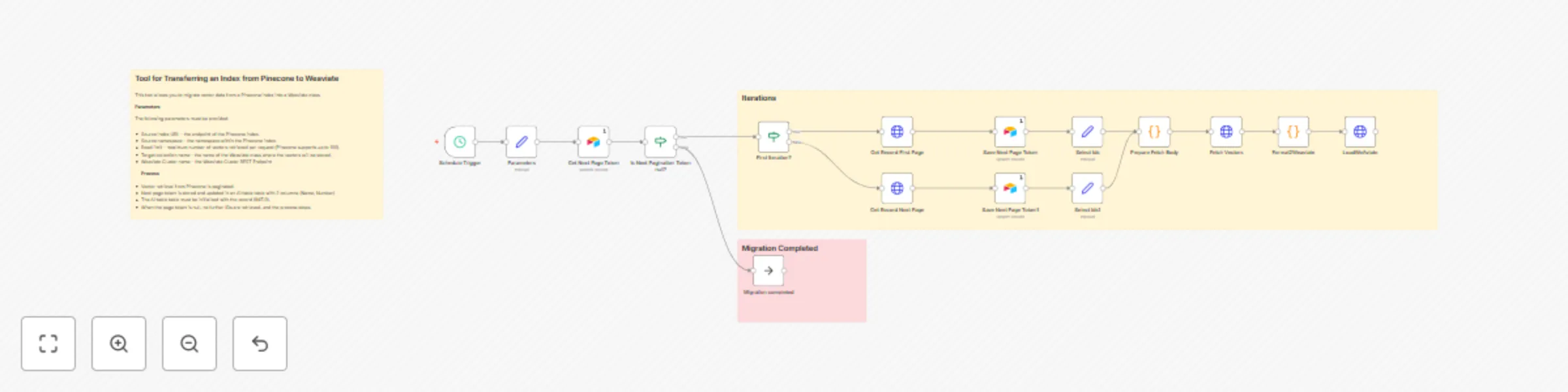
The workflow automates migration by batching, formatting, and transferring vectors along with their metadata:

  1. Initialization – Uses Airtable to store the pagination token. The token starts with a record initialized as INIT (Name=INIT, Number=0).
  2. Pagination handling – Reads batches of vector IDs from the Pinecone index using /vectors/list, resuming from the last stored token.
  3. Vector fetching – For each batch, retrieves embeddings and metadata fields from Pinecone via /vectors/fetch.
  4. Data transformation – Two Code nodes (Prepare Fetch Body and Format2Weaviate) are included to correctly structure the body of each HTTP request and map metadata into Weaviate-compatible objects.
  5. Data loading – Inserts embeddings and metadata into the target Weaviate class through its REST API.
  6. State persistence – Updates the pagination token in Airtable, ensuring the next run resumes from the correct point.
  7. Scheduling – The workflow runs on a defined schedule (e.g., every 15 seconds) until all data has been migrated.

How to set up

  1. Airtable setup

    • Create a Base (e.g., Cycle) and a Table (e.g., NextPage).
    • The table should have two columns:
      • Name (text) → stores the pagination token.
      • Number (number) → stores the row ID to update.
    • Initialize the first and only row with (INIT, 0).
  2. Source and target configuration

    • Make sure you have a Pinecone index and namespace with embeddings.
    • Manually create a target Weaviate Cluster and a target Weaviate Class with the same vector dimensions.
    • In the Parameters node of the workflow, configure the following values:
    Parameter Description Example Value
    pineconeIndex The name of your Pinecone index to read vectors from. my-index
    pineconeNamespace The namespace inside the Pinecone index (leave empty if unused). default
    batchlimit Number of records fetched per iteration. Higher = faster migration but heavier API calls. 100
    weaviateCluster REST endpoint of your Weaviate Cloud instance. https://dbbqrc9itXXXXXXXXX.c0.europe-west3.gcp.weaviate.cloud
    weaviateClass Target class name in Weaviate where objects will be inserted. MyClass
  3. Credentials

    • Configure Pinecone API credentials.
    • Configure Weaviate Bearer token.
    • Configure Airtable API key.
  4. Activate

    • Import the workflow into n8n, update the parameters, and start the schedule trigger.

Requirements

  • Pinecone Cloud account with a configured index and namespace.
  • Weaviate Cloud cluster with a class defined and matching vector dimensions.
  • Airtable account and base to store pagination state.
  • n8n instance with credentials for Pinecone, Weaviate, and Airtable.

How to customize the workflow

  • Adjust the batchlimit parameter to control performance (higher values = fewer API calls, but heavier requests).
  • Adapt the Format2Weaviate Code node if you want to change or expand the metadata stored.
  • Replace Airtable with another persistence store (e.g., Google Sheets, PostgreSQL) if preferred.
  • Extend the workflow to send migration progress updates via Slack, email, or another channel.

1.2 Logical Blocks

This catalog entry is organized from the workflow JSON. The node-level section below shows the executable blocks available for review before importing the template.

2. Block-by-Block Analysis

Block 1 - Parameters

Type / Role
n8n-nodes-base.set - set
Config choices
Version 3.4

Block 2 - Get Next Page Token

Type / Role
n8n-nodes-base.airtable - airtable
Config choices
Version 2.1

Block 3 - Migration completed

Type / Role
n8n-nodes-base.noOp - noOp
Config choices
Version 1

Block 4 - Sticky Note

Type / Role
n8n-nodes-base.stickyNote - stickyNote
Config choices
Version 1

Block 5 - Schedule Trigger

Type / Role
n8n-nodes-base.scheduleTrigger - scheduleTrigger
Config choices
Version 1.2

Block 6 - Sticky Note2

Type / Role
n8n-nodes-base.stickyNote - stickyNote
Config choices
Version 1

Block 7 - Sticky Note3

Type / Role
n8n-nodes-base.stickyNote - stickyNote
Config choices
Version 1

Block 8 - Save Next Page Token

Type / Role
n8n-nodes-base.airtable - airtable
Config choices
Version 2.1

Block 9 - Prepare Fetch Body

Type / Role
n8n-nodes-base.code - code
Config choices
Version 2

Block 10 - Fetch Vectors

Type / Role
n8n-nodes-base.httpRequest - httpRequest
Config choices
Version 4.2

Block 11 - Format2Weaviate

Type / Role
n8n-nodes-base.code - code
Config choices
Version 2

Block 12 - LoadWeAviate

Type / Role
n8n-nodes-base.httpRequest - httpRequest
Config choices
Version 4.2

Block 13 - First Iteration?

Type / Role
n8n-nodes-base.if - if
Config choices
Version 2.2

Block 14 - Get Record First Page

Type / Role
n8n-nodes-base.httpRequest - httpRequest
Config choices
Version 4.2

Block 15 - Get Record Next Page

Type / Role
n8n-nodes-base.httpRequest - httpRequest
Config choices
Version 4.2

Block 16 - Select Ids

Type / Role
n8n-nodes-base.set - set
Config choices
Version 3.4

Block 17 - Select Ids1

Type / Role
n8n-nodes-base.set - set
Config choices
Version 3.4

Block 18 - Save Next Page Token1

Type / Role
n8n-nodes-base.airtable - airtable
Config choices
Version 2.1

Block 19 - Is Next Pagination Token null?

Type / Role
n8n-nodes-base.if - if
Config choices
Version 2.2

3. Summary Table

Workflow Migrate Pinecone index to Weaviate class with Airtable pagination
Complexity advanced
Nodes 19
Categories Engineering, AI RAG
Author Br1
Published 10 Sept 2025

4. Reproducing the Workflow from Scratch

  1. 1. Download the workflow JSON

    Use the JSON export at /data/workflows/8445/8445.json as the source template for this automation.

  2. 2. Import the template into n8n

    Open n8n, import the downloaded JSON, and review each node before activating the workflow.

  3. 3. Configure credentials and variables

    Replace placeholder credentials, API keys, webhook URLs, account IDs, and environment-specific values with your own settings.

  4. 4. Test with sample data

    Run the workflow manually or in a staging workspace, inspect node output, and confirm downstream systems receive the expected data.

  5. 5. Activate and monitor

    Enable the workflow only after testing, then monitor executions, errors, and rate limits during the first production runs.

5. General Notes & Resources

Review imported nodes carefully before activation. This catalog entry is intended to help you inspect the workflow structure, understand required services, and find related templates faster.

Node names, credentials, schedules, webhook paths, and external service limits may need adjustment for your workspace.

Frequently asked questions

What does Migrate Pinecone index to Weaviate class with Airtable pagination do?

Who’s it for This workflow is designed for developers, data engineers, and AI teams who need to migrate a Pinecone Cloud index into a Weaviate Cloud class index without recalculating the vectors (e...

What do I need before importing this workflow?

Review the workflow JSON, configure any required credentials in n8n, and test the automation in a safe workspace before using it in production.

Can I customize this workflow?

Yes. Use the block-by-block analysis and the downloadable JSON to inspect each node, then adjust credentials, prompts, schedules, filters, or destinations for your Engineering, AI RAG use case.