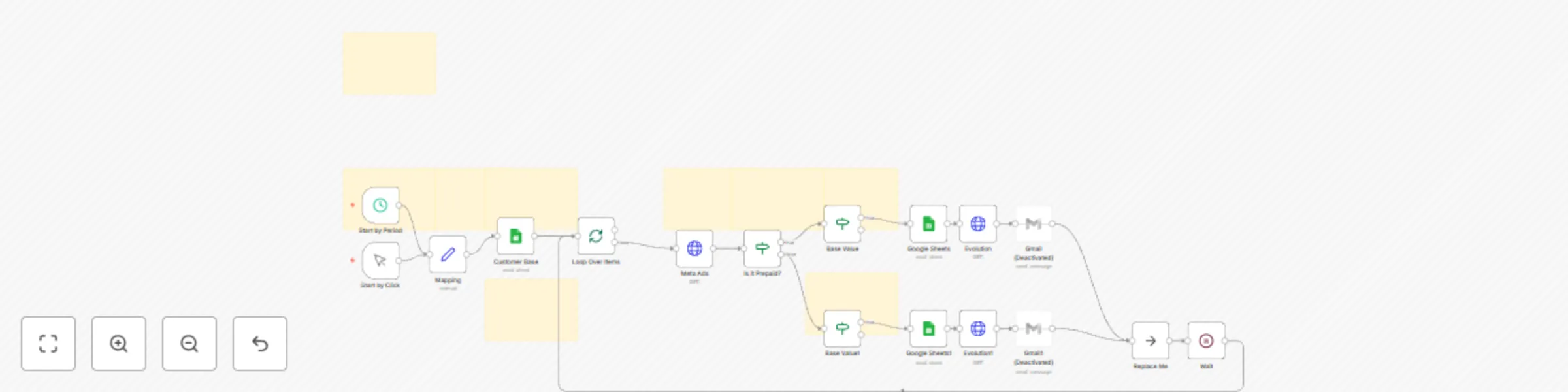
🔔 Meta Ads Low Balance Alert – Auto Notification via WhatsApp or Email

Workflow preview

Workflow preview
100%
🔔 Meta Ads Low Balance Alert – Auto Notification via WhatsApp or Email preview
Open on n8n.io

Important notice

This workflow is provided as-is. Please review and test before using in production.

1. Workflow Overview

Hello my loves! I’m Amanda... I created this workflow with care for marketing professionals and agencies who manage multiple Meta Ads (Facebook) accounts and want to track ad account balances autom...

Best for

  • Miscellaneous automation workflows
  • advanced n8n builders looking for reusable templates

Tools used

n8n-nodes-base.splitinbatches, n8n-nodes-base.noop, n8n-nodes-base.stickynote, n8n-nodes-base.httprequest, n8n-nodes-base.googlesheets, n8n-nodes-base.gmail, n8n-nodes-base.wait, n8n-nodes-base.scheduletrigger

Source and attribution

This workflow is cataloged by N8N Workflows and links back to its original n8n.io source page by Amanda Benks.

Original n8n.io source

1.1 Workflow description

Title
🔔 Meta Ads Low Balance Alert – Auto Notification via WhatsApp or Email
Workflow name
🔔 Meta Ads Low Balance Alert – Auto Notification via WhatsApp or Email

Hello my loves! I’m Amanda...

I created this workflow with care for marketing professionals and agencies who manage multiple Meta Ads (Facebook) accounts and want to track ad account balances automatically — no more logging in every day or risking campaigns stopping unexpectedly.

With this setup, n8n will check the balance of each account using the Meta API, compare it to a defined threshold, and if the balance is too low, it will automatically send a friendly alert via WhatsApp or email. It also logs everything neatly into a Google Sheet — so you always know where things stand.


✨ What this workflow does

  • 🧾 Pulls balance data from Meta Ads accounts using the Facebook Graph API
  • 📉 Compares current balance with the minimum threshold set in a Google Sheet
  • 🚨 Sends low-balance alerts via WhatsApp (Evolution API) or Gmail
  • 🧠 Customizes alerts depending on payment type: Boleto or Credit Card
  • 📊 Updates the Google Sheet with new balance, check date, and status
  • 📆 Can run automatically every day or manually whenever you want

🔧 What you’ll need

  1. A Google Sheet with your client accounts and minimum balance thresholds
    → Use this template: Google Sheet Example
  2. Access Token for Meta Ads API
  3. Evolution API (if you want to send alerts via WhatsApp)
  4. Gmail account connected to n8n (for email notifications)
  5. “Base Value” column filled out in the sheet for each account

✅ Works with:

  • n8n Cloud
  • n8n Self-hosted

🔐 Secure credentials managed directly in n8n — no exposed tokens.


Want to adapt this workflow to your business?

❤️ Buy Workflows: https://iloveflows.gumroad.com
☁️ Try n8n Cloud with my partner link: https://n8n.partnerlinks.io/amanda


Translation to Portuguese:

Olá meus amores! Eu sou a Amanda 🌟

Esse fluxo foi feito com muito cuidado para profissionais que gerenciam contas de anúncios no Meta Ads (Facebook) e precisam acompanhar de perto o saldo disponível, evitando pausas indesejadas nas campanhas.

Com ele, você automatiza todo o controle de saldo: o sistema busca os dados da conta via API do Facebook, calcula o valor restante, compara com o limite definido, envia alertas personalizados por WhatsApp ou e-mail e ainda atualiza tudo em uma planilha do Google Sheets — todos os dias, de forma segura e sem esforço.


✨ O que esse fluxo faz

  • 🔄 Busca automaticamente o saldo das contas via API do Meta Ads
  • 🧮 Verifica se o saldo está abaixo do valor base definido para cada conta
  • 🟨 Se estiver abaixo, envia alerta com mensagem personalizada para o cliente
  • 💌 Alerta pode ser enviado por WhatsApp (via Evolution API) ou Email (Gmail)
  • 📊 Atualiza a planilha do Google Sheets com o novo saldo e data da última checagem
  • 💳 Verifica se o método de pagamento da conta é boleto, PIX ou cartão e envia mensagens diferentes para cada caso
  • 📆 Funciona com agendamento automático diário ou execução manual

🛠️ O que você precisa

  1. Uma planilha no Google Sheets com os dados das contas (use este modelo)
  2. Conta de anúncios no Meta configurada com token de acesso válido
  3. API do Evolution (caso queira enviar alertas por WhatsApp)
  4. Gmail conectado no n8n (para envio de emails)
  5. Base Value (valor mínimo desejado) preenchido na planilha para cada conta

✅ Compatível com:

  • n8n Cloud
  • n8n Auto-hospedado

🔐 Segurança garantida com o uso de credenciais do próprio n8n.


Quer adaptar esse fluxo pro seu sistema?

❤️ Buy Workflows: https://iloveflows.gumroad.com
☁️ Use n8n Cloud com meu link parceiro: https://n8n.partnerlinks.io/amanda

1.2 Logical Blocks

This catalog entry is organized from the workflow JSON. The node-level section below shows the executable blocks available for review before importing the template.

2. Block-by-Block Analysis

Block 1 - Loop Over Items

Type / Role
n8n-nodes-base.splitInBatches - splitInBatches
Config choices
Version 3

Block 2 - Replace Me

Type / Role
n8n-nodes-base.noOp - noOp
Config choices
Version 1

Block 3 - Sticky Note

Type / Role
n8n-nodes-base.stickyNote - stickyNote
Config choices
Version 1

Block 4 - Sticky Note1

Type / Role
n8n-nodes-base.stickyNote - stickyNote
Config choices
Version 1

Block 5 - Meta Ads

Type / Role
n8n-nodes-base.httpRequest - httpRequest
Config choices
Version 4.2

Block 6 - Google Sheets1

Type / Role
n8n-nodes-base.googleSheets - googleSheets
Config choices
Version 4.5

Block 7 - Google Sheets

Type / Role
n8n-nodes-base.googleSheets - googleSheets
Config choices
Version 4.5

Block 8 - Gmail

Type / Role
n8n-nodes-base.gmail - gmail
Config choices
Version 2.1

Block 9 - Gmail1

Type / Role
n8n-nodes-base.gmail - gmail
Config choices
Version 2.1

Block 10 - Wait

Type / Role
n8n-nodes-base.wait - wait
Config choices
Version 1.1

Block 11 - Start by Period

Type / Role
n8n-nodes-base.scheduleTrigger - scheduleTrigger
Config choices
Version 1.2

Block 12 - Start by Click

Type / Role
n8n-nodes-base.manualTrigger - manualTrigger
Config choices
Version 1

Block 13 - Mapping

Type / Role
n8n-nodes-base.set - set
Config choices
Version 3.4

Block 14 - Sticky Note2

Type / Role
n8n-nodes-base.stickyNote - stickyNote
Config choices
Version 1

Block 15 - Sticky Note3

Type / Role
n8n-nodes-base.stickyNote - stickyNote
Config choices
Version 1

Block 16 - Sticky Note4

Type / Role
n8n-nodes-base.stickyNote - stickyNote
Config choices
Version 1

Block 17 - Sticky Note5

Type / Role
n8n-nodes-base.stickyNote - stickyNote
Config choices
Version 1

Block 18 - Sticky Note6

Type / Role
n8n-nodes-base.stickyNote - stickyNote
Config choices
Version 1

Block 19 - Is it Prepaid?

Type / Role
n8n-nodes-base.if - if
Config choices
Version 2.2

Block 20 - Sticky Note7

Type / Role
n8n-nodes-base.stickyNote - stickyNote
Config choices
Version 1

Block 21 - Base Value

Type / Role
n8n-nodes-base.if - if
Config choices
Version 2.2

Block 22 - Base Value1

Type / Role
n8n-nodes-base.if - if
Config choices
Version 2.2

Block 23 - Evolution

Type / Role
n8n-nodes-base.httpRequest - httpRequest
Config choices
Version 4.2

Block 24 - Evolution1

Type / Role
n8n-nodes-base.httpRequest - httpRequest
Config choices
Version 4.2

Showing the first 24 of 26 workflow blocks. Download the JSON for the full node graph.

3. Summary Table

Workflow 🔔 Meta Ads Low Balance Alert – Auto Notification via WhatsApp or Email
Complexity advanced
Nodes 26
Categories Miscellaneous
Author Amanda Benks
Published 24 Apr 2025

4. Reproducing the Workflow from Scratch

  1. 1. Download the workflow JSON

    Use the JSON export at /data/workflows/3695/3695.json as the source template for this automation.

  2. 2. Import the template into n8n

    Open n8n, import the downloaded JSON, and review each node before activating the workflow.

  3. 3. Configure credentials and variables

    Replace placeholder credentials, API keys, webhook URLs, account IDs, and environment-specific values with your own settings.

  4. 4. Test with sample data

    Run the workflow manually or in a staging workspace, inspect node output, and confirm downstream systems receive the expected data.

  5. 5. Activate and monitor

    Enable the workflow only after testing, then monitor executions, errors, and rate limits during the first production runs.

5. General Notes & Resources

Review imported nodes carefully before activation. This catalog entry is intended to help you inspect the workflow structure, understand required services, and find related templates faster.

Node names, credentials, schedules, webhook paths, and external service limits may need adjustment for your workspace.

Frequently asked questions

What does 🔔 Meta Ads Low Balance Alert – Auto Notification via WhatsApp or Email do?

Hello my loves! I’m Amanda... I created this workflow with care for marketing professionals and agencies who manage multiple Meta Ads (Facebook) accounts and want to track ad account balances autom...

What do I need before importing this workflow?

Review the workflow JSON, configure any required credentials in n8n, and test the automation in a safe workspace before using it in production.

Can I customize this workflow?

Yes. Use the block-by-block analysis and the downloadable JSON to inspect each node, then adjust credentials, prompts, schedules, filters, or destinations for your Miscellaneous use case.