Measure AI model carbon footprint with Ecologits.ai methodology

Workflow preview

Workflow preview
100%
Measure AI model carbon footprint with Ecologits.ai methodology preview
Open on n8n.io

Important notice

This workflow is provided as-is. Please review and test before using in production.

1. Workflow Overview

This template provides a straightforward technique to measure and raise awareness about the environmental impact of your AI automations. By adding a simple calculation step to your workflow, you ca...

Best for

  • AI Summarization automation workflows
  • Multimodal AI automation workflows
  • intermediate n8n builders looking for reusable templates

Tools used

n8n-nodes-base.manualtrigger, @n8n/n8n-nodes-langchain.chainllm, @n8n/n8n-nodes-langchain.lmchatopenai, n8n-nodes-base.set, n8n-nodes-base.stickynote

Source and attribution

This workflow is cataloged by N8N Workflows and links back to its original n8n.io source page by Guillaume Duvernay.

Original n8n.io source

1.1 Workflow description

Title
Measure AI model carbon footprint with Ecologits.ai methodology
Workflow name
Measure AI model carbon footprint with Ecologits.ai methodology

This template provides a straightforward technique to measure and raise awareness about the environmental impact of your AI automations.

By adding a simple calculation step to your workflow, you can estimate the carbon footprint (in grams of CO₂ equivalent) generated by each call to a Large Language Model.

Based on the open methodology from Ecologits.ai, this workflow empowers you to build more responsible AI applications. You can use the calculated footprint to inform your users, track your organization's impact, or simply be more mindful of the resources your workflows consume.

Who is this for?

  • Environmentally-conscious developers: Build AI-powered applications with an awareness of their ecological impact.
  • Businesses and organizations: Track and report on the carbon footprint of your AI usage as part of your sustainability goals.
  • Any n8n user using AI: A simple and powerful snippet that can be added to almost any AI workflow to make its invisible environmental costs visible.
  • Educators and advocates: Use this as a practical tool to demonstrate and discuss the real-world impact of AI technologies.

What problem does this solve?

  • Makes the abstract tangible: The environmental cost of a single AI call is often overlooked. This workflow translates it into a concrete, measurable number (grams of CO₂e).
  • Promotes responsible AI development: Encourages builders to consider the efficiency of their prompts and models by showing the direct impact of the generated output.
  • Provides a standardized starting point: Offers a simple, transparent, and extensible method for carbon accounting in your AI workflows, based on a credible, open-source methodology.
  • Facilitates transparent communication: Gives you the data needed to transparently communicate the impact of your AI features to stakeholders and users.

How it works

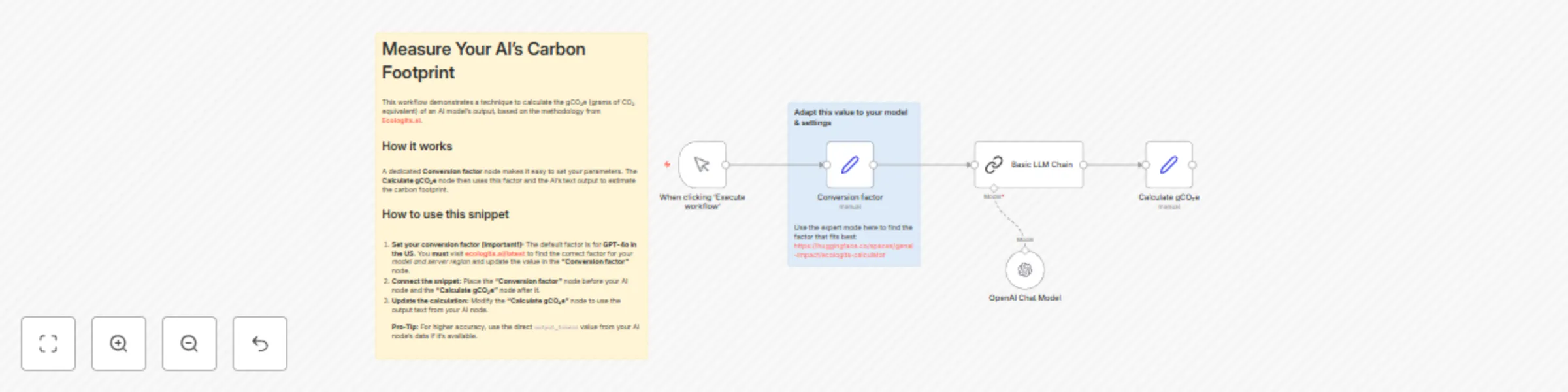
This template demonstrates a simple calculation snippet that you can adapt and add to your own workflows.

  1. Set conversion factor: A dedicated Conversion factor node at the beginning of the workflow holds the gCO₂e per token value. This makes it easy to configure.
  2. AI generates output: An AI node (in this example, a Basic LLM Chain) runs and produces a text output.
  3. Estimate token count: The Calculate gCO₂e node takes the character length of the AI's text output and divides it by 4. This provides a reasonable estimate of the number of tokens generated.
  4. Calculate carbon footprint: The estimated token count is then multiplied by the conversion factor defined in the first node. The result is the carbon footprint for that single AI call.

Setup

  1. Set your conversion factor (Critical Step):
    • The default factor (0.0612) is for GPT-4o hosted in the US.
    • Visit ecologits.ai/latest to find the specific conversion factor for your AI model and server region.
    • In the Conversion factor node, replace the default value with the correct factor.
  2. Integrate the snippet into your workflow:
    • Copy the Conversion factor and Calculate gCO₂e nodes from this template.
    • Place the Conversion factor node near the start of your workflow (before your AI node).
    • Place the Calculate gCO₂e node after your AI node.
  3. Link your AI output:
    • Click on the Calculate gCO₂e node.
    • In the AI output field, replace the expression with the output from your AI node (e.g., {{ $('My OpenAI Node').item.json.choices[0].message.content }}). The carbon calculation will now work with your data.
  4. Activate your workflow. The carbon footprint will now be calculated with each execution.

Taking it further

  • Improve accuracy with token counts: If your AI node (like the native OpenAI node) directly provides the number of output tokens (e.g., completion_tokens), use that number instead of estimating from the text length. This will give you a more precise calculation.
  • Calculate total workflow footprint: If you have multiple AI nodes, add a calculation step after each one. Then, add a final Set node at the end of your workflow to sum all the individual gCO₂e values.
  • Display the impact: Add the final AI output gCO₂e value to your workflow's results, whether it's a Slack message, an email, or a custom dashboard, to keep the environmental impact top-of-mind.
  • A note on AI agents: This estimation method is difficult to apply accurately to AI Agents at this time, as the token usage of their intermediary "thinking" steps is not yet exposed in the workflow data.

1.2 Logical Blocks

This catalog entry is organized from the workflow JSON. The node-level section below shows the executable blocks available for review before importing the template.

2. Block-by-Block Analysis

Block 1 - When clicking ‘Execute workflow’

Type / Role
n8n-nodes-base.manualTrigger - manualTrigger
Config choices
Version 1

Block 2 - Basic LLM Chain

Type / Role
@n8n/n8n-nodes-langchain.chainLlm - chainLlm
Config choices
Version 1.7

Block 3 - OpenAI Chat Model

Type / Role
@n8n/n8n-nodes-langchain.lmChatOpenAi - lmChatOpenAi
Config choices
Version 1.2

Block 4 - Calculate gCO₂e

Type / Role
n8n-nodes-base.set - set
Config choices
Version 3.4

Block 5 - Sticky Note

Type / Role
n8n-nodes-base.stickyNote - stickyNote
Config choices
Version 1

Block 6 - Conversion factor

Type / Role
n8n-nodes-base.set - set
Config choices
Version 3.4

Block 7 - Sticky Note1

Type / Role
n8n-nodes-base.stickyNote - stickyNote
Config choices
Version 1

3. Summary Table

Workflow Measure AI model carbon footprint with Ecologits.ai methodology
Complexity intermediate
Nodes 7
Categories AI Summarization, Multimodal AI
Author Guillaume Duvernay
Published 21 Aug 2025

4. Reproducing the Workflow from Scratch

  1. 1. Download the workflow JSON

    Use the JSON export at /data/workflows/7716/7716.json as the source template for this automation.

  2. 2. Import the template into n8n

    Open n8n, import the downloaded JSON, and review each node before activating the workflow.

  3. 3. Configure credentials and variables

    Replace placeholder credentials, API keys, webhook URLs, account IDs, and environment-specific values with your own settings.

  4. 4. Test with sample data

    Run the workflow manually or in a staging workspace, inspect node output, and confirm downstream systems receive the expected data.

  5. 5. Activate and monitor

    Enable the workflow only after testing, then monitor executions, errors, and rate limits during the first production runs.

5. General Notes & Resources

Review imported nodes carefully before activation. This catalog entry is intended to help you inspect the workflow structure, understand required services, and find related templates faster.

Node names, credentials, schedules, webhook paths, and external service limits may need adjustment for your workspace.

Frequently asked questions

What does Measure AI model carbon footprint with Ecologits.ai methodology do?

This template provides a straightforward technique to measure and raise awareness about the environmental impact of your AI automations. By adding a simple calculation step to your workflow, you ca...

What do I need before importing this workflow?

Review the workflow JSON, configure any required credentials in n8n, and test the automation in a safe workspace before using it in production.

Can I customize this workflow?

Yes. Use the block-by-block analysis and the downloadable JSON to inspect each node, then adjust credentials, prompts, schedules, filters, or destinations for your AI Summarization, Multimodal AI use case.