Block 1 - MCP Server Trigger
- Type / Role
- @n8n/n8n-nodes-langchain.mcpTrigger - mcpTrigger
- Config choices
- Version 1
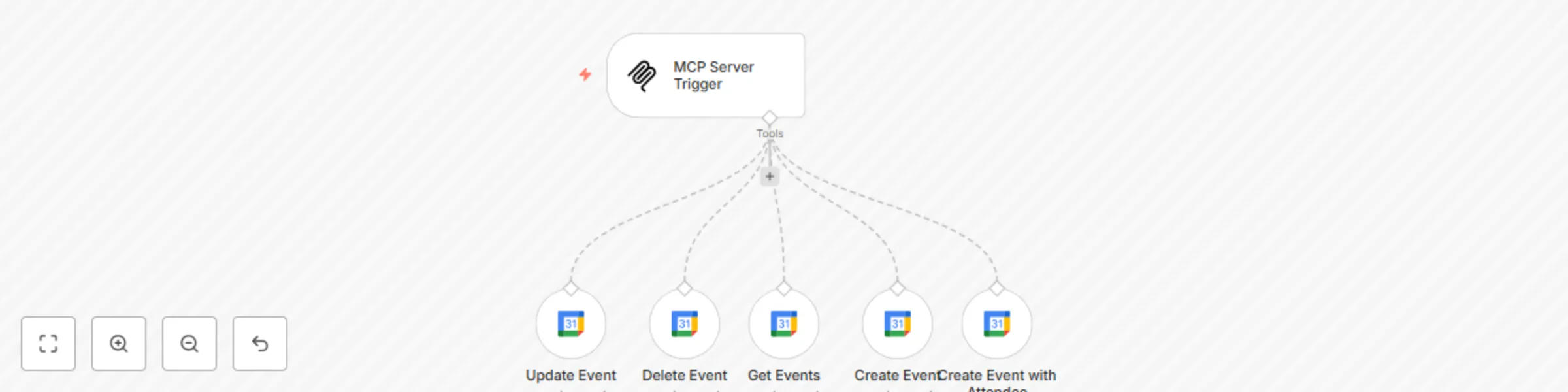


 Early Deal
This workflow is provided as-is. Please review and test before using in production.
Hi! I’m Amanda :) I created this sweet little workflow with lots of love and care, just for you who wants to manage your Google Calendar in a smart and gentle way This AI powered agent connec...
@n8n/n8n-nodes-langchain.mcptrigger, n8n-nodes-base.googlecalendartool
This workflow is cataloged by N8N Workflows and links back to its original n8n.io source page by Amanda Benks.
Original n8n.io sourceI created this sweet little workflow with lots of love and care, just for you who wants to manage your Google Calendar in a smart and gentle way 💌
This AI-powered agent connects with MCP (Multi-Channel Protocol) and understands natural language like “book a meeting tomorrow at 3pm”, “reschedule my call to Monday”, or “what events do I have on Wednesday?” — and it does everything quietly and beautifully in your calendar 🧸
POST /mcp/calendar This agent is perfect for therapists, consultants, coaches, small teams, or anyone who wants to keep their calendar flowing naturally and peacefully with a little help from AI 💆♀️🧠
. .
Esse fluxinho aqui foi feito com muito cuidado pra você que quer automatizar sua agenda do Google Calendar de forma inteligente, simples e com muito carinho 💌
Ele funciona como um agente que conversa com outro sistema de IA (via MCP) e consegue entender pedidos como “agende uma consulta amanhã às 15h”, “remarque a reunião para segunda”, ou “quais eventos tenho na quarta?” — tudo isso feito direto no seu calendário, sem você precisar abrir nada 🧸
mcp/calendar Esse agente é ideal pra psicólogos, consultores, times de atendimento, terapeutas — ou qualquer pessoa fofa que quer deixar sua agenda fluindo sozinha, com a ajuda de um toque de inteligência 💆♀️🧠
This catalog entry is organized from the workflow JSON. The node-level section below shows the executable blocks available for review before importing the template.
| Workflow | MCP AI agent Google Calendar - create, update & manage events |
|---|---|
| Complexity | intermediate |
| Nodes | 6 |
| Categories | Personal Productivity, AI Chatbot |
| Author | Amanda Benks |
| Published | 17 Apr 2025 |
Use the JSON export at /data/workflows/3589/3589.json as the source template for this automation.
Open n8n, import the downloaded JSON, and review each node before activating the workflow.
Replace placeholder credentials, API keys, webhook URLs, account IDs, and environment-specific values with your own settings.
Run the workflow manually or in a staging workspace, inspect node output, and confirm downstream systems receive the expected data.
Enable the workflow only after testing, then monitor executions, errors, and rate limits during the first production runs.
Review imported nodes carefully before activation. This catalog entry is intended to help you inspect the workflow structure, understand required services, and find related templates faster.
Node names, credentials, schedules, webhook paths, and external service limits may need adjustment for your workspace.
Hi! I’m Amanda :) I created this sweet little workflow with lots of love and care, just for you who wants to manage your Google Calendar in a smart and gentle way This AI powered agent connec...
Review the workflow JSON, configure any required credentials in n8n, and test the automation in a safe workspace before using it in production.
Yes. Use the block-by-block analysis and the downloadable JSON to inspect each node, then adjust credentials, prompts, schedules, filters, or destinations for your Personal Productivity, AI Chatbot use case.