Block 1 - Document Upload Webhook
- Type / Role
- n8n-nodes-base.webhook - webhook
- Config choices
- Version 2.1


 Early Deal
Overview This workflow implements a privacy preserving AI document processing pipeline that detects, masks, and securely manages Personally Identifiable Information (PII) before any AI processing o...
n8n-nodes-base.webhook, n8n-nodes-base.set, n8n-nodes-base.extractfromfile, n8n-nodes-base.code, @n8n/n8n-nodes-langchain.agent, @n8n/n8n-nodes-langchain.outputparserstructured, n8n-nodes-base.merge, n8n-nodes-base.postgres
This workflow is cataloged by N8N Workflows and links back to its original n8n.io source page by ResilNext.
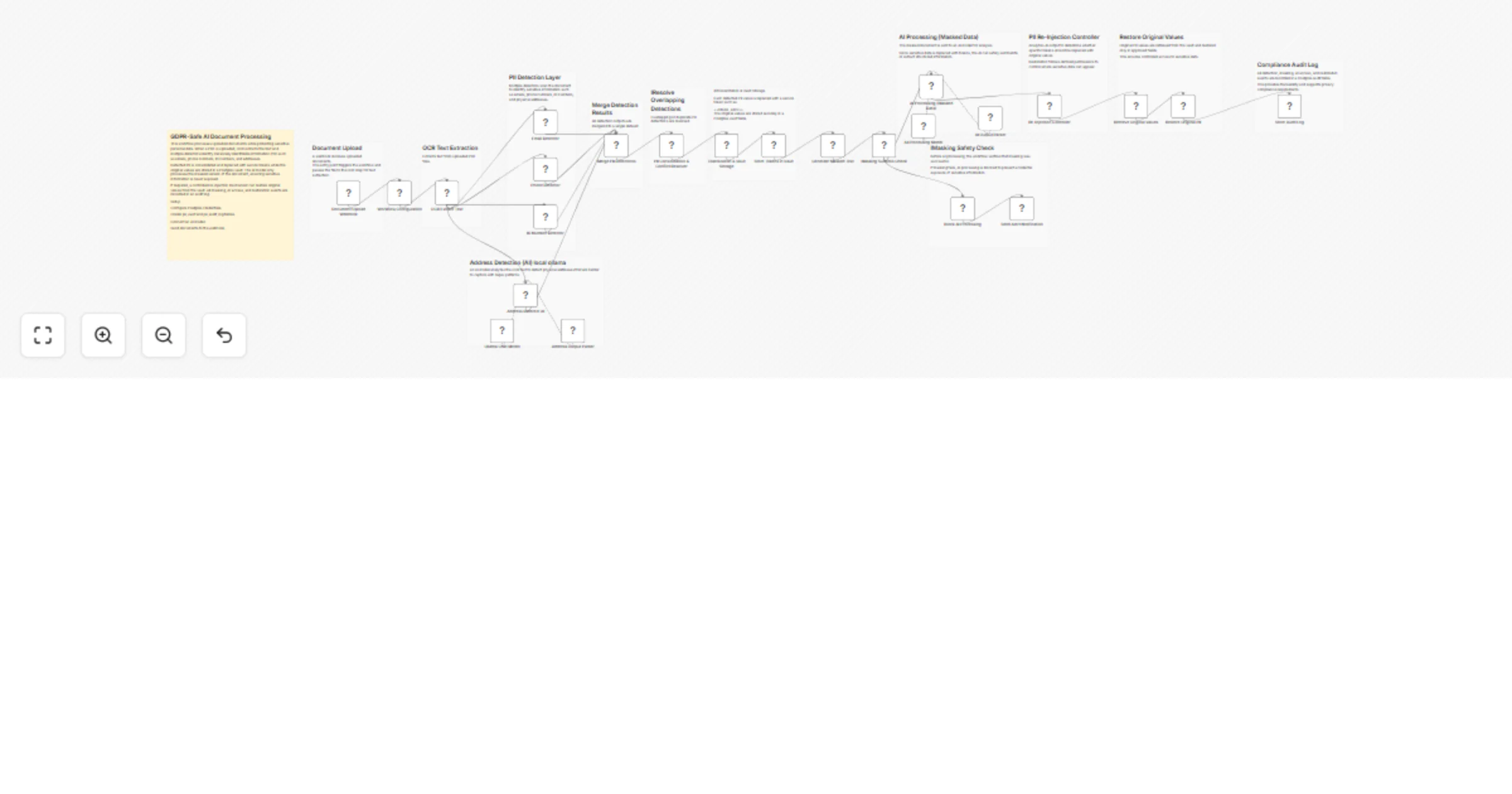
Original n8n.io sourceThis workflow implements a privacy-preserving AI document processing pipeline that detects, masks, and securely manages Personally Identifiable Information (PII) before any AI processing occurs.
Organizations often need to analyze documents such as invoices, forms, contracts, or reports using AI. However, sending documents containing personal data directly to AI models can create serious privacy, compliance, and security risks.
This workflow solves that problem by automatically detecting sensitive information, replacing it with secure tokens, and storing the original values in a protected vault database.
Only the masked version of the document is sent to the AI model for analysis. If required, a controlled PII re-injection mechanism can restore original values after processing.
The workflow also records all operations in an audit log, making it suitable for environments requiring strong compliance such as GDPR, financial services, healthcare, or enterprise document processing systems.
A webhook receives a document (typically a PDF) and triggers the workflow.
The OCR Extract node extracts the text content from the document so it can be analyzed for sensitive information.
Multiple detectors analyze the text to identify different types of sensitive data:
Each detection includes:
All detected PII results are merged into a single dataset. The workflow resolves overlapping detections and removes duplicates to produce a clean list of sensitive values.
Each detected PII value is replaced with a secure token, for example:
<<EMAIL_7F3A>>
<<PHONE_A12B>>
The original values are securely stored in a Postgres vault table.
This ensures sensitive data is never exposed to AI models.
The masked document is sent to an AI model for structured analysis.
Possible AI tasks include:
Since all sensitive data has been tokenized, the AI processes the document without seeing any real personal data.
After AI processing, the workflow can optionally restore original values from the vault.
The Re-Injection Controller determines which fields are allowed to restore PII based on defined permissions.
All events are recorded in an audit table, including:
This provides traceability and compliance reporting.
Create two tables in your database.
Example structure:
token
original_value
type
document_id
created_at
This table securely stores original PII values mapped to tokens.
Example structure:
document_id
pii_types_detected
token_count
ai_access_confirmed
re_injection_events
timestamp
actor
This table records workflow activity for compliance tracking.
This workflow supports multiple AI models:
Configure credentials in n8n before running the workflow.
The workflow starts when a document is sent to the webhook:
POST /webhook/gdpr-document-upload
Upload a PDF file to this endpoint to trigger processing.
Replace the placeholder alert webhook URL with your monitoring or alerting system.
Example use cases:
Alerts are triggered if masking fails.
This workflow is useful for many privacy-sensitive automation scenarios.
Safely process documents containing personal data without exposing PII to AI models.
Use AI to summarize or extract data from documents while maintaining privacy.
Automatically detect and tokenize sensitive data before sending documents to downstream systems.
Process invoices, contracts, and financial reports securely.
Analyze patient documents while ensuring sensitive data is protected.
To run this workflow you need:
Optional integrations:
This workflow creates a secure bridge between sensitive documents and AI systems.
By automatically detecting, masking, and securely storing personal data, it enables organizations to safely apply AI to document processing tasks without exposing sensitive information.
The combination of tokenization, secure vault storage, controlled re-injection, and audit logging makes this workflow suitable for privacy-sensitive industries and enterprise automation pipelines.
This catalog entry is organized from the workflow JSON. The node-level section below shows the executable blocks available for review before importing the template.
Showing the first 24 of 37 workflow blocks. Download the JSON for the full node graph.
| Workflow | Mask PII in documents for GDPR-safe AI processing with Postgres and Claude |
|---|---|
| Complexity | advanced |
| Nodes | 37 |
| Categories | Document Extraction, AI Summarization |
| Author | ResilNext |
| Published | 08 Mar 2026 |
Use the JSON export at /data/workflows/13941/13941.json as the source template for this automation.
Open n8n, import the downloaded JSON, and review each node before activating the workflow.
Replace placeholder credentials, API keys, webhook URLs, account IDs, and environment-specific values with your own settings.
Run the workflow manually or in a staging workspace, inspect node output, and confirm downstream systems receive the expected data.
Enable the workflow only after testing, then monitor executions, errors, and rate limits during the first production runs.
Review imported nodes carefully before activation. This catalog entry is intended to help you inspect the workflow structure, understand required services, and find related templates faster.
Node names, credentials, schedules, webhook paths, and external service limits may need adjustment for your workspace.
Overview This workflow implements a privacy preserving AI document processing pipeline that detects, masks, and securely manages Personally Identifiable Information (PII) before any AI processing o...
Review the workflow JSON, configure any required credentials in n8n, and test the automation in a safe workspace before using it in production.
Yes. Use the block-by-block analysis and the downloadable JSON to inspect each node, then adjust credentials, prompts, schedules, filters, or destinations for your Document Extraction, AI Summarization use case.