Manage invoices and contacts via chat with the Fakturoid AI agent

Workflow preview

Workflow preview
100%
Manage invoices and contacts via chat with the Fakturoid AI agent preview
Open on n8n.io

1. Workflow Overview

Overview Fakturoid AI Agent is an AI powered invoicing assistant for Czech freelancers and small businesses. It connects to Fakturoid — the most popular Czech invoicing platform — and lets you mana...

Best for

  • Invoice Processing automation workflows
  • AI Chatbot automation workflows
  • advanced n8n builders looking for reusable templates

Tools used

@n8n/n8n-nodes-langchain.memorybufferwindow, @n8n/n8n-nodes-langchain.toolworkflow, n8n-nodes-base.stickynote, @n8n/n8n-nodes-langchain.agent, @n8n/n8n-nodes-langchain.chattrigger, @n8n/n8n-nodes-langchain.lmchatopenai

Source and attribution

This workflow is cataloged by N8N Workflows and links back to its original n8n.io source page by Václav Čikl.

Original n8n.io source

1.1 Workflow description

Title
Manage invoices and contacts via chat with the Fakturoid AI agent
Workflow name
Manage invoices and contacts via chat with the Fakturoid AI agent

Overview

Fakturoid AI Agent is an AI-powered invoicing assistant for Czech freelancers and small businesses. It connects to Fakturoid — the most popular Czech invoicing platform — and lets you manage invoices and contacts through natural conversation. No switching tabs, no filling forms. Just chat in Czech and the agent handles the rest.

The agent understands context across the conversation. Tell it to create an invoice for a client you just looked up and it won't ask for their ID again — it already has it.


Key Features

  • Full invoice lifecycle: Create, search, update, delete, and mark invoices as paid
  • Contact management: Search, create, update and delete Fakturoid contacts
  • ARES integration: Auto-fill company details from the Czech business registry by IČO or name
  • Conversation context: Agent remembers entities across the conversation — no repeated lookups
  • Confirmation flow: Always confirms before creating, deleting or marking as paid
  • Lean interaction: Infers item names, quantities and prices from natural input — no unnecessary questions
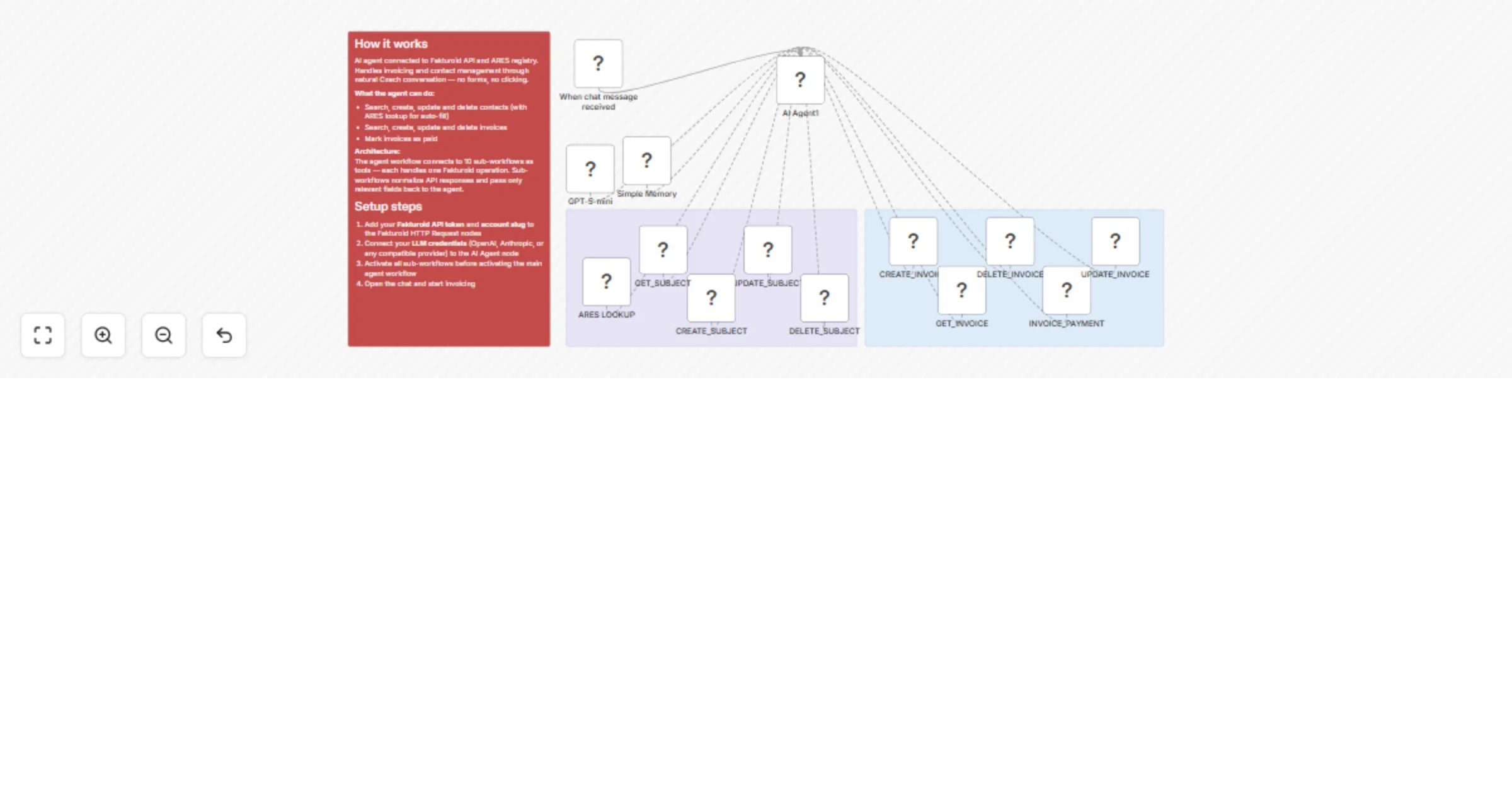
  • Modular architecture: 10 independent sub-workflows as tools, easy to extend or swap

Use Cases

  • Create invoices by describing what you did: "Faktura pro Alzu za 3h konzultace po 2500 Kč"
  • Look up unpaid invoices for a specific client
  • Update due dates or notes on existing invoices
  • Register new clients directly from ARES with one confirmation
  • Mark invoices as paid after receiving payment
  • Delete draft or duplicate invoices

Perfect For

  • Czech freelancers managing invoicing without an accountant
  • Small businesses looking to reduce time spent in Fakturoid UI
  • Developers building invoicing bots for Czech clients
  • Anyone already using Fakturoid who wants a conversational interface

What You'll Need

Tools - subflows

Required Credentials

  • Fakturoid API token — found in Fakturoid Settings → API
  • Fakturoid account slug — the subdomain part of your Fakturoid URL (e.g. yourname from app.fakturoid.cz/yourname)
  • LLM API key — OpenAI, Anthropic, or any provider supported by n8n AI Agent node

Requirements

  • Active Fakturoid account (any plan)
  • n8n instance with AI Agent node support

Technical Details

Architecture

  • 1 main agent workflow + 10 sub-workflows connected as tools
  • Each sub-workflow handles one Fakturoid API operation
  • Sub-workflows normalize API responses — only relevant fields are passed back to the agent
  • Response processing uses a consistent JS pattern across all tools

Tools

Tool Operation
ares_lookup Search Czech business registry
fakturoid_get_subject Search contacts
fakturoid_create_subject Create contact
fakturoid_update_subject Update contact
fakturoid_delete_subject Delete contact
fakturoid_get_invoice Search / list invoices
fakturoid_create_invoice Create invoice
fakturoid_update_invoice Update invoice
fakturoid_delete_invoice Delete invoice
fakturoid_invoice_payment Mark invoice as paid

Agent Behavior

  • System prompt written in English, agent communicates in Czech
  • Uses <thinking> blocks before write operations to verify correct entity IDs
  • Explicit rules to distinguish subject_id, invoice_id, and IČO — prevents cross-contamination
  • Confirmation required before: invoice creation, deletion, marking as paid

API

  • Fakturoid API v3
  • ARES API (Czech business registry, no key required)

Template Author

Questions or need help with setup? 📧 Email: [email protected] 💼 LinkedIn: https://www.linkedin.com/in/vaclavcikl/

1.2 Logical Blocks

This catalog entry is organized from the workflow JSON. The node-level section below shows the executable blocks available for review before importing the template.

2. Block-by-Block Analysis

Block 1 - Simple Memory

Type / Role
@n8n/n8n-nodes-langchain.memoryBufferWindow - memoryBufferWindow
Config choices
Version 1.3

Block 2 - INVOICE_PAYMENT

Type / Role
@n8n/n8n-nodes-langchain.toolWorkflow - toolWorkflow
Config choices
Version 2.2

Block 3 - UPDATE_SUBJECT

Type / Role
@n8n/n8n-nodes-langchain.toolWorkflow - toolWorkflow
Config choices
Version 2.2

Block 4 - CREATE_SUBJECT

Type / Role
@n8n/n8n-nodes-langchain.toolWorkflow - toolWorkflow
Config choices
Version 2.2

Block 5 - GET_SUBJECT

Type / Role
@n8n/n8n-nodes-langchain.toolWorkflow - toolWorkflow
Config choices
Version 2.2

Block 6 - ARES LOOKUP

Type / Role
@n8n/n8n-nodes-langchain.toolWorkflow - toolWorkflow
Config choices
Version 2.2

Block 7 - Sticky Note

Type / Role
n8n-nodes-base.stickyNote - stickyNote
Config choices
Version 1

Block 8 - CREATE_INVOICE

Type / Role
@n8n/n8n-nodes-langchain.toolWorkflow - toolWorkflow
Config choices
Version 2.2

Block 9 - GET_INVOICE

Type / Role
@n8n/n8n-nodes-langchain.toolWorkflow - toolWorkflow
Config choices
Version 2.2

Block 10 - DELETE_INVOICE

Type / Role
@n8n/n8n-nodes-langchain.toolWorkflow - toolWorkflow
Config choices
Version 2.2

Block 11 - Sticky Note1

Type / Role
n8n-nodes-base.stickyNote - stickyNote
Config choices
Version 1

Block 12 - UPDATE_INVOICE

Type / Role
@n8n/n8n-nodes-langchain.toolWorkflow - toolWorkflow
Config choices
Version 2.2

Block 13 - DELETE_SUBJECT

Type / Role
@n8n/n8n-nodes-langchain.toolWorkflow - toolWorkflow
Config choices
Version 2.2

Block 14 - AI Agent1

Type / Role
@n8n/n8n-nodes-langchain.agent - agent
Config choices
Version 3.1

Block 15 - When chat message received

Type / Role
@n8n/n8n-nodes-langchain.chatTrigger - chatTrigger
Config choices
Version 1.4

Block 16 - GPT-5-mini

Type / Role
@n8n/n8n-nodes-langchain.lmChatOpenAi - lmChatOpenAi
Config choices
Version 1

Block 17 - Sticky Note2

Type / Role
n8n-nodes-base.stickyNote - stickyNote
Config choices
Version 1

3. Summary Table

Workflow Manage invoices and contacts via chat with the Fakturoid AI agent
Complexity advanced
Nodes 17
Categories Invoice Processing, AI Chatbot
Author Václav Čikl
Published 10 Mar 2026

4. Reproducing the Workflow from Scratch

  1. 1. Download the workflow JSON

    Use the JSON export at /data/workflows/13987/13987.json as the source template for this automation.

  2. 2. Import the template into n8n

    Open n8n, import the downloaded JSON, and review each node before activating the workflow.

  3. 3. Configure credentials and variables

    Replace placeholder credentials, API keys, webhook URLs, account IDs, and environment-specific values with your own settings.

  4. 4. Test with sample data

    Run the workflow manually or in a staging workspace, inspect node output, and confirm downstream systems receive the expected data.

  5. 5. Activate and monitor

    Enable the workflow only after testing, then monitor executions, errors, and rate limits during the first production runs.

5. General Notes & Resources

Review imported nodes carefully before activation. This catalog entry is intended to help you inspect the workflow structure, understand required services, and find related templates faster.

Node names, credentials, schedules, webhook paths, and external service limits may need adjustment for your workspace.

Frequently asked questions

What does Manage invoices and contacts via chat with the Fakturoid AI agent do?

Overview Fakturoid AI Agent is an AI powered invoicing assistant for Czech freelancers and small businesses. It connects to Fakturoid — the most popular Czech invoicing platform — and lets you mana...

What do I need before importing this workflow?

Review the workflow JSON, configure any required credentials in n8n, and test the automation in a safe workspace before using it in production.

Can I customize this workflow?

Yes. Use the block-by-block analysis and the downloadable JSON to inspect each node, then adjust credentials, prompts, schedules, filters, or destinations for your Invoice Processing, AI Chatbot use case.