Block 1 - When chat message received
- Type / Role
- @n8n/n8n-nodes-langchain.chatTrigger - chatTrigger
- Config choices
- Version 1.1


 Early Deal
This workflow is provided as-is. Please review and test before using in production.
Who is this for? This workflow is ideal for individuals focused on nutrition tracking, meal planning, or diet optimization—whether you’re a health conscious individual, fitness coach, or developer ...
@n8n/n8n-nodes-langchain.chattrigger, @n8n/n8n-nodes-langchain.lmchatopenai, @n8n/n8n-nodes-langchain.outputparserstructured, n8n-nodes-base.telegram, @n8n/n8n-nodes-langchain.openai, n8n-nodes-base.limit, n8n-nodes-base.telegramtrigger, n8n-nodes-base.if
This workflow is cataloged by N8N Workflows and links back to its original n8n.io source page by PollupAI.
Original n8n.io sourceThis workflow is ideal for individuals focused on nutrition tracking, meal planning, or diet optimization—whether you’re a health-conscious individual, fitness coach, or developer working on a healthtech app. It also fits well for anyone who wants to capture their meal data via voice or text, without manually entering everything into a spreadsheet.
Manually logging meals and breaking down their nutritional content is time-consuming and often skipped. This workflow automates that process using Telegram for input, OpenAI for natural language understanding, and Google Sheets for structured tracking. It enables users to record meals by typing or sending voice messages, which are transcribed, analyzed for nutrients, and automatically stored for tracking and review.
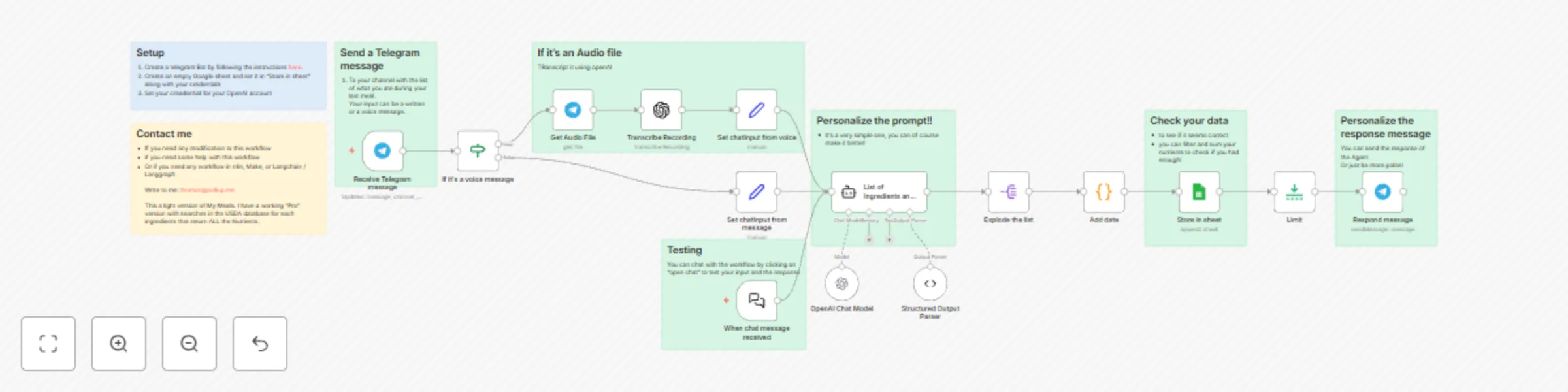
This n8n automation lets users send either a text or voice message to a Telegram bot describing their meal. The workflow then:
A testing interface also allows you to simulate prompts and view structured outputs for development or debugging.
• Enhance prompts in the OpenAI node to improve the structure and accuracy of responses. • Add new fields in the Google Sheet and corresponding logic in the parser if you want more detail. • Adjust the Telegram response to provide motivational feedback, dietary tips, or summaries. • Upgrade to the “Pro” version mentioned in the contact section for USDA database integration and complete nutrient breakdowns.
This is a lightweight, AI-powered meal logging automation that transforms voice or text into actionable nutrition data—perfect for making healthy eating easier and more data-driven.
See my other workflows here
This catalog entry is organized from the workflow JSON. The node-level section below shows the executable blocks available for review before importing the template.
| Workflow | Log meal nutrients from Telegram to Google Sheets using an AI agent |
|---|---|
| Complexity | advanced |
| Nodes | 23 |
| Categories | Personal Productivity, AI Summarization |
| Author | PollupAI |
| Published | 18 Apr 2025 |
Use the JSON export at /data/workflows/3599/3599.json as the source template for this automation.
Open n8n, import the downloaded JSON, and review each node before activating the workflow.
Replace placeholder credentials, API keys, webhook URLs, account IDs, and environment-specific values with your own settings.
Run the workflow manually or in a staging workspace, inspect node output, and confirm downstream systems receive the expected data.
Enable the workflow only after testing, then monitor executions, errors, and rate limits during the first production runs.
Review imported nodes carefully before activation. This catalog entry is intended to help you inspect the workflow structure, understand required services, and find related templates faster.
Node names, credentials, schedules, webhook paths, and external service limits may need adjustment for your workspace.
Who is this for? This workflow is ideal for individuals focused on nutrition tracking, meal planning, or diet optimization—whether you’re a health conscious individual, fitness coach, or developer ...
Review the workflow JSON, configure any required credentials in n8n, and test the automation in a safe workspace before using it in production.
Yes. Use the block-by-block analysis and the downloadable JSON to inspect each node, then adjust credentials, prompts, schedules, filters, or destinations for your Personal Productivity, AI Summarization use case.