Keyboard interest checker: GeekHack forum to Discord notifications

Workflow preview

Workflow preview
100%
Keyboard interest checker: GeekHack forum to Discord notifications preview
Open on n8n.io

Important notice

This workflow is provided as-is. Please review and test before using in production.

1. Workflow Overview

Geekhack Discord Updater How It Works This n8n workflow automatically monitors GeekHack forum RSS feeds every hour for new keyboard posts in Interest Checks and Group Buys sections. When it finds a...

Best for

  • Social Media automation workflows
  • advanced n8n builders looking for reusable templates

Tools used

n8n-nodes-base.scheduletrigger, n8n-nodes-base.rssfeedread, n8n-nodes-base.merge, n8n-nodes-base.code, n8n-nodes-base.postgres, n8n-nodes-base.splitinbatches, n8n-nodes-base.if, n8n-nodes-base.httprequest

Source and attribution

This workflow is cataloged by N8N Workflows and links back to its original n8n.io source page by Anurag Patil.

Original n8n.io source

1.1 Workflow description

Title
Keyboard interest checker: GeekHack forum to Discord notifications
Workflow name
Keyboard interest checker: GeekHack forum to Discord notifications

Geekhack Discord Updater

How It Works

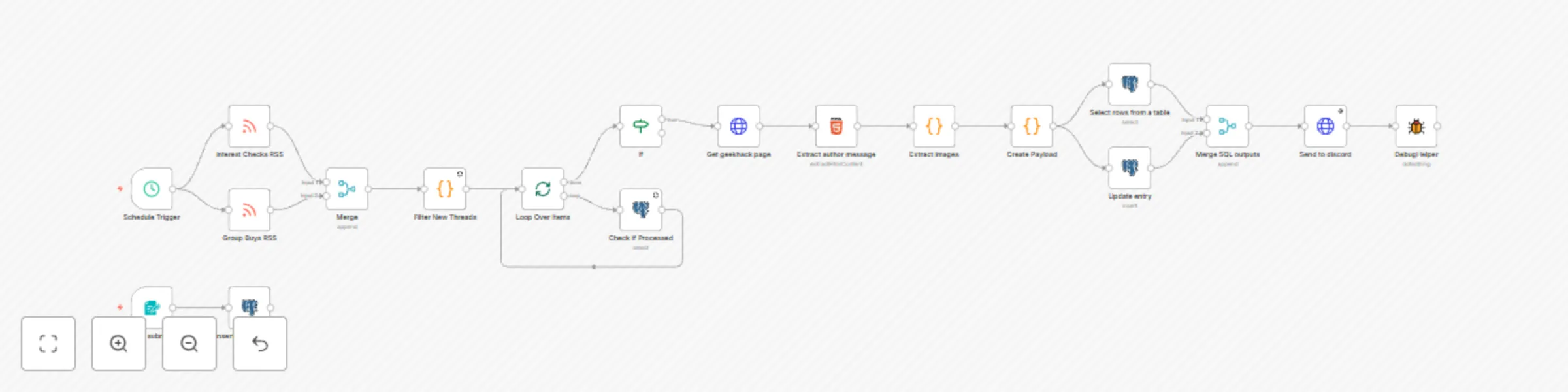
This n8n workflow automatically monitors GeekHack forum RSS feeds every hour for new keyboard posts in Interest Checks and Group Buys sections. When it finds a new thread (not replies), it:

  1. Monitors RSS Feeds: Checks two GeekHack RSS feeds for new posts (50 items each)
  2. Filters New Threads: Removes reply posts by checking for "Re:" prefix in titles
  3. Prevents Duplicates: Queries PostgreSQL database to skip already-processed threads
  4. Scrapes Content: Fetches the full thread page and extracts the original post
  5. Extracts Images: Uses regex to find all images in the post content
  6. Creates Discord Embed: Formats the post data into a rich Discord embed with up to 4 images
  7. Sends to Multiple Webhooks: Retrieves all webhook URLs from database and sends to each one
  8. Logs Processing: Records the thread as processed to prevent duplicates

The workflow includes a webhook management system with a web form to add/remove Discord webhooks dynamically, allowing you to send notifications to multiple Discord servers or channels.

Steps to Set Up

Prerequisites

  • n8n instance running
  • PostgreSQL database
  • Discord webhook URL(s)

1. Database Setup

Create PostgreSQL tables:

Processed threads table:

CREATE TABLE processed_threads (
    topic_id VARCHAR PRIMARY KEY,
    title TEXT,
    processed_at TIMESTAMP DEFAULT NOW()
);

Webhooks table:

CREATE TABLE webhooks (
    id SERIAL PRIMARY KEY,
    url TEXT NOT NULL,
    created_at TIMESTAMP DEFAULT NOW()
);

2. n8n Configuration

Import Workflow
  1. Copy the workflow JSON
  2. Go to n8n → Workflows → Import from JSON
  3. Paste the JSON and import
Configure Credentials
  1. PostgreSQL: Create new PostgreSQL credential with your database connection details
  2. All PostgreSQL nodes should use the same credential

3. Node Configuration

Schedule Trigger
  • Already configured for 1-hour intervals
  • Modify if different timing needed
PostgreSQL Nodes
  • Ensure all PostgreSQL nodes use your PostgreSQL credential:
    • "Check if Processed"
    • "Update entry"
    • "Insert rows in a table"
    • "Select rows from a table"
  • Database schema should be "public"
  • Table names: "processed_threads" and "webhooks"
RSS Feed Limits
  • Both RSS feeds are set to limit=50 items
  • Adjust if you need more/fewer items per check

4. Webhook Management

Adding Webhooks via Web Form
  1. The workflow creates a form trigger for adding webhooks
  2. Access the form URL from the "On form submission" node
  3. Submit Discord webhook URLs through the form
  4. Webhooks are automatically stored in the database
Manual Webhook Addition

Alternatively, insert webhooks directly into the database:

INSERT INTO webhooks (url) VALUES ('https://discord.com/api/webhooks/YOUR_WEBHOOK_URL');

5. Testing

Test the Main Workflow
  1. Ensure you have at least one webhook in the database
  2. Activate the workflow
  3. Use "Execute Workflow" to test manually
  4. Check Discord channels for test messages
Test Webhook Form
  1. Get the form URL from "On form submission" node
  2. Submit a test webhook URL
  3. Verify it appears in the webhooks table

6. Monitoring

  • Check execution history for errors
  • Monitor both database tables for entries
  • Verify all registered webhooks receive notifications
  • Adjust schedule timing if needed

7. Managing Webhooks

  • Use the web form to add new webhook URLs
  • Remove webhooks by deleting from the database:
    DELETE FROM webhooks WHERE url = 'webhook_url_to_remove';
    

The workflow will now automatically post new GeekHack threads to all registered Discord webhooks every hour, with the ability to dynamically manage webhook destinations through the web form interface.

1.2 Logical Blocks

This catalog entry is organized from the workflow JSON. The node-level section below shows the executable blocks available for review before importing the template.

2. Block-by-Block Analysis

Block 1 - Schedule Trigger

Type / Role
n8n-nodes-base.scheduleTrigger - scheduleTrigger
Config choices
Version 1.2

Block 2 - Interest Checks RSS

Type / Role
n8n-nodes-base.rssFeedRead - rssFeedRead
Config choices
Version 1.2

Block 3 - Group Buys RSS

Type / Role
n8n-nodes-base.rssFeedRead - rssFeedRead
Config choices
Version 1.2

Block 4 - Merge

Type / Role
n8n-nodes-base.merge - merge
Config choices
Version 3.2

Block 5 - Filter New Threads

Type / Role
n8n-nodes-base.code - code
Config choices
Version 2

Block 6 - Check if Processed

Type / Role
n8n-nodes-base.postgres - postgres
Config choices
Version 2.6

Block 7 - Update entry

Type / Role
n8n-nodes-base.postgres - postgres
Config choices
Version 2.6

Block 8 - Loop Over Items

Type / Role
n8n-nodes-base.splitInBatches - splitInBatches
Config choices
Version 3

Block 9 - If

Type / Role
n8n-nodes-base.if - if
Config choices
Version 2.2

Block 10 - Get geekhack page

Type / Role
n8n-nodes-base.httpRequest - httpRequest
Config choices
Version 4.2

Block 11 - Extract images

Type / Role
n8n-nodes-base.code - code
Config choices
Version 2

Block 12 - Extract author message

Type / Role
n8n-nodes-base.html - html
Config choices
Version 1.2

Block 13 - Create Payload

Type / Role
n8n-nodes-base.code - code
Config choices
Version 2

Block 14 - Insert rows in a table

Type / Role
n8n-nodes-base.postgres - postgres
Config choices
Version 2.6

Block 15 - On form submission

Type / Role
n8n-nodes-base.formTrigger - formTrigger
Config choices
Version 2.3

Block 16 - Select rows from a table

Type / Role
n8n-nodes-base.postgres - postgres
Config choices
Version 2.6

Block 17 - Send to discord

Type / Role
n8n-nodes-base.httpRequest - httpRequest
Config choices
Version 4.2

Block 18 - DebugHelper

Type / Role
n8n-nodes-base.debugHelper - debugHelper
Config choices
Version 1

Block 19 - Merge SQL outputs

Type / Role
n8n-nodes-base.merge - merge
Config choices
Version 3.2

3. Summary Table

Workflow Keyboard interest checker: GeekHack forum to Discord notifications
Complexity advanced
Nodes 19
Categories Social Media
Author Anurag Patil
Published 30 Aug 2025

4. Reproducing the Workflow from Scratch

  1. 1. Download the workflow JSON

    Use the JSON export at /data/workflows/8045/8045.json as the source template for this automation.

  2. 2. Import the template into n8n

    Open n8n, import the downloaded JSON, and review each node before activating the workflow.

  3. 3. Configure credentials and variables

    Replace placeholder credentials, API keys, webhook URLs, account IDs, and environment-specific values with your own settings.

  4. 4. Test with sample data

    Run the workflow manually or in a staging workspace, inspect node output, and confirm downstream systems receive the expected data.

  5. 5. Activate and monitor

    Enable the workflow only after testing, then monitor executions, errors, and rate limits during the first production runs.

5. General Notes & Resources

Review imported nodes carefully before activation. This catalog entry is intended to help you inspect the workflow structure, understand required services, and find related templates faster.

Node names, credentials, schedules, webhook paths, and external service limits may need adjustment for your workspace.

Frequently asked questions

What does Keyboard interest checker: GeekHack forum to Discord notifications do?

Geekhack Discord Updater How It Works This n8n workflow automatically monitors GeekHack forum RSS feeds every hour for new keyboard posts in Interest Checks and Group Buys sections. When it finds a...

What do I need before importing this workflow?

Review the workflow JSON, configure any required credentials in n8n, and test the automation in a safe workspace before using it in production.

Can I customize this workflow?

Yes. Use the block-by-block analysis and the downloadable JSON to inspect each node, then adjust credentials, prompts, schedules, filters, or destinations for your Social Media use case.