IP geolocation & HTTP port scanning with Google Sheets

Workflow preview

Workflow preview
100%
IP geolocation & HTTP port scanning with Google Sheets preview
Open on n8n.io

Important notice

This workflow is provided as-is. Please review and test before using in production.

1. Workflow Overview

Automate IP geolocation and HTTP port scanning with Google Sheets trigger This n8n template automatically enriches IP addresses with geolocation data and performs HTTP port scanning when new IPs ar...

Best for

  • SecOps automation workflows
  • intermediate n8n builders looking for reusable templates

Tools used

n8n-nodes-base.googlesheetstrigger, n8n-nodes-base.googlesheets, n8n-nodes-base.splitout, n8n-nodes-base.set, n8n-nodes-base.httprequest, n8n-nodes-base.code, n8n-nodes-base.stickynote

Source and attribution

This workflow is cataloged by N8N Workflows and links back to its original n8n.io source page by IranServer.com.

Original n8n.io source

1.1 Workflow description

Title
IP geolocation & HTTP port scanning with Google Sheets
Workflow name
IP geolocation & HTTP port scanning with Google Sheets

Automate IP geolocation and HTTP port scanning with Google Sheets trigger

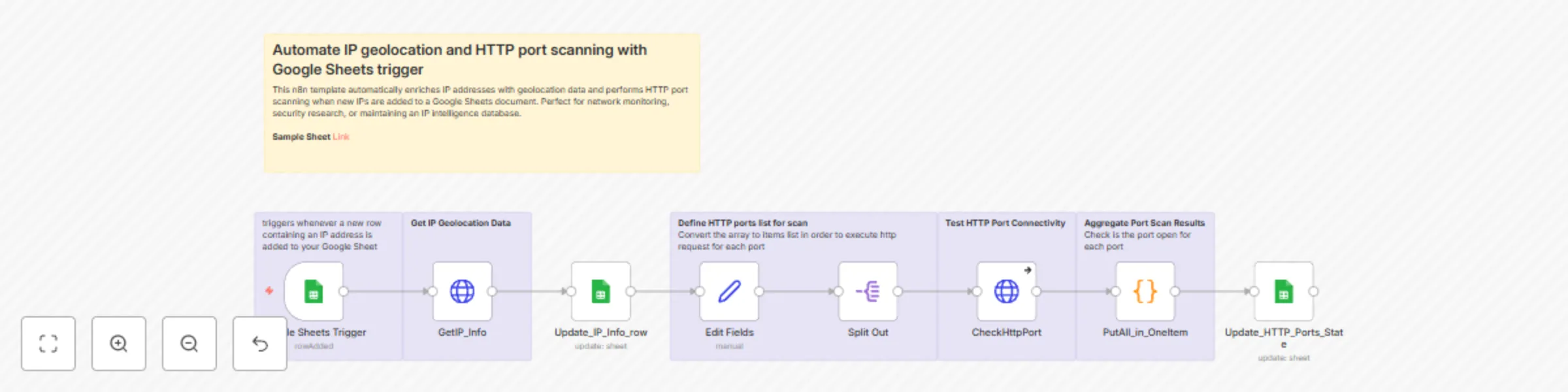
This n8n template automatically enriches IP addresses with geolocation data and performs HTTP port scanning when new IPs are added to a Google Sheets document. Perfect for network monitoring, security research, or maintaining an IP intelligence database.

Who's it for

Network administrators, security researchers, and IT professionals who need to:

  • Track IP geolocation information automatically
  • Monitor HTTP service availability across multiple ports
  • Maintain centralized IP intelligence in spreadsheets
  • Automate repetitive network reconnaissance tasks

How it works

The workflow triggers whenever a new row containing an IP address is added to your Google Sheet. It then:

  1. Fetches geolocation data using the ip-api.com service to get country, city, coordinates, ISP, and organization information
  2. Updates the spreadsheet with the geolocation details
  3. Scans common HTTP ports (80, 443, 8080, 8000, 3000) to check service availability
  4. Records port status back to the same spreadsheet row, showing which services are accessible

The workflow handles both successful connections and various error conditions, providing a comprehensive view of each IP's network profile.

Requirements

  • Google Sheets API access - for reading triggers and updating data
  • Google Sheets document with at least an "IP" column header

How to set up

  1. Create a Google Sheet with columns: IP, Country, City, Lat, Lon, ISP, Org, Port_80, Port_443, Port_8000, Port_8080, Port_3000
  2. Configure Google Sheets credentials in both the trigger and update nodes
  3. Update the document ID in the Google Sheets Trigger and both Update nodes to point to your spreadsheet
  4. Test the workflow by adding an IP address to your sheet and verifying the automation runs

How to customize the workflow

  • Modify port list: Edit the "Edit Fields" node to scan different ports by changing the ports array
  • Add more geolocation fields: The ip-api.com response includes additional fields like timezone, zip code, and AS number
  • Change trigger frequency: Adjust the polling interval in the Google Sheets Trigger for faster or slower monitoring
  • Add notifications: Insert Slack, email, or webhook nodes to alert when specific conditions are detected
  • Filter results: Add IF nodes to process only certain IP ranges or geolocation criteria

1.2 Logical Blocks

This catalog entry is organized from the workflow JSON. The node-level section below shows the executable blocks available for review before importing the template.

2. Block-by-Block Analysis

Block 1 - Google Sheets Trigger

Type / Role
n8n-nodes-base.googleSheetsTrigger - googleSheetsTrigger
Config choices
Version 1

Block 2 - Update_IP_Info_row

Type / Role
n8n-nodes-base.googleSheets - googleSheets
Config choices
Version 4.7

Block 3 - Split Out

Type / Role
n8n-nodes-base.splitOut - splitOut
Config choices
Version 1

Block 4 - Edit Fields

Type / Role
n8n-nodes-base.set - set
Config choices
Version 3.4

Block 5 - Update_HTTP_Ports_State

Type / Role
n8n-nodes-base.googleSheets - googleSheets
Config choices
Version 4.7

Block 6 - CheckHttpPort

Type / Role
n8n-nodes-base.httpRequest - httpRequest
Config choices
Version 4.2

Block 7 - PutAll_in_OneItem

Type / Role
n8n-nodes-base.code - code
Config choices
Version 2

Block 8 - Sticky Note

Type / Role
n8n-nodes-base.stickyNote - stickyNote
Config choices
Version 1

Block 9 - Sticky Note1

Type / Role
n8n-nodes-base.stickyNote - stickyNote
Config choices
Version 1

Block 10 - Sticky Note2

Type / Role
n8n-nodes-base.stickyNote - stickyNote
Config choices
Version 1

Block 11 - Sticky Note3

Type / Role
n8n-nodes-base.stickyNote - stickyNote
Config choices
Version 1

Block 12 - Sticky Note4

Type / Role
n8n-nodes-base.stickyNote - stickyNote
Config choices
Version 1

Block 13 - Sticky Note5

Type / Role
n8n-nodes-base.stickyNote - stickyNote
Config choices
Version 1

Block 14 - GetIP_Info

Type / Role
n8n-nodes-base.httpRequest - httpRequest
Config choices
Version 4.2

3. Summary Table

Workflow IP geolocation & HTTP port scanning with Google Sheets
Complexity intermediate
Nodes 14
Categories SecOps
Author IranServer.com
Published 17 Sept 2025

4. Reproducing the Workflow from Scratch

  1. 1. Download the workflow JSON

    Use the JSON export at /data/workflows/8674/8674.json as the source template for this automation.

  2. 2. Import the template into n8n

    Open n8n, import the downloaded JSON, and review each node before activating the workflow.

  3. 3. Configure credentials and variables

    Replace placeholder credentials, API keys, webhook URLs, account IDs, and environment-specific values with your own settings.

  4. 4. Test with sample data

    Run the workflow manually or in a staging workspace, inspect node output, and confirm downstream systems receive the expected data.

  5. 5. Activate and monitor

    Enable the workflow only after testing, then monitor executions, errors, and rate limits during the first production runs.

5. General Notes & Resources

Review imported nodes carefully before activation. This catalog entry is intended to help you inspect the workflow structure, understand required services, and find related templates faster.

Node names, credentials, schedules, webhook paths, and external service limits may need adjustment for your workspace.

Frequently asked questions

What does IP geolocation & HTTP port scanning with Google Sheets do?

Automate IP geolocation and HTTP port scanning with Google Sheets trigger This n8n template automatically enriches IP addresses with geolocation data and performs HTTP port scanning when new IPs ar...

What do I need before importing this workflow?

Review the workflow JSON, configure any required credentials in n8n, and test the automation in a safe workspace before using it in production.

Can I customize this workflow?

Yes. Use the block-by-block analysis and the downloadable JSON to inspect each node, then adjust credentials, prompts, schedules, filters, or destinations for your SecOps use case.