Block 1 - Sticky Note
- Type / Role
- n8n-nodes-base.stickyNote - stickyNote
- Config choices
- Version 1


 Early Deal
This workflow is provided as-is. Please review and test before using in production.
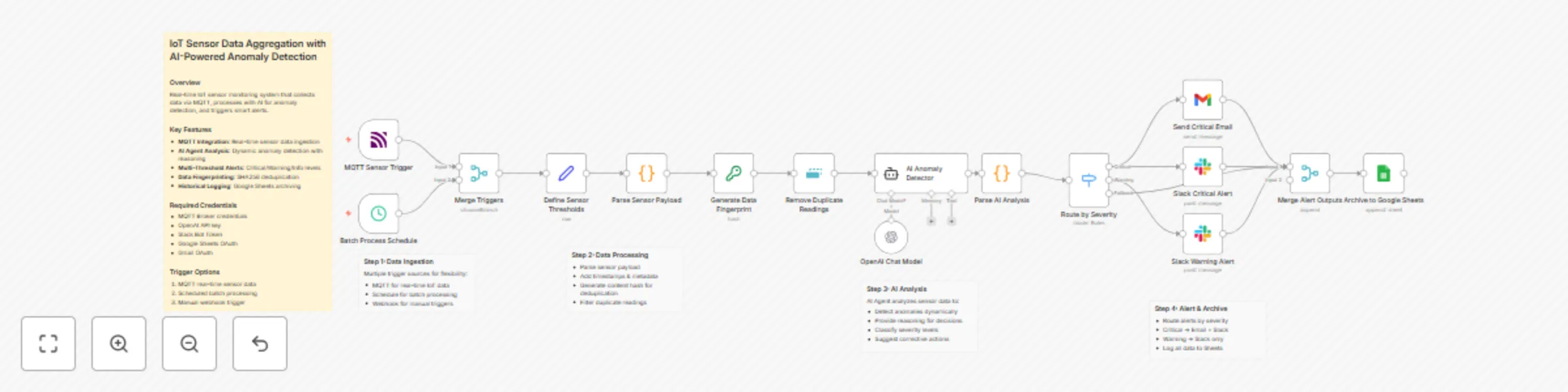
{ "name": "IoT Sensor Data Aggregation with AI Powered Anomaly Detection", "nodes": [ { "parameters": { "content": " How it works\nThis workflow monitors IoT sensors in real time. It ingests data v...
n8n-nodes-base.stickynote, n8n-nodes-base.mqtttrigger, n8n-nodes-base.scheduletrigger, n8n-nodes-base.merge, n8n-nodes-base.set, n8n-nodes-base.code, n8n-nodes-base.crypto, n8n-nodes-base.removeduplicates
This workflow is cataloged by N8N Workflows and links back to its original n8n.io source page by TOMOMITSU ASANO.
Original n8n.io source{
"name": "IoT Sensor Data Aggregation with AI-Powered Anomaly Detection",
"nodes": [
{
"parameters": {
"content": "## How it works\nThis workflow monitors IoT sensors in real-time. It ingests data via MQTT or a schedule, normalizes the format, and removes duplicates using data fingerprinting. An AI Agent then analyzes readings against defined thresholds to detect anomalies. Finally, it routes alerts to Slack or Email based on severity and logs everything to Google Sheets.\n\n## Setup steps\n1. Configure the MQTT Trigger with your broker details.\n2. Set your specific limits in the Define Sensor Thresholds node.\n3. Connect your OpenAI credential to the Chat Model node.\n4. Authenticate the Gmail, Slack, and Google Sheets nodes.\n5. Create a Google Sheet with headers: timestamp, sensorId, location, readings, analysis.",
"height": 484,
"width": 360
},
"id": "298da7ff-0e47-4b6c-85f5-2ce77275cdf3",
"name": "Main Overview",
"type": "n8n-nodes-base.stickyNote",
"typeVersion": 1,
"position": [
-2352,
-480
]
},
{
"parameters": {
"content": "## 1. Data Ingestion\nCaptures sensor data via MQTT for real-time streams or runs on a schedule for batch processing. Both streams are merged for unified handling.",
"height": 488,
"width": 412,
"color": 7
},
"id": "4794b396-cd71-429c-bcef-61780a55d707",
"name": "Section: Ingestion",
"type": "n8n-nodes-base.stickyNote",
"typeVersion": 1,
"position": [
-1822,
-48
]
},
{
"parameters": {
"content": "## 2. Normalization & Deduplication\nSets monitoring thresholds, standardizes the JSON structure, creates a content hash, and filters out duplicate readings to prevent redundant API calls.",
"height": 316,
"width": 884,
"color": 7
},
"id": "339e7cb7-491e-44c9-b561-983e147237d8",
"name": "Section: Processing",
"type": "n8n-nodes-base.stickyNote",
"typeVersion": 1,
"position": [
-1376,
32
]
},
{
"parameters": {
"content": "## 3. AI Anomaly Detection\nAn AI Agent evaluates sensor data against thresholds to identify anomalies, assigning severity levels and providing actionable recommendations.",
"height": 528,
"width": 460,
"color": 7
},
"id": "ebcb7ca3-f70c-4a90-8a2a-f489e7be4c73",
"name": "Section: AI Analysis",
"type": "n8n-nodes-base.stickyNote",
"typeVersion": 1,
"position": [
-422,
24
]
},
{
"parameters": {
"content": "## 4. Routing & Archiving\nRoutes alerts based on severity (Critical = Email+Slack, Warning = Slack) and archives all data points to Google Sheets for historical analysis.",
"height": 756,
"width": 900,
"color": 7
},
"id": "7f2b32a5-d3b2-4fea-844f-4b39b8e8a239",
"name": "Section: Alerting",
"type": "n8n-nodes-base.stickyNote",
"typeVersion": 1,
"position": [
94,
-196
]
},
{
"parameters": {
"topics": "sensors/+/data",
"options": {}
},
"id": "bc86720b-9de9-4693-b090-343d3ebad3a3",
"name": "MQTT Sensor Trigger",
"type": "n8n-nodes-base.mqttTrigger",
"typeVersion": 1,
"position": [
-1760,
88
]
},
{
"parameters": {
"rule": {
"interval": [
{
"field": "minutes",
"minutesInterval": 15
}
]
}
},
"id": "1c38f2d0-aa00-447e-bdae-bffd08c38461",
"name": "Batch Process Schedule",
"type": "n8n-nodes-base.scheduleTrigger",
"typeVersion": 1.2,
"position": [
-1760,
280
]
},
{
"parameters": {
"mode": "chooseBranch"
},
"id": "f9b41822-ee61-448b-b324-38483036e0e1",
"name": "Merge Triggers",
"type": "n8n-nodes-base.merge",
"typeVersion": 3,
"position": [
-1536,
184
]
},
{
"parameters": {
"mode": "raw",
"jsonOutput": "{\n "thresholds": {\n "temperature": {"min": -10, "max": 50, "unit": "C"},\n "humidity": {"min": 20, "max": 90, "unit": "%"},\n "pressure": {"min": 950, "max": 1050, "unit": "hPa"},\n "co2": {"min": 400, "max": 2000, "unit": "ppm"}\n },\n "alertConfig": {\n "criticalChannel": "#iot-critical",\n "warningChannel": "#iot-alerts",\n "emailRecipients": "[email protected]"\n }\n}",
"options": {}
},
"id": "308705a8-edc7-4435-9250-487aa528e033",
"name": "Define Sensor Thresholds",
"type": "n8n-nodes-base.set",
"typeVersion": 3.4,
"position": [
-1312,
184
]
},
{
"parameters": {
"jsCode": "const items = $input.all();\nconst thresholds = $('Define Sensor Thresholds').first().json.thresholds;\nconst results = [];\n\nfor (const item of items) {\n let sensorData;\n try {\n sensorData = typeof item.json.message === 'string' \n ? JSON.parse(item.json.message) \n : item.json;\n } catch (e) {\n sensorData = item.json;\n }\n \n const now = new Date();\n const reading = {\n sensorId: sensorData.sensorId || sensorData.topic?.split('/')[1] || 'unknown',\n location: sensorData.location || 'Main Facility',\n timestamp: now.toISOString(),\n readings: {\n temperature: sensorData.temperature ?? null,\n humidity: sensorData.humidity ?? null,\n pressure: sensorData.pressure ?? null,\n co2: sensorData.co2 ?? null\n },\n metadata: {\n receivedAt: now.toISOString(),\n source: item.json.topic || 'batch',\n thresholds: thresholds\n }\n };\n \n results.push({ json: reading });\n}\n\nreturn results;"
},
"id": "a2008189-5ace-418b-b0db-d51d63dcf2d8",
"name": "Parse Sensor Payload",
"type": "n8n-nodes-base.code",
"typeVersion": 2,
"position": [
-1088,
184
]
},
{
"parameters": {
"type": "SHA256",
"value": "={{ $json.sensorId + '-' + $json.timestamp + '-' + JSON.stringify($json.readings) }}",
"dataPropertyName": "dataHash"
},
"id": "bf8db555-a10e-4468-a44a-cdc4c97e5b80",
"name": "Generate Data Fingerprint",
"type": "n8n-nodes-base.crypto",
"typeVersion": 1,
"position": [
-864,
184
]
},
{
"parameters": {
"compare": "selectedFields",
"fieldsToCompare": "dataHash",
"options": {}
},
"id": "a45405e2-d211-449d-84d7-4538eaf56fcd",
"name": "Remove Duplicate Readings",
"type": "n8n-nodes-base.removeDuplicates",
"typeVersion": 1,
"position": [
-640,
184
]
},
{
"parameters": {
"text": "=Analyze this IoT sensor reading and determine if there are any anomalies:\n\nSensor ID: {{ $json.sensorId }}\nLocation: {{ $json.location }}\nTimestamp: {{ $json.timestamp }}\n\nReadings:\n- Temperature: {{ $json.readings.temperature }}°C (Normal: {{ $json.metadata.thresholds.temperature.min }} to {{ $json.metadata.thresholds.temperature.max }})\n- Humidity: {{ $json.readings.humidity }}% (Normal: {{ $json.metadata.thresholds.humidity.min }} to {{ $json.metadata.thresholds.humidity.max }})\n- CO2: {{ $json.readings.co2 }} ppm (Normal: {{ $json.metadata.thresholds.co2.min }} to {{ $json.metadata.thresholds.co2.max }})\n\nProvide your analysis in this exact JSON format:\n{\n "hasAnomaly": true/false,\n "severity": "critical"/"warning"/"normal",\n "anomalies": ["list of detected issues"],\n "reasoning": "explanation of your analysis",\n "recommendation": "suggested action"\n}",
"options": {
"systemMessage": "You are an IoT monitoring expert. Analyze sensor data and detect anomalies based on the provided thresholds. Be precise and provide actionable recommendations. Always respond in valid JSON format."
}
},
"id": "b60194ba-7b99-44e0-b0d7-9f1632dce4d4",
"name": "AI Anomaly Detector",
"type": "@n8n/n8n-nodes-langchain.agent",
"typeVersion": 1.7,
"position": [
-416,
184
]
},
{
"parameters": {
"jsCode": "const item = $input.first();\nconst originalData = $('Remove Duplicate Readings').first().json;\n\nlet aiAnalysis;\ntry {\n const responseText = item.json.output || item.json.text || '';\n const jsonMatch = responseText.match(/\{[\s\S]\}/);\n aiAnalysis = jsonMatch ? JSON.parse(jsonMatch[0]) : {\n hasAnomaly: false,\n severity: 'normal',\n anomalies: [],\n reasoning: 'Unable to parse AI response',\n recommendation: 'Manual review required'\n };\n} catch (e) {\n aiAnalysis = {\n hasAnomaly: false,\n severity: 'normal',\n anomalies: [],\n reasoning: 'Parse error: ' + e.message,\n recommendation: 'Manual review required'\n };\n}\n\nreturn [{\n json: {\n ...originalData,\n analysis: aiAnalysis,\n alertLevel: aiAnalysis.severity,\n requiresAlert: aiAnalysis.hasAnomaly && aiAnalysis.severity !== 'normal'\n }\n}];"
},
"id": "a145a8c7-538c-411a-95c6-9485acdcb969",
"name": "Parse AI Analysis",
"type": "n8n-nodes-base.code",
"typeVersion": 2,
"position": [
-64,
184
]
},
{
"parameters": {
"rules": {
"values": [
{
"conditions": {
"options": {
"caseSensitive": true,
"typeValidation": "strict"
},
"combinator": "and",
"conditions": [
{
"id": "critical",
"operator": {
"type": "string",
"operation": "equals"
},
"leftValue": "={{ $json.alertLevel }}",
"rightValue": "critical"
}
]
},
"renameOutput": true,
"outputKey": "Critical"
},
{
"conditions": {
"options": {
"caseSensitive": true,
"typeValidation": "strict"
},
"combinator": "and",
"conditions": [
{
"id": "warning",
"operator": {
"type": "string",
"operation": "equals"
},
"leftValue": "={{ $json.alertLevel }}",
"rightValue": "warning"
}
]
},
"renameOutput": true,
"outputKey": "Warning"
}
]
},
"options": {
"fallbackOutput": "extra"
}
},
"id": "1ab9785d-9f7f-4840-b1e9-0afc62b00b12",
"name": "Route by Severity",
"type": "n8n-nodes-base.switch",
"typeVersion": 3.2,
"position": [
160,
168
]
},
{
"parameters": {
"sendTo": "={{ $('Define Sensor Thresholds').first().json.alertConfig.emailRecipients }}",
"subject": "=CRITICAL IoT Alert: {{ $json.sensorId }} - {{ $json.analysis.anomalies[0] || 'Anomaly Detected' }}",
"message": "=CRITICAL IoT SENSOR ALERT\n\nSensor: {{ $json.sensorId }}\nLocation: {{ $json.location }}\nTime: {{ $json.timestamp }}\n\nReadings:\n- Temperature: {{ $json.readings.temperature }}°C\n- Humidity: {{ $json.readings.humidity }}%\n- CO2: {{ $json.readings.co2 }} ppm\n\nAI Analysis:\n{{ $json.analysis.reasoning }}\n\nDetected Issues:\n{{ $json.analysis.anomalies.join('\n- ') }}\n\nRecommendation:\n{{ $json.analysis.recommendation }}",
"options": {}
},
"id": "28201a6c-10b5-4387-be89-10a57c634622",
"name": "Send Critical Email",
"type": "n8n-nodes-base.gmail",
"typeVersion": 2.1,
"position": [
384,
-80
],
"webhookId": "35b9f8fa-4a50-456e-b552-9fd20a25ccc5"
},
{
"parameters": {
"select": "channel",
"channelId": {
"__rl": true,
"mode": "name",
"value": "#iot-critical"
},
"text": "=🚨 CRITICAL IoT ALERT\n\nSensor:* {{ $json.sensorId }}\nLocation: {{ $json.location }}\n\nReadings:\n• Temperature: {{ $json.readings.temperature }}°C\n• Humidity: {{ $json.readings.humidity }}%\n• CO2: {{ $json.readings.co2 }} ppm\n\nAI Analysis: {{ $json.analysis.reasoning }}\nRecommendation: {{ $json.analysis.recommendation }}",
"otherOptions": {}
},
"id": "c5a297be-ccef-40ba-9178-65805262efba",
"name": "Slack Critical Alert",
"type": "n8n-nodes-base.slack",
"typeVersion": 2.2,
"position": [
384,
112
],
"webhookId": "19113595-0208-4b37-b68c-c9788c19f618"
},
{
"parameters": {
"select": "channel",
"channelId": {
"__rl": true,
"mode": "name",
"value": "#iot-alerts"
},
"text": "=⚠️ IoT Warning\n\nSensor: {{ $json.sensorId }} | Location: {{ $json.location }}\nIssue: {{ $json.analysis.anomalies[0] || 'Threshold approaching' }}\nRecommendation: {{ $json.analysis.recommendation }}",
"otherOptions": {}
},
"id": "5c3d7acf-0211-44dd-9f4b-a43d3796abb1",
"name": "Slack Warning Alert",
"type": "n8n-nodes-base.slack",
"typeVersion": 2.2,
"position": [
384,
400
],
"webhookId": "37abfb19-f82f-4449-bd69-a65635b99606"
},
{
"parameters": {},
"id": "6bcbb42f-ec14-4f00-a091-babcc2d2d5c4",
"name": "Merge Alert Outputs",
"type": "n8n-nodes-base.merge",
"typeVersion": 3,
"position": [
608,
184
]
},
{
"parameters": {
"operation": "append",
"documentId": {
"__rl": true,
"mode": "list",
"value": ""
},
"sheetName": {
"__rl": true,
"mode": "list",
"value": ""
}
},
"id": "6243aa23-408d-4928-a512-811eeb3b5f9e",
"name": "Archive to Google Sheets",
"type": "n8n-nodes-base.googleSheets",
"typeVersion": 4.5,
"position": [
832,
184
]
},
{
"parameters": {
"model": "gpt-4o-mini",
"options": {
"temperature": 0.3
}
},
"id": "61081e8a-ebc9-465f-8beb-88af225e59f2",
"name": "OpenAI Chat Model",
"type": "@n8n/n8n-nodes-langchain.lmChatOpenAi",
"typeVersion": 1.2,
"position": [
-344,
408
]
}
],
"pinData": {},
"connections": {
"MQTT Sensor Trigger": {
"main": [
[
{
"node": "Merge Triggers",
"type": "main",
"index": 0
}
]
]
},
"Batch Process Schedule": {
"main": [
[
{
"node": "Merge Triggers",
"type": "main",
"index": 1
}
]
]
},
"Merge Triggers": {
"main": [
[
{
"node": "Define Sensor Thresholds",
"type": "main",
"index": 0
}
]
]
},
"Define Sensor Thresholds": {
"main": [
[
{
"node": "Parse Sensor Payload",
"type": "main",
"index": 0
}
]
]
},
"Parse Sensor Payload": {
"main": [
[
{
"node": "Generate Data Fingerprint",
"type": "main",
"index": 0
}
]
]
},
"Generate Data Fingerprint": {
"main": [
[
{
"node": "Remove Duplicate Readings",
"type": "main",
"index": 0
}
]
]
},
"Remove Duplicate Readings": {
"main": [
[
{
"node": "AI Anomaly Detector",
"type": "main",
"index": 0
}
]
]
},
"AI Anomaly Detector": {
"main": [
[
{
"node": "Parse AI Analysis",
"type": "main",
"index": 0
}
]
]
},
"Parse AI Analysis": {
"main": [
[
{
"node": "Route by Severity",
"type": "main",
"index": 0
}
]
]
},
"Route by Severity": {
"main": [
[
{
"node": "Send Critical Email",
"type": "main",
"index": 0
},
{
"node": "Slack Critical Alert",
"type": "main",
"index": 0
}
],
[
{
"node": "Slack Warning Alert",
"type": "main",
"index": 0
}
],
[
{
"node": "Merge Alert Outputs",
"type": "main",
"index": 0
}
]
]
},
"Send Critical Email": {
"main": [
[
{
"node": "Merge Alert Outputs",
"type": "main",
"index": 0
}
]
]
},
"Slack Critical Alert": {
"main": [
[
{
"node": "Merge Alert Outputs",
"type": "main",
"index": 0
}
]
]
},
"Slack Warning Alert": {
"main": [
[
{
"node": "Merge Alert Outputs",
"type": "main",
"index": 0
}
]
]
},
"Merge Alert Outputs": {
"main": [
[
{
"node": "Archive to Google Sheets",
"type": "main",
"index": 0
}
]
]
},
"OpenAI Chat Model": {
"ai_languageModel": [
[
{
"node": "AI Anomaly Detector",
"type": "ai_languageModel",
"index": 0
}
]
]
}
},
"active": false,
"settings": {
"executionOrder": "v1"
},
"versionId": "",
"meta": {
"instanceId": "15d6057a37b8367f33882dd60593ee5f6cc0c59310ff1dc66b626d726083b48d"
},
"tags": []
}
This catalog entry is organized from the workflow JSON. The node-level section below shows the executable blocks available for review before importing the template.
| Workflow | IoT sensor monitoring with GPT-4o anomaly detection, MQTT & multi-channel alerts |
|---|---|
| Complexity | advanced |
| Nodes | 21 |
| Categories | Engineering, AI Summarization |
| Author | TOMOMITSU ASANO |
| Published | 18 Dec 2025 |
Use the JSON export at /data/workflows/11909/11909.json as the source template for this automation.
Open n8n, import the downloaded JSON, and review each node before activating the workflow.
Replace placeholder credentials, API keys, webhook URLs, account IDs, and environment-specific values with your own settings.
Run the workflow manually or in a staging workspace, inspect node output, and confirm downstream systems receive the expected data.
Enable the workflow only after testing, then monitor executions, errors, and rate limits during the first production runs.
Review imported nodes carefully before activation. This catalog entry is intended to help you inspect the workflow structure, understand required services, and find related templates faster.
Node names, credentials, schedules, webhook paths, and external service limits may need adjustment for your workspace.
{ "name": "IoT Sensor Data Aggregation with AI Powered Anomaly Detection", "nodes": [ { "parameters": { "content": " How it works\nThis workflow monitors IoT sensors in real time. It ingests data v...
Review the workflow JSON, configure any required credentials in n8n, and test the automation in a safe workspace before using it in production.
Yes. Use the block-by-block analysis and the downloadable JSON to inspect each node, then adjust credentials, prompts, schedules, filters, or destinations for your Engineering, AI Summarization use case.