T

TOMOMITSU ASANO

3
Workflows

Workflows by TOMOMITSU ASANO

Workflow preview: Automate invoice processing with GPT-4o classification and XML export to accounting
Free advanced

Automate invoice processing with GPT-4o classification and XML export to accounting

# Intelligent Invoice Processing with AI Classification and XML Export ## Summary Automated invoice processing pipeline that extracts data from PDF invoices, uses AI Agent for intelligent expense categorization, generates XML for accounting systems, and routes high-value invoices for approval. ## Detailed Description A comprehensive accounts payable automation workflow that monitors for new PDF invoices, extracts text content, uses AI to classify expenses and detect anomalies, converts to XML format for accounting system integration, and implements approval workflows for high-value or unusual invoices. ### Key Features - **PDF Text Extraction**: Extract from File node parses invoice PDFs automatically - **AI-Powered Classification**: AI Agent categorizes expenses, suggests GL codes, detects anomalies - **XML Export**: Convert structured data to accounting-compatible XML format - **Approval Workflow**: Route invoices over $5,000 or low confidence for human review - **Multi-Trigger Support**: Google Drive monitoring or manual webhook upload - **Comprehensive Logging**: Archive all processed invoices to Google Sheets ### Use Cases - Accounts payable automation - Expense report processing - Vendor invoice management - Financial document digitization - Audit trail generation ### Required Credentials - Google Drive OAuth (for PDF source folder) - OpenAI API key - Slack Bot Token - Gmail OAuth - Google Sheets OAuth ### Node Count: 24 (19 functional + 5 sticky notes) ### Unique Aspects - Uses **Extract from File** node for PDF text extraction (rarely used) - Uses **XML** node for JSON to XML conversion (very rare) - Uses **AI Agent** node for intelligent classification - Uses **Google Drive Trigger** for file monitoring - Implements **approval workflow** with conditional routing - **Webhook response** mode for API integration ### Workflow Architecture ``` [Google Drive Trigger] [Manual Webhook] | | +----------+-----------+ | v [Filter PDF Files] | v [Download Invoice PDF] | v [Extract PDF Text] | v [Parse Invoice Data] (Code) | v [AI Invoice Classifier] <-- [OpenAI Chat Model] | v [Parse AI Classification] | v [Convert to XML] | v [Format XML Output] | v [Needs Approval?] (If) / \ Yes (>$5000) No (Auto) | | [Email Approval] [Slack Notify] | | +------+-------+ | v [Archive to Google Sheets] | v [Respond to Webhook] ``` ### Configuration Guide 1. **Google Drive**: Set folder ID to monitor in Drive Trigger node 2. **Approval Threshold**: Default $5,000, adjust in "Needs Approval?" node 3. **Email Recipients**: Configure [email protected] 4. **Slack Channel**: Set #finance-notifications for updates 5. **GL Codes**: AI suggests codes; customize in AI prompt if needed 6. **Google Sheets**: Configure document for invoice archive

T
TOMOMITSU ASANO
Invoice Processing
18 Dec 2025
249
0
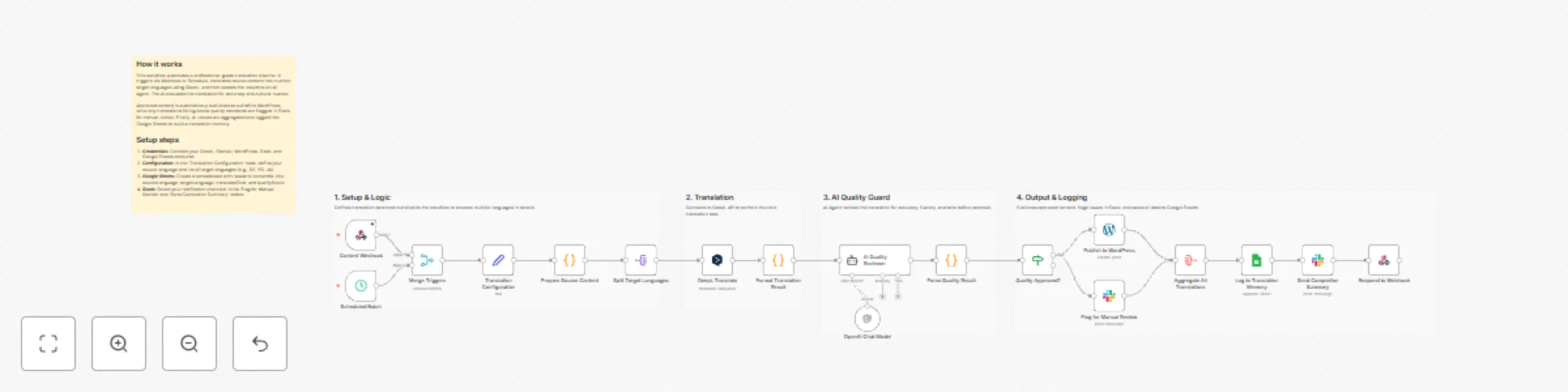
Workflow preview: Translate multilingual content with DeepL, GPT-4, WordPress, Slack and Sheets
Free advanced

Translate multilingual content with DeepL, GPT-4, WordPress, Slack and Sheets

#Multi-Language Content Translation Pipeline with AI Quality Control This workflow provides a professional-grade translation pipeline that combines the speed of DeepL with the intelligent reasoning of OpenAI's GPT-4. It is designed to help teams scale their global content reach without sacrificing linguistic accuracy or cultural nuance. ## Who’s it for This template is ideal for content managers, digital marketing teams, and global publishers who need to localize high volumes of articles or documentation while maintaining a "human-in-the-loop" quality standard. ## How it works The workflow automates the entire translation lifecycle through the following steps: 1. **Trigger:** Content is ingested via a Webhook or a recurring Schedule. 2. **Translation:** The source text is translated into multiple target languages simultaneously using the DeepL API. 3. **AI Quality Guard:** An OpenAI agent evaluates each translation, assigning a quality score based on accuracy and fluency. 4. **Automated Publishing:** Content that meets your quality threshold is automatically uploaded as a draft to WordPress. 5. **Manual Review:** Any translations that fall below the threshold are flagged in Slack for human intervention. 6. **Data Logging:** All results are saved to Google Sheets to build a searchable translation memory. ## How to set up 1. **Credentials:** Connect your DeepL, OpenAI, WordPress, Slack, and Google Sheets accounts. 2. **Configuration:** In the 'Translation Configuration' node, define your source language and a list of target languages (e.g., DE, FR, JA). 3. **Google Sheets:** Create a sheet with headers: `contentId`, `title`, `sourceLanguage`, `targetLanguage`, `translatedText`, and `qualityScore`. 4. **Slack:** Choose the notification channels for alerts and summary reports. ## Requirements - DeepL API key - OpenAI API key (GPT-4o or GPT-4o-mini recommended) - WordPress site with Application Passwords enabled - A Slack workspace and a Google Sheets account ## How to customize the workflow - **Adjust Quality Standards:** Change the `qualityThreshold` value in the configuration node to make the AI verification more or less strict. - **Add Platforms:** Replace the WordPress node with other CMS nodes like Ghost, Strapi, or Contentful to match your stack. - **Advanced QA:** Modify the AI Quality Reviewer’s prompt to focus on specific brand guidelines or industry terminology.

T
TOMOMITSU ASANO
Content Creation
18 Dec 2025
0
0
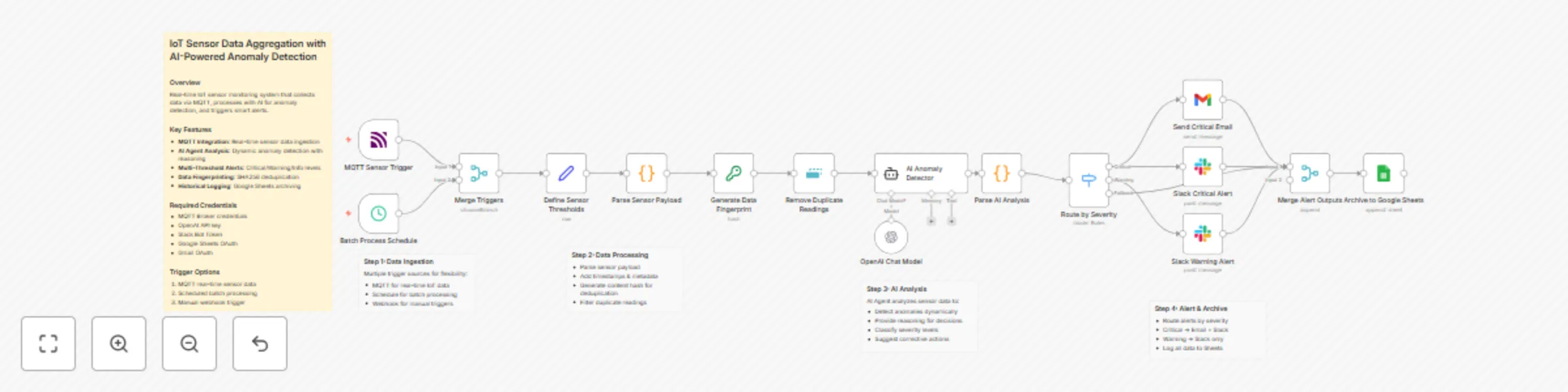
Workflow preview: IoT sensor monitoring with GPT-4o anomaly detection, MQTT & multi-channel alerts
Free advanced

IoT sensor monitoring with GPT-4o anomaly detection, MQTT & multi-channel alerts

{ "name": "IoT Sensor Data Aggregation with AI-Powered Anomaly Detection", "nodes": [ { "parameters": { "content": "## How it works\nThis workflow monitors IoT sensors in real-time. It ingests data via MQTT or a schedule, normalizes the format, and removes duplicates using data fingerprinting. An AI Agent then analyzes readings against defined thresholds to detect anomalies. Finally, it routes alerts to Slack or Email based on severity and logs everything to Google Sheets.\n\n## Setup steps\n1. Configure the **MQTT Trigger** with your broker details.\n2. Set your specific limits in the **Define Sensor Thresholds** node.\n3. Connect your OpenAI credential to the **Chat Model** node.\n4. Authenticate the **Gmail**, **Slack**, and **Google Sheets** nodes.\n5. Create a Google Sheet with headers: `timestamp`, `sensorId`, `location`, `readings`, `analysis`.", "height": 484, "width": 360 }, "id": "298da7ff-0e47-4b6c-85f5-2ce77275cdf3", "name": "Main Overview", "type": "n8n-nodes-base.stickyNote", "typeVersion": 1, "position": [ -2352, -480 ] }, { "parameters": { "content": "## 1. Data Ingestion\nCaptures sensor data via MQTT for real-time streams or runs on a schedule for batch processing. Both streams are merged for unified handling.", "height": 488, "width": 412, "color": 7 }, "id": "4794b396-cd71-429c-bcef-61780a55d707", "name": "Section: Ingestion", "type": "n8n-nodes-base.stickyNote", "typeVersion": 1, "position": [ -1822, -48 ] }, { "parameters": { "content": "## 2. Normalization & Deduplication\nSets monitoring thresholds, standardizes the JSON structure, creates a content hash, and filters out duplicate readings to prevent redundant API calls.", "height": 316, "width": 884, "color": 7 }, "id": "339e7cb7-491e-44c9-b561-983e147237d8", "name": "Section: Processing", "type": "n8n-nodes-base.stickyNote", "typeVersion": 1, "position": [ -1376, 32 ] }, { "parameters": { "content": "## 3. AI Anomaly Detection\nAn AI Agent evaluates sensor data against thresholds to identify anomalies, assigning severity levels and providing actionable recommendations.", "height": 528, "width": 460, "color": 7 }, "id": "ebcb7ca3-f70c-4a90-8a2a-f489e7be4c73", "name": "Section: AI Analysis", "type": "n8n-nodes-base.stickyNote", "typeVersion": 1, "position": [ -422, 24 ] }, { "parameters": { "content": "## 4. Routing & Archiving\nRoutes alerts based on severity (Critical = Email+Slack, Warning = Slack) and archives all data points to Google Sheets for historical analysis.", "height": 756, "width": 900, "color": 7 }, "id": "7f2b32a5-d3b2-4fea-844f-4b39b8e8a239", "name": "Section: Alerting", "type": "n8n-nodes-base.stickyNote", "typeVersion": 1, "position": [ 94, -196 ] }, { "parameters": { "topics": "sensors/+/data", "options": {} }, "id": "bc86720b-9de9-4693-b090-343d3ebad3a3", "name": "MQTT Sensor Trigger", "type": "n8n-nodes-base.mqttTrigger", "typeVersion": 1, "position": [ -1760, 88 ] }, { "parameters": { "rule": { "interval": [ { "field": "minutes", "minutesInterval": 15 } ] } }, "id": "1c38f2d0-aa00-447e-bdae-bffd08c38461", "name": "Batch Process Schedule", "type": "n8n-nodes-base.scheduleTrigger", "typeVersion": 1.2, "position": [ -1760, 280 ] }, { "parameters": { "mode": "chooseBranch" }, "id": "f9b41822-ee61-448b-b324-38483036e0e1", "name": "Merge Triggers", "type": "n8n-nodes-base.merge", "typeVersion": 3, "position": [ -1536, 184 ] }, { "parameters": { "mode": "raw", "jsonOutput": "{\n \"thresholds\": {\n \"temperature\": {\"min\": -10, \"max\": 50, \"unit\": \"C\"},\n \"humidity\": {\"min\": 20, \"max\": 90, \"unit\": \"%\"},\n \"pressure\": {\"min\": 950, \"max\": 1050, \"unit\": \"hPa\"},\n \"co2\": {\"min\": 400, \"max\": 2000, \"unit\": \"ppm\"}\n },\n \"alertConfig\": {\n \"criticalChannel\": \"#iot-critical\",\n \"warningChannel\": \"#iot-alerts\",\n \"emailRecipients\": \"[email protected]\"\n }\n}", "options": {} }, "id": "308705a8-edc7-4435-9250-487aa528e033", "name": "Define Sensor Thresholds", "type": "n8n-nodes-base.set", "typeVersion": 3.4, "position": [ -1312, 184 ] }, { "parameters": { "jsCode": "const items = $input.all();\nconst thresholds = $('Define Sensor Thresholds').first().json.thresholds;\nconst results = [];\n\nfor (const item of items) {\n let sensorData;\n try {\n sensorData = typeof item.json.message === 'string' \n ? JSON.parse(item.json.message) \n : item.json;\n } catch (e) {\n sensorData = item.json;\n }\n \n const now = new Date();\n const reading = {\n sensorId: sensorData.sensorId || sensorData.topic?.split('/')[1] || 'unknown',\n location: sensorData.location || 'Main Facility',\n timestamp: now.toISOString(),\n readings: {\n temperature: sensorData.temperature ?? null,\n humidity: sensorData.humidity ?? null,\n pressure: sensorData.pressure ?? null,\n co2: sensorData.co2 ?? null\n },\n metadata: {\n receivedAt: now.toISOString(),\n source: item.json.topic || 'batch',\n thresholds: thresholds\n }\n };\n \n results.push({ json: reading });\n}\n\nreturn results;" }, "id": "a2008189-5ace-418b-b0db-d51d63dcf2d8", "name": "Parse Sensor Payload", "type": "n8n-nodes-base.code", "typeVersion": 2, "position": [ -1088, 184 ] }, { "parameters": { "type": "SHA256", "value": "={{ $json.sensorId + '-' + $json.timestamp + '-' + JSON.stringify($json.readings) }}", "dataPropertyName": "dataHash" }, "id": "bf8db555-a10e-4468-a44a-cdc4c97e5b80", "name": "Generate Data Fingerprint", "type": "n8n-nodes-base.crypto", "typeVersion": 1, "position": [ -864, 184 ] }, { "parameters": { "compare": "selectedFields", "fieldsToCompare": "dataHash", "options": {} }, "id": "a45405e2-d211-449d-84d7-4538eaf56fcd", "name": "Remove Duplicate Readings", "type": "n8n-nodes-base.removeDuplicates", "typeVersion": 1, "position": [ -640, 184 ] }, { "parameters": { "text": "=Analyze this IoT sensor reading and determine if there are any anomalies:\n\nSensor ID: {{ $json.sensorId }}\nLocation: {{ $json.location }}\nTimestamp: {{ $json.timestamp }}\n\nReadings:\n- Temperature: {{ $json.readings.temperature }}°C (Normal: {{ $json.metadata.thresholds.temperature.min }} to {{ $json.metadata.thresholds.temperature.max }})\n- Humidity: {{ $json.readings.humidity }}% (Normal: {{ $json.metadata.thresholds.humidity.min }} to {{ $json.metadata.thresholds.humidity.max }})\n- CO2: {{ $json.readings.co2 }} ppm (Normal: {{ $json.metadata.thresholds.co2.min }} to {{ $json.metadata.thresholds.co2.max }})\n\nProvide your analysis in this exact JSON format:\n{\n \"hasAnomaly\": true/false,\n \"severity\": \"critical\"/\"warning\"/\"normal\",\n \"anomalies\": [\"list of detected issues\"],\n \"reasoning\": \"explanation of your analysis\",\n \"recommendation\": \"suggested action\"\n}", "options": { "systemMessage": "You are an IoT monitoring expert. Analyze sensor data and detect anomalies based on the provided thresholds. Be precise and provide actionable recommendations. Always respond in valid JSON format." } }, "id": "b60194ba-7b99-44e0-b0d7-9f1632dce4d4", "name": "AI Anomaly Detector", "type": "@n8n/n8n-nodes-langchain.agent", "typeVersion": 1.7, "position": [ -416, 184 ] }, { "parameters": { "jsCode": "const item = $input.first();\nconst originalData = $('Remove Duplicate Readings').first().json;\n\nlet aiAnalysis;\ntry {\n const responseText = item.json.output || item.json.text || '';\n const jsonMatch = responseText.match(/\\{[\\s\\S]*\\}/);\n aiAnalysis = jsonMatch ? JSON.parse(jsonMatch[0]) : {\n hasAnomaly: false,\n severity: 'normal',\n anomalies: [],\n reasoning: 'Unable to parse AI response',\n recommendation: 'Manual review required'\n };\n} catch (e) {\n aiAnalysis = {\n hasAnomaly: false,\n severity: 'normal',\n anomalies: [],\n reasoning: 'Parse error: ' + e.message,\n recommendation: 'Manual review required'\n };\n}\n\nreturn [{\n json: {\n ...originalData,\n analysis: aiAnalysis,\n alertLevel: aiAnalysis.severity,\n requiresAlert: aiAnalysis.hasAnomaly && aiAnalysis.severity !== 'normal'\n }\n}];" }, "id": "a145a8c7-538c-411a-95c6-9485acdcb969", "name": "Parse AI Analysis", "type": "n8n-nodes-base.code", "typeVersion": 2, "position": [ -64, 184 ] }, { "parameters": { "rules": { "values": [ { "conditions": { "options": { "caseSensitive": true, "typeValidation": "strict" }, "combinator": "and", "conditions": [ { "id": "critical", "operator": { "type": "string", "operation": "equals" }, "leftValue": "={{ $json.alertLevel }}", "rightValue": "critical" } ] }, "renameOutput": true, "outputKey": "Critical" }, { "conditions": { "options": { "caseSensitive": true, "typeValidation": "strict" }, "combinator": "and", "conditions": [ { "id": "warning", "operator": { "type": "string", "operation": "equals" }, "leftValue": "={{ $json.alertLevel }}", "rightValue": "warning" } ] }, "renameOutput": true, "outputKey": "Warning" } ] }, "options": { "fallbackOutput": "extra" } }, "id": "1ab9785d-9f7f-4840-b1e9-0afc62b00b12", "name": "Route by Severity", "type": "n8n-nodes-base.switch", "typeVersion": 3.2, "position": [ 160, 168 ] }, { "parameters": { "sendTo": "={{ $('Define Sensor Thresholds').first().json.alertConfig.emailRecipients }}", "subject": "=CRITICAL IoT Alert: {{ $json.sensorId }} - {{ $json.analysis.anomalies[0] || 'Anomaly Detected' }}", "message": "=CRITICAL IoT SENSOR ALERT\n\nSensor: {{ $json.sensorId }}\nLocation: {{ $json.location }}\nTime: {{ $json.timestamp }}\n\nReadings:\n- Temperature: {{ $json.readings.temperature }}°C\n- Humidity: {{ $json.readings.humidity }}%\n- CO2: {{ $json.readings.co2 }} ppm\n\nAI Analysis:\n{{ $json.analysis.reasoning }}\n\nDetected Issues:\n{{ $json.analysis.anomalies.join('\\n- ') }}\n\nRecommendation:\n{{ $json.analysis.recommendation }}", "options": {} }, "id": "28201a6c-10b5-4387-be89-10a57c634622", "name": "Send Critical Email", "type": "n8n-nodes-base.gmail", "typeVersion": 2.1, "position": [ 384, -80 ], "webhookId": "35b9f8fa-4a50-456e-b552-9fd20a25ccc5" }, { "parameters": { "select": "channel", "channelId": { "__rl": true, "mode": "name", "value": "#iot-critical" }, "text": "=🚨 *CRITICAL IoT ALERT*\n\n*Sensor:* {{ $json.sensorId }}\n*Location:* {{ $json.location }}\n\n*Readings:*\n• Temperature: {{ $json.readings.temperature }}°C\n• Humidity: {{ $json.readings.humidity }}%\n• CO2: {{ $json.readings.co2 }} ppm\n\n*AI Analysis:* {{ $json.analysis.reasoning }}\n*Recommendation:* {{ $json.analysis.recommendation }}", "otherOptions": {} }, "id": "c5a297be-ccef-40ba-9178-65805262efba", "name": "Slack Critical Alert", "type": "n8n-nodes-base.slack", "typeVersion": 2.2, "position": [ 384, 112 ], "webhookId": "19113595-0208-4b37-b68c-c9788c19f618" }, { "parameters": { "select": "channel", "channelId": { "__rl": true, "mode": "name", "value": "#iot-alerts" }, "text": "=⚠️ *IoT Warning*\n\n*Sensor:* {{ $json.sensorId }} | *Location:* {{ $json.location }}\n*Issue:* {{ $json.analysis.anomalies[0] || 'Threshold approaching' }}\n*Recommendation:* {{ $json.analysis.recommendation }}", "otherOptions": {} }, "id": "5c3d7acf-0211-44dd-9f4b-a43d3796abb1", "name": "Slack Warning Alert", "type": "n8n-nodes-base.slack", "typeVersion": 2.2, "position": [ 384, 400 ], "webhookId": "37abfb19-f82f-4449-bd69-a65635b99606" }, { "parameters": {}, "id": "6bcbb42f-ec14-4f00-a091-babcc2d2d5c4", "name": "Merge Alert Outputs", "type": "n8n-nodes-base.merge", "typeVersion": 3, "position": [ 608, 184 ] }, { "parameters": { "operation": "append", "documentId": { "__rl": true, "mode": "list", "value": "" }, "sheetName": { "__rl": true, "mode": "list", "value": "" } }, "id": "6243aa23-408d-4928-a512-811eeb3b5f9e", "name": "Archive to Google Sheets", "type": "n8n-nodes-base.googleSheets", "typeVersion": 4.5, "position": [ 832, 184 ] }, { "parameters": { "model": "gpt-4o-mini", "options": { "temperature": 0.3 } }, "id": "61081e8a-ebc9-465f-8beb-88af225e59f2", "name": "OpenAI Chat Model", "type": "@n8n/n8n-nodes-langchain.lmChatOpenAi", "typeVersion": 1.2, "position": [ -344, 408 ] } ], "pinData": {}, "connections": { "MQTT Sensor Trigger": { "main": [ [ { "node": "Merge Triggers", "type": "main", "index": 0 } ] ] }, "Batch Process Schedule": { "main": [ [ { "node": "Merge Triggers", "type": "main", "index": 1 } ] ] }, "Merge Triggers": { "main": [ [ { "node": "Define Sensor Thresholds", "type": "main", "index": 0 } ] ] }, "Define Sensor Thresholds": { "main": [ [ { "node": "Parse Sensor Payload", "type": "main", "index": 0 } ] ] }, "Parse Sensor Payload": { "main": [ [ { "node": "Generate Data Fingerprint", "type": "main", "index": 0 } ] ] }, "Generate Data Fingerprint": { "main": [ [ { "node": "Remove Duplicate Readings", "type": "main", "index": 0 } ] ] }, "Remove Duplicate Readings": { "main": [ [ { "node": "AI Anomaly Detector", "type": "main", "index": 0 } ] ] }, "AI Anomaly Detector": { "main": [ [ { "node": "Parse AI Analysis", "type": "main", "index": 0 } ] ] }, "Parse AI Analysis": { "main": [ [ { "node": "Route by Severity", "type": "main", "index": 0 } ] ] }, "Route by Severity": { "main": [ [ { "node": "Send Critical Email", "type": "main", "index": 0 }, { "node": "Slack Critical Alert", "type": "main", "index": 0 } ], [ { "node": "Slack Warning Alert", "type": "main", "index": 0 } ], [ { "node": "Merge Alert Outputs", "type": "main", "index": 0 } ] ] }, "Send Critical Email": { "main": [ [ { "node": "Merge Alert Outputs", "type": "main", "index": 0 } ] ] }, "Slack Critical Alert": { "main": [ [ { "node": "Merge Alert Outputs", "type": "main", "index": 0 } ] ] }, "Slack Warning Alert": { "main": [ [ { "node": "Merge Alert Outputs", "type": "main", "index": 0 } ] ] }, "Merge Alert Outputs": { "main": [ [ { "node": "Archive to Google Sheets", "type": "main", "index": 0 } ] ] }, "OpenAI Chat Model": { "ai_languageModel": [ [ { "node": "AI Anomaly Detector", "type": "ai_languageModel", "index": 0 } ] ] } }, "active": false, "settings": { "executionOrder": "v1" }, "versionId": "", "meta": { "instanceId": "15d6057a37b8367f33882dd60593ee5f6cc0c59310ff1dc66b626d726083b48d" }, "tags": [] }

T
TOMOMITSU ASANO
Engineering
18 Dec 2025
62
0