Block 1 - Scheduled Check for New Orders
- Type / Role
- n8n-nodes-base.scheduleTrigger - scheduleTrigger
- Config choices
- Version 1.2


 Early Deal
This workflow is provided as-is. Please review and test before using in production.
WooCommerce VIP Customer Automation This workflow automatically identifies VIP customers from your WooCommerce store based on their total spending and number of completed orders. It pulls new order...
n8n-nodes-base.scheduletrigger, n8n-nodes-base.set, n8n-nodes-base.httprequest, n8n-nodes-base.if, n8n-nodes-base.code, n8n-nodes-base.airtable, n8n-nodes-base.slack, n8n-nodes-base.stickynote
This workflow is cataloged by N8N Workflows and links back to its original n8n.io source page by WeblineIndia.
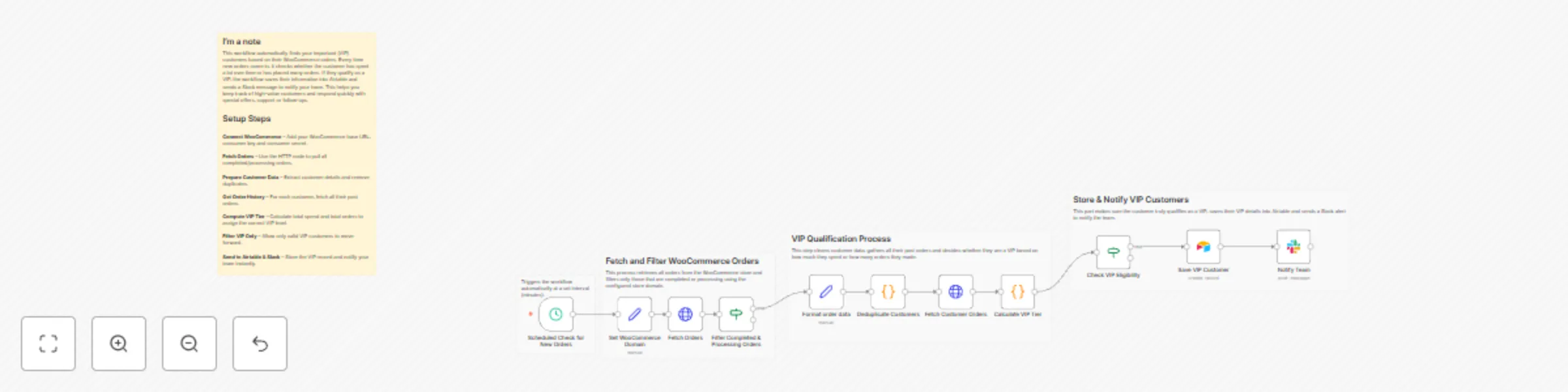
Original n8n.io sourceThis workflow automatically identifies VIP customers from your WooCommerce store based on their total spending and number of completed orders. It pulls new orders on a schedule, filters valid transactions, groups customers, calculates their VIP tier, stores them into Airtable and notifies your team in Slack.It removes all manual checking and ensures your team instantly knows when a high-value customer places an order.
This workflow fully automates VIP customer detection for WooCommerce stores. Every few minutes, it retrieves new orders via WooCommerce API. It filters only processing or completed orders and extracts essential fields such as customer ID, customer name order total and timestamps.
The workflow then groups orders by customer to ensure duplicate orders don’t inflate metrics. For each customer, it fetches their complete order history, calculates lifetime value, counts total paid orders and assigns a VIP tier (Platinum, Gold or Silver).
Once a customer qualifies, their details are saved into Airtable for tracking. A Slack message is simultaneously sent to inform your team so they can take immediate action — such as providing priority support, follow-up messages or special offers.
This system runs completely on its own and keeps customer insights up-to-date without manual checks.
This workflow is ideal for:
You will need:
Edit the logic inside Calculate VIP Tier:
You can modify:
In the Slack node, change:
You can extend this workflow with:
| Issue | Possible Cause | Solution |
|---|---|---|
| No orders fetched | Wrong domain or API keys | Update WooCommerce credentials |
| VIP not detected | Customer has low spend or low orders | Verify VIP rules in “Calculate VIP Tier” |
| Airtable record not created | Incorrect table schema | Match Airtable fields with node mapping |
| Slack alert missing | Wrong Slack channel ID or credentials | Re-check Slack authentication |
| Guest users included | Missing customer_id filter | Ensure customer_id != 0 condition stays in place |
If you need assistance integrating this workflow, customizing VIP rules or adding new automations, our automation team at WeblineIndia is happy to help.
You can also extend this system with loyalty engines, advanced analytics, multi-store support or any custom automation tailored for your eCommerce business.
This catalog entry is organized from the workflow JSON. The node-level section below shows the executable blocks available for review before importing the template.
| Workflow | Identify and notify WooCommerce VIP customers with Airtable and Slack |
|---|---|
| Complexity | advanced |
| Nodes | 16 |
| Categories | CRM, AI Summarization |
| Author | WeblineIndia |
| Published | 01 Jan 2026 |
Use the JSON export at /data/workflows/12370/12370.json as the source template for this automation.
Open n8n, import the downloaded JSON, and review each node before activating the workflow.
Replace placeholder credentials, API keys, webhook URLs, account IDs, and environment-specific values with your own settings.
Run the workflow manually or in a staging workspace, inspect node output, and confirm downstream systems receive the expected data.
Enable the workflow only after testing, then monitor executions, errors, and rate limits during the first production runs.
Review imported nodes carefully before activation. This catalog entry is intended to help you inspect the workflow structure, understand required services, and find related templates faster.
Node names, credentials, schedules, webhook paths, and external service limits may need adjustment for your workspace.
WooCommerce VIP Customer Automation This workflow automatically identifies VIP customers from your WooCommerce store based on their total spending and number of completed orders. It pulls new order...
Review the workflow JSON, configure any required credentials in n8n, and test the automation in a safe workspace before using it in production.
Yes. Use the block-by-block analysis and the downloadable JSON to inspect each node, then adjust credentials, prompts, schedules, filters, or destinations for your CRM, AI Summarization use case.