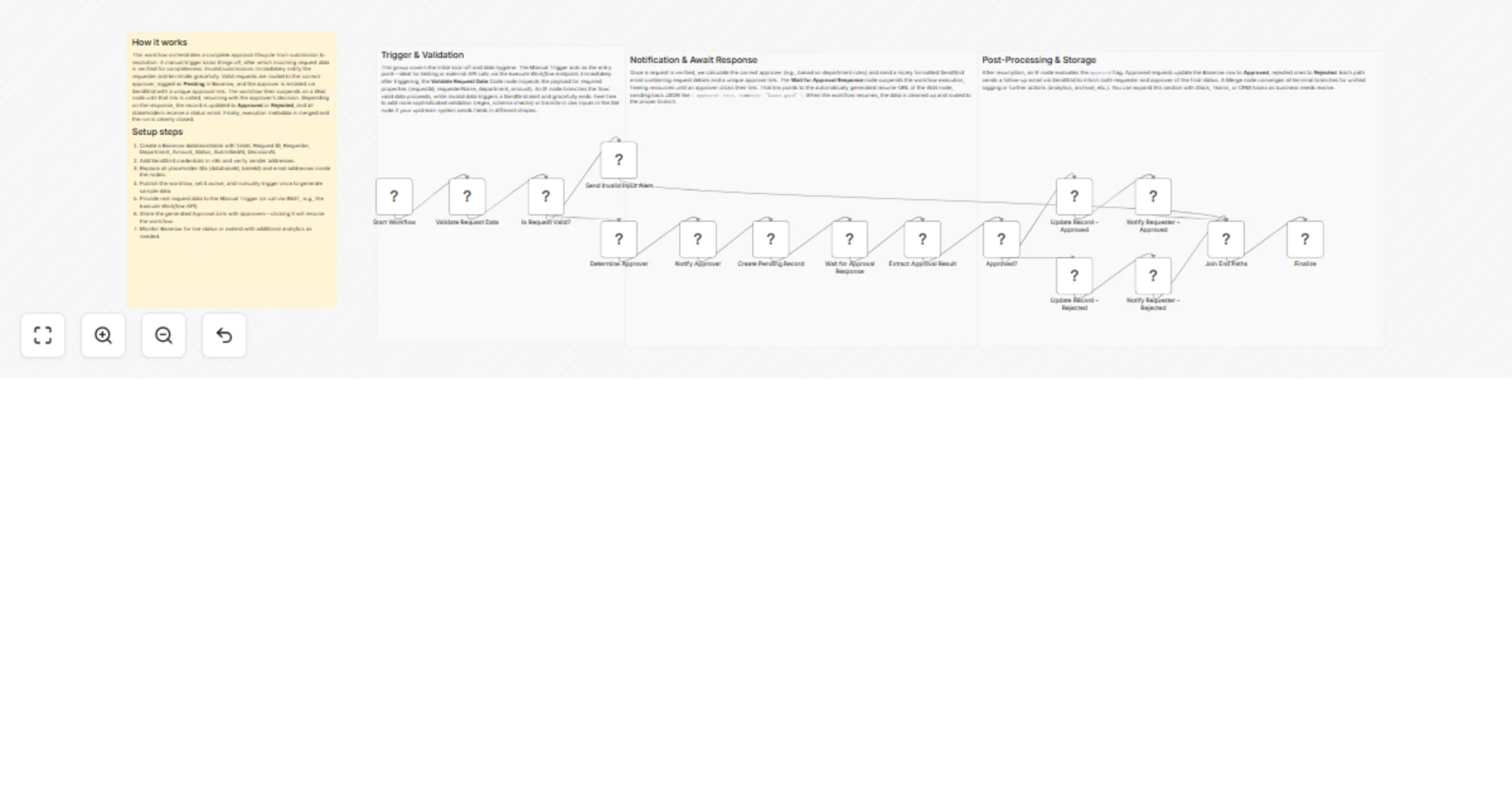
Handle approval requests with SendGrid email and Baserow records

Workflow preview

Workflow preview
100%
Handle approval requests with SendGrid email and Baserow records preview
Open on n8n.io

1. Workflow Overview

Approval Workflow Handler – SendGrid & Baserow This workflow automates the end to end approval process for any request type (e.g., purchase orders, content sign off, access permissions). It routes ...

Best for

  • Document Extraction automation workflows
  • advanced n8n builders looking for reusable templates

Tools used

n8n-nodes-base.stickynote, n8n-nodes-base.manualtrigger, n8n-nodes-base.code, n8n-nodes-base.if, n8n-nodes-base.sendgrid, n8n-nodes-base.baserow, n8n-nodes-base.wait, n8n-nodes-base.set

Source and attribution

This workflow is cataloged by N8N Workflows and links back to its original n8n.io source page by vinci-king-01.

Original n8n.io source

1.1 Workflow description

Title
Handle approval requests with SendGrid email and Baserow records
Workflow name
Handle approval requests with SendGrid email and Baserow records

Approval Workflow Handler – SendGrid & Baserow

This workflow automates the end-to-end approval process for any request type (e.g., purchase orders, content sign-off, access permissions). It routes the request to designated approvers, records every decision in a Baserow table, and notifies requesters and stakeholders via SendGrid at each stage.

Pre-conditions/Requirements

Prerequisites

  • n8n instance (self-hosted, desktop, or n8n cloud)
  • SendGrid account with an API Key
  • Baserow workspace & table set up to store approval records
  • Basic understanding of n8n node configuration

Required Credentials

  • SendGrid API Key – For sending transactional emails
  • Baserow Personal API Token – For creating, updating, and querying table rows

Specific Setup Requirements

Baserow Column Type Purpose Example Value
request_id text Unique identifier for each request 2542
title text Short description of the request “PO > $5K”
status single select Tracks state (Pending, Approved, Rejected) “Pending”
requester text Email of person creating the request [email protected]
approver text Email of assigned approver [email protected]
updated_at date Last status change timestamp

How it works

This workflow automates the end-to-end approval process for any request type (e.g., purchase orders, content sign-off, access permissions). It routes the request to designated approvers, records every decision in a Baserow table, and notifies requesters and stakeholders via SendGrid at each stage.

Key Steps:

  • Trigger: A Manual Trigger (or any upstream workflow) injects the initial request data.
  • Create Record (Baserow): Store the new request as a “Pending” row.
  • Notify Approver (SendGrid): Email the approver with approval/denial links.
  • Wait for Action: Hold execution until the approver clicks a link that calls the workflow’s Webhook URL.
  • Decision Branch (If node): Determine whether the request is Approved or Rejected.
  • Update Record (Baserow): Write the new status and timestamp back to the row.
  • Notify Requester (SendGrid): Send the final decision to the original requester.
  • Error Handling: Error Trigger captures any unhandled failures and notifies ops.

Set up steps

Setup Time: 15-25 minutes

  1. Clone or import the template into your n8n instance.
  2. Add credentials a. Go to Credentials → New → SendGrid and paste your API key. b. Go to Credentials → New → Baserow and paste your Personal API Token.
  3. Configure environment variables (optional but recommended)
  • APPROVER_EMAILS – Comma-separated list of default approvers.
  • STAKEHOLDER_EMAILS – Comma-separated list of CC recipients.
  1. Edit the Baserow node
  • Select your workspace and the “Approvals” table that matches the column schema above.
  1. Customize email templates in both SendGrid nodes (subject, HTML content, variables).
  2. Update Wait node’s webhook URL if running self-hosted behind a reverse proxy.
  3. Run a test execution using the Manual Trigger; confirm emails are delivered and the Baserow table updates correctly.
  4. Switch the trigger (optional) from Manual to Webhook or Schedule for production use.
  5. Enable workflow to begin processing live approval requests.

Node Descriptions

Core Workflow Nodes:

  • Manual Trigger – Starts the workflow during testing or via UI.
  • Set (Initialize Request) – Normalizes incoming data and generates a unique request_id.
  • Baserow (Create Row) – Inserts a new “Pending” record.
  • SendGrid (Notify Approver) – Sends approval request email with dynamic links.
  • Wait – Pauses execution until the approver responds.
  • If (Decision) – Routes the flow based on approved vs rejected.
  • Baserow (Update Row) – Writes final status and timestamp.
  • SendGrid (Notify Requester) – Communicates final decision.
  • Merge – Consolidates parallel branches before ending.
  • Error Trigger – Captures errors, logs them, and optionally notifies ops via email.
  • Sticky Notes – Contain inline documentation for maintainers.

Data Flow:

  1. Manual TriggerSetBaserow (Create Row)SendGrid (Notify Approver)Wait
  2. WaitIf → (Approved ⬅︎ or ➡︎ Rejected) → Baserow (Update Row)SendGrid (Notify Requester)Merge

Customization Examples

1. Auto-assign approver based on request amount

// Code node: Dynamic approver selection
const amount = items[0].json.amount;
items[0].json.approver =
 amount > 10000 ? '[email protected]' : '[email protected]';
return items;

2. Slack notification instead of email

// Replace SendGrid node with Slack node
{
 "channel": "#approvals",
 "text": `Request ${$json["request_id"]} was approved by ${$json["approver"]}`
}

Data Output Format

The workflow outputs structured JSON data:

{
 "request_id": "2542",
 "title": "PO > $5K",
 "status": "Approved",
 "requester": "[email protected]",
 "approver": "[email protected]",
 "updated_at": "2024-04-27T15:41:22.347Z"
}

Troubleshooting

Common Issues

  1. Emails not sending – Verify SendGrid API key and account sender verification; check node credentials.
  2. Baserow “permission denied” – Ensure the Personal API Token has access to the workspace and table.
  3. Wait node never resumes – Confirm the public webhook URL is reachable and correctly embedded in email links.

Performance Tips

  • Batch approvals in a single workflow run when possible to reduce API overhead.
  • Set up Baserow table indexing on request_id for faster lookups.

Pro Tips:

  • Use the Error Trigger to post incidents to a dedicated Slack or Microsoft Teams channel.
  • Store reusable email templates in a separate “Settings” sheet or in n8n’s global static data.
  • Add analytics by sending events to PostHog or Amplitude after each approval.

This is a community-contributed workflow template. It is provided “as-is” without warranty; review and test thoroughly before using in production.

1.2 Logical Blocks

This catalog entry is organized from the workflow JSON. The node-level section below shows the executable blocks available for review before importing the template.

2. Block-by-Block Analysis

Block 1 - 📝 Workflow Overview

Type / Role
n8n-nodes-base.stickyNote - stickyNote
Config choices
Version 1

Block 2 - Section • Trigger & Validation

Type / Role
n8n-nodes-base.stickyNote - stickyNote
Config choices
Version 1

Block 3 - Section • Notify & Wait

Type / Role
n8n-nodes-base.stickyNote - stickyNote
Config choices
Version 1

Block 4 - Section • Post-Processing

Type / Role
n8n-nodes-base.stickyNote - stickyNote
Config choices
Version 1

Block 5 - Start Workflow

Type / Role
n8n-nodes-base.manualTrigger - manualTrigger
Config choices
Version 1

Block 6 - Validate Request Data

Type / Role
n8n-nodes-base.code - code
Config choices
Version 2

Block 7 - Is Request Valid?

Type / Role
n8n-nodes-base.if - if
Config choices
Version 2

Block 8 - Send Invalid Input Alert

Type / Role
n8n-nodes-base.sendGrid - sendGrid
Config choices
Version 1

Block 9 - Determine Approver

Type / Role
n8n-nodes-base.code - code
Config choices
Version 2

Block 10 - Notify Approver

Type / Role
n8n-nodes-base.sendGrid - sendGrid
Config choices
Version 1

Block 11 - Create Pending Record

Type / Role
n8n-nodes-base.baserow - baserow
Config choices
Version 1

Block 12 - Wait for Approval Response

Type / Role
n8n-nodes-base.wait - wait
Config choices
Version 1

Block 13 - Extract Approval Result

Type / Role
n8n-nodes-base.set - set
Config choices
Version 3.4

Block 14 - Approved?

Type / Role
n8n-nodes-base.if - if
Config choices
Version 2

Block 15 - Update Record – Approved

Type / Role
n8n-nodes-base.baserow - baserow
Config choices
Version 1

Block 16 - Notify Requester – Approved

Type / Role
n8n-nodes-base.sendGrid - sendGrid
Config choices
Version 1

Block 17 - Update Record – Rejected

Type / Role
n8n-nodes-base.baserow - baserow
Config choices
Version 1

Block 18 - Notify Requester – Rejected

Type / Role
n8n-nodes-base.sendGrid - sendGrid
Config choices
Version 1

Block 19 - Join End Paths

Type / Role
n8n-nodes-base.merge - merge
Config choices
Version 2.1

Block 20 - Finalize

Type / Role
n8n-nodes-base.code - code
Config choices
Version 2

3. Summary Table

Workflow Handle approval requests with SendGrid email and Baserow records
Complexity advanced
Nodes 20
Categories Document Extraction
Author vinci-king-01
Published 24 Jan 2026

4. Reproducing the Workflow from Scratch

  1. 1. Download the workflow JSON

    Use the JSON export at /data/workflows/12972/12972.json as the source template for this automation.

  2. 2. Import the template into n8n

    Open n8n, import the downloaded JSON, and review each node before activating the workflow.

  3. 3. Configure credentials and variables

    Replace placeholder credentials, API keys, webhook URLs, account IDs, and environment-specific values with your own settings.

  4. 4. Test with sample data

    Run the workflow manually or in a staging workspace, inspect node output, and confirm downstream systems receive the expected data.

  5. 5. Activate and monitor

    Enable the workflow only after testing, then monitor executions, errors, and rate limits during the first production runs.

5. General Notes & Resources

Review imported nodes carefully before activation. This catalog entry is intended to help you inspect the workflow structure, understand required services, and find related templates faster.

Node names, credentials, schedules, webhook paths, and external service limits may need adjustment for your workspace.

Frequently asked questions

What does Handle approval requests with SendGrid email and Baserow records do?

Approval Workflow Handler – SendGrid & Baserow This workflow automates the end to end approval process for any request type (e.g., purchase orders, content sign off, access permissions). It routes ...

What do I need before importing this workflow?

Review the workflow JSON, configure any required credentials in n8n, and test the automation in a safe workspace before using it in production.

Can I customize this workflow?

Yes. Use the block-by-block analysis and the downloadable JSON to inspect each node, then adjust credentials, prompts, schedules, filters, or destinations for your Document Extraction use case.