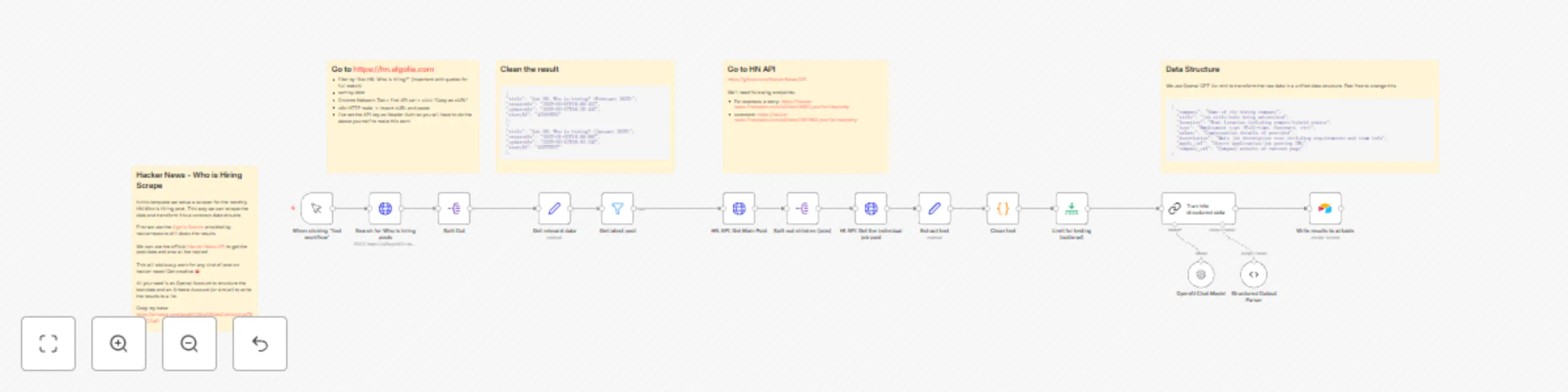
Hacker news job listing scraper and parser

Workflow preview

Workflow preview
100%
Hacker news job listing scraper and parser preview
Open on n8n.io

Important notice

This workflow is provided as-is. Please review and test before using in production.

1. Workflow Overview

This automated workflow scrapes and processes the monthly "Who is Hiring" thread from Hacker News, transforming raw job listings into structured data for analysis or integration with other systems....

Best for

  • Personal Productivity automation workflows
  • advanced n8n builders looking for reusable templates

Tools used

n8n-nodes-base.manualtrigger, n8n-nodes-base.stickynote, n8n-nodes-base.splitout, @n8n/n8n-nodes-langchain.lmchatopenai, @n8n/n8n-nodes-langchain.outputparserstructured, n8n-nodes-base.httprequest, n8n-nodes-base.set, n8n-nodes-base.filter

Source and attribution

This workflow is cataloged by N8N Workflows and links back to its original n8n.io source page by Julian Kaiser.

Original n8n.io source

1.1 Workflow description

Title
Hacker news job listing scraper and parser
Workflow name
Hacker news job listing scraper and parser

This automated workflow scrapes and processes the monthly "Who is Hiring" thread from Hacker News, transforming raw job listings into structured data for analysis or integration with other systems. Perfect for job seekers, recruiters, or anyone looking to monitor tech job market trends.

How it works

Automatically fetches the latest "Who is Hiring" thread from Hacker News Extracts and cleans relevant job posting data using the HN API Splits and processes individual job listings into structured format Parses key information like location, role, requirements, and company details Outputs clean, structured data ready for analysis or export

Set up steps

  1. Configure API access to Hacker News (no authentication required)
  2. Follow the steps to get your cURL command from https://hn.algolia.com/
  3. Set up desired output format (JSON structured data or custom format)
  4. Optional: Configure additional parsing rules for specific job listing information
  5. Optional: Set up integration with preferred storage or analysis tools The workflow transforms unstructured job listings into clean, structured data following this pattern:
  • Input: Raw HN thread comments
  • Process: Extract, clean, and parse text
  • Output: Structured job listing data

This template saves hours of manual work collecting and organizing job listings, making it easier to track and analyze tech job opportunities from Hacker News's popular monthly hiring threads.

1.2 Logical Blocks

This catalog entry is organized from the workflow JSON. The node-level section below shows the executable blocks available for review before importing the template.

2. Block-by-Block Analysis

Block 1 - When clicking ‘Test workflow’

Type / Role
n8n-nodes-base.manualTrigger - manualTrigger
Config choices
Version 1

Block 2 - Sticky Note

Type / Role
n8n-nodes-base.stickyNote - stickyNote
Config choices
Version 1

Block 3 - Split Out

Type / Role
n8n-nodes-base.splitOut - splitOut
Config choices
Version 1

Block 4 - Sticky Note1

Type / Role
n8n-nodes-base.stickyNote - stickyNote
Config choices
Version 1

Block 5 - OpenAI Chat Model

Type / Role
@n8n/n8n-nodes-langchain.lmChatOpenAi - lmChatOpenAi
Config choices
Version 1.2

Block 6 - Structured Output Parser

Type / Role
@n8n/n8n-nodes-langchain.outputParserStructured - outputParserStructured
Config choices
Version 1.2

Block 7 - Search for Who is hiring posts

Type / Role
n8n-nodes-base.httpRequest - httpRequest
Config choices
Version 4.2

Block 8 - Get relevant data

Type / Role
n8n-nodes-base.set - set
Config choices
Version 3.4

Block 9 - Get latest post

Type / Role
n8n-nodes-base.filter - filter
Config choices
Version 2.2

Block 10 - Split out children (jobs)

Type / Role
n8n-nodes-base.splitOut - splitOut
Config choices
Version 1

Block 11 - Trun into structured data

Type / Role
@n8n/n8n-nodes-langchain.chainLlm - chainLlm
Config choices
Version 1.5

Block 12 - Sticky Note2

Type / Role
n8n-nodes-base.stickyNote - stickyNote
Config choices
Version 1

Block 13 - Extract text

Type / Role
n8n-nodes-base.set - set
Config choices
Version 3.4

Block 14 - Clean text

Type / Role
n8n-nodes-base.code - code
Config choices
Version 2

Block 15 - Limit for testing (optional)

Type / Role
n8n-nodes-base.limit - limit
Config choices
Version 1

Block 16 - Sticky Note3

Type / Role
n8n-nodes-base.stickyNote - stickyNote
Config choices
Version 1

Block 17 - Write results to airtable

Type / Role
n8n-nodes-base.airtable - airtable
Config choices
Version 2.1

Block 18 - Sticky Note4

Type / Role
n8n-nodes-base.stickyNote - stickyNote
Config choices
Version 1

Block 19 - HI API: Get the individual job post

Type / Role
n8n-nodes-base.httpRequest - httpRequest
Config choices
Version 4.2

Block 20 - HN API: Get Main Post

Type / Role
n8n-nodes-base.httpRequest - httpRequest
Config choices
Version 4.2

3. Summary Table

Workflow Hacker news job listing scraper and parser
Complexity advanced
Nodes 20
Categories Personal Productivity
Author Julian Kaiser
Published 17 Feb 2025

4. Reproducing the Workflow from Scratch

  1. 1. Download the workflow JSON

    Use the JSON export at /data/workflows/2924/2924.json as the source template for this automation.

  2. 2. Import the template into n8n

    Open n8n, import the downloaded JSON, and review each node before activating the workflow.

  3. 3. Configure credentials and variables

    Replace placeholder credentials, API keys, webhook URLs, account IDs, and environment-specific values with your own settings.

  4. 4. Test with sample data

    Run the workflow manually or in a staging workspace, inspect node output, and confirm downstream systems receive the expected data.

  5. 5. Activate and monitor

    Enable the workflow only after testing, then monitor executions, errors, and rate limits during the first production runs.

5. General Notes & Resources

Review imported nodes carefully before activation. This catalog entry is intended to help you inspect the workflow structure, understand required services, and find related templates faster.

Node names, credentials, schedules, webhook paths, and external service limits may need adjustment for your workspace.

Frequently asked questions

What does Hacker news job listing scraper and parser do?

This automated workflow scrapes and processes the monthly "Who is Hiring" thread from Hacker News, transforming raw job listings into structured data for analysis or integration with other systems....

What do I need before importing this workflow?

Review the workflow JSON, configure any required credentials in n8n, and test the automation in a safe workspace before using it in production.

Can I customize this workflow?

Yes. Use the block-by-block analysis and the downloadable JSON to inspect each node, then adjust credentials, prompts, schedules, filters, or destinations for your Personal Productivity use case.