Block 1 - When clicking ‘Test workflow’
- Type / Role
- n8n-nodes-base.manualTrigger - manualTrigger
- Config choices
- Version 1


 Early Deal
This workflow is provided as-is. Please review and test before using in production.
Who this is for The Google Trend Data Extract & Summarization workflow is ideal for trend researchers, digital marketers, content strategists, and AI developers who want to automate the extraction,...
n8n-nodes-base.manualtrigger, n8n-nodes-base.stickynote, @n8n/n8n-nodes-langchain.chainllm, n8n-nodes-base.set, n8n-nodes-base.httprequest, @n8n/n8n-nodes-langchain.lmchatgooglegemini, n8n-nodes-base.function, @n8n/n8n-nodes-langchain.informationextractor
This workflow is cataloged by N8N Workflows and links back to its original n8n.io source page by Ranjan Dailata.
Original n8n.io sourceThe Google Trend Data Extract & Summarization workflow is ideal for trend researchers, digital marketers, content strategists, and AI developers who want to automate the extraction, summarization, and distribution of Google Trends data. This end-to-end solution helps transform trend signals into human-readable insights and delivers them across multiple channels.
It is built for:
Market Researchers - Tracking trends by topic or region
Content Strategists - Identifying content opportunities from trending data
SEO Analysts - Monitoring search volume and shifts in keyword popularity
Growth Hackers - Reacting quickly to real-time search behavior
AI & Automation Engineers - Creating automated trend monitoring systems
Google Trends data can provide rich insights into user interests, but the raw data is not always structured or easily interpretable at scale. Manually extracting, cleaning, and summarizing trends from multiple regions or categories is time-consuming.
This workflow solves the following problems:
Automates the conversion of markdown or scraped HTML into clean textual input
Transforms unstructured data into structured format ready for processing
Uses AI summarization to generate easy-to-read insights from Google Trends
Distributes summaries via email and webhook notifications
Persists responses to disk for archiving, auditing, or future analytics
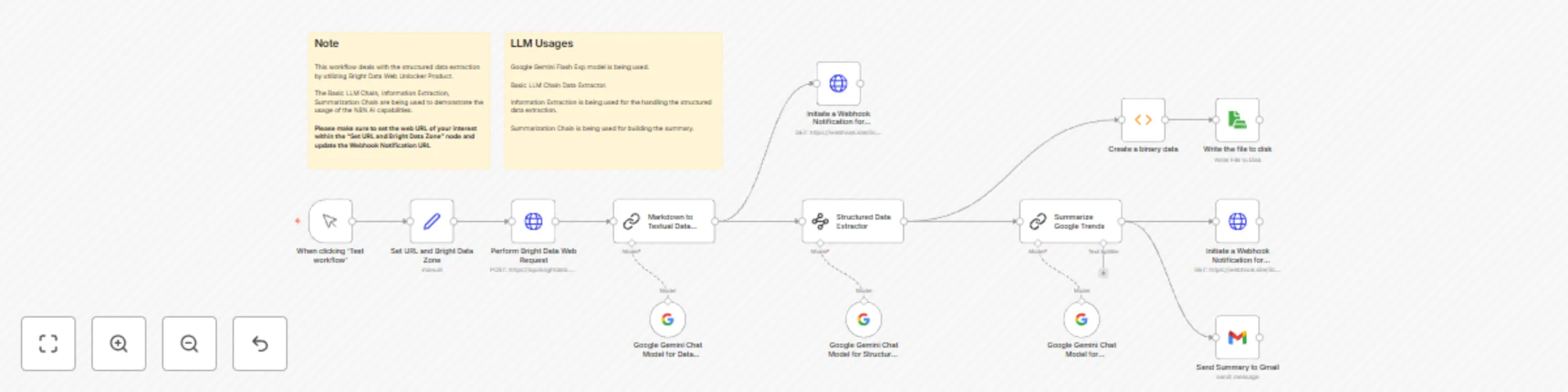
Receives input: Sets an URL for the data extraction and analysis.
Uses Bright Data’s Web Unlocker to extract content from relevant site.
Markdown to Textual Data Extractor: Converts markdown content into plaintext using n8n’s Function or Markdown nodes
Structured Data Extract: Parses the plaintext into structured JSON suitable for AI processing
Summarize Google Trends: Sends structured data to Google Gemini with a summarization prompt to extract key takeaways
Send Summary via Gmail: Composes an email with the AI-generated summary and sends it to a designated recipient
Persist to Disk: Writes the AI structured data to disk
Webhook Notification: Sends the summarized response to an external system (e.g., Slack, Notion, Zapier) using a webhook
This catalog entry is organized from the workflow JSON. The node-level section below shows the executable blocks available for review before importing the template.
| Workflow | Google trend data extract & summarization with Bright Data & Google Gemini |
|---|---|
| Complexity | advanced |
| Nodes | 16 |
| Categories | Market Research, AI Summarization |
| Author | Ranjan Dailata |
| Published | 04 May 2025 |
Use the JSON export at /data/workflows/3854/3854.json as the source template for this automation.
Open n8n, import the downloaded JSON, and review each node before activating the workflow.
Replace placeholder credentials, API keys, webhook URLs, account IDs, and environment-specific values with your own settings.
Run the workflow manually or in a staging workspace, inspect node output, and confirm downstream systems receive the expected data.
Enable the workflow only after testing, then monitor executions, errors, and rate limits during the first production runs.
Review imported nodes carefully before activation. This catalog entry is intended to help you inspect the workflow structure, understand required services, and find related templates faster.
Node names, credentials, schedules, webhook paths, and external service limits may need adjustment for your workspace.
Who this is for The Google Trend Data Extract & Summarization workflow is ideal for trend researchers, digital marketers, content strategists, and AI developers who want to automate the extraction,...
Review the workflow JSON, configure any required credentials in n8n, and test the automation in a safe workspace before using it in production.
Yes. Use the block-by-block analysis and the downloadable JSON to inspect each node, then adjust credentials, prompts, schedules, filters, or destinations for your Market Research, AI Summarization use case.