Block 1 - When clicking ‘Test workflow’
- Type / Role
- n8n-nodes-base.manualTrigger - manualTrigger
- Config choices
- Version 1


 Early Deal
This workflow is provided as-is. Please review and test before using in production.
Who this is for? Google SERP Tracker + Trends and Recommendations is an AI powered n8n workflow that extracts Google search results via Bright Data, parses them into structured JSON using Google Ge...
n8n-nodes-base.manualtrigger, n8n-nodes-base.set, n8n-nodes-base.httprequest, n8n-nodes-base.stickynote, @n8n/n8n-nodes-langchain.chainllm, n8n-nodes-base.code, n8n-nodes-base.splitinbatches, @n8n/n8n-nodes-langchain.lmchatgooglegemini
This workflow is cataloged by N8N Workflows and links back to its original n8n.io source page by Ranjan Dailata.
Original n8n.io sourceGoogle SERP Tracker + Trends and Recommendations is an AI-powered n8n workflow that extracts Google search results via Bright Data, parses them into structured JSON using Google Gemini, and generates actionable recommendations and search trends. It outputs CSV reports and sends real-time Webhook notifications.
This workflow is ideal for:
SEO Agencies needing automated rank & trend tracking
Growth Marketers seeking daily/weekly search-based insights
Product Teams monitoring brand or competitor visibility
Market Researchers performing search behavior analysis
No-code Builders automating search intelligence workflows
Traditional tracking of search engine rankings and search trends is often fragmented and manual. Analyzing SERP changes and trends requires:
Manual extraction or using unstable scrapers
Unstructured or cluttered HTML data
Lack of actionable insights or recommendations
This workflow solves the problem by:
Automating real-time Google SERP data extraction using Bright Data
Structuring unstructured search data using Google Gemini LLM
Generating actionable recommendations and trends
Exporting both CSV reports automatically to disk for downstream use
Notifying external systems via Webhook
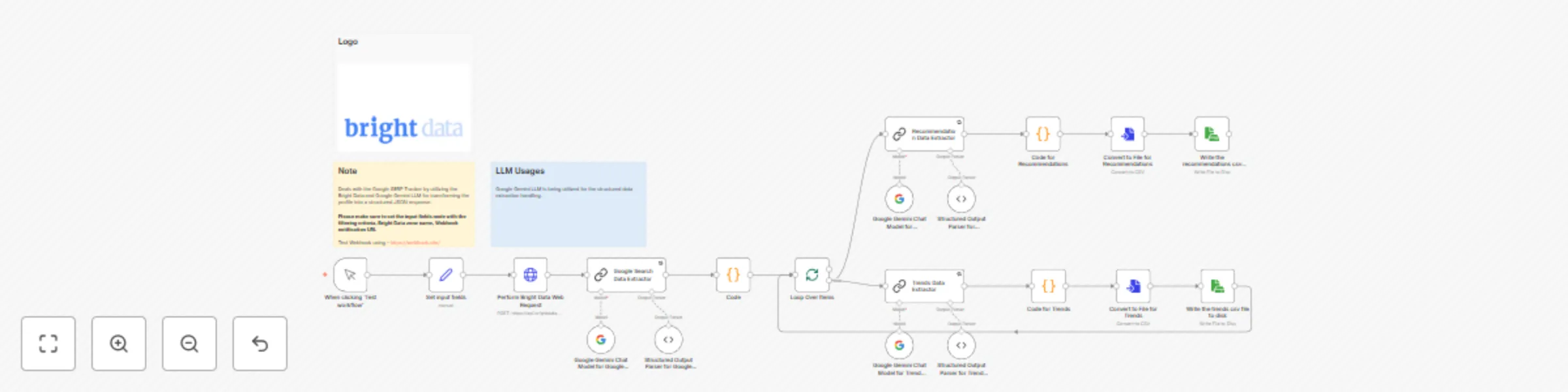
Accepts search input, zone name, and webhook notification URL
Uses Bright Data to extract Google Search Results
Uses Google Gemini LLM to parse the SERP data into structured JSON
Loops over structured results to:
Extract recommendations
Extract trends
Saves both as .csv files (example below):
Google_SERP_Recommendations_Response_2025-06-10T23-01-50-650Z.csv
Google_SERP_Trends_Response_2025-06-10T23-01-38-915Z.csv
Sends a Webhook with the summary or file reference
LLM Usage
Google Gemini LLM handles:
Parsing Google Search HTML into structured JSON
Summarizing recommendation data
Deriving trends from the extracted SERP metadata
The Value field should be set with the Bearer XXXXXXXXXXXXXX. The XXXXXXXXXXXXXX should be replaced by the Web Unlocker Token.
Input Customization
Set your target keyword/phrase in the search field
Add your webhook_notification_url for external triggers or notifications
SERP Source
You can extend the Bright Data search logic to include other engines like Bing or DuckDuckGo.
Output Format
Edit the .csv structure in the Convert to File nodes if you want to include/exclude specific columns.
LLM Prompt Tuning
The Gemini LLM prompt inside the Recommendation or Trends extractor nodes can be fine-tuned for domain-specific insight (e.g., SEO vs eCommerce focus).
This catalog entry is organized from the workflow JSON. The node-level section below shows the executable blocks available for review before importing the template.
| Workflow | Google SERP + trends and recommendations with Bright Data & Google Gemini |
|---|---|
| Complexity | advanced |
| Nodes | 23 |
| Categories | Market Research, AI Summarization |
| Author | Ranjan Dailata |
| Published | 10 Jun 2025 |
Use the JSON export at /data/workflows/4861/4861.json as the source template for this automation.
Open n8n, import the downloaded JSON, and review each node before activating the workflow.
Replace placeholder credentials, API keys, webhook URLs, account IDs, and environment-specific values with your own settings.
Run the workflow manually or in a staging workspace, inspect node output, and confirm downstream systems receive the expected data.
Enable the workflow only after testing, then monitor executions, errors, and rate limits during the first production runs.
Review imported nodes carefully before activation. This catalog entry is intended to help you inspect the workflow structure, understand required services, and find related templates faster.
Node names, credentials, schedules, webhook paths, and external service limits may need adjustment for your workspace.
Who this is for? Google SERP Tracker + Trends and Recommendations is an AI powered n8n workflow that extracts Google search results via Bright Data, parses them into structured JSON using Google Ge...
Review the workflow JSON, configure any required credentials in n8n, and test the automation in a safe workspace before using it in production.
Yes. Use the block-by-block analysis and the downloadable JSON to inspect each node, then adjust credentials, prompts, schedules, filters, or destinations for your Market Research, AI Summarization use case.