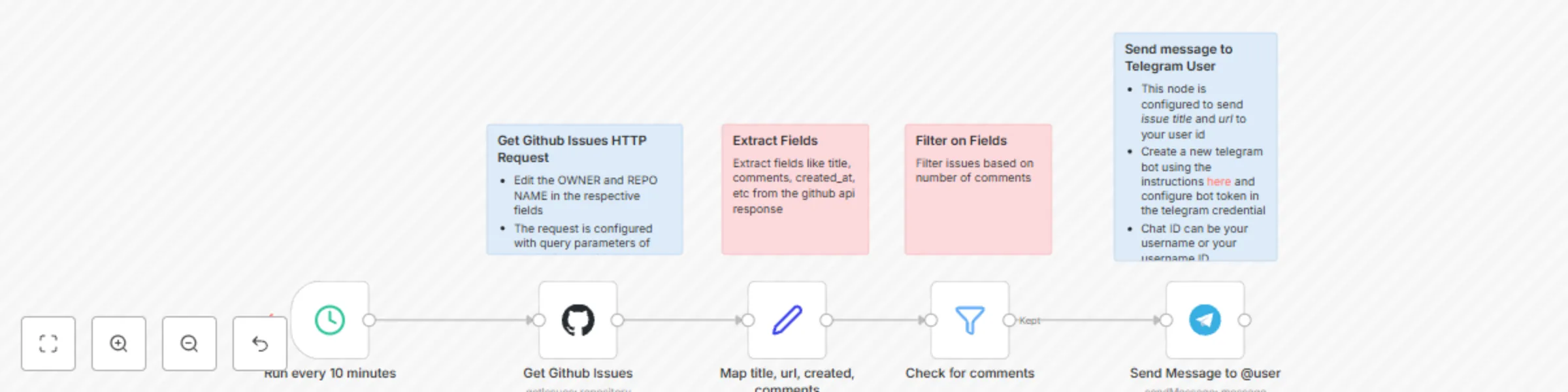
Get GitHub issue updates and send notifications to Telegram

Workflow preview

Workflow preview
100%
Get GitHub issue updates and send notifications to Telegram preview
Open on n8n.io

Important notice

This workflow is provided as-is. Please review and test before using in production.

1. Workflow Overview

Who is this for? This workflow is ideal for: Developers who want to stay updated on issues without constantly checking GitHub. Managers tracking issue progress in a Telegram group. DevOps teams tha...

Best for

  • Project Management automation workflows
  • intermediate n8n builders looking for reusable templates

Tools used

n8n-nodes-base.stickynote, n8n-nodes-base.telegram, n8n-nodes-base.filter, n8n-nodes-base.set, n8n-nodes-base.scheduletrigger, n8n-nodes-base.github

Source and attribution

This workflow is cataloged by N8N Workflows and links back to its original n8n.io source page by Prakash.

Original n8n.io source

1.1 Workflow description

Title
Get GitHub issue updates and send notifications to Telegram
Workflow name
Get GitHub issue updates and send notifications to Telegram

Who is this for?

This workflow is ideal for:

  • Developers who want to stay updated on issues without constantly checking GitHub.
  • Managers tracking issue progress in a Telegram group.
  • DevOps teams that need automated notification alerts for new or updated issues.

What problem does this workflow solve?

Keeping track of GitHub issues manually can be tedious. Teams often miss critical updates because notifications are buried in emails or dashboards. This workflow automates the process by fetching new or open GitHub issues and instantly sending notifications to a specified Telegram chat.

What this workflow does

This workflow connects GitHub and Telegram to provide real-time issue notifications:

  1. Fetch GitHub Issues – Retrieves new or open issues from a selected GitHub repository.
  2. Format the Issue Details – Extracts key information like issue title, number, status, and URL.
  3. Send to Telegram – Posts the formatted issue details to a Telegram group or private chat.

Setup Guide

Prerequisites

Before setting up the workflow, ensure you have:

  • GitHub Personal Access Token: Required to fetch issue details. Generate it under Developer Settings with repo or public_repo permissions.
  • Telegram Bot Token: Create a bot via BotFather on Telegram and obtain the token.
  • Telegram Chat ID: Find the chat ID where the bot should send messages using this method.

Step-by-Step Setup

  1. Set Up GitHub Node

    • Authenticate using your GitHub token.
    • Choose the repository you want to track.
    • Configure filters (e.g., fetch only open issues).
  2. Format Issue Details

    • Extract key details like title, issue number, assignee, and status.
    • Customize the message structure for better readability.
  3. Send Message to Telegram

    • Add the Telegram node and enter your bot token.
    • Use the Chat ID to define the recipient.
    • Format the message to include issue details and links.
  4. Schedule the Workflow (Optional)

    • Use the Cron node to run this workflow periodically (e.g., every hour).

How to Customize This Workflow

  • Filter Issues by Labels: Modify the GitHub node to fetch only issues with specific labels.
  • Include Additional Fields: Add issue comments, priority, or assignee details in the message.
  • Send Alerts Based on Priority: Use conditional logic to send high-priority issues to a different chat.
  • Trigger on Issue Events: Instead of fetching periodically, use GitHub webhooks (if permitted in the repo) to trigger the workflow on issue creation or updates.

Why Use This Workflow?

  • Automates GitHub issue tracking without manually checking repositories.
  • Instant notifications in Telegram ensure quick response times.
  • Fully customizable to fit different team workflows.

1.2 Logical Blocks

This catalog entry is organized from the workflow JSON. The node-level section below shows the executable blocks available for review before importing the template.

2. Block-by-Block Analysis

Block 1 - Sticky Note

Type / Role
n8n-nodes-base.stickyNote - stickyNote
Config choices
Version 1

Block 2 - Sticky Note1

Type / Role
n8n-nodes-base.stickyNote - stickyNote
Config choices
Version 1

Block 3 - Sticky Note2

Type / Role
n8n-nodes-base.stickyNote - stickyNote
Config choices
Version 1

Block 4 - Sticky Note3

Type / Role
n8n-nodes-base.stickyNote - stickyNote
Config choices
Version 1

Block 5 - Send Message to @user

Type / Role
n8n-nodes-base.telegram - telegram
Config choices
Version 1.2

Block 6 - Check for comments

Type / Role
n8n-nodes-base.filter - filter
Config choices
Version 2.2

Block 7 - Map title, url, created, comments

Type / Role
n8n-nodes-base.set - set
Config choices
Version 3.4

Block 8 - Run every 10 minutes

Type / Role
n8n-nodes-base.scheduleTrigger - scheduleTrigger
Config choices
Version 1.2

Block 9 - Get Github Issues

Type / Role
n8n-nodes-base.github - github
Config choices
Version 1

3. Summary Table

Workflow Get GitHub issue updates and send notifications to Telegram
Complexity intermediate
Nodes 9
Categories Project Management
Author Prakash
Published 26 Feb 2025

4. Reproducing the Workflow from Scratch

  1. 1. Download the workflow JSON

    Use the JSON export at /data/workflows/3021/3021.json as the source template for this automation.

  2. 2. Import the template into n8n

    Open n8n, import the downloaded JSON, and review each node before activating the workflow.

  3. 3. Configure credentials and variables

    Replace placeholder credentials, API keys, webhook URLs, account IDs, and environment-specific values with your own settings.

  4. 4. Test with sample data

    Run the workflow manually or in a staging workspace, inspect node output, and confirm downstream systems receive the expected data.

  5. 5. Activate and monitor

    Enable the workflow only after testing, then monitor executions, errors, and rate limits during the first production runs.

5. General Notes & Resources

Review imported nodes carefully before activation. This catalog entry is intended to help you inspect the workflow structure, understand required services, and find related templates faster.

Node names, credentials, schedules, webhook paths, and external service limits may need adjustment for your workspace.

Frequently asked questions

What does Get GitHub issue updates and send notifications to Telegram do?

Who is this for? This workflow is ideal for: Developers who want to stay updated on issues without constantly checking GitHub. Managers tracking issue progress in a Telegram group. DevOps teams tha...

What do I need before importing this workflow?

Review the workflow JSON, configure any required credentials in n8n, and test the automation in a safe workspace before using it in production.

Can I customize this workflow?

Yes. Use the block-by-block analysis and the downloadable JSON to inspect each node, then adjust credentials, prompts, schedules, filters, or destinations for your Project Management use case.