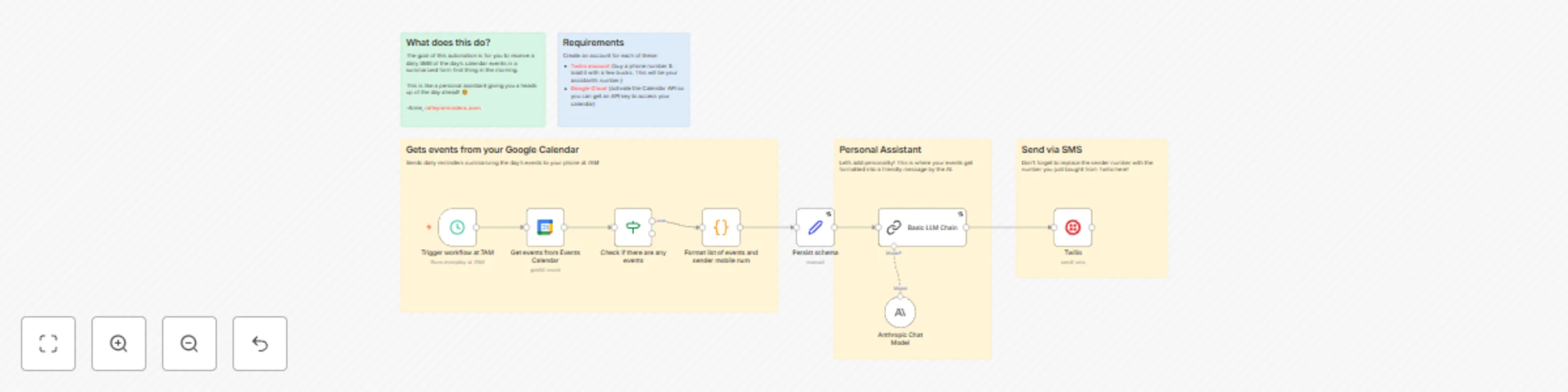
Get daily calendar summaries via SMS with Google Calendar, Twilio and Claude AI

Workflow preview

Workflow preview
100%
Get daily calendar summaries via SMS with Google Calendar, Twilio and Claude AI preview
Open on n8n.io

Important notice

This workflow is provided as-is. Please review and test before using in production.

1. Workflow Overview

This free n8n automation helps anyone—from busy parents to entrepreneurs—get a daily SMS summary of their calendar events. It’s a personal assistant that gives you a heads up of what your day will ...

Best for

  • Personal Productivity automation workflows
  • AI Summarization automation workflows
  • intermediate n8n builders looking for reusable templates

Tools used

n8n-nodes-base.twilio, @n8n/n8n-nodes-langchain.chainllm, n8n-nodes-base.stickynote, @n8n/n8n-nodes-langchain.lmchatanthropic, n8n-nodes-base.scheduletrigger, n8n-nodes-base.googlecalendar, n8n-nodes-base.if, n8n-nodes-base.code

Source and attribution

This workflow is cataloged by N8N Workflows and links back to its original n8n.io source page by Anne Uy Gothong.

Original n8n.io source

1.1 Workflow description

Title
Get daily calendar summaries via SMS with Google Calendar, Twilio and Claude AI
Workflow name
Get daily calendar summaries via SMS with Google Calendar, Twilio and Claude AI

This free n8n automation helps anyone—from busy parents to entrepreneurs—get a daily SMS summary of their calendar events. It’s a personal assistant that gives you a heads up of what your day will look like.

Great for: starting your day cognizant of the day's events, or for the neurodivergent.

Example use case:

Parent receives a text summarizing the Family Calendar events at 5AM. Its a reminder of a child's doctor appointment at 1PM and soccer practice at 430PM. The AI then ends the message on an uplifting note.

Good to Know

  • Requires user to buy a Twilio phone number to send SMS from. Each message, at the time of writing, is $0.083 CAD.
  • Requires basic knowledge of Google Cloud Console for the activation of Google Calendar API

How it Works

  1. Every morning at 7AM, your workflow checks Google Calendar for the day’s events.
  2. It formats your schedule into a friendly, easy-to-read summary using your favorite AI model (any LLM works—Anthropic, OpenAI, Gemini, etc).
  3. That summary is texted directly to your phone via Twilio as a personal daily reminder.

How to Use

  • Copy this n8n workflow into your own instance.
  • Hook up your Google Calendar and Twilio accounts. You can choose the specific calendar in the Calendar node.
  • Choose or swap in any AI model you prefer to personalize your summaries. I find Claude sounds the most natural.
Enjoy your daily, cheerful calendar digest by SMS at 7AM!

Requirements

  • A Google Cloud account (to activate the Calendar API and get credentials—see Google documentation).
  • Twilio account (for sending SMS—get started with Twilio’s easy setup).
  • Any LLM API account (optional, but recommended for polite/friendly summaries).

Customize this flow

  • Change SMS times to fit your morning routine.
  • Adjust message formatting for your style or brand.
  • Swap LLM services, tweak prompts, or combine multiple calendars—whatever works for you.

Reach out anytime at ralleyreminders.com if you have questions or want to share ideas!

1.2 Logical Blocks

This catalog entry is organized from the workflow JSON. The node-level section below shows the executable blocks available for review before importing the template.

2. Block-by-Block Analysis

Block 1 - Twilio

Type / Role
n8n-nodes-base.twilio - twilio
Config choices
Version 1

Block 2 - Basic LLM Chain

Type / Role
@n8n/n8n-nodes-langchain.chainLlm - chainLlm
Config choices
Version 1.6

Block 3 - Sticky Note1

Type / Role
n8n-nodes-base.stickyNote - stickyNote
Config choices
Version 1

Block 4 - Anthropic Chat Model

Type / Role
@n8n/n8n-nodes-langchain.lmChatAnthropic - lmChatAnthropic
Config choices
Version 1.3

Block 5 - Trigger workflow at 7AM

Type / Role
n8n-nodes-base.scheduleTrigger - scheduleTrigger
Config choices
Version 1.2

Block 6 - Get events from Events Calendar

Type / Role
n8n-nodes-base.googleCalendar - googleCalendar
Config choices
Version 1.3

Block 7 - Check if there are any events

Type / Role
n8n-nodes-base.if - if
Config choices
Version 2.2

Block 8 - Format list of events and sender mobile num

Type / Role
n8n-nodes-base.code - code
Config choices
Version 2

Block 9 - Persist schema

Type / Role
n8n-nodes-base.set - set
Config choices
Version 3.4

Block 10 - Sticky Note

Type / Role
n8n-nodes-base.stickyNote - stickyNote
Config choices
Version 1

Block 11 - Sticky Note2

Type / Role
n8n-nodes-base.stickyNote - stickyNote
Config choices
Version 1

Block 12 - Sticky Note3

Type / Role
n8n-nodes-base.stickyNote - stickyNote
Config choices
Version 1

Block 13 - Sticky Note4

Type / Role
n8n-nodes-base.stickyNote - stickyNote
Config choices
Version 1

3. Summary Table

Workflow Get daily calendar summaries via SMS with Google Calendar, Twilio and Claude AI
Complexity intermediate
Nodes 13
Categories Personal Productivity, AI Summarization
Author Anne Uy Gothong
Published 24 Oct 2025

4. Reproducing the Workflow from Scratch

  1. 1. Download the workflow JSON

    Use the JSON export at /data/workflows/10134/10134.json as the source template for this automation.

  2. 2. Import the template into n8n

    Open n8n, import the downloaded JSON, and review each node before activating the workflow.

  3. 3. Configure credentials and variables

    Replace placeholder credentials, API keys, webhook URLs, account IDs, and environment-specific values with your own settings.

  4. 4. Test with sample data

    Run the workflow manually or in a staging workspace, inspect node output, and confirm downstream systems receive the expected data.

  5. 5. Activate and monitor

    Enable the workflow only after testing, then monitor executions, errors, and rate limits during the first production runs.

5. General Notes & Resources

Review imported nodes carefully before activation. This catalog entry is intended to help you inspect the workflow structure, understand required services, and find related templates faster.

Node names, credentials, schedules, webhook paths, and external service limits may need adjustment for your workspace.

Frequently asked questions

What does Get daily calendar summaries via SMS with Google Calendar, Twilio and Claude AI do?

This free n8n automation helps anyone—from busy parents to entrepreneurs—get a daily SMS summary of their calendar events. It’s a personal assistant that gives you a heads up of what your day will ...

What do I need before importing this workflow?

Review the workflow JSON, configure any required credentials in n8n, and test the automation in a safe workspace before using it in production.

Can I customize this workflow?

Yes. Use the block-by-block analysis and the downloadable JSON to inspect each node, then adjust credentials, prompts, schedules, filters, or destinations for your Personal Productivity, AI Summarization use case.