A

Anne Uy Gothong

1
Workflow

Workflows by Anne Uy Gothong

Workflow preview: Get daily calendar summaries via SMS with Google Calendar, Twilio and Claude AI
Free intermediate

Get daily calendar summaries via SMS with Google Calendar, Twilio and Claude AI

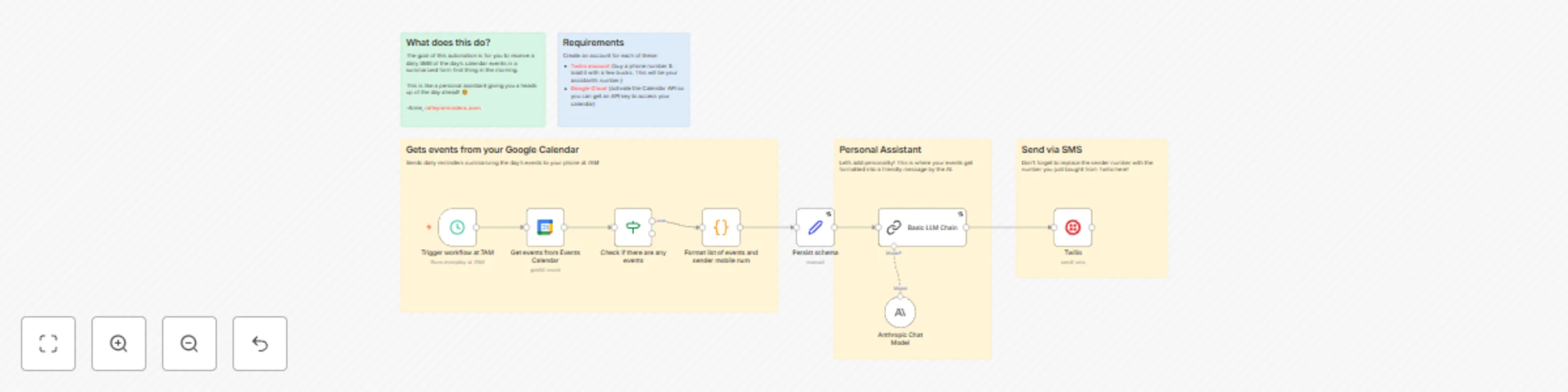
# This free n8n automation helps anyone—from busy parents to entrepreneurs—get a daily SMS summary of their calendar events. It’s a personal assistant that gives you a heads up of what your day will look like. Great for: starting your day cognizant of the day's events, or for the neurodivergent. ### Example use case: Parent receives a text summarizing the Family Calendar events at 5AM. Its a reminder of a child's doctor appointment at 1PM and soccer practice at 430PM. The AI then ends the message on an uplifting note. ### Good to Know - Requires user to buy a Twilio phone number to send SMS from. Each message, at the time of writing, is $0.083 CAD. - Requires basic knowledge of Google Cloud Console for the activation of Google Calendar API ## How it Works 1. Every morning at 7AM, your workflow checks Google Calendar for the day’s events. 2. It formats your schedule into a friendly, easy-to-read summary using your favorite AI model (any LLM works—Anthropic, OpenAI, Gemini, etc). 3. That summary is texted directly to your phone via Twilio as a personal daily reminder. ## How to Use - Copy this n8n workflow into your own instance. - Hook up your Google Calendar and Twilio accounts. You can choose the specific calendar in the Calendar node. - Choose or swap in any AI model you prefer to personalize your summaries. I find Claude sounds the most natural. #### Enjoy your daily, cheerful calendar digest by SMS at 7AM! ## Requirements - A Google Cloud account (to activate the Calendar API and get credentials—see Google documentation). - Twilio account (for sending SMS—get started with Twilio’s easy setup). - Any LLM API account (optional, but recommended for polite/friendly summaries). ## Customize this flow - Change SMS times to fit your morning routine. - Adjust message formatting for your style or brand. - Swap LLM services, tweak prompts, or combine multiple calendars—whatever works for you. Reach out anytime at ralleyreminders.com if you have questions or want to share ideas!

A
Anne Uy Gothong
Personal Productivity
25 Oct 2025
446
0