Block 1 - When clicking ‘Execute workflow’
- Type / Role
- n8n-nodes-base.manualTrigger - manualTrigger
- Config choices
- Version 1


 Early Deal
This workflow is provided as-is. Please review and test before using in production.
This workflow is your ultimate solution for reliable image retrieval from any web source , including those heavily protected. It operates with a smart, cost effective strategy: it first attempts to...
n8n-nodes-base.manualtrigger, n8n-nodes-base.set, n8n-nodes-base.httprequest, n8n-nodes-base.stickynote
This workflow is cataloged by N8N Workflows and links back to its original n8n.io source page by phil.
Original n8n.io sourceThis workflow is your ultimate solution for reliable image retrieval from any web source, including those heavily protected.
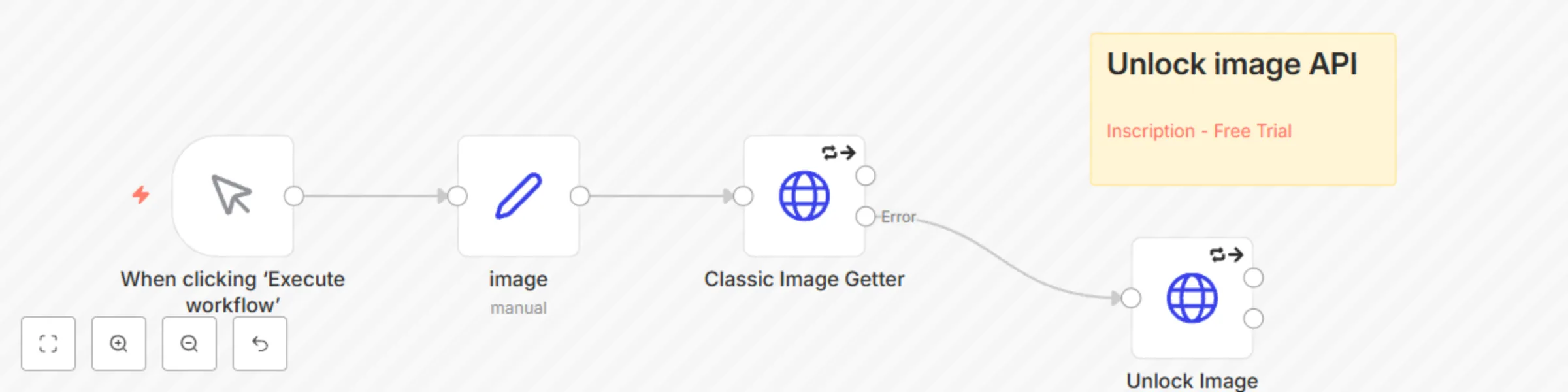
It operates with a smart, cost-effective strategy: it first attempts to fetch the image using a Classic Image Getter node (a standard, free HTTP request). In approximately 80% of cases, this method will be sufficient.
However, for the remaining instances where you encounter IP blocking, CAPTCHAs, rate limiting, or other advanced anti-bot measures, the workflow seamlessly switches to a robust BrightData Web Unblocker service as a fallback. It leverages BrightData’s Image Unblocker to retrieve these blocked images.
This template is indispensable for anyone needing consistent and complete access to web images, ensuring you get the data you need without unnecessary overhead.
Set node defines the target image URL. This can be easily configured to accept dynamic URLs from preceding nodes.HTTP Request node performs a direct image download. It's the primary, free, and efficient method for readily accessible images.HTTP Request node activates only if the "Classic Image Getter" encounters an error. It then routes the image URL through BrightData's Web Unblocker, designed to bypass advanced protective measures and successfully retrieve the image data.To enable the advanced capabilities of this workflow, specifically the BrightData Web Unblocker functionality, you will need a BrightData account and a correctly configured Web Unblocker zone.
n8n-image-unlocker).Authorization header. Replace "Bearer yourkey" with "Bearer YOUR_BRIGHTDATA_API_KEY".zone parameter in the Unlock Image node matches the exact Zone ID you created in your BrightData account. You will need to replace the placeholder web_unlocker with your actual BrightData zone ID.🇫🇷 Contactez nous pour automatiser vos processus
This catalog entry is organized from the workflow JSON. The node-level section below shows the executable blocks available for review before importing the template.
| Workflow | Get any image: standard fetch with BrightData Web Unblocker failover |
|---|---|
| Complexity | intermediate |
| Nodes | 5 |
| Categories | Engineering |
| Author | phil |
| Published | 12 Jul 2025 |
Use the JSON export at /data/workflows/5905/5905.json as the source template for this automation.
Open n8n, import the downloaded JSON, and review each node before activating the workflow.
Replace placeholder credentials, API keys, webhook URLs, account IDs, and environment-specific values with your own settings.
Run the workflow manually or in a staging workspace, inspect node output, and confirm downstream systems receive the expected data.
Enable the workflow only after testing, then monitor executions, errors, and rate limits during the first production runs.
Review imported nodes carefully before activation. This catalog entry is intended to help you inspect the workflow structure, understand required services, and find related templates faster.
Node names, credentials, schedules, webhook paths, and external service limits may need adjustment for your workspace.
This workflow is your ultimate solution for reliable image retrieval from any web source , including those heavily protected. It operates with a smart, cost effective strategy: it first attempts to...
Review the workflow JSON, configure any required credentials in n8n, and test the automation in a safe workspace before using it in production.
Yes. Use the block-by-block analysis and the downloadable JSON to inspect each node, then adjust credentials, prompts, schedules, filters, or destinations for your Engineering use case.