Block 1 - Daily Trigger
- Type / Role
- n8n-nodes-base.scheduleTrigger - scheduleTrigger
- Config choices
- Version 1.2


 Early Deal
This workflow is provided as-is. Please review and test before using in production.
This workflow contains community nodes that are only compatible with the self hosted version of n8n. Setup Time 5 10 minutes Problem Researching and personalizing outreach is slow and manual! You...
n8n-nodes-base.scheduletrigger, n8n-nodes-base.stickynote, n8n-nodes-base.gmail, n8n-nodes-base.set, n8n-nodes-base.perplexity, n8n-nodes-base.merge, n8n-nodes-base.code
This workflow is cataloged by N8N Workflows and links back to its original n8n.io source page by Abhijay Vuyyuru.
Original n8n.io sourceThis workflow contains community nodes that are only compatible with the self-hosted version of n8n.
5-10 minutes
⏳ Researching and personalizing outreach is slow and manual!
You spend hours searching for the right people, reading through profiles, and then writing custom emails—only to repeat the process for every new lead or opportunity. It’s tedious, error-prone, and not scalable.
What if you could get a beautifully formatted, ready-to-send newsletter in your Gmail drafts—automatically, every day?
That’s what this Perplexity Newsletter Workflow does, powered by n8n.
n8n account (self-hosted or cloud) Perplexity API key (or OpenAI API key for similar LLMs) Gmail account (for sending emails) (Optional) Google Sheets account (for archiving newsletters) Who is this for? 🎯 Product Managers who want to stay ahead of trends 🎯 MBA aspirants tracking admission news 🎯 AI professionals and enthusiasts seeking curated updates 🎯 Anyone who wants a daily, personalized, multi-topic newsletter—without manual work
Setup time: 5-10 minutes
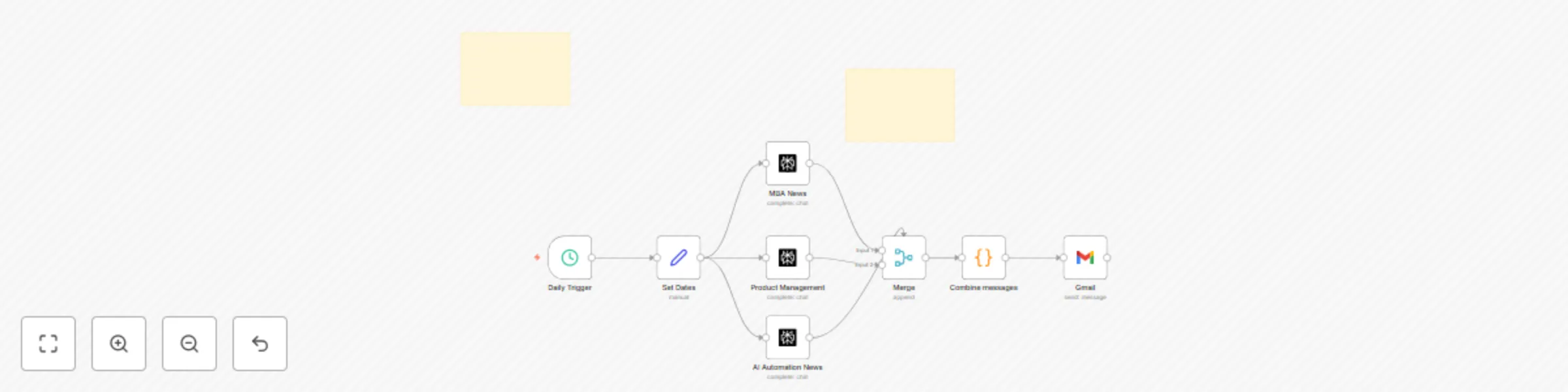
Use a Cron node to schedule the workflow (e.g., every morning at 8am). Fetch News from Perplexity
Add three HTTP Request nodes (or Perplexity nodes if available): One for MBA News One for Product Management News One for AI Automation News Each node sends a prompt to Perplexity and receives a summary with citations. Merge News Items
Use a Merge node (mode: Append) to combine the three news responses. Format Newsletter
Add a Code node after the Merge node. In the Code node, format each news item with a section header (e.g., “MBA News”, “Product Management”, “AI Automation News”), apply HTML formatting, and combine all into a single HTML message. (Use the code from our previous message for beautiful formatting and sectioning.) Send Email
Add a Gmail node. Set the “HTML” field to the formatted newsletter from the Code node. Set the “Subject” to something like “🤖 Your Daily Perplexity Newsletter”. (Optional) Archive to Google Sheets
Add a Google Sheets node to append the newsletter content and date for future reference.
A single, beautifully formatted email in your Gmail drafts, with three clearly labeled sections, clickable sources, and all the latest insights—ready to send or review.
Ready to automate your daily insights? Set up this workflow in n8n and never miss an update again!
Change schedule time in the Cron node Modify news topics or prompts in the Perplexity nodes Adjust section titles or email styling in the Format Newsletter (Code) node
This catalog entry is organized from the workflow JSON. The node-level section below shows the executable blocks available for review before importing the template.
| Workflow | Get an automated, curated newsletter everyday using Perplexity and Gmail |
|---|---|
| Complexity | intermediate |
| Nodes | 10 |
| Categories | Personal Productivity, Multimodal AI |
| Author | Abhijay Vuyyuru |
| Published | 21 Jun 2025 |
Use the JSON export at /data/workflows/5087/5087.json as the source template for this automation.
Open n8n, import the downloaded JSON, and review each node before activating the workflow.
Replace placeholder credentials, API keys, webhook URLs, account IDs, and environment-specific values with your own settings.
Run the workflow manually or in a staging workspace, inspect node output, and confirm downstream systems receive the expected data.
Enable the workflow only after testing, then monitor executions, errors, and rate limits during the first production runs.
Review imported nodes carefully before activation. This catalog entry is intended to help you inspect the workflow structure, understand required services, and find related templates faster.
Node names, credentials, schedules, webhook paths, and external service limits may need adjustment for your workspace.
This workflow contains community nodes that are only compatible with the self hosted version of n8n. Setup Time 5 10 minutes Problem Researching and personalizing outreach is slow and manual! You...
Review the workflow JSON, configure any required credentials in n8n, and test the automation in a safe workspace before using it in production.
Yes. Use the block-by-block analysis and the downloadable JSON to inspect each node, then adjust credentials, prompts, schedules, filters, or destinations for your Personal Productivity, Multimodal AI use case.