Block 1 - When chat message received
- Type / Role
- @n8n/n8n-nodes-langchain.chatTrigger - chatTrigger
- Config choices
- Version 1.1


 Early Deal
This workflow is provided as-is. Please review and test before using in production.
Who is this for? Content creators, writers, and automation enthusiasts experimenting with recursive AI workflows for content generation and refinement. Ideal for those exploring AI agents that coll...
@n8n/n8n-nodes-langchain.chattrigger, @n8n/n8n-nodes-langchain.memorybufferwindow, n8n-nodes-base.set, @n8n/n8n-nodes-langchain.outputparserstructured, @n8n/n8n-nodes-langchain.lmchatopenai, n8n-nodes-base.code, n8n-nodes-base.if, @n8n/n8n-nodes-langchain.agent
This workflow is cataloged by N8N Workflows and links back to its original n8n.io source page by Matty Reed.
Original n8n.io sourceContent creators, writers, and automation enthusiasts experimenting with recursive AI workflows for content generation and refinement. Ideal for those exploring AI agents that collaborate in cycles of writing and editing.
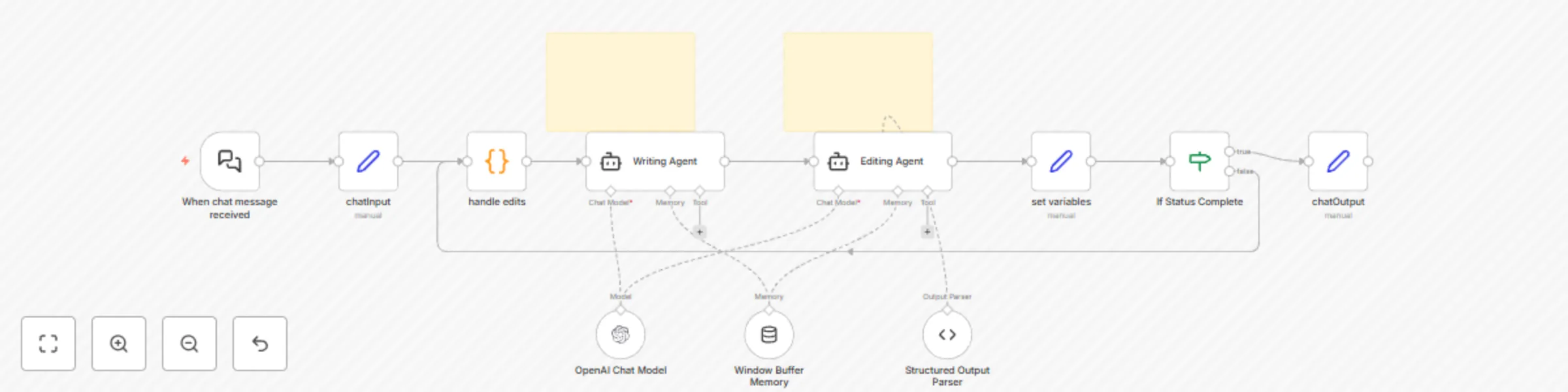
This template introduces a fully automated, recursive writing‑editing loop using multi‑agent collaboration. A “Writing Agent” generates content based on an input topic. An “Editing Agent” reviews it, suggests improvements, and determines whether the work is complete. The loop continues until the editor is satisfied—allowing for high‑quality, iterative AI‑assisted writing with minimal human input.
This template is a foundational setup to help you build custom recursive writing workflows:
Trigger: Activated by an n8n chat message containing a topic. You can customize this to work with webhooks, forms, or other input sources.
Edit Handler: A code node checks for previous edits and sets a default empty string if none are found.
Writing Agent: Generates a blurb based on the topic and any edits. Customize the prompt in this node by editing the user/system instructions to fit your tone, domain, or style preferences.
Editing Agent: Suggests specific edits and outputs a structured JSON object:
{
  "status": "incomplete",
  "edits": "Replace passive voice with active voice in the second sentence. Clarify the main idea in the opening line."
}
You can adjust the JSON format or editing criteria in the prompt field. Customize the prompt in this node by editing the user/system instructions to fit your tone, domain, or style preferences.
Recursive Loop: If the status is “incomplete,” the edits are passed back to the Writing Agent, which revises the blurb.
Completion: Once the Editing Agent outputs a status of “complete,” the workflow ends, and the final blurb is returned to the n8n chat.
Input Topic: “The future of remote work”
Final Blurb: “Remote work is here to stay. As companies embrace flexible setups, productivity and employee satisfaction are reaching new highs. The challenge now is to build culture and collaboration tools that keep up.”
This template offers a powerful starting point for recursive AI writing. Expand it with additional agents, tone shifts, formatting layers, or sentiment analysis as needed.
This catalog entry is organized from the workflow JSON. The node-level section below shows the executable blocks available for review before importing the template.
| Workflow | Generate written content with GPT Recursive Writing & Editing agents |
|---|---|
| Complexity | intermediate |
| Nodes | 13 |
| Categories | Content Creation, Multimodal AI |
| Author | Matty Reed |
| Published | 09 Apr 2025 |
Use the JSON export at /data/workflows/3503/3503.json as the source template for this automation.
Open n8n, import the downloaded JSON, and review each node before activating the workflow.
Replace placeholder credentials, API keys, webhook URLs, account IDs, and environment-specific values with your own settings.
Run the workflow manually or in a staging workspace, inspect node output, and confirm downstream systems receive the expected data.
Enable the workflow only after testing, then monitor executions, errors, and rate limits during the first production runs.
Review imported nodes carefully before activation. This catalog entry is intended to help you inspect the workflow structure, understand required services, and find related templates faster.
Node names, credentials, schedules, webhook paths, and external service limits may need adjustment for your workspace.
Who is this for? Content creators, writers, and automation enthusiasts experimenting with recursive AI workflows for content generation and refinement. Ideal for those exploring AI agents that coll...
Review the workflow JSON, configure any required credentials in n8n, and test the automation in a safe workspace before using it in production.
Yes. Use the block-by-block analysis and the downloadable JSON to inspect each node, then adjust credentials, prompts, schedules, filters, or destinations for your Content Creation, Multimodal AI use case.