Generate weekly supply chain OTIF reports and AI analysis with Notion and GPT-4o

Workflow preview

Workflow preview
100%
Generate weekly supply chain OTIF reports and AI analysis with Notion and GPT-4o preview
Open on n8n.io

1. Workflow Overview

Tags: Logistics, Supply Chain, OTIF, KPI Tracking, Performance Management, AI Analysis, Notion Context Hi! I'm Samir, Supply Chain Engineer, Data Scientist based in P...

Best for

  • Document Extraction automation workflows
  • AI Summarization automation workflows
  • advanced n8n builders looking for reusable templates

Tools used

n8n-nodes-base.code, @n8n/n8n-nodes-langchain.lmchatopenai, n8n-nodes-base.notion, n8n-nodes-base.datatable, @n8n/n8n-nodes-langchain.agent, n8n-nodes-base.stickynote, n8n-nodes-base.scheduletrigger

Source and attribution

This workflow is cataloged by N8N Workflows and links back to its original n8n.io source page by Samir Saci.

Original n8n.io source

1.1 Workflow description

Title
Generate weekly supply chain OTIF reports and AI analysis with Notion and GPT-4o
Workflow name
Generate weekly supply chain OTIF reports and AI analysis with Notion and GPT-4o

Tags: Logistics, Supply Chain, OTIF, KPI Tracking, Performance Management, AI Analysis, Notion

Context

Hi! I'm Samir, Supply Chain Engineer, Data Scientist based in Paris, and founder of LogiGreen.

> Let's use AI with n8n to automate supply chain performance tracking!

Tracking On-Time In-Full (OTIF) delivery performance is critical for retail logistics, but manually compiling data, computing KPIs, and writing analysis reports is time-consuming and error-prone.

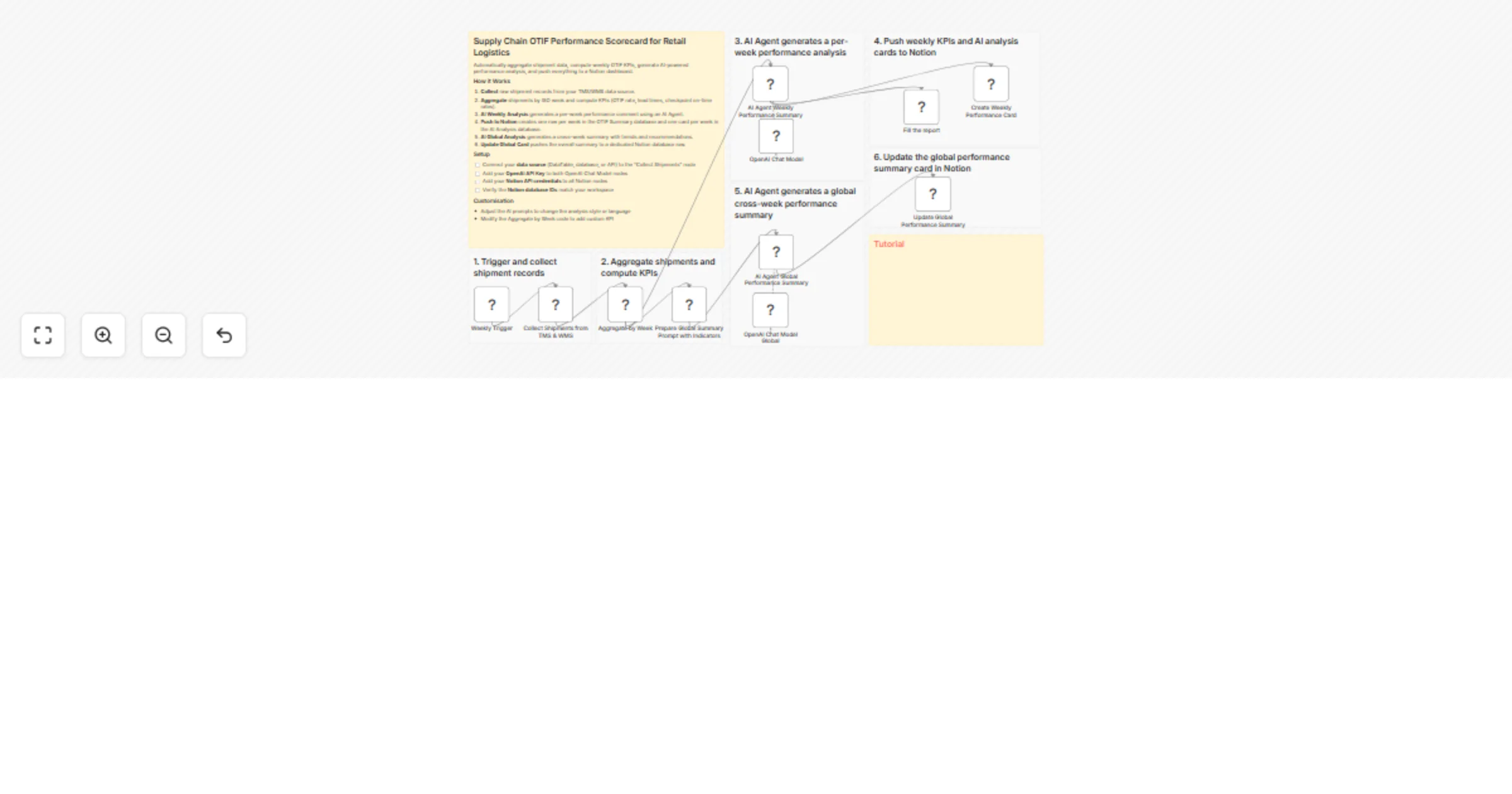
This workflow automates the entire process: collecting shipment data, aggregating weekly KPIs, generating AI powered performance analyses, and pushing everything into a Notion dashboard.

For business inquiries, you can find me on LinkedIn

Demo of the workflow

The workflow collects shipment records from your TMS and WMS, then aggregates them by week.

An AI Agent analyses each week's performance and generates summary cards in Notion.

Weekly OTIF data is automatically pushed to a Notion database for tracking and visualisation.

Who is this template for?

This template is ideal for logistics and supply chain teams looking to automate KPI reporting:

  • Supply chain managers tracking delivery performance across carriers and warehouses
  • Logistics analysts who need automated weekly OTIF scorecards
  • Operations teams looking to leverage AI for performance insights

Tutorial

A complete tutorial (with explanations of every node) is available on YouTube:

What does this workflow do?

This automation uses Notion databases and OpenAI AI Agents to build a complete OTIF scorecard:

  1. The workflow is triggered manually (or on a schedule).
  2. Shipment data is collected from your TMS and WMS systems.
  3. Records are aggregated by week, computing On-Time rate, In-Full rate, and OTIF rate.
  4. An AI Agent analyses each week's performance and identifies trends, issues, and recommendations.
  5. Weekly KPI rows are pushed to the Daily OTIF Summary database in Notion.
  6. Per-week AI analysis cards are created in the AI Generated Analysis database.
  7. A second AI Agent generates a global performance summary across all weeks.
  8. The global summary card is updated in Notion with the overall analysis.

Next Steps

Before running the workflow, follow the sticky notes and configure:

  • Connect your Notion API credentials and update the database IDs in all Notion nodes
  • Add your OpenAI API Key to the AI Agent nodes
  • Update the "Collect Shipments from TMS & WMS" node with your actual data source (API, Google Sheets, or database)
  • Adjust the AI prompts to match your specific KPI thresholds and business context
  • Set up the Notion template with the two required databases: "Daily OTIF Summary" and "AI Generated Analysis"
  • Duplicate the Notion template to your workspace before connecting the workflow
  • (Optional) Change the trigger from manual to a scheduled cron for automated weekly reporting

Submitted: 8 March 2026 Template designed with n8n version 2.10.12

1.2 Logical Blocks

This catalog entry is organized from the workflow JSON. The node-level section below shows the executable blocks available for review before importing the template.

2. Block-by-Block Analysis

Block 1 - Aggregate by Week

Type / Role
n8n-nodes-base.code - code
Config choices
Version 2

Block 2 - OpenAI Chat Model

Type / Role
@n8n/n8n-nodes-langchain.lmChatOpenAi - lmChatOpenAi
Config choices
Version 1.2

Block 3 - Fill the report

Type / Role
n8n-nodes-base.notion - notion
Config choices
Version 2.2

Block 4 - OpenAI Chat Model Global

Type / Role
@n8n/n8n-nodes-langchain.lmChatOpenAi - lmChatOpenAi
Config choices
Version 1.2

Block 5 - Collect Shipments from TMS & WMS

Type / Role
n8n-nodes-base.dataTable - dataTable
Config choices
Version 1.1

Block 6 - AI Agent Weekly Performance Summary

Type / Role
@n8n/n8n-nodes-langchain.agent - agent
Config choices
Version 1.7

Block 7 - AI Agent Global Performance Summary

Type / Role
@n8n/n8n-nodes-langchain.agent - agent
Config choices
Version 1.7

Block 8 - Update Global Performance Summary

Type / Role
n8n-nodes-base.notion - notion
Config choices
Version 2.2

Block 9 - Create Weekly Performance Card

Type / Role
n8n-nodes-base.notion - notion
Config choices
Version 2.2

Block 10 - Prepare Global Summary Prompt with Indicators

Type / Role
n8n-nodes-base.code - code
Config choices
Version 2

Block 11 - Sticky Note

Type / Role
n8n-nodes-base.stickyNote - stickyNote
Config choices
Version 1

Block 12 - Sticky Note1

Type / Role
n8n-nodes-base.stickyNote - stickyNote
Config choices
Version 1

Block 13 - Sticky Note2

Type / Role
n8n-nodes-base.stickyNote - stickyNote
Config choices
Version 1

Block 14 - Sticky Note3

Type / Role
n8n-nodes-base.stickyNote - stickyNote
Config choices
Version 1

Block 15 - Sticky Note4

Type / Role
n8n-nodes-base.stickyNote - stickyNote
Config choices
Version 1

Block 16 - Sticky Note5

Type / Role
n8n-nodes-base.stickyNote - stickyNote
Config choices
Version 1

Block 17 - Sticky Note6

Type / Role
n8n-nodes-base.stickyNote - stickyNote
Config choices
Version 1

Block 18 - Sticky Note7

Type / Role
n8n-nodes-base.stickyNote - stickyNote
Config choices
Version 1

Block 19 - Weekly Trigger

Type / Role
n8n-nodes-base.scheduleTrigger - scheduleTrigger
Config choices
Version 1.3

3. Summary Table

Workflow Generate weekly supply chain OTIF reports and AI analysis with Notion and GPT-4o
Complexity advanced
Nodes 19
Categories Document Extraction, AI Summarization
Author Samir Saci
Published 08 Mar 2026

4. Reproducing the Workflow from Scratch

  1. 1. Download the workflow JSON

    Use the JSON export at /data/workflows/13944/13944.json as the source template for this automation.

  2. 2. Import the template into n8n

    Open n8n, import the downloaded JSON, and review each node before activating the workflow.

  3. 3. Configure credentials and variables

    Replace placeholder credentials, API keys, webhook URLs, account IDs, and environment-specific values with your own settings.

  4. 4. Test with sample data

    Run the workflow manually or in a staging workspace, inspect node output, and confirm downstream systems receive the expected data.

  5. 5. Activate and monitor

    Enable the workflow only after testing, then monitor executions, errors, and rate limits during the first production runs.

5. General Notes & Resources

Review imported nodes carefully before activation. This catalog entry is intended to help you inspect the workflow structure, understand required services, and find related templates faster.

Node names, credentials, schedules, webhook paths, and external service limits may need adjustment for your workspace.

Frequently asked questions

What does Generate weekly supply chain OTIF reports and AI analysis with Notion and GPT-4o do?

Tags: Logistics, Supply Chain, OTIF, KPI Tracking, Performance Management, AI Analysis, Notion Context Hi! I'm Samir, Supply Chain Engineer, Data Scientist based in P...

What do I need before importing this workflow?

Review the workflow JSON, configure any required credentials in n8n, and test the automation in a safe workspace before using it in production.

Can I customize this workflow?

Yes. Use the block-by-block analysis and the downloadable JSON to inspect each node, then adjust credentials, prompts, schedules, filters, or destinations for your Document Extraction, AI Summarization use case.