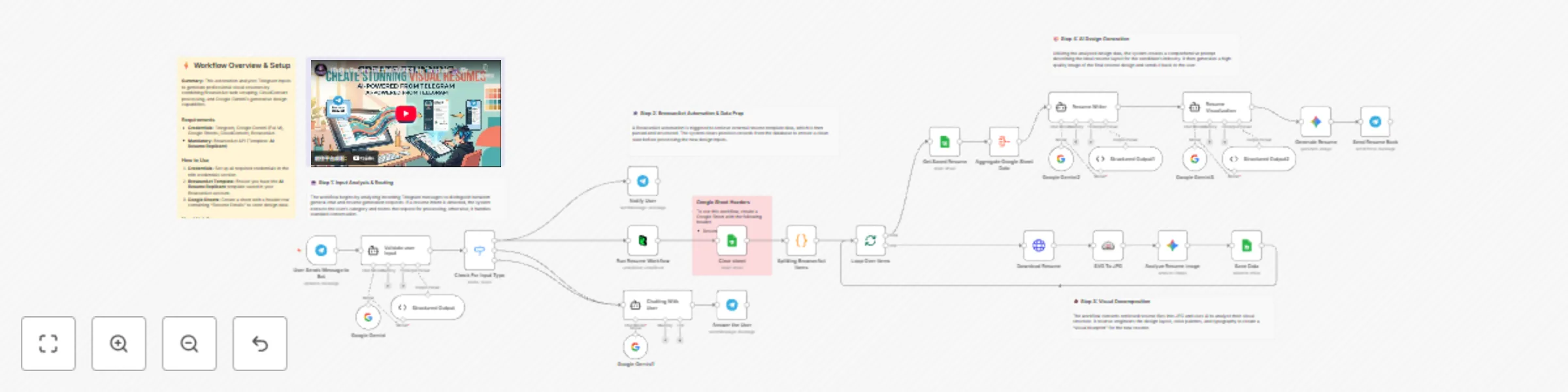
Generate visual resumes from Telegram using Google Gemini and BrowserAct

Workflow preview

Workflow preview
100%
Generate visual resumes from Telegram using Google Gemini and BrowserAct preview
Open on n8n.io

Important notice

This workflow is provided as-is. Please review and test before using in production.

1. Workflow Overview

Generate visual resumes from Telegram inputs using Google Gemini This workflow transforms text based resume data into visually stunning images by leveraging Google Gemini's reasoning and vision cap...

Best for

  • Document Extraction automation workflows
  • Multimodal AI automation workflows
  • advanced n8n builders looking for reusable templates

Tools used

n8n-nodes-base.httprequest, n8n-nodes-base.telegram, @n8n/n8n-nodes-langchain.outputparserstructured, @n8n/n8n-nodes-langchain.lmchatgooglegemini, @n8n/n8n-nodes-langchain.agent, n8n-nodes-base.googlesheets, n8n-nodes-base.splitinbatches, n8n-nodes-base.stickynote

Source and attribution

This workflow is cataloged by N8N Workflows and links back to its original n8n.io source page by Madame AI Team | Kai.

Original n8n.io source

1.1 Workflow description

Title
Generate visual resumes from Telegram using Google Gemini and BrowserAct
Workflow name
Generate visual resumes from Telegram using Google Gemini and BrowserAct

Generate visual resumes from Telegram inputs using Google Gemini

This workflow transforms text-based resume data into visually stunning images by leveraging Google Gemini's reasoning and vision capabilities. It autonomously analyzes the candidate's profile, selects an appropriate design template based on their industry, and renders a high-quality resume image directly in Telegram.

Target Audience

Job seekers, career coaches, resume writers, and recruitment agencies looking to automate design generation.

How it works

  1. Classify Input: The workflow starts with a Telegram trigger. A Google Gemini agent analyzes the incoming message to determine if it is a casual chat or a resume generation request.
  2. Fetch Context: If it is a resume request, a BrowserAct node triggers a workflow (using the "AI Resume Replicant" template) to fetch necessary external context or data.
  3. Ingest Designs (Optional): If a reference image is provided, CloudConvert standardizes the file, and Google Gemini Vision reverse-engineers the layout and style, saving the "Visual DNA" to Google Sheets.
  4. Draft Blueprint: The "Resume Writer" AI agent selects a stored design template that matches the candidate's industry (e.g., "Corporate" for Finance, "Creative" for Design) and maps the text content to the layout.
  5. Generate Prompt: A "Visualizer" AI agent converts the structured blueprint into a highly detailed natural language prompt for image generation.
  6. Render & Deliver: Google Gemini generates the final resume image, which is then sent back to the user via Telegram.

How to set up

  1. Configure Credentials: Connect your Telegram, Google Gemini, Google Sheets, CloudConvert, and BrowserAct accounts in n8n.
  2. Prepare BrowserAct: Ensure the AI Resume Replicant template is saved in your BrowserAct account.
  3. Setup Google Sheet: Create a new Google Sheet with the required header (listed below).
  4. Connect Sheet: Open the Google Sheets nodes (Clear, Get, Append) and select your new spreadsheet.
  5. Configure Telegram: Ensure your Telegram Bot is connected to the Trigger and Message nodes.

Google Sheet Headers

To use this workflow, create a Google Sheet with the following header:

  • Resume Details

Requirements

  • BrowserAct account (Template: AI Resume Replicant).
  • Google Gemini account.
  • Telegram account (Bot Token).
  • CloudConvert account.
  • Google Sheets account.

How to customize the workflow

  1. Refine Design Logic: Modify the system prompt in the "Resume Writer" agent to change how the AI matches industries to design styles (e.g., force specific colors for specific roles).
  2. Change Output Format: Replace the Telegram response node with a Google Drive node to save the generated images as PDF or PNG files instead of sending them.
  3. Switch Image Model: Update the "Generate an image" node to use a different image generation model if preferred (e.g., OpenAI DALL-E).

Need Help?


Workflow Guidance and Showcase Video

1.2 Logical Blocks

This catalog entry is organized from the workflow JSON. The node-level section below shows the executable blocks available for review before importing the template.

2. Block-by-Block Analysis

Block 1 - Download Resume

Type / Role
n8n-nodes-base.httpRequest - httpRequest
Config choices
Version 4.3

Block 2 - Notify User

Type / Role
n8n-nodes-base.telegram - telegram
Config choices
Version 1.2

Block 3 - Structured Output2

Type / Role
@n8n/n8n-nodes-langchain.outputParserStructured - outputParserStructured
Config choices
Version 1.3

Block 4 - Google Gemini3

Type / Role
@n8n/n8n-nodes-langchain.lmChatGoogleGemini - lmChatGoogleGemini
Config choices
Version 1

Block 5 - Resume Writer

Type / Role
@n8n/n8n-nodes-langchain.agent - agent
Config choices
Version 3

Block 6 - Structured Output1

Type / Role
@n8n/n8n-nodes-langchain.outputParserStructured - outputParserStructured
Config choices
Version 1.3

Block 7 - Google Gemini2

Type / Role
@n8n/n8n-nodes-langchain.lmChatGoogleGemini - lmChatGoogleGemini
Config choices
Version 1

Block 8 - Clear sheet

Type / Role
n8n-nodes-base.googleSheets - googleSheets
Config choices
Version 4.7

Block 9 - Loop Over Items

Type / Role
n8n-nodes-base.splitInBatches - splitInBatches
Config choices
Version 3

Block 10 - Google Gemini1

Type / Role
@n8n/n8n-nodes-langchain.lmChatGoogleGemini - lmChatGoogleGemini
Config choices
Version 1

Block 11 - Structured Output

Type / Role
@n8n/n8n-nodes-langchain.outputParserStructured - outputParserStructured
Config choices
Version 1.3

Block 12 - Google Gemini

Type / Role
@n8n/n8n-nodes-langchain.lmChatGoogleGemini - lmChatGoogleGemini
Config choices
Version 1

Block 13 - Validate user Input

Type / Role
@n8n/n8n-nodes-langchain.agent - agent
Config choices
Version 3

Block 14 - Documentation

Type / Role
n8n-nodes-base.stickyNote - stickyNote
Config choices
Version 1

Block 15 - Step 1 Explanation

Type / Role
n8n-nodes-base.stickyNote - stickyNote
Config choices
Version 1

Block 16 - Step 2 Explanation

Type / Role
n8n-nodes-base.stickyNote - stickyNote
Config choices
Version 1

Block 17 - Step 3 Explanation

Type / Role
n8n-nodes-base.stickyNote - stickyNote
Config choices
Version 1

Block 18 - Step 4 Explanation

Type / Role
n8n-nodes-base.stickyNote - stickyNote
Config choices
Version 1

Block 19 - User Sends Message to Bot

Type / Role
n8n-nodes-base.telegramTrigger - telegramTrigger
Config choices
Version 1.2

Block 20 - Check For Input Type

Type / Role
n8n-nodes-base.switch - switch
Config choices
Version 3.4

Block 21 - Run Resume Workflow

Type / Role
n8n-nodes-browseract.browserAct - browserAct
Config choices
Version 1

Block 22 - Splitting BrowserAct Items

Type / Role
n8n-nodes-base.code - code
Config choices
Version 2

Block 23 - Chatting With User

Type / Role
@n8n/n8n-nodes-langchain.agent - agent
Config choices
Version 3

Block 24 - SVG To JPG

Type / Role
@cloudconvert/n8n-nodes-cloudconvert.cloudConvert - cloudConvert
Config choices
Version 1

Showing the first 24 of 34 workflow blocks. Download the JSON for the full node graph.

3. Summary Table

Workflow Generate visual resumes from Telegram using Google Gemini and BrowserAct
Complexity advanced
Nodes 34
Categories Document Extraction, Multimodal AI
Author Madame AI Team | Kai
Published 01 Jan 2026

4. Reproducing the Workflow from Scratch

  1. 1. Download the workflow JSON

    Use the JSON export at /data/workflows/12346/12346.json as the source template for this automation.

  2. 2. Import the template into n8n

    Open n8n, import the downloaded JSON, and review each node before activating the workflow.

  3. 3. Configure credentials and variables

    Replace placeholder credentials, API keys, webhook URLs, account IDs, and environment-specific values with your own settings.

  4. 4. Test with sample data

    Run the workflow manually or in a staging workspace, inspect node output, and confirm downstream systems receive the expected data.

  5. 5. Activate and monitor

    Enable the workflow only after testing, then monitor executions, errors, and rate limits during the first production runs.

5. General Notes & Resources

Review imported nodes carefully before activation. This catalog entry is intended to help you inspect the workflow structure, understand required services, and find related templates faster.

Node names, credentials, schedules, webhook paths, and external service limits may need adjustment for your workspace.

Frequently asked questions

What does Generate visual resumes from Telegram using Google Gemini and BrowserAct do?

Generate visual resumes from Telegram inputs using Google Gemini This workflow transforms text based resume data into visually stunning images by leveraging Google Gemini's reasoning and vision cap...

What do I need before importing this workflow?

Review the workflow JSON, configure any required credentials in n8n, and test the automation in a safe workspace before using it in production.

Can I customize this workflow?

Yes. Use the block-by-block analysis and the downloadable JSON to inspect each node, then adjust credentials, prompts, schedules, filters, or destinations for your Document Extraction, Multimodal AI use case.