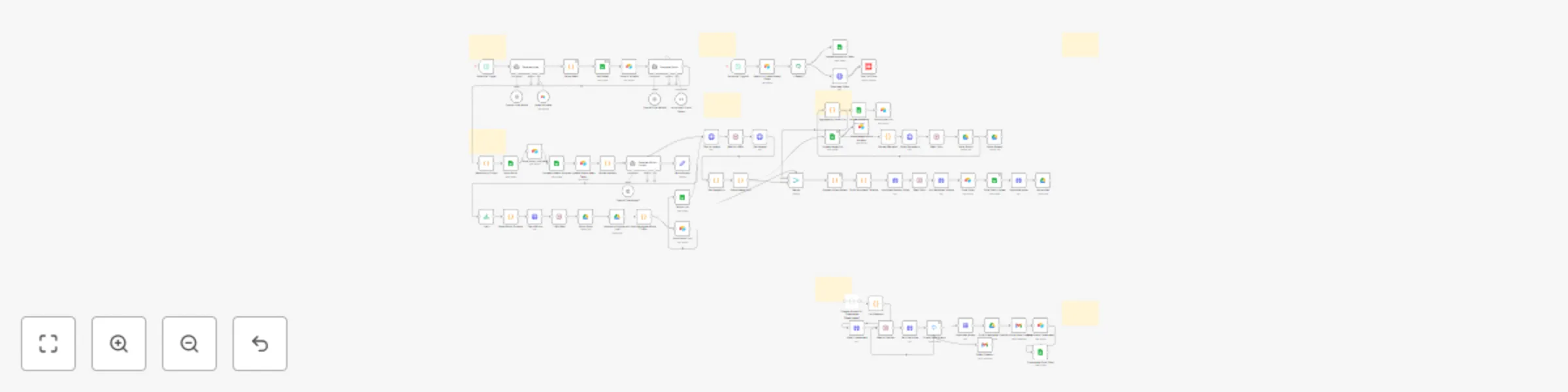
Generate videos with AI, ElevenLabs,PIAPI Shotstack/Creatomate & post to Youtube

Workflow preview

Workflow preview
100%
Generate videos with AI, ElevenLabs,PIAPI Shotstack/Creatomate & post to Youtube preview
Open on n8n.io

Important notice

This workflow is provided as-is. Please review and test before using in production.

1. Workflow Overview

Auto Generate Long Videos with AI, ElevenLabs,PIAPI,Shotstack/Creatomate & Post to Youtube Overview This n8n automation workflow automates the creation, scripting, produ...

Best for

  • Content Creation automation workflows
  • Multimodal AI automation workflows
  • advanced n8n builders looking for reusable templates

Tools used

n8n-nodes-base.scheduletrigger, n8n-nodes-base.code, @n8n/n8n-nodes-langchain.agent, @n8n/n8n-nodes-langchain.lmchatopenai, n8n-nodes-base.airtabletool, n8n-nodes-base.googlesheets, n8n-nodes-base.airtable, @n8n/n8n-nodes-langchain.outputparserstructured

Source and attribution

This workflow is cataloged by N8N Workflows and links back to its original n8n.io source page by Immanuel.

Original n8n.io source

1.1 Workflow description

Title
Generate videos with AI, ElevenLabs,PIAPI Shotstack/Creatomate & post to Youtube
Workflow name
Generate videos with AI, ElevenLabs,PIAPI Shotstack/Creatomate & post to Youtube

Auto-Generate Long Videos with AI, ElevenLabs,PIAPI,Shotstack/Creatomate & Post to Youtube

Overview

This n8n automation workflow automates the creation, scripting, production, and posting of YouTube videos. It leverages AI (OpenAI), image generation (PIAPI), video rendering (Shotstack), and platform integrations (Airtable, Google Sheets, YouTube) to streamline the process.

Target Audience

  • Content creators, video producers, and YouTubers seeking to automate video content creation.
  • Digital marketing teams managing video campaigns for travel or history niches.
  • Users familiar with n8n, Airtable, Google Sheets, YouTube, and API integrations.

Problem Solved

Manually managing YouTube video production, from ideation to posting, is time-consuming and prone to errors. This workflow addresses:

  • Content Sourcing: Generates video ideas using AI based on "domain of choice".
  • Content Formatting: Automatically creates detailed scripts and scene structures.
  • Visual Production: Produces high-quality images and renders videos with minimal manual input.
  • Multi-Platform Integration: Publishes to YouTube with status tracking in Airtable and Google Sheets.
  • Status Tracking: Monitors progress (Generated, Scripted, Produced, Published) across platforms.

Prerequisites

Before setting up, ensure you have:

  1. An n8n instance (self-hosted or cloud)
  2. API credentials for:
    • OpenAI (for idea generation)
    • PIAPI.ai (for image and video generation)
    • ElevenLabs (for audio generation)
    • Shotstack (for video rendering)
    • Creatomate (for video rendering)
    • Airtable & Google Sheets and Drive (for storage and tracking)
    • Gmail (for notifications)
    • YouTube API (for posting to YouTube)

How the Automation Works (Step by Step)

  1. Trigger (Schedule Trigger)

    • Initiates the workflow daily
    • Connects to "Generate Idea"
  2. Generate Idea

    • Uses OpenAI to create a unique 4-minute video idea with a title, description, keywords, scene structure, and intrigue note
    • Checks Airtable "Ideas" table via searchAirtable to avoid duplicates
    • Connects to "Parse Ideas"
  3. Parse Ideas

    • Extracts title, description, and notes from the OpenAI output using JavaScript
    • Connects to "Add Ideas"
  4. Add Ideas

    • Stores the initial idea in Google Sheets "Ideas" sheet with fields like "Idea", "Description", and "Progress" (set to "Generated")
    • Connects to "Store in Airtable"
  5. Store in Airtable

    • Saves the idea to Airtable "Ideas" table with mapped fields and typecast enabled
    • Connects to "Generate Script"
  6. Generate Script

    • Creates a 500-600 word script with 8-10 scenes using OpenAI, based on the latest "Generated" idea
    • Uses Structured Output Parser to format output
    • Connects to "Parse Script Output"
  7. Parse Script Output

    • Formats the script into readable text and JSON, extracting scenes and closing question
    • Connects to "Store Script"
  8. Store Script

    • Saves the script to Google Sheets "Production" sheet with "Script", "Scenes", and "Status" (set to "Scripted")
    • Connects to "Store Script in Airtable"
  9. Store Script in Airtable

    • Saves the script to Airtable "Production" table with mapped fields and typecast enabled
    • Connects to "Updated Idea to Scripted"
  10. Updated Idea to Scripted

    • Updates the idea status to "Scripted" in Google Sheets "Ideas" sheet
    • Connects to "Update Status Ideas Table"
  11. Update Status Ideas Table

    • Updates the idea status to "Scripted" in Airtable "Ideas" table, matching by "Idea ID"
    • Connects to "Extract Scenes"
  12. Extract Scenes

    • Parses scene data from Airtable "Production" table for image generation
    • Connects to "Text-to-Image"
  13. Text-to-Image

    • Generates images for each scene using PIAPI
    • Connects to "Wait for 4 Min"
  14. Wait for 4 Min

    • Waits 3 minutes to allow image generation to complete
    • Connects to "Get Images"
  15. Trigger (Schedule Trigger1)

    • Initiates the posting process daily
    • Connects to "Search for Latest Ready Video"
  16. Search for Latest Ready Video

    • Searches Airtable "Production" table for the latest video with "Status" = "Ready"
    • Connects to "If Ready?"
  17. If Ready?

    • Checks if a video is ready (condition: Status contains Ready)
    • If true, connects to "Download Video" and "Update Production Table"
  18. Download Video

    • Downloads the video file using the VideoURL from Airtable
    • Connects to "Post YouTube"
  19. Post YouTube

    • Uploads the video to YouTube with title and description, using YouTube OAuth2
  20. Update Production Table

    • Updates the "Production" sheet in Google Sheets, setting "Status" to "Published" and matching by "Production ID"

Additional Nodes and Processes

  • OpenAI Chat Model: Powers "Generate Idea" and "Generate Script" with GPT
  • Structured Output Parser: Ensures proper JSON output for scripts
  • Get Images: Retrieves generated images
  • Extract Narration: Prepares narration for voice generation
  • Voice Generation: Generates voiceovers
  • Generate Music Prompt: Creates music prompts using OpenAI
  • Text-to-Music: Generates music
  • Build Shotstack Timeline: Constructs video timeline
  • ShotStack Render Video: Renders the final video
  • Poll Rendered Videos: Checks video rendering status
  • Final Video: Updates Airtable "Production" with final video details
  • Final Video Update: Updates Google Sheets "Production" with video URL
  • Music Urls: Adds music URLs to the process

Setup Requirements

Before starting, ensure you have the following

1 n8n Instance

  • A self-hosted or cloud-based n8n instance to run the workflow

2 API Credentials

  • OpenAI: API key
  • Airtable: Personal Access Token (e.g, "Airtable Personal Access Token
  • Google Sheets: OAuth2 credentials
  • PIAPI: HTTP Header Auth key
  • YouTube: OAuth2 credentials 3 Airtable Configuration
  • Base: "Youtube Videos"
  • Tables:
    • "Ideas"
    • "Production"
  • Share with the Airtable token

4 Google Sheets Configuration

  • Document: "Youtube Videos"
  • Sheets:
    • "Ideas"
    • "Production"
  • Share with the Google Sheets credential email
  1. Shotstack Configuration (Assumed)
  • API key and endpoint for video rendering (not specified in JSON)

Setup Instructions

  1. Import the Workflow
  • Import the provided JSON file into your n8n instance
  1. Configure Credentials
  • Add OpenAI, Airtable, Google Sheets, PIAPI, and YouTube credentials in n8n’s credential manager
  1. Set Up Airtable
  • Create or update the "Ideas" and "Production" tables with the specified fields
  • Ensure proper permissions with the Airtable token
  1. Configure Google Sheets
  • Create or update the "Ideas" and "Production" sheets with the specified columns
  • Share the document with the Google Sheets credential email
  1. Schedule Triggers
  • Set "Schedule Trigger" to trigger
  1. Test the Workflow
  • Run manually to verify each node’s functionality
  • Check Airtable, Google Sheets, and YouTube for updates
  • Ensure PIAPI image generation completes (wait 4 minutes)
  1. Monitor and Adjust
  • Monitor API rate limits (e.g, PIAPI, YouTube)
  • Adjust wait times if image or video generation delays occur
  • Verify connections for unlinked nodes

Benefits

  • Efficiency: Automates the entire process from idea to posting
  • Scalability: Handles daily video production
  • Quality: Ensures cinematic scripts and visuals
  • Tracking: Provides detailed progress monitoring

Notes

  • Rate Limits: Be aware of PIAPI (150,000 units per task) and YouTube API limits
  • Timing: Adjust wait nodes (e.g, "Wait for 4 Min") based on API response times

Conclusion and Suggestions to Improve the Automation

Conclusion

This workflow streamlines YouTube video production, making it ideal for busy content creators, video producers, and marketing teams. Customize it by adding more platforms, adjusting wait delays for image/video generation, or enhancing notifications for status updates. Share your feedback in the n8n community to help others benefit from this automation.

Suggestions to Improve

  • Customization: Adjust prompts, timings, and API parameters based on your needs
  • Expand "Text-to-Music" with multiple music styles or integrate a royalty-free music API for variety.
  • Improve Video Rendering: Optimize "Build Shotstack Timeline" and "ShotStack Render Video" with predefined templates to reduce rendering time.
  • Add Analytics Tracking: Include a node to fetch YouTube Analytics post-upload for performance monitoring.
  • Error Handling: Add error-catching nodes (e.g., "If" nodes) to retry failed image or video generations.
  • Notification System: Incorporate email or Slack notifications for key milestones (e.g., script completion, video upload).

1.2 Logical Blocks

This catalog entry is organized from the workflow JSON. The node-level section below shows the executable blocks available for review before importing the template.

2. Block-by-Block Analysis

Block 1 - Schedule Trigger

Type / Role
n8n-nodes-base.scheduleTrigger - scheduleTrigger
Config choices
Version 1

Block 2 - Parse Ideas

Type / Role
n8n-nodes-base.code - code
Config choices
Version 1

Block 3 - Generate Script

Type / Role
@n8n/n8n-nodes-langchain.agent - agent
Config choices
Version 1.9

Block 4 - OpenAI Chat Model1

Type / Role
@n8n/n8n-nodes-langchain.lmChatOpenAi - lmChatOpenAi
Config choices
Version 1.2

Block 5 - OpenAI Chat Model

Type / Role
@n8n/n8n-nodes-langchain.lmChatOpenAi - lmChatOpenAi
Config choices
Version 1.2

Block 6 - searchAirtable

Type / Role
n8n-nodes-base.airtableTool - airtableTool
Config choices
Version 2.1

Block 7 - Add Ideas

Type / Role
n8n-nodes-base.googleSheets - googleSheets
Config choices
Version 4.5

Block 8 - Generate Idea

Type / Role
@n8n/n8n-nodes-langchain.agent - agent
Config choices
Version 1.9

Block 9 - Store in Airtable

Type / Role
n8n-nodes-base.airtable - airtable
Config choices
Version 2.1

Block 10 - Structured Output Parser

Type / Role
@n8n/n8n-nodes-langchain.outputParserStructured - outputParserStructured
Config choices
Version 1.2

Block 11 - Store Script

Type / Role
n8n-nodes-base.googleSheets - googleSheets
Config choices
Version 4.5

Block 12 - Store Script in Airtable

Type / Role
n8n-nodes-base.airtable - airtable
Config choices
Version 2.1

Block 13 - Parse Script Output

Type / Role
n8n-nodes-base.code - code
Config choices
Version 2

Block 14 - Update Status Ideas Table

Type / Role
n8n-nodes-base.airtable - airtable
Config choices
Version 2.1

Block 15 - Updated Idea to Scripted

Type / Role
n8n-nodes-base.googleSheets - googleSheets
Config choices
Version 4.5

Block 16 - Extract Scenes

Type / Role
n8n-nodes-base.code - code
Config choices
Version 2

Block 17 - Text-to-Image

Type / Role
n8n-nodes-base.httpRequest - httpRequest
Config choices
Version 4.2

Block 18 - Sticky Note

Type / Role
n8n-nodes-base.stickyNote - stickyNote
Config choices
Version 1

Block 19 - Wait for 4 Min

Type / Role
n8n-nodes-base.wait - wait
Config choices
Version 1.1

Block 20 - Store Image Urls in Airtable

Type / Role
n8n-nodes-base.airtable - airtable
Config choices
Version 2.1

Block 21 - Get Images

Type / Role
n8n-nodes-base.httpRequest - httpRequest
Config choices
Version 4.2

Block 22 - Get ImageUrls

Type / Role
n8n-nodes-base.code - code
Config choices
Version 2

Block 23 - Scene Image Urls

Type / Role
n8n-nodes-base.code - code
Config choices
Version 2

Block 24 - Extract Narration

Type / Role
n8n-nodes-base.code - code
Config choices
Version 2

Showing the first 24 of 79 workflow blocks. Download the JSON for the full node graph.

3. Summary Table

Workflow Generate videos with AI, ElevenLabs,PIAPI Shotstack/Creatomate & post to Youtube
Complexity advanced
Nodes 79
Categories Content Creation, Multimodal AI
Author Immanuel
Published 03 Jun 2025

4. Reproducing the Workflow from Scratch

  1. 1. Download the workflow JSON

    Use the JSON export at /data/workflows/4630/4630.json as the source template for this automation.

  2. 2. Import the template into n8n

    Open n8n, import the downloaded JSON, and review each node before activating the workflow.

  3. 3. Configure credentials and variables

    Replace placeholder credentials, API keys, webhook URLs, account IDs, and environment-specific values with your own settings.

  4. 4. Test with sample data

    Run the workflow manually or in a staging workspace, inspect node output, and confirm downstream systems receive the expected data.

  5. 5. Activate and monitor

    Enable the workflow only after testing, then monitor executions, errors, and rate limits during the first production runs.

5. General Notes & Resources

Review imported nodes carefully before activation. This catalog entry is intended to help you inspect the workflow structure, understand required services, and find related templates faster.

Node names, credentials, schedules, webhook paths, and external service limits may need adjustment for your workspace.

Frequently asked questions

What does Generate videos with AI, ElevenLabs,PIAPI Shotstack/Creatomate & post to Youtube do?

Auto Generate Long Videos with AI, ElevenLabs,PIAPI,Shotstack/Creatomate & Post to Youtube Overview This n8n automation workflow automates the creation, scripting, produ...

What do I need before importing this workflow?

Review the workflow JSON, configure any required credentials in n8n, and test the automation in a safe workspace before using it in production.

Can I customize this workflow?

Yes. Use the block-by-block analysis and the downloadable JSON to inspect each node, then adjust credentials, prompts, schedules, filters, or destinations for your Content Creation, Multimodal AI use case.