Block 1 - On form submission
- Type / Role
- n8n-nodes-base.formTrigger - formTrigger
- Config choices
- Version 2.3


 Early Deal
This workflow is provided as-is. Please review and test before using in production.
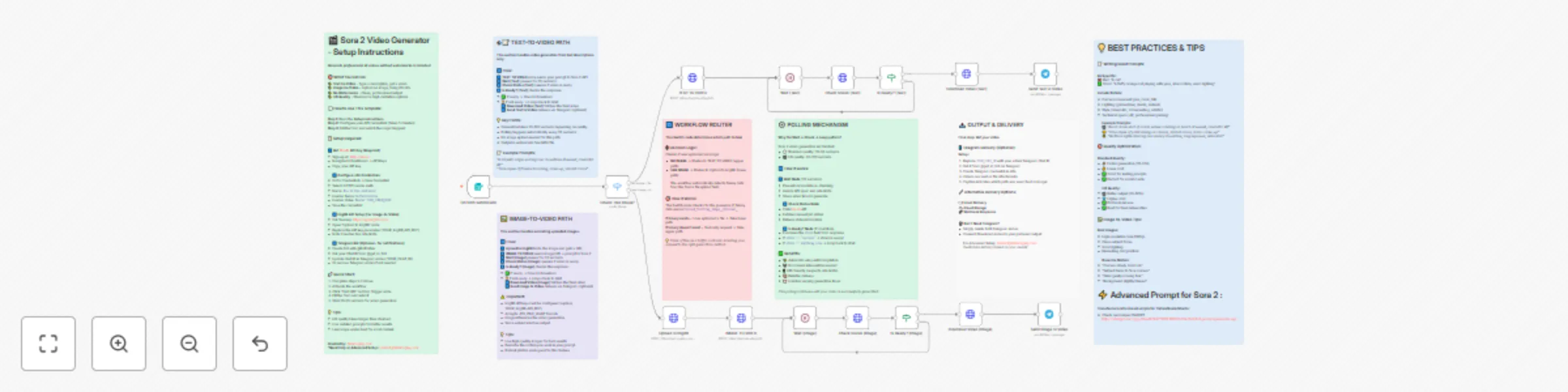
Sora 2 Video Generator No Watermark (Minimal Setup) This n8n workflow enables you to generate professional AI videos using OpenAI's Sora 2 without watermarks. Create videos from text descriptions o...
n8n-nodes-base.formtrigger, n8n-nodes-base.switch, n8n-nodes-base.httprequest, n8n-nodes-base.wait, n8n-nodes-base.if, n8n-nodes-base.stickynote, n8n-nodes-base.telegram
This workflow is cataloged by N8N Workflows and links back to its original n8n.io source page by Bilel Aroua.
Original n8n.io sourceGenerate cinematic AI videos for social media, marketing campaigns, product demos, or creative projects. The workflow handles both text-to-video and image-to-video generation with automatic status polling until your video is ready.
Good to know:
• Kie.AI charges per video generation. Check their pricing page for current rates • Videos typically take 30-60 seconds for standard quality, 60-120 seconds for HD • The workflow automatically retries status checks every 30 seconds until completion • No watermarks on output videos
• Users submit video requests via a beautiful web form with description, aspect ratio, and quality options • The workflow detects if an image was uploaded and routes to either text-to-video or image-to-video • For image uploads, the file is automatically uploaded to ImgBB to generate a public URL • The request is sent to Sora 2 API via Kie.AI with your specifications (prompt, quality, aspect ratio) • The workflow waits 30 seconds, then checks if video generation is complete • If not ready, it automatically loops back and checks again every 30 seconds • Once complete, the video is downloaded and optionally sent via Telegram notification • Clean, watermark-free MP4 video output ready for use
Step 1: Get Kie.AI API Key • Sign up at kie.ai and navigate to your dashboard • Go to API Keys section and generate a new key • Copy the API key for the next step
Step 2: Configure n8n Credentials
• In n8n, go to Credentials → New Credential
• Select "HTTP Header Auth"
• Name: Kie Ai(Veo and more) (exact name required)
• Header Name: Authorization
• Header Value: Bearer YOUR_API_KEY
• Save the credential
Step 3: ImgBB Setup (for Image-to-Video)
• Get a free API key from api.imgbb.com
• Open the "Upload to ImgBB" node in the workflow
• Replace the YOUR_ImgBB_API_KEY parameter with your ImgBB API key
Step 4: (Optional) Telegram Notifications • Create a bot with @BotFather on Telegram • Get your Chat ID from @get_id_bot • Update YOUR_CHAT_ID in both Telegram nodes • Or delete Telegram nodes entirely if not needed
• Kie.AI account with API access for Sora 2 • ImgBB account for image hosting (free tier available) • (Optional) Telegram bot for video delivery notifications
• Adjust wait times in the Wait nodes if generation takes longer in your region • Add email notifications instead of/in addition to Telegram • Modify the form to collect additional metadata (user info, project names, etc.) • Add error handling nodes for production deployments • Connect to cloud storage (Google Drive, Dropbox) instead of Telegram for video delivery • Integrate with your existing CMS or content management system
For assistance and support: [email protected]
This catalog entry is organized from the workflow JSON. The node-level section below shows the executable blocks available for review before importing the template.
| Workflow | Generate videos from text or images with Sora 2 AI - no watermark |
|---|---|
| Complexity | advanced |
| Nodes | 22 |
| Categories | Content Creation, Multimodal AI |
| Author | Bilel Aroua |
| Published | 17 Oct 2025 |
Use the JSON export at /data/workflows/9810/9810.json as the source template for this automation.
Open n8n, import the downloaded JSON, and review each node before activating the workflow.
Replace placeholder credentials, API keys, webhook URLs, account IDs, and environment-specific values with your own settings.
Run the workflow manually or in a staging workspace, inspect node output, and confirm downstream systems receive the expected data.
Enable the workflow only after testing, then monitor executions, errors, and rate limits during the first production runs.
Review imported nodes carefully before activation. This catalog entry is intended to help you inspect the workflow structure, understand required services, and find related templates faster.
Node names, credentials, schedules, webhook paths, and external service limits may need adjustment for your workspace.
Sora 2 Video Generator No Watermark (Minimal Setup) This n8n workflow enables you to generate professional AI videos using OpenAI's Sora 2 without watermarks. Create videos from text descriptions o...
Review the workflow JSON, configure any required credentials in n8n, and test the automation in a safe workspace before using it in production.
Yes. Use the block-by-block analysis and the downloadable JSON to inspect each node, then adjust credentials, prompts, schedules, filters, or destinations for your Content Creation, Multimodal AI use case.