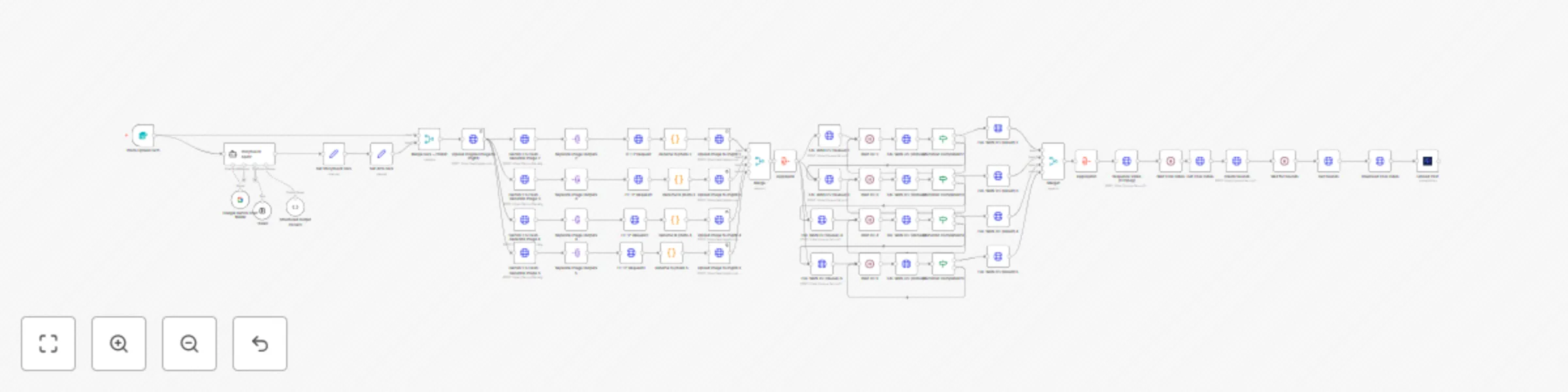
Generate video ads with Gemini 2.5 flash images & FAL WAN animation

Workflow preview

Workflow preview
100%
Generate video ads with Gemini 2.5 flash images & FAL WAN animation preview
Open on n8n.io

Important notice

This workflow is provided as-is. Please review and test before using in production.

1. Workflow Overview

This automated workflow template transforms a single product image into a complete professional advertisement video with dynamic motio...

Best for

  • Content Creation automation workflows
  • Multimodal AI automation workflows
  • advanced n8n builders looking for reusable templates

Tools used

n8n-nodes-base.httprequest, n8n-nodes-base.wait, n8n-nodes-base.if, @n8n/n8n-nodes-langchain.outputparserstructured, @n8n/n8n-nodes-langchain.toolthink, n8n-nodes-base.merge, @n8n/n8n-nodes-langchain.agent, n8n-nodes-base.set

Source and attribution

This workflow is cataloged by N8N Workflows and links back to its original n8n.io source page by Juan Carlos Cavero Gracia.

Original n8n.io source

1.1 Workflow description

Title
Generate video ads with Gemini 2.5 flash images & FAL WAN animation
Workflow name
Generate video ads with Gemini 2.5 flash images & FAL WAN animation

This automated workflow template transforms a single product image into a complete professional advertisement video with dynamic motion and custom soundtrack. Perfect for e-commerce businesses, marketing agencies, and content creators who need to quickly produce high-quality video ads for social media platforms like TikTok, Instagram Reels, and YouTube Shorts.

Note: This workflow uses FAL.ai API for AI image generation with Gemini Bano Banana and video creation with Wan, Google Gemini for intelligent storyboarding, ImgBB for image hosting, and Upload-Post.com for automated social media publishing.

Who Is This For?

  • E-commerce Businesses: Transform product photos into engaging video advertisements that drive sales and increase conversion rates across social media platforms.
  • Marketing Agencies: Scale video ad production for multiple clients without expensive video equipment or extensive editing time.
  • Social Media Managers: Create consistent, professional video content for brands that stands out in crowded social feeds.
  • Content Creators & Influencers: Generate eye-catching product showcase videos for sponsored content and affiliate marketing campaigns.
  • Small Business Owners: Compete with larger brands by creating professional-quality video ads on a budget.

What Problem Does This Workflow Solve?

Creating professional video advertisements traditionally requires expensive equipment, design skills, and hours of editing time. This workflow addresses these challenges by:

  • AI-Powered Visual Enhancement: Automatically generates 4 unique variations of your product image with different lighting, backgrounds, and visual effects.
  • Intelligent Motion Generation: Converts static images into dynamic 5-second video clips with smooth camera movements, rotations, and visual effects.
  • Automated Storyboarding: Uses AI to create a cohesive visual narrative that showcases your product from multiple appealing angles.
  • Professional Audio Integration: Automatically generates and adds suitable background music that matches your product and brand aesthetic.
  • Seamless Video Composition: Combines all video clips into a single 20-second advertisement with smooth transitions.
  • Multi-Platform Publishing: Automatically uploads finished videos to TikTok, Instagram, and YouTube with optimized formatting.

How It Works

  1. Product Upload: Submit a single product image and brief description through the web form interface.
  2. AI Storyboard Creation: Google Gemini AI analyzes your product and creates a 4-frame visual story with lighting enhancements, background changes, and cinematic effects.
  3. Image Generation: FAL.ai Gemini 2.5 Flash creates 4 unique variations of your product image based on the AI-generated prompts.
  4. Video Animation: Each enhanced image is converted into a 5-second video clip with specific motion patterns (rotation, zoom, lighting sweeps, camera orbits).
  5. Quality Control: The system monitors video generation progress and ensures all clips are successfully created before proceeding.
  6. Video Sequencing: FFmpeg API combines all 4 video clips into a seamless 20-second advertisement with smooth transitions.
  7. Audio Enhancement: AI generates appropriate background music that matches your product category and brand style.
  8. Final Composition: Audio and video are merged to create the complete advertisement.
  9. Automated Publishing: The finished video is automatically uploaded to TikTok, Instagram Reels, and YouTube with your product description.

Setup

  1. FAL.ai API Setup:
    • Create account at fal.ai and obtain API credentials
    • Add your API token to the HTTP request authentication nodes
  2. Google Gemini API:
    • Set up Google AI Studio account and get API key
    • Configure the Google Gemini Chat Model node with your credentials
  3. ImgBB Configuration:
    • Register at imgbb.com for image hosting
    • Update the imgbb_api_key in the "Set APIs Vars" node
  4. Upload-Post Integration:
    • Create account at upload-post.com
    • Connect your social media accounts (TikTok, Instagram, YouTube)
    • Add your Upload-Post credentials to the final upload node
  5. Workflow Configuration:
    • Adjust video parameters (resolution, frame rate, duration) in the image-to-video nodes
    • Customize audio prompts in the "Create Sounds" node
    • Modify social media posting settings in the "Upload Post" node

Requirements

  • Accounts: n8n, FAL.ai, Google AI Studio, ImgBB, Upload-Post.com
  • API Keys: FAL.ai API token, Google Gemini API key, ImgBB API key, Upload-Post credentials
  • Social Media: Connected TikTok, Instagram, and YouTube accounts for automated publishing

Features

  • AI-Powered Image Enhancement: Creates 4 professional variations with lighting, background, and effect improvements
  • Dynamic Video Generation: Converts static images to engaging videos with camera movements and visual effects
  • Intelligent Audio Matching: Generates background music that complements your product and target audience
  • Multi-Platform Optimization: Automatically formats videos for TikTok, Instagram Reels, and YouTube Shorts (9:16 aspect ratio)
  • Progress Monitoring: Built-in status checking ensures reliable video generation before proceeding to next steps
  • Automated Publishing: Direct upload to social media platforms with optimized descriptions and formatting
  • Scalable Processing: Handles multiple video generations simultaneously for efficient batch processing
  • Professional Quality: Produces broadcast-ready videos suitable for paid advertising campaigns

Use this template to revolutionize your product marketing strategy, automatically converting any product photo into multiple high-quality video advertisements ready for immediate social media deployment.

1.2 Logical Blocks

This catalog entry is organized from the workflow JSON. The node-level section below shows the executable blocks available for review before importing the template.

2. Block-by-Block Analysis

Block 1 - FAL WAN i2v (Queue) 2

Type / Role
n8n-nodes-base.httpRequest - httpRequest
Config choices
Version 4.2

Block 2 - FAL WAN i2v (Queue) 3

Type / Role
n8n-nodes-base.httpRequest - httpRequest
Config choices
Version 4.2

Block 3 - FAL WAN i2v (Queue) 4

Type / Role
n8n-nodes-base.httpRequest - httpRequest
Config choices
Version 4.2

Block 4 - FAL WAN i2v (Queue) 5

Type / Role
n8n-nodes-base.httpRequest - httpRequest
Config choices
Version 4.2

Block 5 - Wait i2v 2

Type / Role
n8n-nodes-base.wait - wait
Config choices
Version 1.1

Block 6 - Wait i2v 3

Type / Role
n8n-nodes-base.wait - wait
Config choices
Version 1.1

Block 7 - Wait i2v 4

Type / Role
n8n-nodes-base.wait - wait
Config choices
Version 1.1

Block 8 - Wait i2v 5

Type / Role
n8n-nodes-base.wait - wait
Config choices
Version 1.1

Block 9 - FAL WAN i2v (Result) 2

Type / Role
n8n-nodes-base.httpRequest - httpRequest
Config choices
Version 4.2

Block 10 - FAL WAN i2v (Result) 3

Type / Role
n8n-nodes-base.httpRequest - httpRequest
Config choices
Version 4.2

Block 11 - FAL WAN i2v (Result) 4

Type / Role
n8n-nodes-base.httpRequest - httpRequest
Config choices
Version 4.2

Block 12 - FAL WAN i2v (Result) 5

Type / Role
n8n-nodes-base.httpRequest - httpRequest
Config choices
Version 4.2

Block 13 - Animation Completed?2

Type / Role
n8n-nodes-base.if - if
Config choices
Version 2.2

Block 14 - Animation Completed?3

Type / Role
n8n-nodes-base.if - if
Config choices
Version 2.2

Block 15 - Animation Completed?4

Type / Role
n8n-nodes-base.if - if
Config choices
Version 2.2

Block 16 - Animation Completed?5

Type / Role
n8n-nodes-base.if - if
Config choices
Version 2.2

Block 17 - FAL WAN i2v (status)2

Type / Role
n8n-nodes-base.httpRequest - httpRequest
Config choices
Version 4.2

Block 18 - FAL WAN i2v (status)3

Type / Role
n8n-nodes-base.httpRequest - httpRequest
Config choices
Version 4.2

Block 19 - FAL WAN i2v (status)4

Type / Role
n8n-nodes-base.httpRequest - httpRequest
Config choices
Version 4.2

Block 20 - FAL WAN i2v (status)5

Type / Role
n8n-nodes-base.httpRequest - httpRequest
Config choices
Version 4.2

Block 21 - Structured Output Parser2

Type / Role
@n8n/n8n-nodes-langchain.outputParserStructured - outputParserStructured
Config choices
Version 1.2

Block 22 - Think2

Type / Role
@n8n/n8n-nodes-langchain.toolThink - toolThink
Config choices
Version 1

Block 23 - Merge1

Type / Role
n8n-nodes-base.merge - merge
Config choices
Version 3.1

Block 24 - Storyboard Agent

Type / Role
@n8n/n8n-nodes-langchain.agent - agent
Config choices
Version 1.9

Showing the first 24 of 61 workflow blocks. Download the JSON for the full node graph.

3. Summary Table

Workflow Generate video ads with Gemini 2.5 flash images & FAL WAN animation
Complexity advanced
Nodes 61
Categories Content Creation, Multimodal AI
Author Juan Carlos Cavero Gracia
Published 27 Aug 2025

4. Reproducing the Workflow from Scratch

  1. 1. Download the workflow JSON

    Use the JSON export at /data/workflows/7964/7964.json as the source template for this automation.

  2. 2. Import the template into n8n

    Open n8n, import the downloaded JSON, and review each node before activating the workflow.

  3. 3. Configure credentials and variables

    Replace placeholder credentials, API keys, webhook URLs, account IDs, and environment-specific values with your own settings.

  4. 4. Test with sample data

    Run the workflow manually or in a staging workspace, inspect node output, and confirm downstream systems receive the expected data.

  5. 5. Activate and monitor

    Enable the workflow only after testing, then monitor executions, errors, and rate limits during the first production runs.

5. General Notes & Resources

Review imported nodes carefully before activation. This catalog entry is intended to help you inspect the workflow structure, understand required services, and find related templates faster.

Node names, credentials, schedules, webhook paths, and external service limits may need adjustment for your workspace.

Frequently asked questions

What does Generate video ads with Gemini 2.5 flash images & FAL WAN animation do?

This automated workflow template transforms a single product image into a complete professional advertisement video with dynamic motio...

What do I need before importing this workflow?

Review the workflow JSON, configure any required credentials in n8n, and test the automation in a safe workspace before using it in production.

Can I customize this workflow?

Yes. Use the block-by-block analysis and the downloadable JSON to inspect each node, then adjust credentials, prompts, schedules, filters, or destinations for your Content Creation, Multimodal AI use case.